
Deprecated: Creation of dynamic property Timber\Site::$pingback is deprecated in /var/www/html/web/app/themes/ilsoftware/vendor/timber/timber/lib/Site.php on line 180

Deprecated: Creation of dynamic property Timber\User::$name is deprecated in /var/www/html/web/app/themes/ilsoftware/vendor/timber/timber/lib/User.php on line 118

Deprecated: Creation of dynamic property Timber\Post::$old_id is deprecated in /var/www/html/web/app/themes/ilsoftware/vendor/timber/timber/lib/Core.php on line 71

Deprecated: Creation of dynamic property Timber\Post::$_thumbnail_id is deprecated in /var/www/html/web/app/themes/ilsoftware/vendor/timber/timber/lib/Core.php on line 71

Deprecated: Creation of dynamic property Timber\Post::$ext-thumbnail_url is deprecated in /var/www/html/web/app/themes/ilsoftware/vendor/timber/timber/lib/Core.php on line 71

Deprecated: Creation of dynamic property Timber\Post::$_edit_last is deprecated in /var/www/html/web/app/themes/ilsoftware/vendor/timber/timber/lib/Core.php on line 71

Deprecated: Creation of dynamic property Timber\Post::$_yoast_wpseo_metadesc is deprecated in /var/www/html/web/app/themes/ilsoftware/vendor/timber/timber/lib/Core.php on line 71

Deprecated: Creation of dynamic property Timber\Post::$_edit_lock is deprecated in /var/www/html/web/app/themes/ilsoftware/vendor/timber/timber/lib/Core.php on line 71

Deprecated: Creation of dynamic property Timber\Post::$has_disclaimer is deprecated in /var/www/html/web/app/themes/ilsoftware/vendor/timber/timber/lib/Core.php on line 71

Deprecated: Creation of dynamic property Timber\Post::$onesignal_meta_box_present is deprecated in /var/www/html/web/app/themes/ilsoftware/vendor/timber/timber/lib/Core.php on line 71

Deprecated: Creation of dynamic property Timber\Post::$onesignal_send_notification is deprecated in /var/www/html/web/app/themes/ilsoftware/vendor/timber/timber/lib/Core.php on line 71

Deprecated: Creation of dynamic property Timber\Post::$onesignal_modify_title_and_content is deprecated in /var/www/html/web/app/themes/ilsoftware/vendor/timber/timber/lib/Core.php on line 71

Deprecated: Creation of dynamic property Timber\Post::$onesignal_notification_custom_heading is deprecated in /var/www/html/web/app/themes/ilsoftware/vendor/timber/timber/lib/Core.php on line 71

Deprecated: Creation of dynamic property Timber\Post::$onesignal_notification_custom_content is deprecated in /var/www/html/web/app/themes/ilsoftware/vendor/timber/timber/lib/Core.php on line 71

Deprecated: Creation of dynamic property Timber\Post::$response_body is deprecated in /var/www/html/web/app/themes/ilsoftware/vendor/timber/timber/lib/Core.php on line 71

Deprecated: Creation of dynamic property Timber\Post::$status is deprecated in /var/www/html/web/app/themes/ilsoftware/vendor/timber/timber/lib/Core.php on line 71

Deprecated: Creation of dynamic property Timber\Post::$_yoast_indexnow_last_ping is deprecated in /var/www/html/web/app/themes/ilsoftware/vendor/timber/timber/lib/Core.php on line 71

Deprecated: Creation of dynamic property Timber\Post::$tipologia is deprecated in /var/www/html/web/app/themes/ilsoftware/vendor/timber/timber/lib/Core.php on line 71

Deprecated: Creation of dynamic property Timber\Post::$_tipologia is deprecated in /var/www/html/web/app/themes/ilsoftware/vendor/timber/timber/lib/Core.php on line 71

Deprecated: Creation of dynamic property Timber\Post::$attributi is deprecated in /var/www/html/web/app/themes/ilsoftware/vendor/timber/timber/lib/Core.php on line 71

Deprecated: Creation of dynamic property Timber\Post::$_attributi is deprecated in /var/www/html/web/app/themes/ilsoftware/vendor/timber/timber/lib/Core.php on line 71

Deprecated: Creation of dynamic property Timber\Post::$in_evidenza_newsletter is deprecated in /var/www/html/web/app/themes/ilsoftware/vendor/timber/timber/lib/Core.php on line 71

Deprecated: Creation of dynamic property Timber\Post::$_in_evidenza_newsletter is deprecated in /var/www/html/web/app/themes/ilsoftware/vendor/timber/timber/lib/Core.php on line 71

Deprecated: Creation of dynamic property Timber\Post::$inviato_in_newsletter is deprecated in /var/www/html/web/app/themes/ilsoftware/vendor/timber/timber/lib/Core.php on line 71

Deprecated: Creation of dynamic property Timber\Post::$_inviato_in_newsletter is deprecated in /var/www/html/web/app/themes/ilsoftware/vendor/timber/timber/lib/Core.php on line 71

Deprecated: Creation of dynamic property Timber\Post::$_yoast_wpseo_primary_category is deprecated in /var/www/html/web/app/themes/ilsoftware/vendor/timber/timber/lib/Core.php on line 71

Deprecated: Creation of dynamic property Timber\Post::$_yoast_wpseo_primary_blz_affiliation_attributes is deprecated in /var/www/html/web/app/themes/ilsoftware/vendor/timber/timber/lib/Core.php on line 71

Deprecated: Creation of dynamic property Timber\Post::$_yoast_wpseo_primary_content_type is deprecated in /var/www/html/web/app/themes/ilsoftware/vendor/timber/timber/lib/Core.php on line 71

Deprecated: Creation of dynamic property Timber\Post::$_yoast_wpseo_primary_attributes is deprecated in /var/www/html/web/app/themes/ilsoftware/vendor/timber/timber/lib/Core.php on line 71

Deprecated: Creation of dynamic property Timber\Post::$_yoast_wpseo_primary_speciali is deprecated in /var/www/html/web/app/themes/ilsoftware/vendor/timber/timber/lib/Core.php on line 71

Deprecated: Creation of dynamic property Timber\Post::$_yoast_wpseo_focuskw is deprecated in /var/www/html/web/app/themes/ilsoftware/vendor/timber/timber/lib/Core.php on line 71

Deprecated: Creation of dynamic property Timber\Post::$_yoast_wpseo_linkdex is deprecated in /var/www/html/web/app/themes/ilsoftware/vendor/timber/timber/lib/Core.php on line 71

Deprecated: Creation of dynamic property Timber\Post::$_yoast_wpseo_content_score is deprecated in /var/www/html/web/app/themes/ilsoftware/vendor/timber/timber/lib/Core.php on line 71

Deprecated: Creation of dynamic property Timber\Post::$_yoast_wpseo_focuskeywords is deprecated in /var/www/html/web/app/themes/ilsoftware/vendor/timber/timber/lib/Core.php on line 71

Deprecated: Creation of dynamic property Timber\Post::$_yoast_wpseo_keywordsynonyms is deprecated in /var/www/html/web/app/themes/ilsoftware/vendor/timber/timber/lib/Core.php on line 71

Deprecated: Creation of dynamic property Timber\Post::$_yoast_wpseo_estimated-reading-time-minutes is deprecated in /var/www/html/web/app/themes/ilsoftware/vendor/timber/timber/lib/Core.php on line 71

Deprecated: Creation of dynamic property Timber\Post::$_yoast_wpseo_wordproof_timestamp is deprecated in /var/www/html/web/app/themes/ilsoftware/vendor/timber/timber/lib/Core.php on line 71

Deprecated: Creation of dynamic property Timber\Post::$post_date_gmt is deprecated in /var/www/html/web/app/themes/ilsoftware/vendor/timber/timber/lib/Core.php on line 71

Deprecated: Creation of dynamic property Timber\Post::$comment_status is deprecated in /var/www/html/web/app/themes/ilsoftware/vendor/timber/timber/lib/Core.php on line 71

Deprecated: Creation of dynamic property Timber\Post::$ping_status is deprecated in /var/www/html/web/app/themes/ilsoftware/vendor/timber/timber/lib/Core.php on line 71

Deprecated: Creation of dynamic property Timber\Post::$post_password is deprecated in /var/www/html/web/app/themes/ilsoftware/vendor/timber/timber/lib/Core.php on line 71

Deprecated: Creation of dynamic property Timber\Post::$post_name is deprecated in /var/www/html/web/app/themes/ilsoftware/vendor/timber/timber/lib/Core.php on line 71

Deprecated: Creation of dynamic property Timber\Post::$to_ping is deprecated in /var/www/html/web/app/themes/ilsoftware/vendor/timber/timber/lib/Core.php on line 71

Deprecated: Creation of dynamic property Timber\Post::$pinged is deprecated in /var/www/html/web/app/themes/ilsoftware/vendor/timber/timber/lib/Core.php on line 71

Deprecated: Creation of dynamic property Timber\Post::$post_modified is deprecated in /var/www/html/web/app/themes/ilsoftware/vendor/timber/timber/lib/Core.php on line 71

Deprecated: Creation of dynamic property Timber\Post::$post_modified_gmt is deprecated in /var/www/html/web/app/themes/ilsoftware/vendor/timber/timber/lib/Core.php on line 71

Deprecated: Creation of dynamic property Timber\Post::$post_content_filtered is deprecated in /var/www/html/web/app/themes/ilsoftware/vendor/timber/timber/lib/Core.php on line 71

Deprecated: Creation of dynamic property Timber\Post::$guid is deprecated in /var/www/html/web/app/themes/ilsoftware/vendor/timber/timber/lib/Core.php on line 71

Deprecated: Creation of dynamic property Timber\Post::$menu_order is deprecated in /var/www/html/web/app/themes/ilsoftware/vendor/timber/timber/lib/Core.php on line 71

Deprecated: Creation of dynamic property Timber\Post::$post_mime_type is deprecated in /var/www/html/web/app/themes/ilsoftware/vendor/timber/timber/lib/Core.php on line 71

Deprecated: Creation of dynamic property Timber\Post::$comment_count is deprecated in /var/www/html/web/app/themes/ilsoftware/vendor/timber/timber/lib/Core.php on line 71

Deprecated: Creation of dynamic property Timber\Post::$filter is deprecated in /var/www/html/web/app/themes/ilsoftware/vendor/timber/timber/lib/Core.php on line 71
Affiancare pagine e schede in Chrome come negli altri browser | IlSoftware.it

Affiancare pagine e schede in Chrome come negli altri browser

Due semplici procedure per affiancare pagine e schede con il browser di Google, con Chromium e derivati, con Firefox. Presentiamo anche un'estensione personalizzata, da eseguire in locale, per dividere la schermata di Chrome in verticale, esattamente in due parti uguali.

Quante volte vi capita di voler affiancare più schede di Chrome, Edge, di qualunque altro browser derivato da Chromium o di Firefox? Spesso è utile mantenere contemporaneamente aperte e visualizzate sullo schermo più pagine Web: se ad esempio si stessero utilizzando Office Online o Google Documenti potrebbe risultare molto utile tenere il documento aperto in una finestra del browser a sinistra e a destra le schede di navigazione di uno o più siti Web.

Affiancare le schede in Chrome (come negli browser) può risultare assai utile anche per confrontare il contenuto di due pagine scorrendo contemporaneamente il contenuto dell’una e dell’altra.

Come affiancare pagine e schede in Chrome e con qualunque altro browser senza usare alcuna estensione

Esistono tante estensioni per i principali browser che aiutano ad affiancare due schede aperte. Ma perché installare e tenere abilitata un’estensione quando si può fare tutto dall’interfaccia del browser e usando i comandi di Windows?

Supponiamo di aver aperto più schede in Chrome o in un altro browser. Per affiancarne il contenuto sullo schermo è sufficiente seguire una procedura semplicissima:

1) Tenere premuto con il tasto sinistro del mouse su una delle due schede che si vogliono affiancare quindi trascinare verso il basso in un’area libera della pagina. Rilasciando il tasto sinistro del mouse il contenuto della scheda verrà posto in una nuova finestra del browser.

In alternativa si può cliccare con il tasto destro del mouse sulla scheda e scegliere Sposta scheda in un’altra finestra, Nuova finestra in Chrome, Sposta scheda in una nuova finestra in Edge e Sposta scheda, Sposta in una nuova finestra in Firefox.

2) Portandosi nella barra delle applicazioni di Windows, cliccare sull’icona del browser quindi sulla finestra con il contenuto di quella che in precedenza era una scheda.

3) Premere la combinazione di tasti Windows+freccia destra per disporre la finestra nella parte destra dello schermo (che verrà automaticamente diviso a metà).

4) Windows (in particolare la funzione Snap Assist) chiede che cosa visualizzare a sinistra: fare clic sulla “miniatura” che mostra l’altra finestra del browser in uso. In questo modo si saranno affiancate due finestre del browser con la possibilità di usare comodamente lo scrolling sull’una e sull’altra per scorrere i contenuti a proprio piacimento.

5) In ciascuna finestra è ovviamente possibile aprire nuove schede. Cliccando con il tasto destro quindi su Sposta scheda in un’altra finestra, si può ripristinare la situazione di partenza.

Le due finestre del browser possono essere ingrandite a tutto schermo usando l’apposito pulsante in alto a destra oppure usando la combinazione di tasti Windows+freccia su.

Condividiamo ulteriori spunti operativi e informazioni utili nell’articolo Come dividere lo schermo in Windows 10.

Per passare rapidamente in Chrome da una scheda a quella successiva o precedente si possono usare le combinazioni di tasti CTRL+TAB e CTRL+MAIUSC+TAB.

Creare la propria estensione per Chrome, Chromium e browser derivati

Un’ottima alternativa, senza alcun bisogno di ricorrere ad estensioni sviluppate da terze parti e di dubbia provenienza, è creare un’estensione ospitata in locale, compatibile con Chrome, Chromium e browser Web derivati.

Scaricate il file compresso split_view.zip che abbiamo sviluppato per voi e memorizzatene tutto il contenuto in una cartella di vostra scelta, ad esempio c:\split_view.

Il progetto dell’estensione è composto da una manciata di file dalla struttura molto semplice:

  • manifest.json: Il file di configurazione dell’estensione.
  • popup.html: L’interfaccia per inserire gli URL delle due pagine da affiancare.
  • popup.js: Lo script che gestisce l’interazione con la finestra popup.
  • split_view.html: La pagina che contiene i due iframe affiancati.
  • split_view.js: Lo script che gestisce il comportamento della visualizzazione divisa.

Date un’occhiata al contenuto dei vari file aprendoli con un semplice editor di testo.

Come installare l’estensione locale

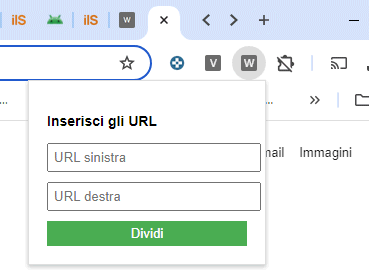
L’estensione locale “split_view” non fa altro che creare una nuova pagina contenente due tag IFRAME affiancati. In ognuno dei due è mostrata la pagina indicata dall’utente nei campi URL sinistra e URL destra.
Affiancare pagine Web Chrome

Va detto che con alcuni siti Web potrebbe apparire l’errore “connessione negata“.  Questo accade quando il sito implementa una politica di sicurezza chiamata X-Frame-Options o utilizza le Content-Security-Policy (CSP) per bloccare il caricamento delle pagine all’interno di IFRAME.

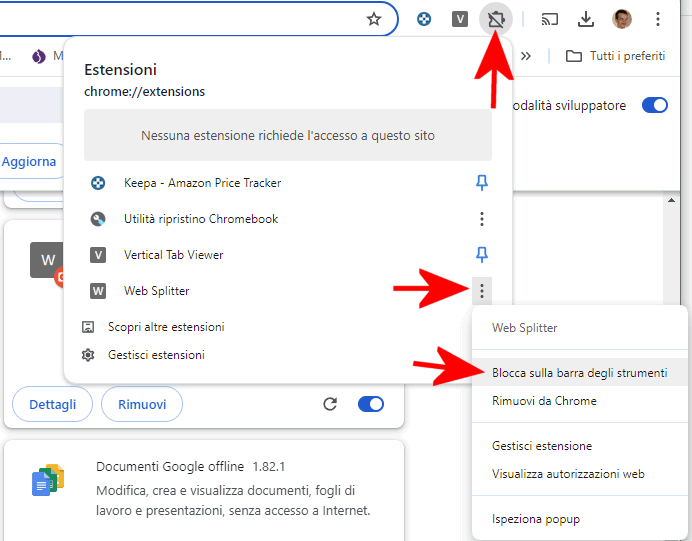
Per installare l’estensione in esecuzione in locale, è sufficiente digitare chrome://extensions nella barra degli indirizzi di Chrome, attivare la modalità sviluppatore in alto a destra, fare clic sul pulsante Carica estensione non pacchettizzata quindi selezionare la cartella in cui si sono in precedenza estratti i file di “split_view“.
Estensione per dividere la schermata di Chrome

Il passo seguente consiste nel cliccare sull’icona delle estensioni nella barra degli strumenti, utilizzare i tre puntini accanto a Web Splitter, quindi selezionare Blocca sulla barra degli strumenti.

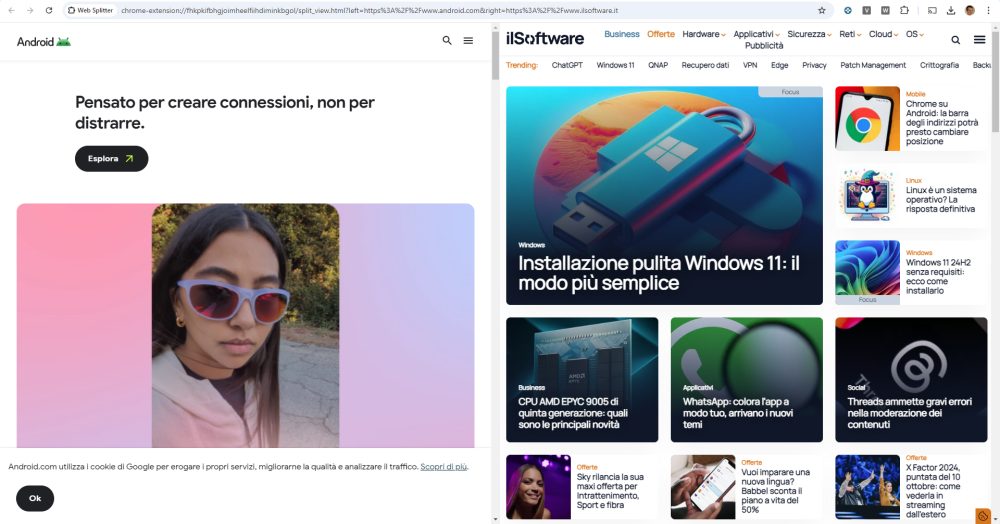
D’ora in avanti, cliccando sull’icona “W” nella barra degli strumenti, si ha la possibilità di incollare due URL corrispondenti ad altrettante pagine Web. Il contenuto delle due pagine è automaticamente affiancato in Chrome e risulta navigabile senza limitazioni.
Dividere schermo di Chrome e affiancare pagine Web

Aggiungendo la direttiva icon all’interno del file manifest.json dell’estensione, è possibile sostituire la lettera “W” con un’icona di propria scelta.

Ti consigliamo anche

Link copiato negli appunti