Deprecated: Creation of dynamic property Timber\Site::$pingback is deprecated in /var/www/html/web/app/themes/ilsoftware/vendor/timber/timber/lib/Site.php on line 180

Deprecated: Creation of dynamic property Timber\User::$name is deprecated in /var/www/html/web/app/themes/ilsoftware/vendor/timber/timber/lib/User.php on line 118

Deprecated: Creation of dynamic property Timber\Post::$has_disclaimer is deprecated in /var/www/html/web/app/themes/ilsoftware/vendor/timber/timber/lib/Core.php on line 71

Deprecated: Creation of dynamic property Timber\Post::$os_meta is deprecated in /var/www/html/web/app/themes/ilsoftware/vendor/timber/timber/lib/Core.php on line 71

Deprecated: Creation of dynamic property Timber\Post::$_edit_lock is deprecated in /var/www/html/web/app/themes/ilsoftware/vendor/timber/timber/lib/Core.php on line 71

Deprecated: Creation of dynamic property Timber\Post::$_edit_last is deprecated in /var/www/html/web/app/themes/ilsoftware/vendor/timber/timber/lib/Core.php on line 71

Deprecated: Creation of dynamic property Timber\Post::$_thumbnail_id is deprecated in /var/www/html/web/app/themes/ilsoftware/vendor/timber/timber/lib/Core.php on line 71

Deprecated: Creation of dynamic property Timber\Post::$tipologia is deprecated in /var/www/html/web/app/themes/ilsoftware/vendor/timber/timber/lib/Core.php on line 71

Deprecated: Creation of dynamic property Timber\Post::$_tipologia is deprecated in /var/www/html/web/app/themes/ilsoftware/vendor/timber/timber/lib/Core.php on line 71

Deprecated: Creation of dynamic property Timber\Post::$attributi is deprecated in /var/www/html/web/app/themes/ilsoftware/vendor/timber/timber/lib/Core.php on line 71

Deprecated: Creation of dynamic property Timber\Post::$_attributi is deprecated in /var/www/html/web/app/themes/ilsoftware/vendor/timber/timber/lib/Core.php on line 71

Deprecated: Creation of dynamic property Timber\Post::$in_evidenza_newsletter is deprecated in /var/www/html/web/app/themes/ilsoftware/vendor/timber/timber/lib/Core.php on line 71

Deprecated: Creation of dynamic property Timber\Post::$_in_evidenza_newsletter is deprecated in /var/www/html/web/app/themes/ilsoftware/vendor/timber/timber/lib/Core.php on line 71

Deprecated: Creation of dynamic property Timber\Post::$inviato_in_newsletter is deprecated in /var/www/html/web/app/themes/ilsoftware/vendor/timber/timber/lib/Core.php on line 71

Deprecated: Creation of dynamic property Timber\Post::$_inviato_in_newsletter is deprecated in /var/www/html/web/app/themes/ilsoftware/vendor/timber/timber/lib/Core.php on line 71

Deprecated: Creation of dynamic property Timber\Post::$_yoast_wpseo_primary_category is deprecated in /var/www/html/web/app/themes/ilsoftware/vendor/timber/timber/lib/Core.php on line 71

Deprecated: Creation of dynamic property Timber\Post::$_yoast_wpseo_primary_blz_affiliation_attributes is deprecated in /var/www/html/web/app/themes/ilsoftware/vendor/timber/timber/lib/Core.php on line 71

Deprecated: Creation of dynamic property Timber\Post::$_yoast_wpseo_primary_content_type is deprecated in /var/www/html/web/app/themes/ilsoftware/vendor/timber/timber/lib/Core.php on line 71

Deprecated: Creation of dynamic property Timber\Post::$_yoast_wpseo_primary_attributes is deprecated in /var/www/html/web/app/themes/ilsoftware/vendor/timber/timber/lib/Core.php on line 71

Deprecated: Creation of dynamic property Timber\Post::$_yoast_wpseo_primary_speciali is deprecated in /var/www/html/web/app/themes/ilsoftware/vendor/timber/timber/lib/Core.php on line 71

Deprecated: Creation of dynamic property Timber\Post::$_yoast_wpseo_focuskw is deprecated in /var/www/html/web/app/themes/ilsoftware/vendor/timber/timber/lib/Core.php on line 71

Deprecated: Creation of dynamic property Timber\Post::$_yoast_wpseo_metadesc is deprecated in /var/www/html/web/app/themes/ilsoftware/vendor/timber/timber/lib/Core.php on line 71

Deprecated: Creation of dynamic property Timber\Post::$_yoast_wpseo_linkdex is deprecated in /var/www/html/web/app/themes/ilsoftware/vendor/timber/timber/lib/Core.php on line 71

Deprecated: Creation of dynamic property Timber\Post::$_yoast_wpseo_content_score is deprecated in /var/www/html/web/app/themes/ilsoftware/vendor/timber/timber/lib/Core.php on line 71

Deprecated: Creation of dynamic property Timber\Post::$_yoast_wpseo_focuskeywords is deprecated in /var/www/html/web/app/themes/ilsoftware/vendor/timber/timber/lib/Core.php on line 71

Deprecated: Creation of dynamic property Timber\Post::$_yoast_wpseo_keywordsynonyms is deprecated in /var/www/html/web/app/themes/ilsoftware/vendor/timber/timber/lib/Core.php on line 71

Deprecated: Creation of dynamic property Timber\Post::$_yoast_wpseo_estimated-reading-time-minutes is deprecated in /var/www/html/web/app/themes/ilsoftware/vendor/timber/timber/lib/Core.php on line 71

Deprecated: Creation of dynamic property Timber\Post::$newsletter_subject is deprecated in /var/www/html/web/app/themes/ilsoftware/vendor/timber/timber/lib/Core.php on line 71

Deprecated: Creation of dynamic property Timber\Post::$_newsletter_subject is deprecated in /var/www/html/web/app/themes/ilsoftware/vendor/timber/timber/lib/Core.php on line 71

Deprecated: Creation of dynamic property Timber\Post::$newsletter_summary is deprecated in /var/www/html/web/app/themes/ilsoftware/vendor/timber/timber/lib/Core.php on line 71

Deprecated: Creation of dynamic property Timber\Post::$_newsletter_summary is deprecated in /var/www/html/web/app/themes/ilsoftware/vendor/timber/timber/lib/Core.php on line 71

Deprecated: Creation of dynamic property Timber\Post::$_yoast_indexnow_last_ping is deprecated in /var/www/html/web/app/themes/ilsoftware/vendor/timber/timber/lib/Core.php on line 71

Deprecated: Creation of dynamic property Timber\Post::$_oembed_f901aa75050f1d01bdd169574a133694 is deprecated in /var/www/html/web/app/themes/ilsoftware/vendor/timber/timber/lib/Core.php on line 71

Deprecated: Creation of dynamic property Timber\Post::$_oembed_time_f901aa75050f1d01bdd169574a133694 is deprecated in /var/www/html/web/app/themes/ilsoftware/vendor/timber/timber/lib/Core.php on line 71

Deprecated: Creation of dynamic property Timber\Post::$post_date_gmt is deprecated in /var/www/html/web/app/themes/ilsoftware/vendor/timber/timber/lib/Core.php on line 71

Deprecated: Creation of dynamic property Timber\Post::$comment_status is deprecated in /var/www/html/web/app/themes/ilsoftware/vendor/timber/timber/lib/Core.php on line 71

Deprecated: Creation of dynamic property Timber\Post::$ping_status is deprecated in /var/www/html/web/app/themes/ilsoftware/vendor/timber/timber/lib/Core.php on line 71

Deprecated: Creation of dynamic property Timber\Post::$post_password is deprecated in /var/www/html/web/app/themes/ilsoftware/vendor/timber/timber/lib/Core.php on line 71

Deprecated: Creation of dynamic property Timber\Post::$post_name is deprecated in /var/www/html/web/app/themes/ilsoftware/vendor/timber/timber/lib/Core.php on line 71

Deprecated: Creation of dynamic property Timber\Post::$to_ping is deprecated in /var/www/html/web/app/themes/ilsoftware/vendor/timber/timber/lib/Core.php on line 71

Deprecated: Creation of dynamic property Timber\Post::$pinged is deprecated in /var/www/html/web/app/themes/ilsoftware/vendor/timber/timber/lib/Core.php on line 71

Deprecated: Creation of dynamic property Timber\Post::$post_modified is deprecated in /var/www/html/web/app/themes/ilsoftware/vendor/timber/timber/lib/Core.php on line 71

Deprecated: Creation of dynamic property Timber\Post::$post_modified_gmt is deprecated in /var/www/html/web/app/themes/ilsoftware/vendor/timber/timber/lib/Core.php on line 71

Deprecated: Creation of dynamic property Timber\Post::$post_content_filtered is deprecated in /var/www/html/web/app/themes/ilsoftware/vendor/timber/timber/lib/Core.php on line 71

Deprecated: Creation of dynamic property Timber\Post::$guid is deprecated in /var/www/html/web/app/themes/ilsoftware/vendor/timber/timber/lib/Core.php on line 71

Deprecated: Creation of dynamic property Timber\Post::$menu_order is deprecated in /var/www/html/web/app/themes/ilsoftware/vendor/timber/timber/lib/Core.php on line 71

Deprecated: Creation of dynamic property Timber\Post::$post_mime_type is deprecated in /var/www/html/web/app/themes/ilsoftware/vendor/timber/timber/lib/Core.php on line 71

Deprecated: Creation of dynamic property Timber\Post::$comment_count is deprecated in /var/www/html/web/app/themes/ilsoftware/vendor/timber/timber/lib/Core.php on line 71

Deprecated: Creation of dynamic property Timber\Post::$filter is deprecated in /var/www/html/web/app/themes/ilsoftware/vendor/timber/timber/lib/Core.php on line 71

Deprecated: Creation of dynamic property Timber\Post::$status is deprecated in /var/www/html/web/app/themes/ilsoftware/vendor/timber/timber/lib/Core.php on line 71
Aggiorna gratis a Windows 11 con Rufus: quello che nessuno ti ha mai detto | IlSoftware.it

Aggiorna gratis a Windows 11 con Rufus: quello che nessuno ti ha mai detto

Rufus è uno strumento gratuito e open source che permette di creare facilmente chiavette USB avviabili da immagini ISO di Windows e Linux. Oltre all’installazione pulita, può essere usato per aggiornare gratuitamente Windows 10 a Windows 11, anche su hardware non compatibile.

Rufus è un piccolo software gratuito e open source che permette di creare facilmente supporti di avvio, come chiavette USB di boot, a partire dalle immagini ISO dei sistemi operativi. Grazie a Rufus è possibile preparare rapidamente un’unità avviabile per installare Windows, Linux e altri sistemi.

Il supporto USB avviabile predisposto con Rufus, può essere però utilizzato anche per aggiornare a Windows 11 gratis da qualunque sistema Windows 10 che utilizzi una regolare licenza. L’unità di boot creata con Rufus, infatti, nasce per un’installazione da zero del sistema operativo ma nulla impedisce di sfruttarla anche per migrare da Windows 10 a Windows 11.

Rufus e l’importanza di usare chiavette USB veloci

È importante, tuttavia, accertarsi di selezionare una chiavetta USB veloce e che la porta USB del PC non faccia da “collo di bottiglia”. In un altro articolo abbiamo visto come velocizzare i trasferimenti USB lenti, riconoscendo porte e dispositivi.

Ad esempio, una chiavetta USB 3.2 Gen 2, con velocità teorica fino a 10 Gbps, può trasferire i dati circa il doppio più velocemente rispetto a una USB 3.2 Gen 1 (5 Gbps); per non parlare di una semplice USB 2.0 (fino a 480 Mbps).

Tuttavia, anche se la chiavetta è veloce, se viene collegata a una porta USB 2.0 o a una porta USB 3.0 non nativa (ad esempio gestita da un controller più lento), si avrà comunque un collo di bottiglia che limita la velocità effettiva. Per ottenere prestazioni ottimali è quindi consigliabile usare sia una chiavetta USB ad alte prestazioni, sia una porta USB 3.0 o superiore direttamente collegata alla scheda madre del PC.

Diversamente, se si parla di aggiornamento diretto da Windows 10 a Windows 11, allora tanto vale escludere proprio le chiavetta USB e montare il file ISO scaricato dai server Microsoft.

Creare una chiavetta avviabile Windows 11 con Rufus

La creazione di una chiavetta o comunque di un supporto USB avviabile con Rufus è un’operazione molto semplice. Basta collegare l’unità USB al PC, selezionarla dal menu Dispositivo/unità quindi fare clic su SELEZIONA per scegliere il file ISO di Windows 11 scaricato dai server Microsoft (Scarica l’immagine disco di Windows 11 (ISO) per dispositivi x64) oppure optare per DOWNLOAD se si volesse scaricare l’immagine del supporto d’installazione avvalendosi soltanto di un apposito script (Fido) integrato in Rufus.

Premendo la combinazione ALT+E è addirittura possibile creare un supporto d’installazione universale per Windows 11, in grado di avviarsi sia su macchine con BIOS legacy, sulle più moderne dotate di BIOS UEFI (in ogni caso devono essere sistemi x86-64). In Tipo sistema destinazione compare BIOS o UEFI.
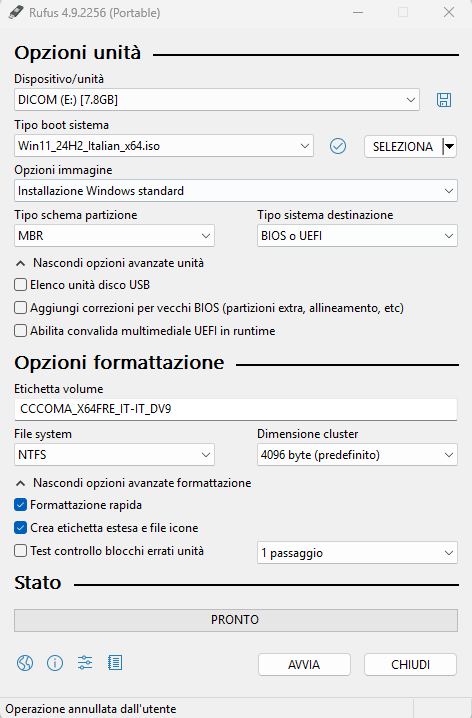
Configurazione Rufus installazione Windows 11

Personalizzazione dell’installazione di Windows 11

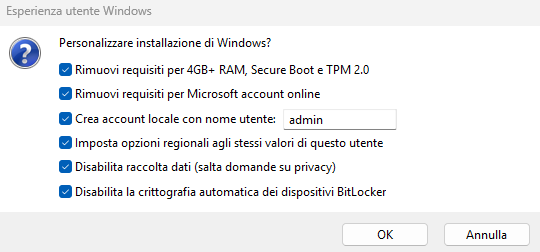
Con un clic su Avvia, Rufus presenta l’immagine in figura che permette di personalizzare l’installazione di Windows 11 attivando tutta una serie di comportamenti. Lasciando attivate tutte le caselle, Rufus aggiunge al supporto USB un file \sources\$OEM$\$$\Panther\unattend.xml che effettua quanto segue:

  • Bypassing dei requisiti per l’installazione di Windows 11 (RAM, Secure Boot, chip TPM 2.0): BypassTPMCheck, BypassSecureBootCheck e BypassRAMCheck tutti impostati a “1”.
  • Eliminazione del requisito legato all’utilizzo di un account Microsoft nella fase di installazione (BypassNRO = 1).
  • Rimozione del requisito che impone l’uso di una connessione Internet attiva durante l’installazione.
  • Impostazione del fuso orario corrente, come sul PC usato per creare il supporto d’installazione.
  • Richiesta di creazione e utilizzo di un account amministratore locale (con password impostata su password). L’utente è deve reimpostarla al successivo login (uso del comando net user "admin" /logonpasswordchg:yes e di net accounts /maxpwage:unlimited per evitare qualunque scadenza della password).
  • Configurazione della tastiera e impostazioni regionali italiane.
  • Disattivazione delle domande in materia di privacy e raccolta dei dati.
  • Disattivazione della crittografia automatica del contenuto del dispositivo, compresa l’unità di sistema (PreventDeviceEncryption=true).

Bypass requisiti Windows 11 con Rufus

Va tuttavia considerato che il contenuto del file unattend.xml è ignorato durante una procedura di aggiornamento.

Avvio dell’aggiornamento diretto a Windows 11

Per aggiornare a Windows 11 da un sistema Windows 10, si può usare il supporto d’installazione creato con Rufus: basta visualizzarne il contenuto in Esplora file quindi fare doppio clic su setup.exe.
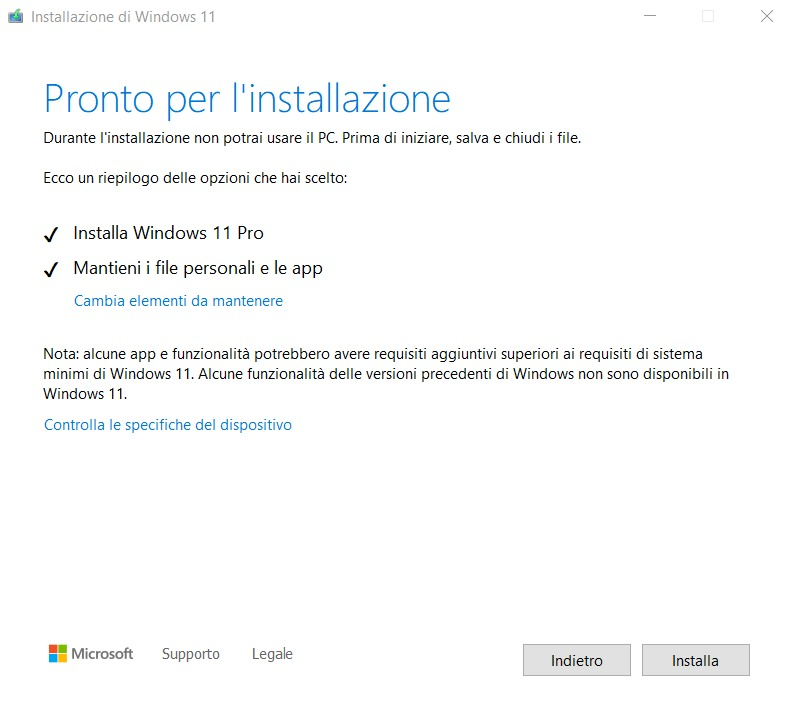
Aggiornamento a Windows 11 con Rufus

Se la routine di installazione di Windows 11 mostrasse È necessario il tuo intervento e indicasse l’impossibilità di procedere per via del mancato rispetto dei requisiti minimi, si può eventualmente provare a forzare l’installazione (diamo per scontato che sui PC più vecchi si sia accertato il supporto per l’istruzione POPCNT e le estensioni SSE4.2).

Effettuando un aggiornamento in-place, ovvero cliccando due volte sul file setup.exe, l’installazione di Windows 11 ignora il contenuto del file \sources\$OEM$\$$\Panther\unattend.xml.

Scavalcare i requisiti per l’aggiornamento gratuito a Windows 11

Per usare il supporto Rufus al fine dell’aggiornamento gratuito a Windows 11, si può semplicemente premere Windows+R quindi digitare X:\sources\setupprep.exe /product server dove X: è la lettera di unità corrispondente al supporto d’installazione.

Si può eventualmente usare la sintassi seguente per annullare la verifica di eventuali incompatibilità (a rischio dell’utente): X:\sources\setupprep.exe /product server /Compat IgnoreWarning /MigrateDrivers All

È possibile annullare tutti i riferimenti a Windows Server presenti nella finestra d’installazione. La procedura di aggiornamento caricherà sul sistema la stessa edizione di Windows già presente (ad esempio: Windows 10 Pro aggiorna a Windows 11 Pro).

Come soluzione alternativa, si può aprire il prompt dei comandi con i diritti di amministratore (cmd, Esegui come amministratore) quindi incollare i seguenti comandi:

reg add HKCU\SOFTWARE\Microsoft\PCHC /v UpgradeEligibility /t REG_DWORD /d 1 /f

reg delete HKCU\SOFTWARE\Microsoft\PCHealthCheck /f

reg delete "HKLM\SOFTWARE\Microsoft\Windows NT\CurrentVersion\AppCompatFlags\CompatMarkers" /f

reg delete "HKLM\SOFTWARE\Microsoft\Windows NT\CurrentVersion\AppCompatFlags\Shared" /f

reg delete "HKLM\SOFTWARE\Microsoft\Windows NT\CurrentVersion\AppCompatFlags\TargetVersionUpgradeExperienceIndicators" /f

reg add "HKLM\SOFTWARE\Microsoft\Windows NT\CurrentVersion\AppCompatFlags\HwReqChk" /f /v HwReqChkVars /t REG_MULTI_SZ /s , /d "SQ_SecureBootCapable=TRUE,SQ_SecureBootEnabled=TRUE,SQ_TpmVersion=2,SQ_RamMB=8192,"

reg add "HKLM\SYSTEM\Setup\MoSetup" /v AllowUpgradesWithUnsupportedTPMOrCPU /t REG_DWORD /d 1 /f

Le modifiche al registro di sistema indicate, servono proprio a bypassare i controlli sui requisiti hardware.

Note finali

Come accennato in apertura, se non si utilizzasse una chiavetta USB sufficientemente veloce, per l’aggiornamento da Windows 10 a Windows 11 (o per la reinstallazione di Windows 11 su una macchina in cui il sistema è già presente…) si può cliccare due volte sul file ISO del sistema operativo quindi cliccare su setup.exe.

Per bypassare eventualmente il controllo dei requisiti, valgono i consigli riportati al precedente paragrafo “Scavalcare i requisiti per l’aggiornamento gratuito a Windows 11“. Ovviamente, nei comandi al posto di X: si deve specificare la lettera di unità virtuale assegnata dal sistema operativo al contenuto del file ISO di Windows 11.

Ti consigliamo anche

Link copiato negli appunti