
Deprecated: Creation of dynamic property Timber\Site::$pingback is deprecated in /var/www/html/web/app/themes/ilsoftware/vendor/timber/timber/lib/Site.php on line 180

Deprecated: Creation of dynamic property Timber\User::$name is deprecated in /var/www/html/web/app/themes/ilsoftware/vendor/timber/timber/lib/User.php on line 118

Deprecated: Creation of dynamic property Timber\Post::$os_meta is deprecated in /var/www/html/web/app/themes/ilsoftware/vendor/timber/timber/lib/Core.php on line 71

Deprecated: Creation of dynamic property Timber\Post::$has_disclaimer is deprecated in /var/www/html/web/app/themes/ilsoftware/vendor/timber/timber/lib/Core.php on line 71

Deprecated: Creation of dynamic property Timber\Post::$_edit_lock is deprecated in /var/www/html/web/app/themes/ilsoftware/vendor/timber/timber/lib/Core.php on line 71

Deprecated: Creation of dynamic property Timber\Post::$_edit_last is deprecated in /var/www/html/web/app/themes/ilsoftware/vendor/timber/timber/lib/Core.php on line 71

Deprecated: Creation of dynamic property Timber\Post::$_thumbnail_id is deprecated in /var/www/html/web/app/themes/ilsoftware/vendor/timber/timber/lib/Core.php on line 71

Deprecated: Creation of dynamic property Timber\Post::$tipologia is deprecated in /var/www/html/web/app/themes/ilsoftware/vendor/timber/timber/lib/Core.php on line 71

Deprecated: Creation of dynamic property Timber\Post::$_tipologia is deprecated in /var/www/html/web/app/themes/ilsoftware/vendor/timber/timber/lib/Core.php on line 71

Deprecated: Creation of dynamic property Timber\Post::$attributi is deprecated in /var/www/html/web/app/themes/ilsoftware/vendor/timber/timber/lib/Core.php on line 71

Deprecated: Creation of dynamic property Timber\Post::$_attributi is deprecated in /var/www/html/web/app/themes/ilsoftware/vendor/timber/timber/lib/Core.php on line 71

Deprecated: Creation of dynamic property Timber\Post::$in_evidenza_newsletter is deprecated in /var/www/html/web/app/themes/ilsoftware/vendor/timber/timber/lib/Core.php on line 71

Deprecated: Creation of dynamic property Timber\Post::$_in_evidenza_newsletter is deprecated in /var/www/html/web/app/themes/ilsoftware/vendor/timber/timber/lib/Core.php on line 71

Deprecated: Creation of dynamic property Timber\Post::$inviato_in_newsletter is deprecated in /var/www/html/web/app/themes/ilsoftware/vendor/timber/timber/lib/Core.php on line 71

Deprecated: Creation of dynamic property Timber\Post::$_inviato_in_newsletter is deprecated in /var/www/html/web/app/themes/ilsoftware/vendor/timber/timber/lib/Core.php on line 71

Deprecated: Creation of dynamic property Timber\Post::$_yoast_wpseo_primary_category is deprecated in /var/www/html/web/app/themes/ilsoftware/vendor/timber/timber/lib/Core.php on line 71

Deprecated: Creation of dynamic property Timber\Post::$_yoast_wpseo_primary_blz_affiliation_attributes is deprecated in /var/www/html/web/app/themes/ilsoftware/vendor/timber/timber/lib/Core.php on line 71

Deprecated: Creation of dynamic property Timber\Post::$_yoast_wpseo_primary_content_type is deprecated in /var/www/html/web/app/themes/ilsoftware/vendor/timber/timber/lib/Core.php on line 71

Deprecated: Creation of dynamic property Timber\Post::$_yoast_wpseo_primary_attributes is deprecated in /var/www/html/web/app/themes/ilsoftware/vendor/timber/timber/lib/Core.php on line 71

Deprecated: Creation of dynamic property Timber\Post::$_yoast_wpseo_primary_speciali is deprecated in /var/www/html/web/app/themes/ilsoftware/vendor/timber/timber/lib/Core.php on line 71

Deprecated: Creation of dynamic property Timber\Post::$_yoast_wpseo_focuskw is deprecated in /var/www/html/web/app/themes/ilsoftware/vendor/timber/timber/lib/Core.php on line 71

Deprecated: Creation of dynamic property Timber\Post::$_yoast_wpseo_metadesc is deprecated in /var/www/html/web/app/themes/ilsoftware/vendor/timber/timber/lib/Core.php on line 71

Deprecated: Creation of dynamic property Timber\Post::$_yoast_wpseo_linkdex is deprecated in /var/www/html/web/app/themes/ilsoftware/vendor/timber/timber/lib/Core.php on line 71

Deprecated: Creation of dynamic property Timber\Post::$_yoast_wpseo_content_score is deprecated in /var/www/html/web/app/themes/ilsoftware/vendor/timber/timber/lib/Core.php on line 71

Deprecated: Creation of dynamic property Timber\Post::$_yoast_wpseo_focuskeywords is deprecated in /var/www/html/web/app/themes/ilsoftware/vendor/timber/timber/lib/Core.php on line 71

Deprecated: Creation of dynamic property Timber\Post::$_yoast_wpseo_keywordsynonyms is deprecated in /var/www/html/web/app/themes/ilsoftware/vendor/timber/timber/lib/Core.php on line 71

Deprecated: Creation of dynamic property Timber\Post::$_yoast_wpseo_estimated-reading-time-minutes is deprecated in /var/www/html/web/app/themes/ilsoftware/vendor/timber/timber/lib/Core.php on line 71

Deprecated: Creation of dynamic property Timber\Post::$os_previous_publish_date is deprecated in /var/www/html/web/app/themes/ilsoftware/vendor/timber/timber/lib/Core.php on line 71

Deprecated: Creation of dynamic property Timber\Post::$os_notification_id is deprecated in /var/www/html/web/app/themes/ilsoftware/vendor/timber/timber/lib/Core.php on line 71

Deprecated: Creation of dynamic property Timber\Post::$_yoast_indexnow_last_ping is deprecated in /var/www/html/web/app/themes/ilsoftware/vendor/timber/timber/lib/Core.php on line 71

Deprecated: Creation of dynamic property Timber\Post::$newsletter_subject is deprecated in /var/www/html/web/app/themes/ilsoftware/vendor/timber/timber/lib/Core.php on line 71

Deprecated: Creation of dynamic property Timber\Post::$_newsletter_subject is deprecated in /var/www/html/web/app/themes/ilsoftware/vendor/timber/timber/lib/Core.php on line 71

Deprecated: Creation of dynamic property Timber\Post::$newsletter_summary is deprecated in /var/www/html/web/app/themes/ilsoftware/vendor/timber/timber/lib/Core.php on line 71

Deprecated: Creation of dynamic property Timber\Post::$_newsletter_summary is deprecated in /var/www/html/web/app/themes/ilsoftware/vendor/timber/timber/lib/Core.php on line 71

Deprecated: Creation of dynamic property Timber\Post::$post_date_gmt is deprecated in /var/www/html/web/app/themes/ilsoftware/vendor/timber/timber/lib/Core.php on line 71

Deprecated: Creation of dynamic property Timber\Post::$comment_status is deprecated in /var/www/html/web/app/themes/ilsoftware/vendor/timber/timber/lib/Core.php on line 71

Deprecated: Creation of dynamic property Timber\Post::$ping_status is deprecated in /var/www/html/web/app/themes/ilsoftware/vendor/timber/timber/lib/Core.php on line 71

Deprecated: Creation of dynamic property Timber\Post::$post_password is deprecated in /var/www/html/web/app/themes/ilsoftware/vendor/timber/timber/lib/Core.php on line 71

Deprecated: Creation of dynamic property Timber\Post::$post_name is deprecated in /var/www/html/web/app/themes/ilsoftware/vendor/timber/timber/lib/Core.php on line 71

Deprecated: Creation of dynamic property Timber\Post::$to_ping is deprecated in /var/www/html/web/app/themes/ilsoftware/vendor/timber/timber/lib/Core.php on line 71

Deprecated: Creation of dynamic property Timber\Post::$pinged is deprecated in /var/www/html/web/app/themes/ilsoftware/vendor/timber/timber/lib/Core.php on line 71

Deprecated: Creation of dynamic property Timber\Post::$post_modified is deprecated in /var/www/html/web/app/themes/ilsoftware/vendor/timber/timber/lib/Core.php on line 71

Deprecated: Creation of dynamic property Timber\Post::$post_modified_gmt is deprecated in /var/www/html/web/app/themes/ilsoftware/vendor/timber/timber/lib/Core.php on line 71

Deprecated: Creation of dynamic property Timber\Post::$post_content_filtered is deprecated in /var/www/html/web/app/themes/ilsoftware/vendor/timber/timber/lib/Core.php on line 71

Deprecated: Creation of dynamic property Timber\Post::$guid is deprecated in /var/www/html/web/app/themes/ilsoftware/vendor/timber/timber/lib/Core.php on line 71

Deprecated: Creation of dynamic property Timber\Post::$menu_order is deprecated in /var/www/html/web/app/themes/ilsoftware/vendor/timber/timber/lib/Core.php on line 71

Deprecated: Creation of dynamic property Timber\Post::$post_mime_type is deprecated in /var/www/html/web/app/themes/ilsoftware/vendor/timber/timber/lib/Core.php on line 71

Deprecated: Creation of dynamic property Timber\Post::$comment_count is deprecated in /var/www/html/web/app/themes/ilsoftware/vendor/timber/timber/lib/Core.php on line 71

Deprecated: Creation of dynamic property Timber\Post::$filter is deprecated in /var/www/html/web/app/themes/ilsoftware/vendor/timber/timber/lib/Core.php on line 71

Deprecated: Creation of dynamic property Timber\Post::$status is deprecated in /var/www/html/web/app/themes/ilsoftware/vendor/timber/timber/lib/Core.php on line 71
Basta anteprime! Il trucco nascosto di Windows 11 per aprire subito l’ultima finestra attiva | IlSoftware.it

Basta anteprime! Il trucco nascosto di Windows 11 per aprire subito l’ultima finestra attiva

Il trucco segreto per attivare e utilizzare la funzione Last Active Click su Windows 11: consente di passare subito all'ultima finestra aperta dalla barra delle applicazioni, velocizzando il flusso di lavoro.

Quando un’applicazione Windows ha più finestre aperte, ad esempio un browser con più istanze separate, Esplora file con più cartelle contemporaneamente aperte, Word con più documenti sui quali si sta lavorando in parallelo, la barra delle applicazioni mostra per impostazione predefinita un’unica icona. Facendo clic su quell’icona, Windows 11 presenta l’anteprima di tutte le finestre per consentire all’utente di scegliere a quale passare. Per molti la funzione è comoda. Per altri, soprattutto chi passa di frequente da una finestra all’altra, si tratta di un passaggio inutile e rallentante.

Windows 11 integra Last Active Click, una funzione nascosta non esposta nell’interfaccia grafica, che permette di saltare le anteprime e aprire direttamente l’ultima finestra attiva di una qualsiasi applicazione. Con un singolo clic si torna immediatamente al contesto di lavoro precedente, velocizzando il flusso di lavoro e riducendo la “frizione cognitiva” derivata dalle anteprime (o miniature) a comparsa.

Come passare subito all’ultima finestra aperta con un clic sulla barra delle applicazioni Windows

La funzione Last Active Click non è prerogativa di Windows 11: esiste almeno sin dai tempi di Windows 7 e quindi può essere utilizzata ancora oggi, ad esempio, da chi intendesse continuare a lavorare con Windows 10.

Per fare una prova, cominciate con l’aprire un po’ di documenti con Microsoft Word, con LibreOffice o con qualunque altra suite per l’ufficio. Aprite anche un po’ di cartelle, in finestre separate, avvalendovi di Esplora file (Windows+E). Visto che ci siete, date anche un’occhiata ai migliori trucchi da tastiera per Esplora file.

Adesso spostate il puntatore del mouse sull’icona di Esplora file, di Word o di altri programmi in esecuzione per i quali si sono aperte almeno due finestre.

Nella barra delle applicazioni, lasciando il puntatore del mouse sull’icona senza cliccare, vedrete apparire le anteprime (miniature) del contenuto di ciascuna finestra aperta.
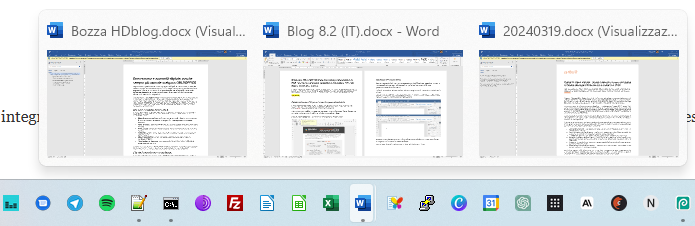
Anteprima finestre aperte barra applicazioni Windows

Cliccando sull’icona nella barra delle applicazioni non succede nulla se il programma corrispondente ha più finestre aperte. Questo almeno per impostazione predefinita.

Abilitare Last Active Click su richiesta, premendo il tasto CTRL

Adesso, provate a utilizzare un trucco segreto. Tenete premuto il tasto CTRL sulla tastiera mentre cliccate sull’icona del programma “multi-finestra” nella barra delle applicazioni.

Utilizzando questa “gabola”, Windows mostra immediatamente la finestra dell’applicazione sulla quale si è lavorato più di recente. In altre parole, tra le varie finestre aperte e relative alla medesima applicazione in esecuzione, Windows mostra l’ultima utilizzata in precedenza.

Il sistema operativo Microsoft ricorda la sequenza di utilizzo delle varie finestre aperte, tante che se ripetete l’operazione con un altro programma (sempre tenendo premuto il tasto CTRL e cliccando una sola volta), otterrete il medesimo effetto.

Se tenete premuto ancora il tasto CTRL e continuate a cliccare sull’icona nella barra delle applicazioni, Windows mostra – una dopo l’altra – ciascuna finestra aperta, passando automaticamente dall’una all’altra. Di solito le varie finestre di una stessa applicazione, vengono via via sovrapposte tenendo premuto CTRL e cliccando più volte.

Come accedere sempre al contenuto dell’ultima finestra aperta

Anziché sfruttare la pressione del tasto CTRL, si può eventualmente modificare la configurazione di Windows in modo tale che cliccando su un programma con più finestre nella barra delle applicazioni, si apra automaticamente l’ultima finestra utilizzata in precedenza.

Poiché Microsoft non ha integrato l’opzione nelle Impostazioni né introdotto un criterio GPO dedicato, l’unico modo per gestirla è intervenire sul registro di sistema.

Digitate quindi cmd nella casella di ricerca di Windows, scegliete Esegui come amministratore quindi incollate quanto segue:

reg add HKCU\SOFTWARE\Microsoft\Windows\CurrentVersion\Explorer\Advanced /v LastActiveClick /t REG_DWORD /d 1 /f

Per rendere immediatamente operativa la modifica, è necessario digitare i due comandi seguenti in modo da ricaricare la shell di Windows:

taskkill /im explorer.exe /f
explorer.exe

A questo punto, cliccando una volta sull’icona di un programma nella barra delle applicazioni (SENZA premere CTRL), Windows mostra l’ultima finestra sulla quale si stava lavorando precedentemente. Facendo più volte clic sull’icona dello stesso programma nella barra delle applicazioni, si passa automaticamente alle altre finestre aperte.

Note finali

Attivando la funzione Last Active Click dal registro di sistema, il tasto CTRL è automaticamente disattivato. Il comportamento predefinito di Windows diventa differente: un singolo clic sull’icona del programma con più finestre mostra l’ultima finestra aperta; cliccando più volte sulla barra delle applicazioni si passa da una finestra all’altra.

Nel caso in cui si volesse annullare la modifica e ripristinare il comportamento di default, basta aprire di nuovo il prompt dei comandi con i diritti di amministratore quindi usare la seguente istruzione:

reg add HKCU\SOFTWARE\Microsoft\Windows\CurrentVersion\Explorer\Advanced /v LastActiveClick /t REG_DWORD /d 0 /f

Per rendere effettiva la modifica è necessario fermare il processo explorer.exe e riavviarlo, come spiegato in precedenza, oppure effettuare un reboot del sistema.

Ti consigliamo anche

Link copiato negli appunti