
Deprecated: Creation of dynamic property Timber\Site::$pingback is deprecated in /var/www/html/web/app/themes/ilsoftware/vendor/timber/timber/lib/Site.php on line 180

Deprecated: Creation of dynamic property Timber\User::$name is deprecated in /var/www/html/web/app/themes/ilsoftware/vendor/timber/timber/lib/User.php on line 118

Deprecated: Creation of dynamic property Timber\Post::$has_disclaimer is deprecated in /var/www/html/web/app/themes/ilsoftware/vendor/timber/timber/lib/Core.php on line 71

Deprecated: Creation of dynamic property Timber\Post::$_edit_lock is deprecated in /var/www/html/web/app/themes/ilsoftware/vendor/timber/timber/lib/Core.php on line 71

Deprecated: Creation of dynamic property Timber\Post::$_edit_last is deprecated in /var/www/html/web/app/themes/ilsoftware/vendor/timber/timber/lib/Core.php on line 71

Deprecated: Creation of dynamic property Timber\Post::$onesignal_meta_box_present is deprecated in /var/www/html/web/app/themes/ilsoftware/vendor/timber/timber/lib/Core.php on line 71

Deprecated: Creation of dynamic property Timber\Post::$onesignal_send_notification is deprecated in /var/www/html/web/app/themes/ilsoftware/vendor/timber/timber/lib/Core.php on line 71

Deprecated: Creation of dynamic property Timber\Post::$onesignal_modify_title_and_content is deprecated in /var/www/html/web/app/themes/ilsoftware/vendor/timber/timber/lib/Core.php on line 71

Deprecated: Creation of dynamic property Timber\Post::$onesignal_notification_custom_heading is deprecated in /var/www/html/web/app/themes/ilsoftware/vendor/timber/timber/lib/Core.php on line 71

Deprecated: Creation of dynamic property Timber\Post::$onesignal_notification_custom_content is deprecated in /var/www/html/web/app/themes/ilsoftware/vendor/timber/timber/lib/Core.php on line 71

Deprecated: Creation of dynamic property Timber\Post::$_yoast_wpseo_focuskw is deprecated in /var/www/html/web/app/themes/ilsoftware/vendor/timber/timber/lib/Core.php on line 71

Deprecated: Creation of dynamic property Timber\Post::$_yoast_wpseo_linkdex is deprecated in /var/www/html/web/app/themes/ilsoftware/vendor/timber/timber/lib/Core.php on line 71

Deprecated: Creation of dynamic property Timber\Post::$_yoast_wpseo_content_score is deprecated in /var/www/html/web/app/themes/ilsoftware/vendor/timber/timber/lib/Core.php on line 71

Deprecated: Creation of dynamic property Timber\Post::$_yoast_wpseo_estimated-reading-time-minutes is deprecated in /var/www/html/web/app/themes/ilsoftware/vendor/timber/timber/lib/Core.php on line 71

Deprecated: Creation of dynamic property Timber\Post::$_yoast_wpseo_wordproof_timestamp is deprecated in /var/www/html/web/app/themes/ilsoftware/vendor/timber/timber/lib/Core.php on line 71

Deprecated: Creation of dynamic property Timber\Post::$tipologia is deprecated in /var/www/html/web/app/themes/ilsoftware/vendor/timber/timber/lib/Core.php on line 71

Deprecated: Creation of dynamic property Timber\Post::$_tipologia is deprecated in /var/www/html/web/app/themes/ilsoftware/vendor/timber/timber/lib/Core.php on line 71

Deprecated: Creation of dynamic property Timber\Post::$attributi is deprecated in /var/www/html/web/app/themes/ilsoftware/vendor/timber/timber/lib/Core.php on line 71

Deprecated: Creation of dynamic property Timber\Post::$_attributi is deprecated in /var/www/html/web/app/themes/ilsoftware/vendor/timber/timber/lib/Core.php on line 71

Deprecated: Creation of dynamic property Timber\Post::$in_evidenza_newsletter is deprecated in /var/www/html/web/app/themes/ilsoftware/vendor/timber/timber/lib/Core.php on line 71

Deprecated: Creation of dynamic property Timber\Post::$_in_evidenza_newsletter is deprecated in /var/www/html/web/app/themes/ilsoftware/vendor/timber/timber/lib/Core.php on line 71

Deprecated: Creation of dynamic property Timber\Post::$inviato_in_newsletter is deprecated in /var/www/html/web/app/themes/ilsoftware/vendor/timber/timber/lib/Core.php on line 71

Deprecated: Creation of dynamic property Timber\Post::$_inviato_in_newsletter is deprecated in /var/www/html/web/app/themes/ilsoftware/vendor/timber/timber/lib/Core.php on line 71

Deprecated: Creation of dynamic property Timber\Post::$_yoast_wpseo_primary_category is deprecated in /var/www/html/web/app/themes/ilsoftware/vendor/timber/timber/lib/Core.php on line 71

Deprecated: Creation of dynamic property Timber\Post::$_yoast_wpseo_primary_blz_affiliation_attributes is deprecated in /var/www/html/web/app/themes/ilsoftware/vendor/timber/timber/lib/Core.php on line 71

Deprecated: Creation of dynamic property Timber\Post::$_yoast_wpseo_primary_content_type is deprecated in /var/www/html/web/app/themes/ilsoftware/vendor/timber/timber/lib/Core.php on line 71

Deprecated: Creation of dynamic property Timber\Post::$_yoast_wpseo_primary_attributes is deprecated in /var/www/html/web/app/themes/ilsoftware/vendor/timber/timber/lib/Core.php on line 71

Deprecated: Creation of dynamic property Timber\Post::$_yoast_wpseo_primary_speciali is deprecated in /var/www/html/web/app/themes/ilsoftware/vendor/timber/timber/lib/Core.php on line 71

Deprecated: Creation of dynamic property Timber\Post::$_yoast_wpseo_metadesc is deprecated in /var/www/html/web/app/themes/ilsoftware/vendor/timber/timber/lib/Core.php on line 71

Deprecated: Creation of dynamic property Timber\Post::$_thumbnail_id is deprecated in /var/www/html/web/app/themes/ilsoftware/vendor/timber/timber/lib/Core.php on line 71

Deprecated: Creation of dynamic property Timber\Post::$response_body is deprecated in /var/www/html/web/app/themes/ilsoftware/vendor/timber/timber/lib/Core.php on line 71

Deprecated: Creation of dynamic property Timber\Post::$status is deprecated in /var/www/html/web/app/themes/ilsoftware/vendor/timber/timber/lib/Core.php on line 71

Deprecated: Creation of dynamic property Timber\Post::$post_date_gmt is deprecated in /var/www/html/web/app/themes/ilsoftware/vendor/timber/timber/lib/Core.php on line 71

Deprecated: Creation of dynamic property Timber\Post::$comment_status is deprecated in /var/www/html/web/app/themes/ilsoftware/vendor/timber/timber/lib/Core.php on line 71

Deprecated: Creation of dynamic property Timber\Post::$ping_status is deprecated in /var/www/html/web/app/themes/ilsoftware/vendor/timber/timber/lib/Core.php on line 71

Deprecated: Creation of dynamic property Timber\Post::$post_password is deprecated in /var/www/html/web/app/themes/ilsoftware/vendor/timber/timber/lib/Core.php on line 71

Deprecated: Creation of dynamic property Timber\Post::$post_name is deprecated in /var/www/html/web/app/themes/ilsoftware/vendor/timber/timber/lib/Core.php on line 71

Deprecated: Creation of dynamic property Timber\Post::$to_ping is deprecated in /var/www/html/web/app/themes/ilsoftware/vendor/timber/timber/lib/Core.php on line 71

Deprecated: Creation of dynamic property Timber\Post::$pinged is deprecated in /var/www/html/web/app/themes/ilsoftware/vendor/timber/timber/lib/Core.php on line 71

Deprecated: Creation of dynamic property Timber\Post::$post_modified is deprecated in /var/www/html/web/app/themes/ilsoftware/vendor/timber/timber/lib/Core.php on line 71

Deprecated: Creation of dynamic property Timber\Post::$post_modified_gmt is deprecated in /var/www/html/web/app/themes/ilsoftware/vendor/timber/timber/lib/Core.php on line 71

Deprecated: Creation of dynamic property Timber\Post::$post_content_filtered is deprecated in /var/www/html/web/app/themes/ilsoftware/vendor/timber/timber/lib/Core.php on line 71

Deprecated: Creation of dynamic property Timber\Post::$guid is deprecated in /var/www/html/web/app/themes/ilsoftware/vendor/timber/timber/lib/Core.php on line 71

Deprecated: Creation of dynamic property Timber\Post::$menu_order is deprecated in /var/www/html/web/app/themes/ilsoftware/vendor/timber/timber/lib/Core.php on line 71

Deprecated: Creation of dynamic property Timber\Post::$post_mime_type is deprecated in /var/www/html/web/app/themes/ilsoftware/vendor/timber/timber/lib/Core.php on line 71

Deprecated: Creation of dynamic property Timber\Post::$comment_count is deprecated in /var/www/html/web/app/themes/ilsoftware/vendor/timber/timber/lib/Core.php on line 71

Deprecated: Creation of dynamic property Timber\Post::$filter is deprecated in /var/www/html/web/app/themes/ilsoftware/vendor/timber/timber/lib/Core.php on line 71
ChatGPT: come scaricare le conversazioni in formato Markdown | IlSoftware.it

ChatGPT: come scaricare le conversazioni in formato Markdown

Vediamo come esportare le conversazioni ChatGPT e convertirle in file Markdown formattati, facili da consultare e utilizzare.

Quando si parla di Markdown si fa riferimento a un linguaggio di markup leggero e facile da usare utilizzato per formattare il testo in modo semplice e strutturato. Creato con l’obiettivo di semplificare la scrittura e la formattazione dei documenti, Markdown consente agli autori di concentrarsi sul contenuto invece che sulle complessità e i “fastidi” della formattazione.

In Markdown, la formattazione del testo è definita utilizzando una serie di marcatori di formattazione, come asterischi, trattini, parentesi quadre e altri ancora. Questi marcatori sono facili da leggere e scrivere, anche in forma di testo semplice, e il concetto alla base del loro utilizzo è ben noto anche a chi ad esempio vuole applicare il grassetto o altre formattazioni su WhatsApp come con altre app di messaggistica.

La semplice sintassi di Markdown, per esempio, prevede l’utilizzo del simbolo # prima del titolo oppure dell’asterisco * prima di ogni voce di un elenco puntato; il grassetto si fa con un doppio asterisco mentre il corsivo inserendo il testo tra trattini bassi (underscore), e così via.

Tante piattaforme di scrittura e blogging usano Markdown che è adottato anche repository GitHub per la formattazione della documentazione.

Scaricare i contenuti ChatGPT come testo Markdown immediatamente utilizzabile

Il progetto Chat History Export to MD si propone come uno script Python che consente di convertire l’intera cronologia di conversazioni e dati esportati da ChatGPT in file Markdown ben formattati.

ChatGPT consente di esportare le chat cliccando sui tre puntini in basso a sinistra, nella finestra dell’applicazione, su Settings su Data controls e infine sul pulsante Export a destra di Export data.
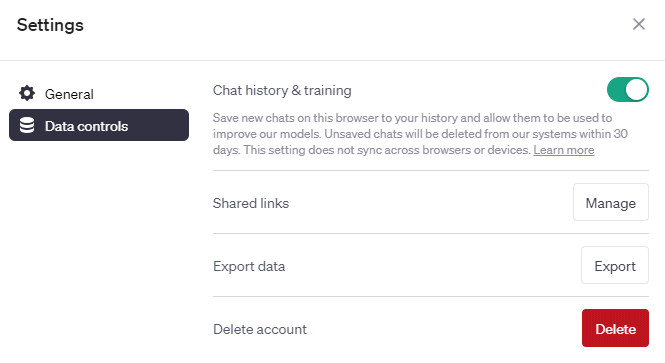
Esportare contenuto chat ChatGPT

Dopo una breve attesa, si riceve al proprio indirizzo email un archivio Zip compresso contenente la lista delle conversazioni, avute in precedenza con ChatGPT, sia in formato HTML che JSON.

Lo script Python che vi presentiamo permette di trasformare il backup delle conversazioni ChatGPT in formato Markdown attingendo automaticamente al contenuto del file Zip esportato con la procedura predefinita offerta da OpenAI e descritta poco sopra.

L’applicazione Chat History Export to MD è in grado di rilevare il file Zip più recente contenuto nella directory di sistema ~/Downloads/. Nasce quindi come tool open source da eseguire su una macchina Linux ma può essere sfruttato senza problemi anche da Windows utilizzando una finestra di WSL (Windows Subsystem for Linux).

Come usare lo script Python che genera un file Markdown delle conversazioni con ChatGPT

Il primo passo per usare lo script consiste nel clonare il repository GitHub: per procedere in tal senso, basta impartire il comando seguente:

git clone https://github.com/mohamed-chs/chatgpt-history-export-to-md.git

Prima di eseguire lo script, è necessario assicurarsi di avere salvato i dati delle conversazioni di ChatGPT in file Zip. A questo punto, se l’archivio delle chat ChatGPT fosse posizionato nel percorso ~/Downloads/, basta digitare semplicemente:

python main.py

Lo script crea i file Markdown formattati e li salva nella directory predefinita, ovvero ~/Documents/ChatGPT-Conversations/MD/.

Personalizzare il funzionamento dello script

Ovviamente è possibile personalizzare lo script specificando il percorso in cui è memorizzato l’archivio Zip delle conversazioni di ChatGPT e la cartella in cui si desiderano ottenere i file Markdown. Le opzioni --zip_file e --out_folder consentono rispettivamente di indicare la cartella che ospita i file esportati dalla chat di OpenAI e la directory di destinazione per i file Markdown.

L’esempio seguente permette di indicare un file Zip e una cartella di destinazione da usare:

python main.py --zip_file "~/Downloads/chatgpt.zip" --out_folder "~/mie-conversazioni-markdown"

Il progetto permette anche di aggiungere le cosiddette intestazioni YAML ai file Markdown prodotti: si tratta di informazioni addizionali sulle singole conversazioni che possono risultare molto utili in svariate situazioni.

È possibile personalizzare ulteriormente lo script modificando il file config.json:

{
"system_title": "System",
"user_title": "YOUR NAME",
"assistant_title": "My AI",
"tool_title": "Code output (or plugin name)",
"delimiters_default": true
}

Il parametro system_title consente di specificare il titolo da assegnare ai messaggi di sistema, ad esempio quelli generati da ChatGPT; user_title di personalizzare il titolo dei messaggi dell’utente; assistant_title di definire l'”etichetta” da assegnare ai messaggi generati dall’assistente virtuale; tool_title di precisare il titolo da attribuire ai messaggi che rappresentano l’output di un interprete del codice o l’esito dell’elaborazione di un plugin, quando utilizzato insieme con ChatGPT.

Infine, delimiters_default è un’opzione di tipo boolean che permette di specificare se, nei file Markdown, usare i delimitatori predefiniti o cambiare quelli relativi ai simboli di parentesi.

Cos’è un’intestazione YAML

Un header o intestazione YAML è una sezione contenente metadati strutturati in formato YAML (YAML Ain’t Markup Language) posizionata all’inizio di un documento. Si tratta di una sezione spesso adoperata proprio nei file Markdown come in altre tipologie di formati di file.

L’intestazione YAML fornisce informazioni aggiuntive sul contenuto del documento e può essere utilizzata per scopi di organizzazione, formattazione, categorizzazione e gestione dei dati.

Molti sistemi di gestione dei contenuti, piattaforme di blogging e generatori di siti Web statici utilizzano gli header YAML per acquisire informazioni sulle pagine e presentare i contenuti in modo appropriato. Il generatore di siti Web statici Jekyll può utilizzare YAML per predisporre automaticamente un indice o per assegnare un layout specifico a una pagina.

Nel caso delle conversazioni ChatGPT, evidentemente, YAML si rivela uno strumento prezioso per mostrare subito le informazioni salienti sui contenuti di una chat, così da renderne ancora più semplice ed efficace l’individuazione e la successiva eventuale elaborazione, anche automatizzata.

Credit immagine in apertura: iStock.com/Supatman

Ti consigliamo anche

Link copiato negli appunti