
Deprecated: Creation of dynamic property Timber\Site::$pingback is deprecated in /var/www/html/web/app/themes/ilsoftware/vendor/timber/timber/lib/Site.php on line 180

Deprecated: Creation of dynamic property Timber\User::$name is deprecated in /var/www/html/web/app/themes/ilsoftware/vendor/timber/timber/lib/User.php on line 118

Deprecated: Creation of dynamic property Timber\Post::$has_disclaimer is deprecated in /var/www/html/web/app/themes/ilsoftware/vendor/timber/timber/lib/Core.php on line 71

Deprecated: Creation of dynamic property Timber\Post::$_edit_lock is deprecated in /var/www/html/web/app/themes/ilsoftware/vendor/timber/timber/lib/Core.php on line 71

Deprecated: Creation of dynamic property Timber\Post::$_edit_last is deprecated in /var/www/html/web/app/themes/ilsoftware/vendor/timber/timber/lib/Core.php on line 71

Deprecated: Creation of dynamic property Timber\Post::$onesignal_meta_box_present is deprecated in /var/www/html/web/app/themes/ilsoftware/vendor/timber/timber/lib/Core.php on line 71

Deprecated: Creation of dynamic property Timber\Post::$onesignal_send_notification is deprecated in /var/www/html/web/app/themes/ilsoftware/vendor/timber/timber/lib/Core.php on line 71

Deprecated: Creation of dynamic property Timber\Post::$onesignal_modify_title_and_content is deprecated in /var/www/html/web/app/themes/ilsoftware/vendor/timber/timber/lib/Core.php on line 71

Deprecated: Creation of dynamic property Timber\Post::$onesignal_notification_custom_heading is deprecated in /var/www/html/web/app/themes/ilsoftware/vendor/timber/timber/lib/Core.php on line 71

Deprecated: Creation of dynamic property Timber\Post::$onesignal_notification_custom_content is deprecated in /var/www/html/web/app/themes/ilsoftware/vendor/timber/timber/lib/Core.php on line 71

Deprecated: Creation of dynamic property Timber\Post::$tipologia is deprecated in /var/www/html/web/app/themes/ilsoftware/vendor/timber/timber/lib/Core.php on line 71

Deprecated: Creation of dynamic property Timber\Post::$_tipologia is deprecated in /var/www/html/web/app/themes/ilsoftware/vendor/timber/timber/lib/Core.php on line 71

Deprecated: Creation of dynamic property Timber\Post::$attributi is deprecated in /var/www/html/web/app/themes/ilsoftware/vendor/timber/timber/lib/Core.php on line 71

Deprecated: Creation of dynamic property Timber\Post::$_attributi is deprecated in /var/www/html/web/app/themes/ilsoftware/vendor/timber/timber/lib/Core.php on line 71

Deprecated: Creation of dynamic property Timber\Post::$in_evidenza_newsletter is deprecated in /var/www/html/web/app/themes/ilsoftware/vendor/timber/timber/lib/Core.php on line 71

Deprecated: Creation of dynamic property Timber\Post::$_in_evidenza_newsletter is deprecated in /var/www/html/web/app/themes/ilsoftware/vendor/timber/timber/lib/Core.php on line 71

Deprecated: Creation of dynamic property Timber\Post::$inviato_in_newsletter is deprecated in /var/www/html/web/app/themes/ilsoftware/vendor/timber/timber/lib/Core.php on line 71

Deprecated: Creation of dynamic property Timber\Post::$_inviato_in_newsletter is deprecated in /var/www/html/web/app/themes/ilsoftware/vendor/timber/timber/lib/Core.php on line 71

Deprecated: Creation of dynamic property Timber\Post::$_yoast_wpseo_primary_category is deprecated in /var/www/html/web/app/themes/ilsoftware/vendor/timber/timber/lib/Core.php on line 71

Deprecated: Creation of dynamic property Timber\Post::$_yoast_wpseo_primary_blz_affiliation_attributes is deprecated in /var/www/html/web/app/themes/ilsoftware/vendor/timber/timber/lib/Core.php on line 71

Deprecated: Creation of dynamic property Timber\Post::$_yoast_wpseo_primary_content_type is deprecated in /var/www/html/web/app/themes/ilsoftware/vendor/timber/timber/lib/Core.php on line 71

Deprecated: Creation of dynamic property Timber\Post::$_yoast_wpseo_primary_attributes is deprecated in /var/www/html/web/app/themes/ilsoftware/vendor/timber/timber/lib/Core.php on line 71

Deprecated: Creation of dynamic property Timber\Post::$_yoast_wpseo_primary_speciali is deprecated in /var/www/html/web/app/themes/ilsoftware/vendor/timber/timber/lib/Core.php on line 71

Deprecated: Creation of dynamic property Timber\Post::$_yoast_wpseo_focuskw is deprecated in /var/www/html/web/app/themes/ilsoftware/vendor/timber/timber/lib/Core.php on line 71

Deprecated: Creation of dynamic property Timber\Post::$_yoast_wpseo_metadesc is deprecated in /var/www/html/web/app/themes/ilsoftware/vendor/timber/timber/lib/Core.php on line 71

Deprecated: Creation of dynamic property Timber\Post::$_yoast_wpseo_linkdex is deprecated in /var/www/html/web/app/themes/ilsoftware/vendor/timber/timber/lib/Core.php on line 71

Deprecated: Creation of dynamic property Timber\Post::$_yoast_wpseo_content_score is deprecated in /var/www/html/web/app/themes/ilsoftware/vendor/timber/timber/lib/Core.php on line 71

Deprecated: Creation of dynamic property Timber\Post::$_yoast_wpseo_focuskeywords is deprecated in /var/www/html/web/app/themes/ilsoftware/vendor/timber/timber/lib/Core.php on line 71

Deprecated: Creation of dynamic property Timber\Post::$_yoast_wpseo_keywordsynonyms is deprecated in /var/www/html/web/app/themes/ilsoftware/vendor/timber/timber/lib/Core.php on line 71

Deprecated: Creation of dynamic property Timber\Post::$_yoast_wpseo_estimated-reading-time-minutes is deprecated in /var/www/html/web/app/themes/ilsoftware/vendor/timber/timber/lib/Core.php on line 71

Deprecated: Creation of dynamic property Timber\Post::$_yoast_wpseo_wordproof_timestamp is deprecated in /var/www/html/web/app/themes/ilsoftware/vendor/timber/timber/lib/Core.php on line 71

Deprecated: Creation of dynamic property Timber\Post::$_thumbnail_id is deprecated in /var/www/html/web/app/themes/ilsoftware/vendor/timber/timber/lib/Core.php on line 71

Deprecated: Creation of dynamic property Timber\Post::$_oembed_5cecb393ceb48ca75f9fab17fbcfa20d is deprecated in /var/www/html/web/app/themes/ilsoftware/vendor/timber/timber/lib/Core.php on line 71

Deprecated: Creation of dynamic property Timber\Post::$_oembed_time_5cecb393ceb48ca75f9fab17fbcfa20d is deprecated in /var/www/html/web/app/themes/ilsoftware/vendor/timber/timber/lib/Core.php on line 71

Deprecated: Creation of dynamic property Timber\Post::$response_body is deprecated in /var/www/html/web/app/themes/ilsoftware/vendor/timber/timber/lib/Core.php on line 71

Deprecated: Creation of dynamic property Timber\Post::$status is deprecated in /var/www/html/web/app/themes/ilsoftware/vendor/timber/timber/lib/Core.php on line 71

Deprecated: Creation of dynamic property Timber\Post::$_yoast_indexnow_last_ping is deprecated in /var/www/html/web/app/themes/ilsoftware/vendor/timber/timber/lib/Core.php on line 71

Deprecated: Creation of dynamic property Timber\Post::$post_date_gmt is deprecated in /var/www/html/web/app/themes/ilsoftware/vendor/timber/timber/lib/Core.php on line 71

Deprecated: Creation of dynamic property Timber\Post::$comment_status is deprecated in /var/www/html/web/app/themes/ilsoftware/vendor/timber/timber/lib/Core.php on line 71

Deprecated: Creation of dynamic property Timber\Post::$ping_status is deprecated in /var/www/html/web/app/themes/ilsoftware/vendor/timber/timber/lib/Core.php on line 71

Deprecated: Creation of dynamic property Timber\Post::$post_password is deprecated in /var/www/html/web/app/themes/ilsoftware/vendor/timber/timber/lib/Core.php on line 71

Deprecated: Creation of dynamic property Timber\Post::$post_name is deprecated in /var/www/html/web/app/themes/ilsoftware/vendor/timber/timber/lib/Core.php on line 71

Deprecated: Creation of dynamic property Timber\Post::$to_ping is deprecated in /var/www/html/web/app/themes/ilsoftware/vendor/timber/timber/lib/Core.php on line 71

Deprecated: Creation of dynamic property Timber\Post::$pinged is deprecated in /var/www/html/web/app/themes/ilsoftware/vendor/timber/timber/lib/Core.php on line 71

Deprecated: Creation of dynamic property Timber\Post::$post_modified is deprecated in /var/www/html/web/app/themes/ilsoftware/vendor/timber/timber/lib/Core.php on line 71

Deprecated: Creation of dynamic property Timber\Post::$post_modified_gmt is deprecated in /var/www/html/web/app/themes/ilsoftware/vendor/timber/timber/lib/Core.php on line 71

Deprecated: Creation of dynamic property Timber\Post::$post_content_filtered is deprecated in /var/www/html/web/app/themes/ilsoftware/vendor/timber/timber/lib/Core.php on line 71

Deprecated: Creation of dynamic property Timber\Post::$guid is deprecated in /var/www/html/web/app/themes/ilsoftware/vendor/timber/timber/lib/Core.php on line 71

Deprecated: Creation of dynamic property Timber\Post::$menu_order is deprecated in /var/www/html/web/app/themes/ilsoftware/vendor/timber/timber/lib/Core.php on line 71

Deprecated: Creation of dynamic property Timber\Post::$post_mime_type is deprecated in /var/www/html/web/app/themes/ilsoftware/vendor/timber/timber/lib/Core.php on line 71

Deprecated: Creation of dynamic property Timber\Post::$comment_count is deprecated in /var/www/html/web/app/themes/ilsoftware/vendor/timber/timber/lib/Core.php on line 71

Deprecated: Creation of dynamic property Timber\Post::$filter is deprecated in /var/www/html/web/app/themes/ilsoftware/vendor/timber/timber/lib/Core.php on line 71
Chromecast Google TV senza telecomando grazie allo smartphone | IlSoftware.it

Chromecast Google TV senza telecomando grazie allo smartphone

Usare lo smartphone come telecomando per gestire una chiavetta Chromecast con Google TV è molto semplice: basta attivare Bluetooth, collegarsi alla stessa rete WiFi e avviare un'applicazione dedicata.

La chiavetta Chromecast con Google TV è attualmente commercializzata in due versioni: la prima, più economica, supporta la risoluzione Full HD 1080p mentre la seconda permette di gestire contenuti video in formato 4K. In entrambi i casi, le chiavette consentono di rendere smart un televisore che non lo è: basta che il TV sia dotato di una porta USB-A e di una HDMI.

Diversamente da quanto avveniva con le precedenti generazioni delle chiavette Chromecast, le più recenti versioni “con Google TV” necessitano di alimentazione separata (tramite porta USB-C posta nella parte inferiore del dispositivo). La potenza fornita dalla porta USB del televisore, non è infatti più sufficiente per “pilotare” le chiavette Chromecast più moderne.

Come usare Chromecast Google TV senza telecomando

Le Chromecast di qualche anno fa erano semplicemente dispositivi “passivi”: ricevevano attraverso la tecnologia Google Cast il flusso multimediale da riprodurre sul televisore. La riproduzione dei dati audio-video era sempre disposta da un altro device collegato in rete locale.

Con l’avvento di Chromecast con supporto Google TV, il casting da altri dispositivi connessi in LAN è sempre possibile. Tuttavia, la chiavetta è diventata un device indipendente. La piattaforma Google TV, infatti, poggia su un sistema operativo basato su Android TV, ottimizzato per l’utilizzo su televisori e dispositivi collegati al televisore. L’interfaccia utente semplificata raggruppa diversi servizi di streaming video come Netflix, Amazon Prime Video, Disney+, Now TV, Paramount+, TIMVISION, Rai Play, Infinity+, Spotify, Rakuten, Amazon Music e così via. È inoltre possibile accedere alla ricerca vocale dei contenuti mentre l’intelligenza artificiale Google suggerisce programmi, film e spunti sulla base delle preferenze di ciascun utente.

Le applicazioni si installano, su Chromecast con Google TV, sempre dal Play Store ma l’utente può comunque effettuare il sideloading delle app, decidendo di sua sponte con quali funzionalità arricchire la piattaforma.

Il telecomando incluso nella confezione di Chromecast con Google TV consente di attivare la ricerca vocale e di accedere in modo rapido a servizi di streaming online come YouTube e Netflix.

Usare lo smartphone al posto del telecomando per Chromecast con Google TV

Dicevamo che essendo un dispositivo indipendente, con un suo sistema operativo e una piattaforma come Google TV integrata, la chiavetta Chromecast di ultima generazione necessita di un telecomando. Che è fornito da Google nella confezione e che è eventualmente acquistabile anche come prodotto a sé.

Non trovate più il telecomando di Chromecast con Google TV, vostra figlia ve l’ha immerso in acqua e non siete riusciti a ripristinarne il funzionamento, ve l’ha mangiato il gatto, una ruspa ve l’ha schiacciato? In queste e in tante altre situazioni, sappiate che è possibile usare Chromecast Google TV senza telecomando.

Riuscirci è semplicissimo: il telecomando per Chromecast con Google TV, infatti, non è altro che un dispositivo che dialoga con la chiavetta installata dietro al televisore utilizzando Bluetooth. Un dispositivo Bluetooth, può quindi essere configurato per colloquiare con la chiavetta Chromecast.

La procedura pratica

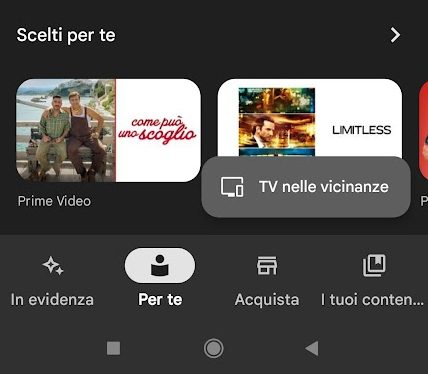
Il modo più semplice per gestire Chromecast con Google TV senza telecomando, consiste nell’installare l’app Google TV sullo smartphone, assicurarsi che il dispositivo mobile sia connesso con la stessa rete WiFi usata da Chromecast quindi avviare l’applicazione.
Chromecast Google TV senza telecomando

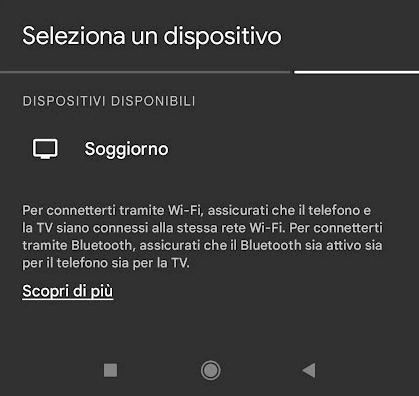
In basso a destra, nell’app Google TV, si deve toccare il pulsante TV nelle vicinanze quindi completare la scansione della rete alla ricerca di Chromecast. Google TV mostra il nome della chiavetta, precedentemente configurato, che deve essere selezionato.
Ricerca Chromecast rete locale

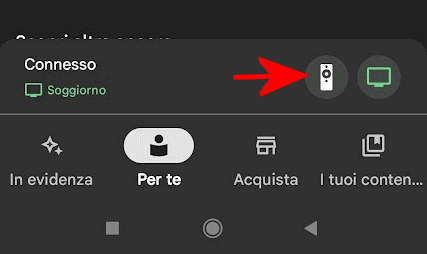
A questo punto, è bene accedere al menu del sistema operativo installato sul dispositivo mobile e attivare Bluetooth agendo sull’apposita icona (di solito è accessibile trascinando dall’alto verso il basso). Dopo qualche istante di attesa, si dovrebbe veder apparire l’icona raffigurante un piccolo telecomando, sulla destra. Non attivando Bluetooth, l’icona non comparirà: assicurarsi quindi di aver provveduto in tal senso.
Telecomando Chromecast smartphone Bluetooth

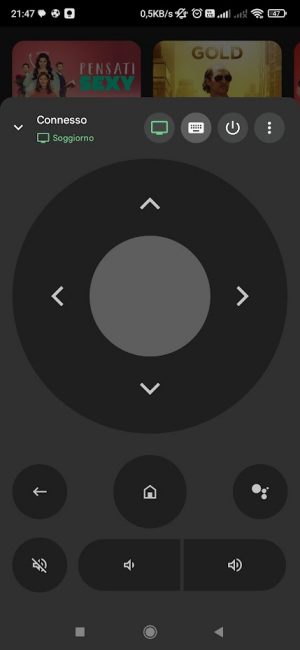
Toccando l’icona del telecomando da smartphone, si troveranno tutte le funzioni proprie del telecomando di Chromecast con Google TV. Si hanno ad esempio a disposizione i controlli per spostarsi tra le varie voci dell’interfaccia, per selezionare un’opzione, per tornare indietro, portarsi alla schermata principale, attivare la ricerca vocale, gestire il volume e spegnere Chromecast.
Controlli telecomando Chromecast con Google TV

In caso di problemi sulla rete WiFi, ad esempio allorquando il router e gli eventuali nodi utilizzati per estendere il raggio di copertura non rendessero reciprocamente visibili i terminali attestati su punti di accesso differenti, potrebbe accadere di perdere il controllo sul dispositivo Chromecast. Almeno temporaneamente.

Qualora vi fossero problemi con la stabilità del collegamento Bluetooth, l’app Google TV mostra il messaggio Per mostrare i controlli riproduci qualcosa. In questi frangenti, di solito, basta attendere un attimo affinché le comunicazioni tra Chromecast con Google TV e telecomando-smartphone riprendano regolarmente.

Ti consigliamo anche

Link copiato negli appunti