
Deprecated: Creation of dynamic property Timber\Site::$pingback is deprecated in /var/www/html/web/app/themes/ilsoftware/vendor/timber/timber/lib/Site.php on line 180

Deprecated: Creation of dynamic property Timber\User::$name is deprecated in /var/www/html/web/app/themes/ilsoftware/vendor/timber/timber/lib/User.php on line 118

Deprecated: Creation of dynamic property Timber\Post::$has_disclaimer is deprecated in /var/www/html/web/app/themes/ilsoftware/vendor/timber/timber/lib/Core.php on line 71

Deprecated: Creation of dynamic property Timber\Post::$_edit_lock is deprecated in /var/www/html/web/app/themes/ilsoftware/vendor/timber/timber/lib/Core.php on line 71

Deprecated: Creation of dynamic property Timber\Post::$_edit_last is deprecated in /var/www/html/web/app/themes/ilsoftware/vendor/timber/timber/lib/Core.php on line 71

Deprecated: Creation of dynamic property Timber\Post::$onesignal_meta_box_present is deprecated in /var/www/html/web/app/themes/ilsoftware/vendor/timber/timber/lib/Core.php on line 71

Deprecated: Creation of dynamic property Timber\Post::$onesignal_send_notification is deprecated in /var/www/html/web/app/themes/ilsoftware/vendor/timber/timber/lib/Core.php on line 71

Deprecated: Creation of dynamic property Timber\Post::$onesignal_modify_title_and_content is deprecated in /var/www/html/web/app/themes/ilsoftware/vendor/timber/timber/lib/Core.php on line 71

Deprecated: Creation of dynamic property Timber\Post::$onesignal_notification_custom_heading is deprecated in /var/www/html/web/app/themes/ilsoftware/vendor/timber/timber/lib/Core.php on line 71

Deprecated: Creation of dynamic property Timber\Post::$onesignal_notification_custom_content is deprecated in /var/www/html/web/app/themes/ilsoftware/vendor/timber/timber/lib/Core.php on line 71

Deprecated: Creation of dynamic property Timber\Post::$_yoast_wpseo_content_score is deprecated in /var/www/html/web/app/themes/ilsoftware/vendor/timber/timber/lib/Core.php on line 71

Deprecated: Creation of dynamic property Timber\Post::$_yoast_wpseo_focuskeywords is deprecated in /var/www/html/web/app/themes/ilsoftware/vendor/timber/timber/lib/Core.php on line 71

Deprecated: Creation of dynamic property Timber\Post::$_yoast_wpseo_keywordsynonyms is deprecated in /var/www/html/web/app/themes/ilsoftware/vendor/timber/timber/lib/Core.php on line 71

Deprecated: Creation of dynamic property Timber\Post::$_yoast_wpseo_estimated-reading-time-minutes is deprecated in /var/www/html/web/app/themes/ilsoftware/vendor/timber/timber/lib/Core.php on line 71

Deprecated: Creation of dynamic property Timber\Post::$_yoast_wpseo_wordproof_timestamp is deprecated in /var/www/html/web/app/themes/ilsoftware/vendor/timber/timber/lib/Core.php on line 71

Deprecated: Creation of dynamic property Timber\Post::$tipologia is deprecated in /var/www/html/web/app/themes/ilsoftware/vendor/timber/timber/lib/Core.php on line 71

Deprecated: Creation of dynamic property Timber\Post::$_tipologia is deprecated in /var/www/html/web/app/themes/ilsoftware/vendor/timber/timber/lib/Core.php on line 71

Deprecated: Creation of dynamic property Timber\Post::$attributi is deprecated in /var/www/html/web/app/themes/ilsoftware/vendor/timber/timber/lib/Core.php on line 71

Deprecated: Creation of dynamic property Timber\Post::$_attributi is deprecated in /var/www/html/web/app/themes/ilsoftware/vendor/timber/timber/lib/Core.php on line 71

Deprecated: Creation of dynamic property Timber\Post::$in_evidenza_newsletter is deprecated in /var/www/html/web/app/themes/ilsoftware/vendor/timber/timber/lib/Core.php on line 71

Deprecated: Creation of dynamic property Timber\Post::$_in_evidenza_newsletter is deprecated in /var/www/html/web/app/themes/ilsoftware/vendor/timber/timber/lib/Core.php on line 71

Deprecated: Creation of dynamic property Timber\Post::$inviato_in_newsletter is deprecated in /var/www/html/web/app/themes/ilsoftware/vendor/timber/timber/lib/Core.php on line 71

Deprecated: Creation of dynamic property Timber\Post::$_inviato_in_newsletter is deprecated in /var/www/html/web/app/themes/ilsoftware/vendor/timber/timber/lib/Core.php on line 71

Deprecated: Creation of dynamic property Timber\Post::$_yoast_wpseo_primary_category is deprecated in /var/www/html/web/app/themes/ilsoftware/vendor/timber/timber/lib/Core.php on line 71

Deprecated: Creation of dynamic property Timber\Post::$_yoast_wpseo_primary_blz_affiliation_attributes is deprecated in /var/www/html/web/app/themes/ilsoftware/vendor/timber/timber/lib/Core.php on line 71

Deprecated: Creation of dynamic property Timber\Post::$_yoast_wpseo_primary_content_type is deprecated in /var/www/html/web/app/themes/ilsoftware/vendor/timber/timber/lib/Core.php on line 71

Deprecated: Creation of dynamic property Timber\Post::$_yoast_wpseo_primary_attributes is deprecated in /var/www/html/web/app/themes/ilsoftware/vendor/timber/timber/lib/Core.php on line 71

Deprecated: Creation of dynamic property Timber\Post::$_yoast_wpseo_primary_speciali is deprecated in /var/www/html/web/app/themes/ilsoftware/vendor/timber/timber/lib/Core.php on line 71

Deprecated: Creation of dynamic property Timber\Post::$_yoast_wpseo_focuskw is deprecated in /var/www/html/web/app/themes/ilsoftware/vendor/timber/timber/lib/Core.php on line 71

Deprecated: Creation of dynamic property Timber\Post::$_yoast_wpseo_metadesc is deprecated in /var/www/html/web/app/themes/ilsoftware/vendor/timber/timber/lib/Core.php on line 71

Deprecated: Creation of dynamic property Timber\Post::$_yoast_wpseo_linkdex is deprecated in /var/www/html/web/app/themes/ilsoftware/vendor/timber/timber/lib/Core.php on line 71

Deprecated: Creation of dynamic property Timber\Post::$_thumbnail_id is deprecated in /var/www/html/web/app/themes/ilsoftware/vendor/timber/timber/lib/Core.php on line 71

Deprecated: Creation of dynamic property Timber\Post::$response_body is deprecated in /var/www/html/web/app/themes/ilsoftware/vendor/timber/timber/lib/Core.php on line 71

Deprecated: Creation of dynamic property Timber\Post::$status is deprecated in /var/www/html/web/app/themes/ilsoftware/vendor/timber/timber/lib/Core.php on line 71

Deprecated: Creation of dynamic property Timber\Post::$_yoast_indexnow_last_ping is deprecated in /var/www/html/web/app/themes/ilsoftware/vendor/timber/timber/lib/Core.php on line 71

Deprecated: Creation of dynamic property Timber\Post::$_oembed_93a643f0abfc735120f1365a1343224a is deprecated in /var/www/html/web/app/themes/ilsoftware/vendor/timber/timber/lib/Core.php on line 71

Deprecated: Creation of dynamic property Timber\Post::$_oembed_time_93a643f0abfc735120f1365a1343224a is deprecated in /var/www/html/web/app/themes/ilsoftware/vendor/timber/timber/lib/Core.php on line 71

Deprecated: Creation of dynamic property Timber\Post::$_oembed_1bed3bea9ec2c6bbcc1d4002a8d79fe8 is deprecated in /var/www/html/web/app/themes/ilsoftware/vendor/timber/timber/lib/Core.php on line 71

Deprecated: Creation of dynamic property Timber\Post::$_oembed_time_1bed3bea9ec2c6bbcc1d4002a8d79fe8 is deprecated in /var/www/html/web/app/themes/ilsoftware/vendor/timber/timber/lib/Core.php on line 71

Deprecated: Creation of dynamic property Timber\Post::$post_date_gmt is deprecated in /var/www/html/web/app/themes/ilsoftware/vendor/timber/timber/lib/Core.php on line 71

Deprecated: Creation of dynamic property Timber\Post::$comment_status is deprecated in /var/www/html/web/app/themes/ilsoftware/vendor/timber/timber/lib/Core.php on line 71

Deprecated: Creation of dynamic property Timber\Post::$ping_status is deprecated in /var/www/html/web/app/themes/ilsoftware/vendor/timber/timber/lib/Core.php on line 71

Deprecated: Creation of dynamic property Timber\Post::$post_password is deprecated in /var/www/html/web/app/themes/ilsoftware/vendor/timber/timber/lib/Core.php on line 71

Deprecated: Creation of dynamic property Timber\Post::$post_name is deprecated in /var/www/html/web/app/themes/ilsoftware/vendor/timber/timber/lib/Core.php on line 71

Deprecated: Creation of dynamic property Timber\Post::$to_ping is deprecated in /var/www/html/web/app/themes/ilsoftware/vendor/timber/timber/lib/Core.php on line 71

Deprecated: Creation of dynamic property Timber\Post::$pinged is deprecated in /var/www/html/web/app/themes/ilsoftware/vendor/timber/timber/lib/Core.php on line 71

Deprecated: Creation of dynamic property Timber\Post::$post_modified is deprecated in /var/www/html/web/app/themes/ilsoftware/vendor/timber/timber/lib/Core.php on line 71

Deprecated: Creation of dynamic property Timber\Post::$post_modified_gmt is deprecated in /var/www/html/web/app/themes/ilsoftware/vendor/timber/timber/lib/Core.php on line 71

Deprecated: Creation of dynamic property Timber\Post::$post_content_filtered is deprecated in /var/www/html/web/app/themes/ilsoftware/vendor/timber/timber/lib/Core.php on line 71

Deprecated: Creation of dynamic property Timber\Post::$guid is deprecated in /var/www/html/web/app/themes/ilsoftware/vendor/timber/timber/lib/Core.php on line 71

Deprecated: Creation of dynamic property Timber\Post::$menu_order is deprecated in /var/www/html/web/app/themes/ilsoftware/vendor/timber/timber/lib/Core.php on line 71

Deprecated: Creation of dynamic property Timber\Post::$post_mime_type is deprecated in /var/www/html/web/app/themes/ilsoftware/vendor/timber/timber/lib/Core.php on line 71

Deprecated: Creation of dynamic property Timber\Post::$comment_count is deprecated in /var/www/html/web/app/themes/ilsoftware/vendor/timber/timber/lib/Core.php on line 71

Deprecated: Creation of dynamic property Timber\Post::$filter is deprecated in /var/www/html/web/app/themes/ilsoftware/vendor/timber/timber/lib/Core.php on line 71
Collegare schede di espansione PCIe a Raspberry Pi è possibile: ecco come | IlSoftware.it

Collegare schede di espansione PCIe a Raspberry Pi è possibile: ecco come

Il supporto per le schede PCIe da parte di Raspberry Pi 5 apre un nuovo mondo ai maker e agli amanti dell'elettronica. Qualche suggerimento di carattere generale per collegare al single-board computer schede video potenti, adattatori USB, soluzioni per lo storage dei dati, schede di rete Ethernet e wireless.

La recente scheda Raspberry Pi 5 è la prima in assoluto della serie a supportare l’interfaccia PCIe (PCI Express). In un altro articolo abbiamo visto come avviare Raspberry Pi da un’unità SSD PCIe NVMe. Anziché ricorrere alla classica scheda SD, impostando un SSD PCIe come unità di avvio, si può godere di prestazioni notevolmente migliorate.

La domanda a questo punto è la seguente: si possono collegare al single-board computer Raspberry Pi 5 altre tipologie di schede di espansione PCIe? Se sì, quali sono le alternative sulle quali si può fare affidamento?

L’ottimo Jeff Geerling ha sviluppato un sito Web che funge da raccolta ragionata per le schede PCIe che gli utenti possessori di Raspberry Pi possono eventualmente collegare e utilizzare: nella lista si trovano schede grafiche, schede USB, schede di rete Ethernet e adattatori WiFi, dispositivi multimediali e audio, supporti SATA e soluzioni per lo storage dei dati, switch di vario genere, oltre ai già citati moduli M.2 NVMe.

Come base si può utilizzare sempre un adattatore come Geekworm X1001 in accoppiata con una scheda di espansione come questa. Inserendo quest’ultima nello slot M.2 di X1001, si ha a disposizione una porta PCIe x4, utile per collegare altri dispositivi alla Raspberry Pi 5.
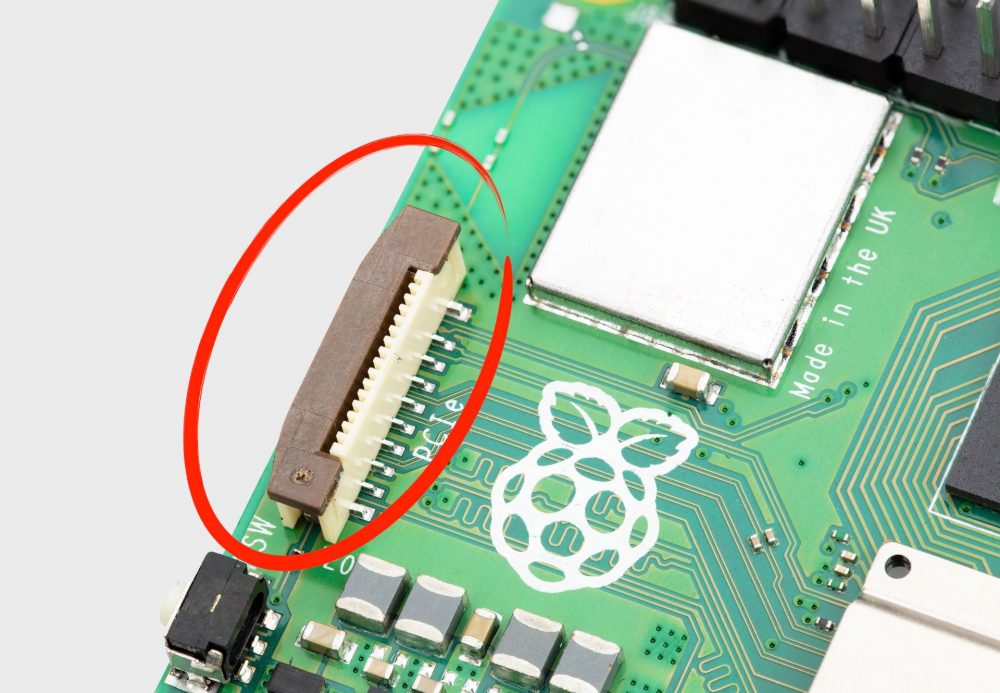
Connettore PCIe Raspberry Pi 5

Alcuni dispositivi PCIe (ad esempio le schede di espansione USB) sono riconosciuti, senza necessità di particolari modifiche. Alcune di esse necessitano semplicemente di una fonte di alimentazione ausiliaria. Ciò significa che è necessario collegare la scheda PCIe con una presa elettrica a muro. Digitando il comando lspci nella finestra del terminale della Raspberry Pi, è possibile verificare che il dispositivo PCIe sia correttamente rilevato e riconosciuto.

Per quanto riguarda le schede grafiche, il nostro consiglio è dare un’occhiata alla sezione GPU sul sito di Geerling e seguire le indicazioni riportate. In alcuni casi, le schede semplicemente funzionano, in altri è necessario ricompilare il kernel Linux e installare il driver corretto.
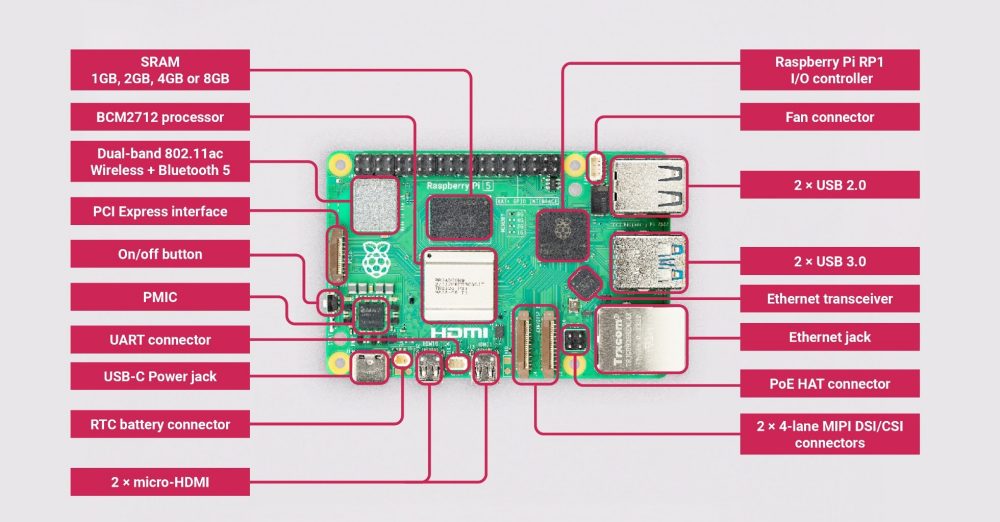
Schema circuitale Raspberry Pi 5

Compilazione del kernel per le schede PCIe che lo richiedono

Non tutte le schede PCIe esterne, dicevamo, sono direttamente riconosciute dalla Raspberry Pi 5. In questi casi la procedura da seguire per la compilazione del kernel è riportata nella documentazione “Building the kernel locally“. Riassumiamo di seguito i comandi da usare, ad esempio per configurare una scheda LAN:

sudo apt install git bc bison flex libssl-dev make

git clone --depth=1 https://github.com/raspberrypi/linux

cd linux
KERNEL=kernel_2712
make bcm2712_defconfig

Gli ultimi tre comandi si riferiscono appunto alle schede Raspberry Pi 5 a 64 bit. Infine, il comando make menuconfig avvia un’interfaccia testuale per la configurazione avanzata del kernel. Questo passo consente all’utente di personalizzare le opzioni del kernel in base alle proprie esigenze.

Il passo seguente consiste nell’individuare e abilitare i moduli kernel relativi alla scheda PCIe che si desidera utilizzate con la propria Raspberry Pi 5.

Digitando infine sudo nano .config, si deve andare alla ricerca della variabile CONFIG_LOCALVERSION aggiungendo una stringa identificativa al nome già presente (esempio: CONFIG_LOCALVERSION="-v8-16k-ilsoftware").

Il comando seguente permette di compilare e installare il nuovo kernel:

make -j4 Image.gz modules dtbs

sudo make modules_install

I comandi successivi sono parte del processo di installazione del kernel personalizzato. Essi assicurano che i file necessari siano posizionati correttamente nella directory di avvio del firmware per consentire all’hardware di eseguire il kernel personalizzato al successivo riavvio del sistema:

sudo cp arch/arm64/boot/dts/broadcom/*.dtb /boot/firmware/
sudo cp arch/arm64/boot/dts/overlays/*.dtb* /boot/firmware/overlays/
sudo cp arch/arm64/boot/dts/overlays/README /boot/firmware/overlays/
sudo cp arch/arm64/boot/Image.gz /boot/firmware/$KERNEL.img

A questo punto, si può riavviare la scheda Raspberry Pi (sudo reboot) quindi controllare che il nome del kernel sia quello personalizzato (esempio: "-v8-16k-ilsoftware"), impartendo il comando uname -a.

Inserendo nell’apposito slot la scheda PCIe appena configurata, questa dovrebbe funzionare senza problemi.

Se, quando si ha a che fare con le schede di più grandi dimensioni, l’installazione su una piccola Raspberry Pi possa sembrare un po’ un “accrocchio“, la possibilità di abilitare il supporto di potenti schede PCIe esterne apre a infinite possibilità, per chi ha la pazienza, l’interesse e la volontà di coglierle.

Le immagini pubblicate nell’articolo sono tratte dal sito ufficiale di Raspberry Pi.

Ti consigliamo anche

Link copiato negli appunti