
Deprecated: Creation of dynamic property Timber\Site::$pingback is deprecated in /var/www/html/web/app/themes/ilsoftware/vendor/timber/timber/lib/Site.php on line 180

Deprecated: Creation of dynamic property Timber\User::$name is deprecated in /var/www/html/web/app/themes/ilsoftware/vendor/timber/timber/lib/User.php on line 118

Deprecated: Creation of dynamic property Timber\Post::$has_disclaimer is deprecated in /var/www/html/web/app/themes/ilsoftware/vendor/timber/timber/lib/Core.php on line 71

Deprecated: Creation of dynamic property Timber\Post::$_edit_lock is deprecated in /var/www/html/web/app/themes/ilsoftware/vendor/timber/timber/lib/Core.php on line 71

Deprecated: Creation of dynamic property Timber\Post::$_edit_last is deprecated in /var/www/html/web/app/themes/ilsoftware/vendor/timber/timber/lib/Core.php on line 71

Deprecated: Creation of dynamic property Timber\Post::$onesignal_meta_box_present is deprecated in /var/www/html/web/app/themes/ilsoftware/vendor/timber/timber/lib/Core.php on line 71

Deprecated: Creation of dynamic property Timber\Post::$onesignal_send_notification is deprecated in /var/www/html/web/app/themes/ilsoftware/vendor/timber/timber/lib/Core.php on line 71

Deprecated: Creation of dynamic property Timber\Post::$onesignal_modify_title_and_content is deprecated in /var/www/html/web/app/themes/ilsoftware/vendor/timber/timber/lib/Core.php on line 71

Deprecated: Creation of dynamic property Timber\Post::$onesignal_notification_custom_heading is deprecated in /var/www/html/web/app/themes/ilsoftware/vendor/timber/timber/lib/Core.php on line 71

Deprecated: Creation of dynamic property Timber\Post::$onesignal_notification_custom_content is deprecated in /var/www/html/web/app/themes/ilsoftware/vendor/timber/timber/lib/Core.php on line 71

Deprecated: Creation of dynamic property Timber\Post::$tipologia is deprecated in /var/www/html/web/app/themes/ilsoftware/vendor/timber/timber/lib/Core.php on line 71

Deprecated: Creation of dynamic property Timber\Post::$_tipologia is deprecated in /var/www/html/web/app/themes/ilsoftware/vendor/timber/timber/lib/Core.php on line 71

Deprecated: Creation of dynamic property Timber\Post::$attributi is deprecated in /var/www/html/web/app/themes/ilsoftware/vendor/timber/timber/lib/Core.php on line 71

Deprecated: Creation of dynamic property Timber\Post::$_attributi is deprecated in /var/www/html/web/app/themes/ilsoftware/vendor/timber/timber/lib/Core.php on line 71

Deprecated: Creation of dynamic property Timber\Post::$in_evidenza_newsletter is deprecated in /var/www/html/web/app/themes/ilsoftware/vendor/timber/timber/lib/Core.php on line 71

Deprecated: Creation of dynamic property Timber\Post::$_in_evidenza_newsletter is deprecated in /var/www/html/web/app/themes/ilsoftware/vendor/timber/timber/lib/Core.php on line 71

Deprecated: Creation of dynamic property Timber\Post::$inviato_in_newsletter is deprecated in /var/www/html/web/app/themes/ilsoftware/vendor/timber/timber/lib/Core.php on line 71

Deprecated: Creation of dynamic property Timber\Post::$_inviato_in_newsletter is deprecated in /var/www/html/web/app/themes/ilsoftware/vendor/timber/timber/lib/Core.php on line 71

Deprecated: Creation of dynamic property Timber\Post::$_yoast_wpseo_primary_category is deprecated in /var/www/html/web/app/themes/ilsoftware/vendor/timber/timber/lib/Core.php on line 71

Deprecated: Creation of dynamic property Timber\Post::$_yoast_wpseo_primary_blz_affiliation_attributes is deprecated in /var/www/html/web/app/themes/ilsoftware/vendor/timber/timber/lib/Core.php on line 71

Deprecated: Creation of dynamic property Timber\Post::$_yoast_wpseo_primary_content_type is deprecated in /var/www/html/web/app/themes/ilsoftware/vendor/timber/timber/lib/Core.php on line 71

Deprecated: Creation of dynamic property Timber\Post::$_yoast_wpseo_primary_attributes is deprecated in /var/www/html/web/app/themes/ilsoftware/vendor/timber/timber/lib/Core.php on line 71

Deprecated: Creation of dynamic property Timber\Post::$_yoast_wpseo_primary_speciali is deprecated in /var/www/html/web/app/themes/ilsoftware/vendor/timber/timber/lib/Core.php on line 71

Deprecated: Creation of dynamic property Timber\Post::$_yoast_wpseo_focuskw is deprecated in /var/www/html/web/app/themes/ilsoftware/vendor/timber/timber/lib/Core.php on line 71

Deprecated: Creation of dynamic property Timber\Post::$_yoast_wpseo_metadesc is deprecated in /var/www/html/web/app/themes/ilsoftware/vendor/timber/timber/lib/Core.php on line 71

Deprecated: Creation of dynamic property Timber\Post::$_yoast_wpseo_linkdex is deprecated in /var/www/html/web/app/themes/ilsoftware/vendor/timber/timber/lib/Core.php on line 71

Deprecated: Creation of dynamic property Timber\Post::$_yoast_wpseo_content_score is deprecated in /var/www/html/web/app/themes/ilsoftware/vendor/timber/timber/lib/Core.php on line 71

Deprecated: Creation of dynamic property Timber\Post::$_yoast_wpseo_focuskeywords is deprecated in /var/www/html/web/app/themes/ilsoftware/vendor/timber/timber/lib/Core.php on line 71

Deprecated: Creation of dynamic property Timber\Post::$_yoast_wpseo_keywordsynonyms is deprecated in /var/www/html/web/app/themes/ilsoftware/vendor/timber/timber/lib/Core.php on line 71

Deprecated: Creation of dynamic property Timber\Post::$_yoast_wpseo_estimated-reading-time-minutes is deprecated in /var/www/html/web/app/themes/ilsoftware/vendor/timber/timber/lib/Core.php on line 71

Deprecated: Creation of dynamic property Timber\Post::$_thumbnail_id is deprecated in /var/www/html/web/app/themes/ilsoftware/vendor/timber/timber/lib/Core.php on line 71

Deprecated: Creation of dynamic property Timber\Post::$response_body is deprecated in /var/www/html/web/app/themes/ilsoftware/vendor/timber/timber/lib/Core.php on line 71

Deprecated: Creation of dynamic property Timber\Post::$status is deprecated in /var/www/html/web/app/themes/ilsoftware/vendor/timber/timber/lib/Core.php on line 71

Deprecated: Creation of dynamic property Timber\Post::$_yoast_indexnow_last_ping is deprecated in /var/www/html/web/app/themes/ilsoftware/vendor/timber/timber/lib/Core.php on line 71

Deprecated: Creation of dynamic property Timber\Post::$post_date_gmt is deprecated in /var/www/html/web/app/themes/ilsoftware/vendor/timber/timber/lib/Core.php on line 71

Deprecated: Creation of dynamic property Timber\Post::$comment_status is deprecated in /var/www/html/web/app/themes/ilsoftware/vendor/timber/timber/lib/Core.php on line 71

Deprecated: Creation of dynamic property Timber\Post::$ping_status is deprecated in /var/www/html/web/app/themes/ilsoftware/vendor/timber/timber/lib/Core.php on line 71

Deprecated: Creation of dynamic property Timber\Post::$post_password is deprecated in /var/www/html/web/app/themes/ilsoftware/vendor/timber/timber/lib/Core.php on line 71

Deprecated: Creation of dynamic property Timber\Post::$post_name is deprecated in /var/www/html/web/app/themes/ilsoftware/vendor/timber/timber/lib/Core.php on line 71

Deprecated: Creation of dynamic property Timber\Post::$to_ping is deprecated in /var/www/html/web/app/themes/ilsoftware/vendor/timber/timber/lib/Core.php on line 71

Deprecated: Creation of dynamic property Timber\Post::$pinged is deprecated in /var/www/html/web/app/themes/ilsoftware/vendor/timber/timber/lib/Core.php on line 71

Deprecated: Creation of dynamic property Timber\Post::$post_modified is deprecated in /var/www/html/web/app/themes/ilsoftware/vendor/timber/timber/lib/Core.php on line 71

Deprecated: Creation of dynamic property Timber\Post::$post_modified_gmt is deprecated in /var/www/html/web/app/themes/ilsoftware/vendor/timber/timber/lib/Core.php on line 71

Deprecated: Creation of dynamic property Timber\Post::$post_content_filtered is deprecated in /var/www/html/web/app/themes/ilsoftware/vendor/timber/timber/lib/Core.php on line 71

Deprecated: Creation of dynamic property Timber\Post::$guid is deprecated in /var/www/html/web/app/themes/ilsoftware/vendor/timber/timber/lib/Core.php on line 71

Deprecated: Creation of dynamic property Timber\Post::$menu_order is deprecated in /var/www/html/web/app/themes/ilsoftware/vendor/timber/timber/lib/Core.php on line 71

Deprecated: Creation of dynamic property Timber\Post::$post_mime_type is deprecated in /var/www/html/web/app/themes/ilsoftware/vendor/timber/timber/lib/Core.php on line 71

Deprecated: Creation of dynamic property Timber\Post::$comment_count is deprecated in /var/www/html/web/app/themes/ilsoftware/vendor/timber/timber/lib/Core.php on line 71

Deprecated: Creation of dynamic property Timber\Post::$filter is deprecated in /var/www/html/web/app/themes/ilsoftware/vendor/timber/timber/lib/Core.php on line 71
Comando pwd Linux: cos'è e quando usarlo | IlSoftware.it

Comando pwd Linux: cos'è e quando usarlo

Il comando pwd Linux è fondamentale per visualizzare il percorso della directory corrente. Nel nostro articolo vediamo come usarlo da solo oppure abbinato con vari parametri.

Capita spesso di lavorare con la finestra del terminale Linux, soprattutto quando si devono configurare software ricorrendo a procedure manuali oppure quando si amministra una macchina remota via SSH. Il comando pwd Linux è uno degli strumenti più basilari e utili perché consente di visualizzare il percorso assoluto della directory in cui ci si trova, fornendo una vera e propria bussola per l’utente all’interno del filesystem. In questo articolo prendiamo in esame il funzionamento del comando, alcuni trucchi e dettagli nascosti che possono migliorare l’esperienza con il terminale Linux.

Cosa fa il comando pwd Linux

Il comando pwd utilizzato senza parametri consente di ottenere il percorso assoluto della cartella corrente. Stabilire con certezza la directory in uso è essenziale per eseguire qualunque operazione, ad esempio per copiare file o spostare elementi da una posizione all’altra.
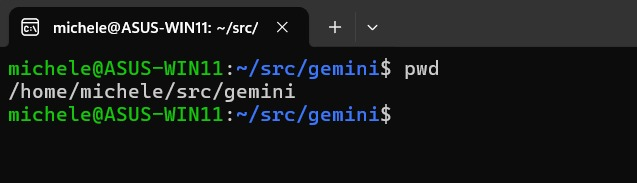
Comando pwd Linux

La semplicità del comando pwd nasconde alcune opzioni utili. Ad esempio, digitando pwd -L si riceve in risposta il percorso logico della directory corrente, seguendo eventuali collegamenti simbolici. Ancora, pwd -P mostra il percorso fisico effettivo, risolvendo tutti i collegamenti simbolici. L’iniziale “L” sta infatti per logical; “P” per physical.

Se ~/cartella fosse un collegamento simbolico a /mnt/disco/cartella, il comando pwd -L mostra il primo, mentre pwd -P restituisce il secondo.

Qualche trucco per usare al meglio il comando pwd su Linux

Una delle caratteristiche storiche di Linux (e anche tra le più potenti) consiste nella possibilità di concatenare più comandi e, soprattutto, fare in modo che l’ouput di uno faccia da input per quello successivo. È possibile farlo anche in Windows ma la maggiore versatilità e flessibilità è arrivata soltanto con PowerShell, introdotto a partire dal 2006.

Salvare il percorso della cartella corrente negli appunti

L’istruzione che segue combina pwd con xclip in maniera tale da copiare il percorso corrente nell’area degli appunti:

pwd | xclip -selection clipboard

In questo modo è facile incollare altrove il percorso (CTRL+V), ad esempio in un tool di sistema o comunque basato su interfaccia grafica.

Copiare il percorso in una variabile

All’interno di script bash, pwd è indispensabile per ottenere informazioni sulla directory corrente ed effettuare operazioni in maniera automatizzata.

La prima delle seguenti due istruzioni provvede a salvare il percorso della cartella in uso all’interno della variabile cartella_lavoro. La seconda mostra un messaggio con il valore di tale variabile:

cartella_lavoro=$(pwd)
echo "Percorso della cartella memorizzata: $cartella_lavoro"

Pwd Linux: esempio pratico

Il riferimento alla variabile così creata può essere sfruttato negli script oppure all’interno di comandi eseguiti nella finestra del terminale. In questo modo non si devono specificare per esteso, ogni volta, le cartelle di origine e di destinazione.

Per rimuovere la variabile dalla memoria, si può usare il comando unset. In questo caso si può scrivere unset cartella_lavoro.

Automatizzare backup locali

Conoscere la directory corrente è utile per creare in modo semplice e rapido degli archivi di backup:

tar -czf backup.tar.gz $cartella_lavoro

Il comando crea un archivio della directory estrapolata al passo precedente con pwd e salvata nella variabile indicata.

Ovviamente, il comando funziona a patto che la variabile $cartella_lavoro sia definita correttamente e contenga il percorso della directory da comprimere in un archivio separato.

Alias personalizzati

Nell’articolo sugli alias Linux abbiamo visto che sono vere e proprie scorciatoie per richiamare comandi, anche quelli più complessi e articolati.

Impartendo la seguente istruzione, è possibile creare un alias chiamato ds (sta per Dove sono?) che permette di visualizzare il percorso fisico senza digitare ogni volta pwd -P:

alias ds='pwd -P'

Alias pwd Linux

Qualora si volesse rimuovere definitivamente l’alias ds, basta utilizzare il comando unalias ds e premere Invio.

Credit immagine in apertura: iStock.com – gdainti

Ti consigliamo anche

Link copiato negli appunti