
Deprecated: Creation of dynamic property Timber\Site::$pingback is deprecated in /var/www/html/web/app/themes/ilsoftware/vendor/timber/timber/lib/Site.php on line 180

Deprecated: Creation of dynamic property Timber\User::$name is deprecated in /var/www/html/web/app/themes/ilsoftware/vendor/timber/timber/lib/User.php on line 118

Deprecated: Creation of dynamic property Timber\Post::$has_disclaimer is deprecated in /var/www/html/web/app/themes/ilsoftware/vendor/timber/timber/lib/Core.php on line 71

Deprecated: Creation of dynamic property Timber\Post::$_edit_lock is deprecated in /var/www/html/web/app/themes/ilsoftware/vendor/timber/timber/lib/Core.php on line 71

Deprecated: Creation of dynamic property Timber\Post::$_edit_last is deprecated in /var/www/html/web/app/themes/ilsoftware/vendor/timber/timber/lib/Core.php on line 71

Deprecated: Creation of dynamic property Timber\Post::$onesignal_meta_box_present is deprecated in /var/www/html/web/app/themes/ilsoftware/vendor/timber/timber/lib/Core.php on line 71

Deprecated: Creation of dynamic property Timber\Post::$onesignal_send_notification is deprecated in /var/www/html/web/app/themes/ilsoftware/vendor/timber/timber/lib/Core.php on line 71

Deprecated: Creation of dynamic property Timber\Post::$onesignal_modify_title_and_content is deprecated in /var/www/html/web/app/themes/ilsoftware/vendor/timber/timber/lib/Core.php on line 71

Deprecated: Creation of dynamic property Timber\Post::$onesignal_notification_custom_heading is deprecated in /var/www/html/web/app/themes/ilsoftware/vendor/timber/timber/lib/Core.php on line 71

Deprecated: Creation of dynamic property Timber\Post::$onesignal_notification_custom_content is deprecated in /var/www/html/web/app/themes/ilsoftware/vendor/timber/timber/lib/Core.php on line 71

Deprecated: Creation of dynamic property Timber\Post::$_yoast_wpseo_content_score is deprecated in /var/www/html/web/app/themes/ilsoftware/vendor/timber/timber/lib/Core.php on line 71

Deprecated: Creation of dynamic property Timber\Post::$_yoast_wpseo_focuskeywords is deprecated in /var/www/html/web/app/themes/ilsoftware/vendor/timber/timber/lib/Core.php on line 71

Deprecated: Creation of dynamic property Timber\Post::$_yoast_wpseo_keywordsynonyms is deprecated in /var/www/html/web/app/themes/ilsoftware/vendor/timber/timber/lib/Core.php on line 71

Deprecated: Creation of dynamic property Timber\Post::$_yoast_wpseo_estimated-reading-time-minutes is deprecated in /var/www/html/web/app/themes/ilsoftware/vendor/timber/timber/lib/Core.php on line 71

Deprecated: Creation of dynamic property Timber\Post::$_yoast_wpseo_wordproof_timestamp is deprecated in /var/www/html/web/app/themes/ilsoftware/vendor/timber/timber/lib/Core.php on line 71

Deprecated: Creation of dynamic property Timber\Post::$tipologia is deprecated in /var/www/html/web/app/themes/ilsoftware/vendor/timber/timber/lib/Core.php on line 71

Deprecated: Creation of dynamic property Timber\Post::$_tipologia is deprecated in /var/www/html/web/app/themes/ilsoftware/vendor/timber/timber/lib/Core.php on line 71

Deprecated: Creation of dynamic property Timber\Post::$attributi is deprecated in /var/www/html/web/app/themes/ilsoftware/vendor/timber/timber/lib/Core.php on line 71

Deprecated: Creation of dynamic property Timber\Post::$_attributi is deprecated in /var/www/html/web/app/themes/ilsoftware/vendor/timber/timber/lib/Core.php on line 71

Deprecated: Creation of dynamic property Timber\Post::$in_evidenza_newsletter is deprecated in /var/www/html/web/app/themes/ilsoftware/vendor/timber/timber/lib/Core.php on line 71

Deprecated: Creation of dynamic property Timber\Post::$_in_evidenza_newsletter is deprecated in /var/www/html/web/app/themes/ilsoftware/vendor/timber/timber/lib/Core.php on line 71

Deprecated: Creation of dynamic property Timber\Post::$inviato_in_newsletter is deprecated in /var/www/html/web/app/themes/ilsoftware/vendor/timber/timber/lib/Core.php on line 71

Deprecated: Creation of dynamic property Timber\Post::$_inviato_in_newsletter is deprecated in /var/www/html/web/app/themes/ilsoftware/vendor/timber/timber/lib/Core.php on line 71

Deprecated: Creation of dynamic property Timber\Post::$_yoast_wpseo_primary_category is deprecated in /var/www/html/web/app/themes/ilsoftware/vendor/timber/timber/lib/Core.php on line 71

Deprecated: Creation of dynamic property Timber\Post::$_yoast_wpseo_primary_blz_affiliation_attributes is deprecated in /var/www/html/web/app/themes/ilsoftware/vendor/timber/timber/lib/Core.php on line 71

Deprecated: Creation of dynamic property Timber\Post::$_yoast_wpseo_primary_content_type is deprecated in /var/www/html/web/app/themes/ilsoftware/vendor/timber/timber/lib/Core.php on line 71

Deprecated: Creation of dynamic property Timber\Post::$_yoast_wpseo_primary_attributes is deprecated in /var/www/html/web/app/themes/ilsoftware/vendor/timber/timber/lib/Core.php on line 71

Deprecated: Creation of dynamic property Timber\Post::$_yoast_wpseo_primary_speciali is deprecated in /var/www/html/web/app/themes/ilsoftware/vendor/timber/timber/lib/Core.php on line 71

Deprecated: Creation of dynamic property Timber\Post::$_yoast_wpseo_focuskw is deprecated in /var/www/html/web/app/themes/ilsoftware/vendor/timber/timber/lib/Core.php on line 71

Deprecated: Creation of dynamic property Timber\Post::$_yoast_wpseo_metadesc is deprecated in /var/www/html/web/app/themes/ilsoftware/vendor/timber/timber/lib/Core.php on line 71

Deprecated: Creation of dynamic property Timber\Post::$_yoast_wpseo_linkdex is deprecated in /var/www/html/web/app/themes/ilsoftware/vendor/timber/timber/lib/Core.php on line 71

Deprecated: Creation of dynamic property Timber\Post::$_thumbnail_id is deprecated in /var/www/html/web/app/themes/ilsoftware/vendor/timber/timber/lib/Core.php on line 71

Deprecated: Creation of dynamic property Timber\Post::$response_body is deprecated in /var/www/html/web/app/themes/ilsoftware/vendor/timber/timber/lib/Core.php on line 71

Deprecated: Creation of dynamic property Timber\Post::$status is deprecated in /var/www/html/web/app/themes/ilsoftware/vendor/timber/timber/lib/Core.php on line 71

Deprecated: Creation of dynamic property Timber\Post::$_yoast_indexnow_last_ping is deprecated in /var/www/html/web/app/themes/ilsoftware/vendor/timber/timber/lib/Core.php on line 71

Deprecated: Creation of dynamic property Timber\Post::$_oembed_93a643f0abfc735120f1365a1343224a is deprecated in /var/www/html/web/app/themes/ilsoftware/vendor/timber/timber/lib/Core.php on line 71

Deprecated: Creation of dynamic property Timber\Post::$_oembed_time_93a643f0abfc735120f1365a1343224a is deprecated in /var/www/html/web/app/themes/ilsoftware/vendor/timber/timber/lib/Core.php on line 71

Deprecated: Creation of dynamic property Timber\Post::$_oembed_1bed3bea9ec2c6bbcc1d4002a8d79fe8 is deprecated in /var/www/html/web/app/themes/ilsoftware/vendor/timber/timber/lib/Core.php on line 71

Deprecated: Creation of dynamic property Timber\Post::$_oembed_time_1bed3bea9ec2c6bbcc1d4002a8d79fe8 is deprecated in /var/www/html/web/app/themes/ilsoftware/vendor/timber/timber/lib/Core.php on line 71

Deprecated: Creation of dynamic property Timber\Post::$post_date_gmt is deprecated in /var/www/html/web/app/themes/ilsoftware/vendor/timber/timber/lib/Core.php on line 71

Deprecated: Creation of dynamic property Timber\Post::$comment_status is deprecated in /var/www/html/web/app/themes/ilsoftware/vendor/timber/timber/lib/Core.php on line 71

Deprecated: Creation of dynamic property Timber\Post::$ping_status is deprecated in /var/www/html/web/app/themes/ilsoftware/vendor/timber/timber/lib/Core.php on line 71

Deprecated: Creation of dynamic property Timber\Post::$post_password is deprecated in /var/www/html/web/app/themes/ilsoftware/vendor/timber/timber/lib/Core.php on line 71

Deprecated: Creation of dynamic property Timber\Post::$post_name is deprecated in /var/www/html/web/app/themes/ilsoftware/vendor/timber/timber/lib/Core.php on line 71

Deprecated: Creation of dynamic property Timber\Post::$to_ping is deprecated in /var/www/html/web/app/themes/ilsoftware/vendor/timber/timber/lib/Core.php on line 71

Deprecated: Creation of dynamic property Timber\Post::$pinged is deprecated in /var/www/html/web/app/themes/ilsoftware/vendor/timber/timber/lib/Core.php on line 71

Deprecated: Creation of dynamic property Timber\Post::$post_modified is deprecated in /var/www/html/web/app/themes/ilsoftware/vendor/timber/timber/lib/Core.php on line 71

Deprecated: Creation of dynamic property Timber\Post::$post_modified_gmt is deprecated in /var/www/html/web/app/themes/ilsoftware/vendor/timber/timber/lib/Core.php on line 71

Deprecated: Creation of dynamic property Timber\Post::$post_content_filtered is deprecated in /var/www/html/web/app/themes/ilsoftware/vendor/timber/timber/lib/Core.php on line 71

Deprecated: Creation of dynamic property Timber\Post::$guid is deprecated in /var/www/html/web/app/themes/ilsoftware/vendor/timber/timber/lib/Core.php on line 71

Deprecated: Creation of dynamic property Timber\Post::$menu_order is deprecated in /var/www/html/web/app/themes/ilsoftware/vendor/timber/timber/lib/Core.php on line 71

Deprecated: Creation of dynamic property Timber\Post::$post_mime_type is deprecated in /var/www/html/web/app/themes/ilsoftware/vendor/timber/timber/lib/Core.php on line 71

Deprecated: Creation of dynamic property Timber\Post::$comment_count is deprecated in /var/www/html/web/app/themes/ilsoftware/vendor/timber/timber/lib/Core.php on line 71

Deprecated: Creation of dynamic property Timber\Post::$filter is deprecated in /var/www/html/web/app/themes/ilsoftware/vendor/timber/timber/lib/Core.php on line 71
Come aprire unità BitLocker e leggerne il contenuto da Linux | IlSoftware.it

Come aprire unità BitLocker e leggerne il contenuto da Linux

Una guida pratica per leggere il contenuto delle unità crittografate con BitLocker da Linux, usando ad esempio un supporto di avvio live.

BitLocker è una funzionalità crittografica offerta da Windows progettata per proteggere i dati conservati in hard disk e SSD, unità di sistema comprese. L’obiettivo principale di BitLocker è  impedire che soggetti non autorizzati possano venire in possesso dei dati altrui, anche se fisicamente in possesso del dispositivo della vittima.

Uno strumento come BitLocker non è immune a qualunque tentativo di attacco: il bypass di BitLocker è possibile con un analizzatore logico e un po’ di tempo da dedicare all'”impresa” e su alcuni sistemi più vecchi è addirittura possibile leggere il contenuto in chiaro presente sul bus usando una Raspberry Pi Pico, così da sottrarre la password di cifratura. Questi tipi di aggressioni, tuttavia, non sono possibili se sul sistema è attivo l’uso del chip TPM più PIN pre-boot.

Accedere al contenuto di unità BitLocker con Linux

In caso di problemi con Windows, potrebbe essere necessario accedere ai dati cifrati con BitLocker da un sistema operativo differente. Linux offre un modo piuttosto semplice per accedere ai dati BitLocker senza dover necessariamente passare per la piattaforma Microsoft.

Lo strumento principe per leggere una partizione BitLocker da qualunque distribuzione basata sul “pinguino” si chiama dislocker. È comunque richiesta la conoscenza del codice di ripristino o del PIN usato sul sistema protetto con BitLocker: diversamente, l’accesso ai dati crittografati risulterà impossibile.

dislocker è uno strumento open source progettato per abilitare l’accesso e la lettura dei dati presenti su partizioni BitLocker cifrate, utilizzando sistemi Linux. L’applicazione gestisce la decodifica dei dati sia con il codice o chiave di ripristino (recovery key), sia con il PIN.

Conclusa con successo la fase di decodifica dell’unità BitLocker, dislocker consente l’accesso ai dati in essa memorizzati così come se fossero conservati in una normale partizione.

Come leggere le unità crittografate BitLocker con l’utilità dislocker

Un’utilità come dislocker può essere ovviamente utilizzata con la stragrande maggioranza delle distribuzioni Linux. Nell’esempio che proponiamo di seguito, abbiamo utilizzato la più recente versione LTS di lubuntu (distribuzione derivata da Ubuntu) ma è possibile usare praticamente qualsiasi altro progetto GNU/Linux.

Dopo aver scaricato il file ISO di lubuntu (o della distribuzione Linux preferita), è necessario predisporre una chiavetta USB avviabile contenente il sistema operativo. Per farlo e avviare la distribuzione anche sui sistemi ove Secure Boot risulta abilitato lato UEFI, si può usare ad esempio balenaEtcher. Si tratta di un tool che, senza troppi fronzoli, consente di effettuare il boot delle principali distribuzioni Linux da un supporto USB esterno.

Avviare una distribuzione Linux live da supporto USB

L’avvio di lubuntu si concretizza impostando la corretta sequenza di boot nel BIOS/UEFI (prima i supporti USB; poi tutte le altre unità di memorizzazione…).

Alla comparsa del desktop di lubuntu (selezionare l’opzione Try lubuntu without installing dal menu di avvio), si deve innanzi tutto stabilire una connessione di rete, Ethernet o WiFi. Per configurare una WiFi, basta cliccare sull’icona in basso a destra, scegliere l’SSID della rete alla quale ci si vuole connettere, selezionare Preferences, Advanced Network Configuration dal menu principale, cliccare sul simbolo dell’ingranaggio e indicare – nella scheda WiFi Security – la password per accedere alla rete wireless.
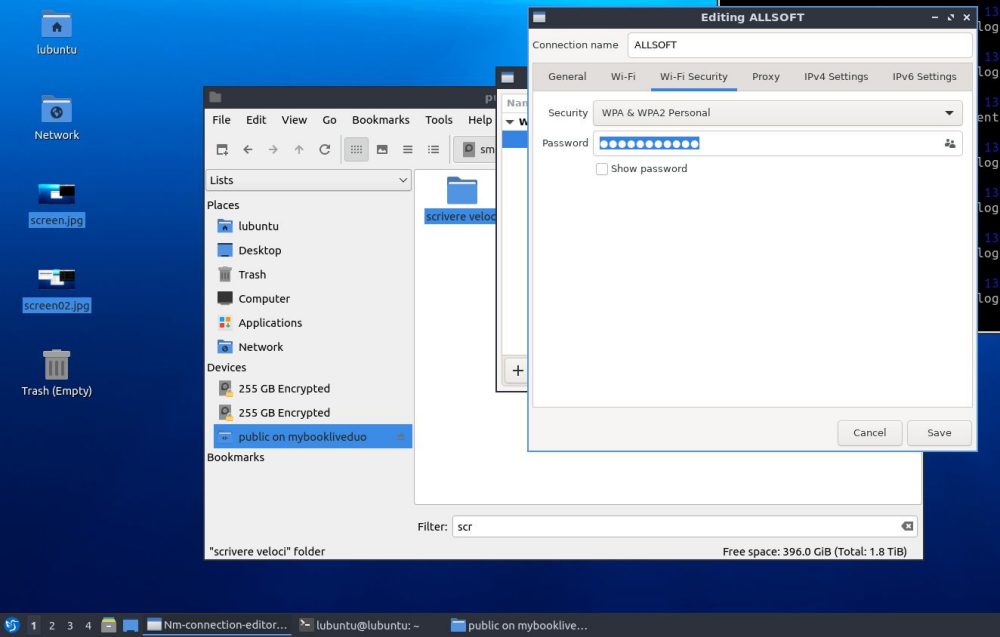
lbuntu, connessione di rete configurazione WiFi

Dal menu System tools, QTerminal, si può aprire una finestra del terminale digitando quindi i seguenti comandi per scegliere il layout di tastiera italiano:

sudo loadkeys it
sudo setxkbmap it

Installare GParted e dislocker

GParted, acronimo di GNOME Partition Editor, è un software open source per la gestione delle partizioni su sistemi Linux. Suggeriamo di installarlo per verificare subito, in maniera visuale, gli identificativi associati a ciascuna partizione presente nelle unità collegate con il sistema. Per procedere con l’installazione, basta digitare quanto segue nella finestra del terminale:

sudo apt install gparted -y

Si può cogliere l’occasione per scaricare e installare subito anche l’utilità dislocker:

sudo apt install dislocker -y

Nell’esempio in figura, si nota che la partizione cifrata BitLocker è presente nell’unità indicata come /dev/sda e ha identificativo /dev/sda3 (sotto la colonna File system, si legge chiaramente BitLocker).
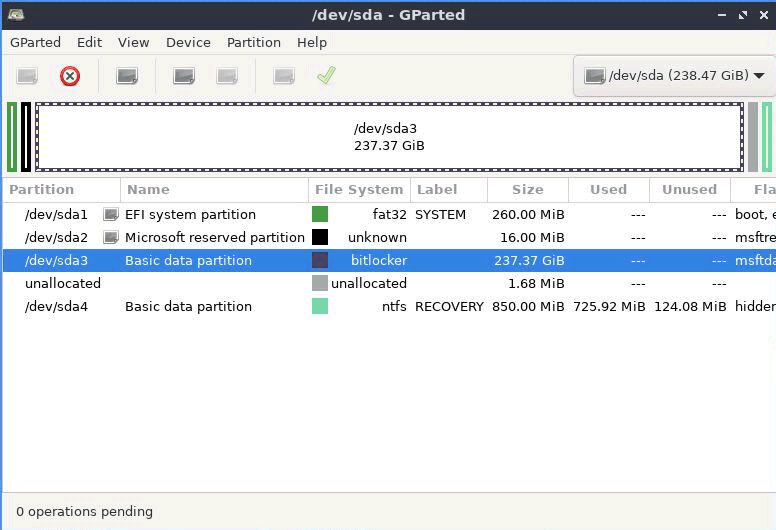
Leggere unità cifrate BitLocker da Linux

Decodifica della partizione BitLocker

L’operazione di decodifica vera e propria inizia con la creazione di due punti di mount per dislocker utilizzando i comandi seguenti:

sudo mkdir /media/bitlocker
sudo chown lubuntu:lubuntu /media/bitlocker
sudo mkdir /media/bitlockerloop
sudo chown lubuntu:lubuntu /media/bitlockerloop

Questi comandi creano due directory, una per montare la partizione BitLocker decrittata (/media/bitlocker) e l’altra per il loopback mount (/media/bitlockerloop). Nei comandi chown, la prima occorrenza di lubuntu è il nome dell’utente al quale si sta assegnando la proprietà della cartella specificata; la seconda occorrenza corrisponde al nome del gruppo.

Il passaggio seguente si concretizza nell’utilizzo di uno dei seguenti due comandi:

sudo dislocker -V /dev/sda3 -p123456-123456-123456-123456-123456-123456-123456-123456 -- /media/bitlocker

sudo dislocker -V /dev/sda3 -u123456 -- /media/bitlocker

In entrambi i comandi, l’opzione -V è utilizzata per indicare l’identificativo dell’unità BitLocker da decodificare (nel nostro esempio, come abbiamo visto in precedenza, è /dev/sda3). I parametri -p e -u permettono, rispettivamente, di specificare il codice di ripristino o PIN. Come detto, va usato l’uno o l’altro comando, effettuando le opportune sostituzioni.
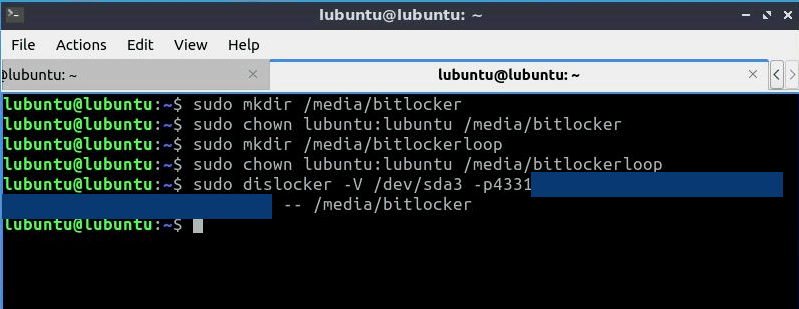
Decodifica BitLocker su Linux

Il loopback mount è un meccanismo che consente di montare un file, rendendone visibile il contenuto a Linux così come se fosse una partizione fisica.

Montare l’unità BitLocker decodificata e accedere al suo contenuto

Se tutto fosse andato per il verso giusto, i comandi precedenti non inviano alcun tipo di conferma. Si può quindi procedere con il mounting dell’unità BitLocker appena decodificata. Il comando da usare è il seguente:

sudo mount -o loop /media/bitlocker/dislocker-file /media/bitlockerloop

L’istruzione non fa altro che montare il contenuto del file di dislocker contenente l’immagine dell’unità cifrata BitLocker, all’interno della cartella /media/bitlockerloop.

A questo punto, accedendo al file manager di lubuntu (o della distro Linux prescelta), si troverà l’unità bitlockerloop contenente tutti i file di Windows, a loro volta custoditi nella partizione BitLocker.
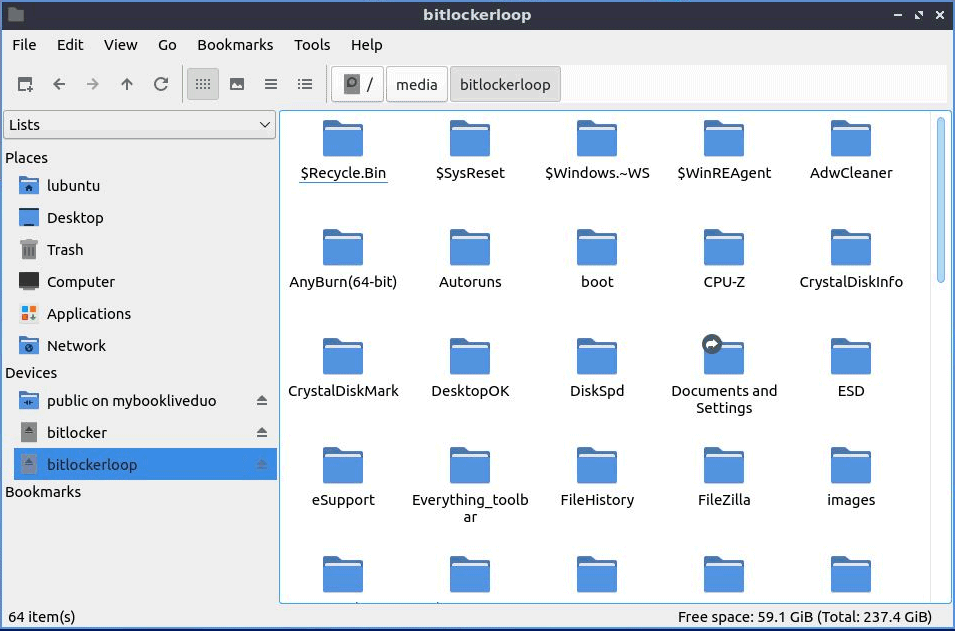
Accesso contenuto partizione BitLocker da Linux

Credit immagine in apertura: iStock.com – BlackJack3D

Ti consigliamo anche

Link copiato negli appunti