
Deprecated: Creation of dynamic property Timber\Site::$pingback is deprecated in /var/www/html/web/app/themes/ilsoftware/vendor/timber/timber/lib/Site.php on line 180

Deprecated: Creation of dynamic property Timber\User::$name is deprecated in /var/www/html/web/app/themes/ilsoftware/vendor/timber/timber/lib/User.php on line 118

Deprecated: Creation of dynamic property Timber\Post::$has_disclaimer is deprecated in /var/www/html/web/app/themes/ilsoftware/vendor/timber/timber/lib/Core.php on line 71

Deprecated: Creation of dynamic property Timber\Post::$_edit_lock is deprecated in /var/www/html/web/app/themes/ilsoftware/vendor/timber/timber/lib/Core.php on line 71

Deprecated: Creation of dynamic property Timber\Post::$_edit_last is deprecated in /var/www/html/web/app/themes/ilsoftware/vendor/timber/timber/lib/Core.php on line 71

Deprecated: Creation of dynamic property Timber\Post::$_oembed_ac1b0c6594af3df3a3451263fb664ef8 is deprecated in /var/www/html/web/app/themes/ilsoftware/vendor/timber/timber/lib/Core.php on line 71

Deprecated: Creation of dynamic property Timber\Post::$_oembed_d3cdb7864026bcecf9427c1d28d0260d is deprecated in /var/www/html/web/app/themes/ilsoftware/vendor/timber/timber/lib/Core.php on line 71

Deprecated: Creation of dynamic property Timber\Post::$onesignal_meta_box_present is deprecated in /var/www/html/web/app/themes/ilsoftware/vendor/timber/timber/lib/Core.php on line 71

Deprecated: Creation of dynamic property Timber\Post::$onesignal_send_notification is deprecated in /var/www/html/web/app/themes/ilsoftware/vendor/timber/timber/lib/Core.php on line 71

Deprecated: Creation of dynamic property Timber\Post::$onesignal_modify_title_and_content is deprecated in /var/www/html/web/app/themes/ilsoftware/vendor/timber/timber/lib/Core.php on line 71

Deprecated: Creation of dynamic property Timber\Post::$onesignal_notification_custom_heading is deprecated in /var/www/html/web/app/themes/ilsoftware/vendor/timber/timber/lib/Core.php on line 71

Deprecated: Creation of dynamic property Timber\Post::$onesignal_notification_custom_content is deprecated in /var/www/html/web/app/themes/ilsoftware/vendor/timber/timber/lib/Core.php on line 71

Deprecated: Creation of dynamic property Timber\Post::$tipologia is deprecated in /var/www/html/web/app/themes/ilsoftware/vendor/timber/timber/lib/Core.php on line 71

Deprecated: Creation of dynamic property Timber\Post::$_tipologia is deprecated in /var/www/html/web/app/themes/ilsoftware/vendor/timber/timber/lib/Core.php on line 71

Deprecated: Creation of dynamic property Timber\Post::$attributi is deprecated in /var/www/html/web/app/themes/ilsoftware/vendor/timber/timber/lib/Core.php on line 71

Deprecated: Creation of dynamic property Timber\Post::$_attributi is deprecated in /var/www/html/web/app/themes/ilsoftware/vendor/timber/timber/lib/Core.php on line 71

Deprecated: Creation of dynamic property Timber\Post::$in_evidenza_newsletter is deprecated in /var/www/html/web/app/themes/ilsoftware/vendor/timber/timber/lib/Core.php on line 71

Deprecated: Creation of dynamic property Timber\Post::$_in_evidenza_newsletter is deprecated in /var/www/html/web/app/themes/ilsoftware/vendor/timber/timber/lib/Core.php on line 71

Deprecated: Creation of dynamic property Timber\Post::$inviato_in_newsletter is deprecated in /var/www/html/web/app/themes/ilsoftware/vendor/timber/timber/lib/Core.php on line 71

Deprecated: Creation of dynamic property Timber\Post::$_inviato_in_newsletter is deprecated in /var/www/html/web/app/themes/ilsoftware/vendor/timber/timber/lib/Core.php on line 71

Deprecated: Creation of dynamic property Timber\Post::$_yoast_wpseo_primary_category is deprecated in /var/www/html/web/app/themes/ilsoftware/vendor/timber/timber/lib/Core.php on line 71

Deprecated: Creation of dynamic property Timber\Post::$_yoast_wpseo_primary_blz_affiliation_attributes is deprecated in /var/www/html/web/app/themes/ilsoftware/vendor/timber/timber/lib/Core.php on line 71

Deprecated: Creation of dynamic property Timber\Post::$_yoast_wpseo_primary_content_type is deprecated in /var/www/html/web/app/themes/ilsoftware/vendor/timber/timber/lib/Core.php on line 71

Deprecated: Creation of dynamic property Timber\Post::$_yoast_wpseo_primary_attributes is deprecated in /var/www/html/web/app/themes/ilsoftware/vendor/timber/timber/lib/Core.php on line 71

Deprecated: Creation of dynamic property Timber\Post::$_yoast_wpseo_primary_speciali is deprecated in /var/www/html/web/app/themes/ilsoftware/vendor/timber/timber/lib/Core.php on line 71

Deprecated: Creation of dynamic property Timber\Post::$_yoast_wpseo_content_score is deprecated in /var/www/html/web/app/themes/ilsoftware/vendor/timber/timber/lib/Core.php on line 71

Deprecated: Creation of dynamic property Timber\Post::$_yoast_wpseo_focuskeywords is deprecated in /var/www/html/web/app/themes/ilsoftware/vendor/timber/timber/lib/Core.php on line 71

Deprecated: Creation of dynamic property Timber\Post::$_yoast_wpseo_keywordsynonyms is deprecated in /var/www/html/web/app/themes/ilsoftware/vendor/timber/timber/lib/Core.php on line 71

Deprecated: Creation of dynamic property Timber\Post::$_yoast_wpseo_estimated-reading-time-minutes is deprecated in /var/www/html/web/app/themes/ilsoftware/vendor/timber/timber/lib/Core.php on line 71

Deprecated: Creation of dynamic property Timber\Post::$_yoast_wpseo_wordproof_timestamp is deprecated in /var/www/html/web/app/themes/ilsoftware/vendor/timber/timber/lib/Core.php on line 71

Deprecated: Creation of dynamic property Timber\Post::$_yoast_wpseo_focuskw is deprecated in /var/www/html/web/app/themes/ilsoftware/vendor/timber/timber/lib/Core.php on line 71

Deprecated: Creation of dynamic property Timber\Post::$_yoast_wpseo_metadesc is deprecated in /var/www/html/web/app/themes/ilsoftware/vendor/timber/timber/lib/Core.php on line 71

Deprecated: Creation of dynamic property Timber\Post::$_yoast_wpseo_linkdex is deprecated in /var/www/html/web/app/themes/ilsoftware/vendor/timber/timber/lib/Core.php on line 71

Deprecated: Creation of dynamic property Timber\Post::$_thumbnail_id is deprecated in /var/www/html/web/app/themes/ilsoftware/vendor/timber/timber/lib/Core.php on line 71

Deprecated: Creation of dynamic property Timber\Post::$response_body is deprecated in /var/www/html/web/app/themes/ilsoftware/vendor/timber/timber/lib/Core.php on line 71

Deprecated: Creation of dynamic property Timber\Post::$status is deprecated in /var/www/html/web/app/themes/ilsoftware/vendor/timber/timber/lib/Core.php on line 71

Deprecated: Creation of dynamic property Timber\Post::$_yoast_indexnow_last_ping is deprecated in /var/www/html/web/app/themes/ilsoftware/vendor/timber/timber/lib/Core.php on line 71

Deprecated: Creation of dynamic property Timber\Post::$_oembed_b09513c661a5583bd2c0a20ac3d8217b is deprecated in /var/www/html/web/app/themes/ilsoftware/vendor/timber/timber/lib/Core.php on line 71

Deprecated: Creation of dynamic property Timber\Post::$_oembed_time_b09513c661a5583bd2c0a20ac3d8217b is deprecated in /var/www/html/web/app/themes/ilsoftware/vendor/timber/timber/lib/Core.php on line 71

Deprecated: Creation of dynamic property Timber\Post::$_oembed_6c92290c4131b29e557aa36662f986d5 is deprecated in /var/www/html/web/app/themes/ilsoftware/vendor/timber/timber/lib/Core.php on line 71

Deprecated: Creation of dynamic property Timber\Post::$_oembed_time_6c92290c4131b29e557aa36662f986d5 is deprecated in /var/www/html/web/app/themes/ilsoftware/vendor/timber/timber/lib/Core.php on line 71

Deprecated: Creation of dynamic property Timber\Post::$newsletter_subject is deprecated in /var/www/html/web/app/themes/ilsoftware/vendor/timber/timber/lib/Core.php on line 71

Deprecated: Creation of dynamic property Timber\Post::$_newsletter_subject is deprecated in /var/www/html/web/app/themes/ilsoftware/vendor/timber/timber/lib/Core.php on line 71

Deprecated: Creation of dynamic property Timber\Post::$newsletter_summary is deprecated in /var/www/html/web/app/themes/ilsoftware/vendor/timber/timber/lib/Core.php on line 71

Deprecated: Creation of dynamic property Timber\Post::$_newsletter_summary is deprecated in /var/www/html/web/app/themes/ilsoftware/vendor/timber/timber/lib/Core.php on line 71

Deprecated: Creation of dynamic property Timber\Post::$post_date_gmt is deprecated in /var/www/html/web/app/themes/ilsoftware/vendor/timber/timber/lib/Core.php on line 71

Deprecated: Creation of dynamic property Timber\Post::$comment_status is deprecated in /var/www/html/web/app/themes/ilsoftware/vendor/timber/timber/lib/Core.php on line 71

Deprecated: Creation of dynamic property Timber\Post::$ping_status is deprecated in /var/www/html/web/app/themes/ilsoftware/vendor/timber/timber/lib/Core.php on line 71

Deprecated: Creation of dynamic property Timber\Post::$post_password is deprecated in /var/www/html/web/app/themes/ilsoftware/vendor/timber/timber/lib/Core.php on line 71

Deprecated: Creation of dynamic property Timber\Post::$post_name is deprecated in /var/www/html/web/app/themes/ilsoftware/vendor/timber/timber/lib/Core.php on line 71

Deprecated: Creation of dynamic property Timber\Post::$to_ping is deprecated in /var/www/html/web/app/themes/ilsoftware/vendor/timber/timber/lib/Core.php on line 71

Deprecated: Creation of dynamic property Timber\Post::$pinged is deprecated in /var/www/html/web/app/themes/ilsoftware/vendor/timber/timber/lib/Core.php on line 71

Deprecated: Creation of dynamic property Timber\Post::$post_modified is deprecated in /var/www/html/web/app/themes/ilsoftware/vendor/timber/timber/lib/Core.php on line 71

Deprecated: Creation of dynamic property Timber\Post::$post_modified_gmt is deprecated in /var/www/html/web/app/themes/ilsoftware/vendor/timber/timber/lib/Core.php on line 71

Deprecated: Creation of dynamic property Timber\Post::$post_content_filtered is deprecated in /var/www/html/web/app/themes/ilsoftware/vendor/timber/timber/lib/Core.php on line 71

Deprecated: Creation of dynamic property Timber\Post::$guid is deprecated in /var/www/html/web/app/themes/ilsoftware/vendor/timber/timber/lib/Core.php on line 71

Deprecated: Creation of dynamic property Timber\Post::$menu_order is deprecated in /var/www/html/web/app/themes/ilsoftware/vendor/timber/timber/lib/Core.php on line 71

Deprecated: Creation of dynamic property Timber\Post::$post_mime_type is deprecated in /var/www/html/web/app/themes/ilsoftware/vendor/timber/timber/lib/Core.php on line 71

Deprecated: Creation of dynamic property Timber\Post::$comment_count is deprecated in /var/www/html/web/app/themes/ilsoftware/vendor/timber/timber/lib/Core.php on line 71

Deprecated: Creation of dynamic property Timber\Post::$filter is deprecated in /var/www/html/web/app/themes/ilsoftware/vendor/timber/timber/lib/Core.php on line 71
Come esportare brani da Spotify e inserirli in una nuova playlist | IlSoftware.it

Come esportare brani da Spotify e inserirli in una nuova playlist

Sveliamo una procedura semplice, basata sull'uso di script Python, che consente di esportare i brani preferiti Spotify sia come file di testo che sotto forma di nuova playlist, pubblica o privata.

Indipendentemente dal piano utilizzato, Spotify consente di comporre, nel tempo, una lista di brani preferiti. Un tempo lo si faceva toccando l’icona del cuore, più di recente sostituita dal simbolo “+” durante la riproduzione. La sezione “Brani che ti piacciono” non è una vera e propria playlist e Spotify non consente di salvare questi dati come file TXT o CSV. In questo nostro articolo vi sveliamo come esportare brani da Spotify e salvarli eventualmente all’interno di una nuova playlist, creata allo scopo.

Abbiamo detto che Spotify non integra di per sé alcuna funzionalità per esportare la musica. Nel seguito spieghiamo come farlo senza ricorrere ad applicazioni di terze parti e senza trasferire alcun dato personale su altri server remoti.

Gli utenti di Spotify, compresi coloro che utilizzano il piano free, senza la sottoscrizione di alcun abbonamento, possono infatti creare e utilizzare delle applicazioni. Basta servirsi di Spotify for Developers, la piattaforma per gli sviluppatori che mette a disposizione apposite chiavi per l’utilizzo delle API (Application Programming Interface) del servizio.

Le API Spotify sono uno strumento prezioso in quanto permettono di richiedere l’effettuazione di operazioni non previste all’interno della normale interfaccia, su desktop, dispositivi mobili e Web.

Esportare brani preferiti da Spotify

Per dialogare con le API di Spotify, utilizziamo il linguaggio Python che deve essere installato sul sistema in uso. È possibile utilizzare qualunque sistema operativo e anche il Sottosistema Windows per Linux (WSL) per eseguire una distribuzione Linux come Ubuntu in finestra, senza abbandonare Windows.

I comandi seguenti permettono di verificare se siano correttamente installati sia Python che pip, il gestore di pacchetti Python:

python3 --version
pip --version

Sostituire eventualmente python3 con python e pip con pip3.

Creare una nuova app all’interno di Spotify for Developers

Come primo passo, è necessario portarsi negli strumenti per gli sviluppatori, effettuando il login con il proprio account Spotify. Cliccando su Create app, si deve assegnare un nome e una descrizione all’app in fase di creazione. Nel campo Redirect URIs, si deve inserire quanto segue:

http://localhost:8888/callback
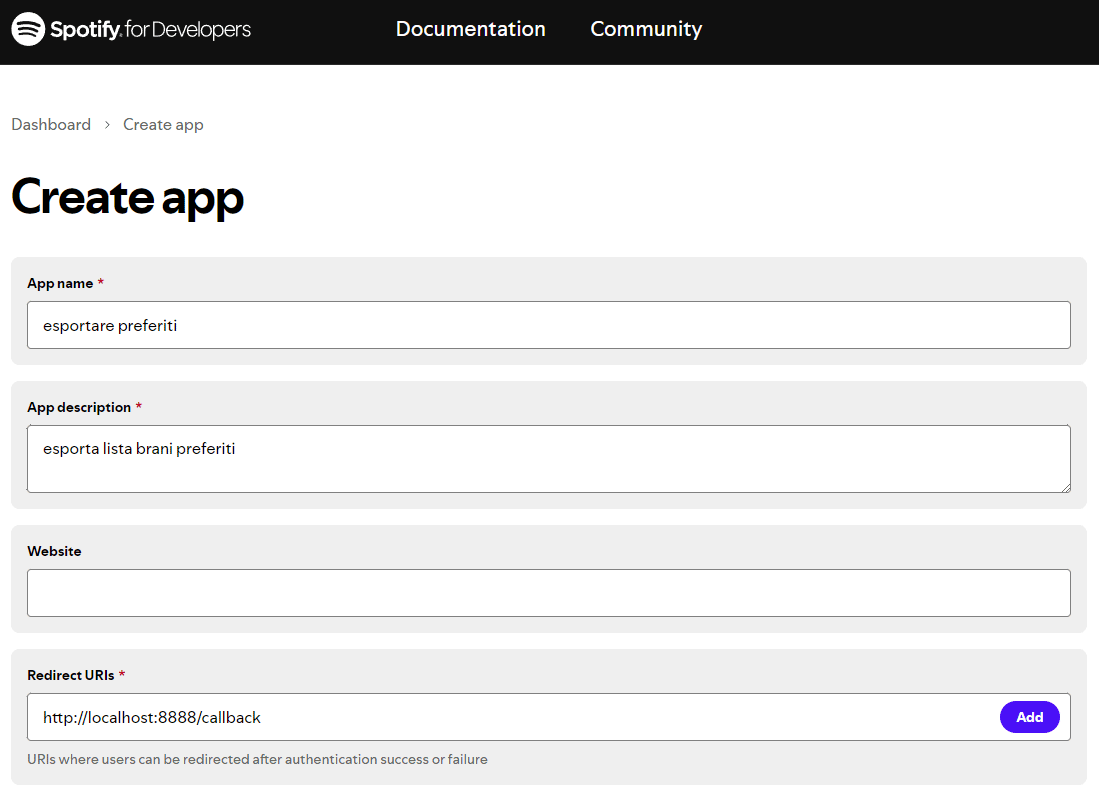
Esportare brani Spotify API

Gli altri campi e le varie caselle accessorie possono essere lasciati inalterati. Alla fine, cliccare sul pulsante Save.

Selezionando l’applicazione appena creata, quindi scegliendo Settings, si accede alla scheda Basic information. È importante fare clic sul link View client secret e tenere sotto mano il contenuto dei campi Client ID e Client secret.

Script Python per estrarre la lista dei brani preferiti su Spotify

Per esportare i brani preferiti Spotify e salvarne l’elenco in formato testuale, si può utilizzare un semplice script Python. Per creare lo script branipreferiti.py in Linux, basta digitare:

nano branipreferiti.py

Il passaggio successivo consiste nel selezionare e incollare nell’editor di testo tutto il codice che segue:

import spotipy
from spotipy.oauth2 import SpotifyOAuth

# Configura le credenziali
sp = spotipy.Spotify(auth_manager=SpotifyOAuth(client_id="TUO_CLIENTID",
                                               client_secret="TUO_CLIENTSECRET",
                                               redirect_uri="http://localhost:8888/callback",
                                               scope="user-library-read"))

# Imposta il limite di risultati per pagina
limit = 50
offset = 0
all_tracks = []

while True:
    # Recupera i brani salvati con offset e limite
    results = sp.current_user_saved_tracks(limit=limit, offset=offset)
    tracks = results['items']
    all_tracks.extend(tracks)

    # Verifica se ci sono altri brani da recuperare
    if len(tracks) < limit:
        break

    # Aggiorna l'offset per la prossima iterazione
    offset += limit

# Scrivi i link dei brani in un file di testo
with open('brani_preferiti.txt', 'w', encoding='utf-8') as file:
    for idx, item in enumerate(all_tracks):
        track = item['track']
        file.write(f"{idx + 1}. {track['name']} - {track['external_urls']['spotify']}\n")

print("La lista dei brani preferiti è stata salvata in 'brani_preferiti.txt'.")

Al posto di TUO_CLIENTID e TUO_CLIENTSECRET vanno specificate le stringhe Client ID e Client secret associate all’app creata in precedenza.

È quindi necessario procedere con l’installazione della libreria Spotipy:

pip install spotipy

Digitando python3 branipreferiti.py, si avvia lo script che dapprima richiede un’autorizzazione specifica per accedere a tutti i dati contenuti nell’account Spotify. Per procedere, basta cliccare su Accetto.
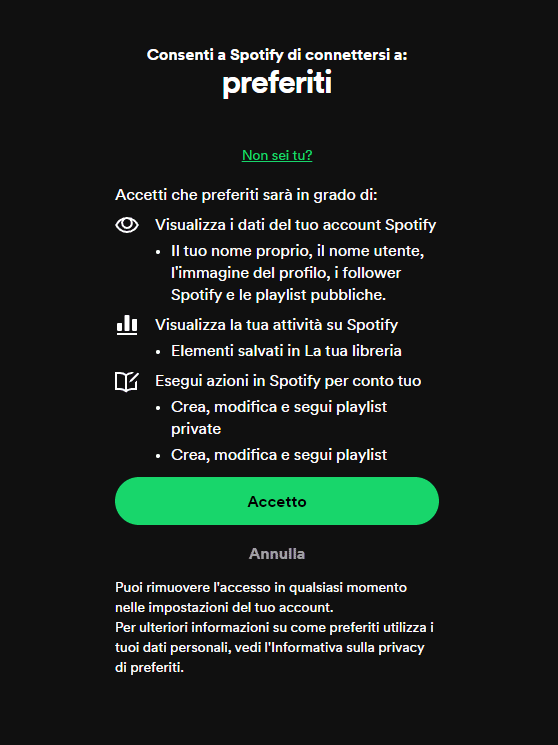
Autorizzazione accesso lista brani musicali Spotify

La libreria Spotipy gestisce l’autenticazione attraverso un server Web locale, che risponde all’URL specificato (ad esempio http://localhost:8888/callback). Una volta autorizzato, il server locale riceve automaticamente un codice di conferma da Spotify e procede a completare l’autenticazione senza che l’utente debba mai incollare manualmente l’URL.

Poiché l’API di Spotify restituisce i risultati ovvero l’elenco dei brani musicali in blocchi (pagine) da 20 brani per richiesta, lo script Python effettua un’iterazione su tutte le pagine dei risultati.

Alla fine, ciò che si ottiene in output è un file di nome brani_preferiti.txt contenente la lista dei brani preferiti Spotify in formato testuale. Si può verificarlo digitando nano brani_preferiti.txt.
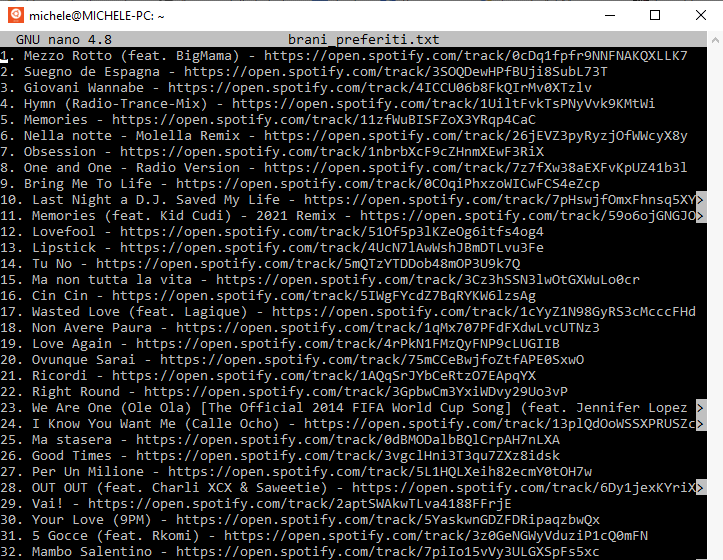
Lista brani preferiti Spotify Python

Creare una playlist Spotify pubblica o privata con i brani preferiti

Il passaggio seguente potrebbe essere quello di trasformare la lista dei brani preferiti in una playlist Spotify, pubblica o privata.

È possibile utilizzare il seguente script Python che crea una playlist chiamata “Playlist da brani preferiti“. Per impostazione predefinita, la lista è privata (public=False) ma è possibile renderla pubblica semplicemente passando all’API Spotify la direttiva public=True:

import spotipy
from spotipy.oauth2 import SpotifyOAuth

# Configura le credenziali
sp = spotipy.Spotify(auth_manager=SpotifyOAuth(client_id="TUO_CLIENTID",
                                               client_secret="TUO_CLIENTSECRET",
                                               redirect_uri="http://localhost:8888/callback",
                                               scope="playlist-modify-private,playlist-modify-public,user-library-read">
# Passo 1: Recuperare i brani preferiti
limit = 50
offset = 0
all_tracks = []

while True:
    results = sp.current_user_saved_tracks(limit=limit, offset=offset)
    tracks = results['items']
    all_tracks.extend(tracks)

    if len(tracks) < limit:
        break

    offset += limit

# Estrarre gli URI dei brani (necessari per aggiungerli alla playlist)
track_uris = [item['track']['uri'] for item in all_tracks]

# Passo 2: Creare una nuova playlist
user_id = sp.current_user()['id']  # Ottieni l'ID dell'utente corrente
playlist_name = "Playlist da brani preferiti"
playlist_description = "Una playlist creata automaticamente con i brani che ti piacciono"
playlist = sp.user_playlist_create(user=user_id, name=playlist_name, public=False, description=playlist_description)

# Passo 3: Aggiungere i brani preferiti alla nuova playlist
# L'API Spotify permette di aggiungere fino a 100 brani per richiesta
for i in range(0, len(track_uris), 100):
    sp.playlist_add_items(playlist_id=playlist['id'], items=track_uris[i:i + 100])

print(f"La playlist '{playlist_name}' è stata creata con successo e i brani preferiti sono stati aggiunti.")

Al solito, i “segnaposto” TUO_CLIENTID e TUO_CLIENTSECRET vanno sostituiti con i valori Client ID e Client secret associati all’app creata in precedenza.

Lo script tiene conto del fatto che Spotify accetta soltanto fino a 100 brani per richiesta: per creare playlist composte da un numero elevato di brani, l’attività è automaticamente suddivisa in più richieste.

Ovviamente, è possibile personalizzare il nome della playlist modificando il valore della variabile playlist_name. In corrispondenza della riga successiva si trova anche la descrizione.

Terminata l’operazione di esportazione dei brani, si può accedere normalmente all’interfaccia di Spotify e applicare gli ultimi aggiustamenti sulla playlist così creata. Ricordiamo che è possibile servirsi dei tasti freccia, da premere insieme con CTRL o MAIUSC per selezionare più brani (esattamente come si farebbe in un qualunque file manager).

Note finali

Se non si fosse fatto velocemente clic sui pulsanti Accetto, gli script Python potrebbero restituire un errore simile al seguente: “spotipy.oauth2.SpotifyOauthError: Server listening on localhost has not been accessed“. In questo caso è sufficiente riprovare, eventualmente cancellando la playlist parziale che fosse stata nel frattempo creata. È eventualmente possibile aggiungere una routine per la gestione della scadenza del token autorizzativo di Spotify.

L’immagine in apertura è di Spotify ed è tratta da questa pagina.

Ti consigliamo anche

Link copiato negli appunti