
Deprecated: Creation of dynamic property Timber\Site::$pingback is deprecated in /var/www/html/web/app/themes/ilsoftware/vendor/timber/timber/lib/Site.php on line 180

Deprecated: Creation of dynamic property Timber\User::$name is deprecated in /var/www/html/web/app/themes/ilsoftware/vendor/timber/timber/lib/User.php on line 118

Deprecated: Creation of dynamic property Timber\Post::$has_disclaimer is deprecated in /var/www/html/web/app/themes/ilsoftware/vendor/timber/timber/lib/Core.php on line 71

Deprecated: Creation of dynamic property Timber\Post::$_edit_lock is deprecated in /var/www/html/web/app/themes/ilsoftware/vendor/timber/timber/lib/Core.php on line 71

Deprecated: Creation of dynamic property Timber\Post::$_edit_last is deprecated in /var/www/html/web/app/themes/ilsoftware/vendor/timber/timber/lib/Core.php on line 71

Deprecated: Creation of dynamic property Timber\Post::$onesignal_meta_box_present is deprecated in /var/www/html/web/app/themes/ilsoftware/vendor/timber/timber/lib/Core.php on line 71

Deprecated: Creation of dynamic property Timber\Post::$onesignal_send_notification is deprecated in /var/www/html/web/app/themes/ilsoftware/vendor/timber/timber/lib/Core.php on line 71

Deprecated: Creation of dynamic property Timber\Post::$onesignal_modify_title_and_content is deprecated in /var/www/html/web/app/themes/ilsoftware/vendor/timber/timber/lib/Core.php on line 71

Deprecated: Creation of dynamic property Timber\Post::$onesignal_notification_custom_heading is deprecated in /var/www/html/web/app/themes/ilsoftware/vendor/timber/timber/lib/Core.php on line 71

Deprecated: Creation of dynamic property Timber\Post::$onesignal_notification_custom_content is deprecated in /var/www/html/web/app/themes/ilsoftware/vendor/timber/timber/lib/Core.php on line 71

Deprecated: Creation of dynamic property Timber\Post::$_yoast_wpseo_content_score is deprecated in /var/www/html/web/app/themes/ilsoftware/vendor/timber/timber/lib/Core.php on line 71

Deprecated: Creation of dynamic property Timber\Post::$_yoast_wpseo_estimated-reading-time-minutes is deprecated in /var/www/html/web/app/themes/ilsoftware/vendor/timber/timber/lib/Core.php on line 71

Deprecated: Creation of dynamic property Timber\Post::$_yoast_wpseo_wordproof_timestamp is deprecated in /var/www/html/web/app/themes/ilsoftware/vendor/timber/timber/lib/Core.php on line 71

Deprecated: Creation of dynamic property Timber\Post::$tipologia is deprecated in /var/www/html/web/app/themes/ilsoftware/vendor/timber/timber/lib/Core.php on line 71

Deprecated: Creation of dynamic property Timber\Post::$_tipologia is deprecated in /var/www/html/web/app/themes/ilsoftware/vendor/timber/timber/lib/Core.php on line 71

Deprecated: Creation of dynamic property Timber\Post::$attributi is deprecated in /var/www/html/web/app/themes/ilsoftware/vendor/timber/timber/lib/Core.php on line 71

Deprecated: Creation of dynamic property Timber\Post::$_attributi is deprecated in /var/www/html/web/app/themes/ilsoftware/vendor/timber/timber/lib/Core.php on line 71

Deprecated: Creation of dynamic property Timber\Post::$in_evidenza_newsletter is deprecated in /var/www/html/web/app/themes/ilsoftware/vendor/timber/timber/lib/Core.php on line 71

Deprecated: Creation of dynamic property Timber\Post::$_in_evidenza_newsletter is deprecated in /var/www/html/web/app/themes/ilsoftware/vendor/timber/timber/lib/Core.php on line 71

Deprecated: Creation of dynamic property Timber\Post::$inviato_in_newsletter is deprecated in /var/www/html/web/app/themes/ilsoftware/vendor/timber/timber/lib/Core.php on line 71

Deprecated: Creation of dynamic property Timber\Post::$_inviato_in_newsletter is deprecated in /var/www/html/web/app/themes/ilsoftware/vendor/timber/timber/lib/Core.php on line 71

Deprecated: Creation of dynamic property Timber\Post::$_yoast_wpseo_primary_category is deprecated in /var/www/html/web/app/themes/ilsoftware/vendor/timber/timber/lib/Core.php on line 71

Deprecated: Creation of dynamic property Timber\Post::$_yoast_wpseo_primary_blz_affiliation_attributes is deprecated in /var/www/html/web/app/themes/ilsoftware/vendor/timber/timber/lib/Core.php on line 71

Deprecated: Creation of dynamic property Timber\Post::$_yoast_wpseo_primary_content_type is deprecated in /var/www/html/web/app/themes/ilsoftware/vendor/timber/timber/lib/Core.php on line 71

Deprecated: Creation of dynamic property Timber\Post::$_yoast_wpseo_primary_attributes is deprecated in /var/www/html/web/app/themes/ilsoftware/vendor/timber/timber/lib/Core.php on line 71

Deprecated: Creation of dynamic property Timber\Post::$_yoast_wpseo_primary_speciali is deprecated in /var/www/html/web/app/themes/ilsoftware/vendor/timber/timber/lib/Core.php on line 71

Deprecated: Creation of dynamic property Timber\Post::$_yoast_wpseo_focuskw is deprecated in /var/www/html/web/app/themes/ilsoftware/vendor/timber/timber/lib/Core.php on line 71

Deprecated: Creation of dynamic property Timber\Post::$_yoast_wpseo_metadesc is deprecated in /var/www/html/web/app/themes/ilsoftware/vendor/timber/timber/lib/Core.php on line 71

Deprecated: Creation of dynamic property Timber\Post::$_yoast_wpseo_linkdex is deprecated in /var/www/html/web/app/themes/ilsoftware/vendor/timber/timber/lib/Core.php on line 71

Deprecated: Creation of dynamic property Timber\Post::$_thumbnail_id is deprecated in /var/www/html/web/app/themes/ilsoftware/vendor/timber/timber/lib/Core.php on line 71

Deprecated: Creation of dynamic property Timber\Post::$newsletter_subject is deprecated in /var/www/html/web/app/themes/ilsoftware/vendor/timber/timber/lib/Core.php on line 71

Deprecated: Creation of dynamic property Timber\Post::$_newsletter_subject is deprecated in /var/www/html/web/app/themes/ilsoftware/vendor/timber/timber/lib/Core.php on line 71

Deprecated: Creation of dynamic property Timber\Post::$newsletter_summary is deprecated in /var/www/html/web/app/themes/ilsoftware/vendor/timber/timber/lib/Core.php on line 71

Deprecated: Creation of dynamic property Timber\Post::$_newsletter_summary is deprecated in /var/www/html/web/app/themes/ilsoftware/vendor/timber/timber/lib/Core.php on line 71

Deprecated: Creation of dynamic property Timber\Post::$response_body is deprecated in /var/www/html/web/app/themes/ilsoftware/vendor/timber/timber/lib/Core.php on line 71

Deprecated: Creation of dynamic property Timber\Post::$status is deprecated in /var/www/html/web/app/themes/ilsoftware/vendor/timber/timber/lib/Core.php on line 71

Deprecated: Creation of dynamic property Timber\Post::$post_date_gmt is deprecated in /var/www/html/web/app/themes/ilsoftware/vendor/timber/timber/lib/Core.php on line 71

Deprecated: Creation of dynamic property Timber\Post::$comment_status is deprecated in /var/www/html/web/app/themes/ilsoftware/vendor/timber/timber/lib/Core.php on line 71

Deprecated: Creation of dynamic property Timber\Post::$ping_status is deprecated in /var/www/html/web/app/themes/ilsoftware/vendor/timber/timber/lib/Core.php on line 71

Deprecated: Creation of dynamic property Timber\Post::$post_password is deprecated in /var/www/html/web/app/themes/ilsoftware/vendor/timber/timber/lib/Core.php on line 71

Deprecated: Creation of dynamic property Timber\Post::$post_name is deprecated in /var/www/html/web/app/themes/ilsoftware/vendor/timber/timber/lib/Core.php on line 71

Deprecated: Creation of dynamic property Timber\Post::$to_ping is deprecated in /var/www/html/web/app/themes/ilsoftware/vendor/timber/timber/lib/Core.php on line 71

Deprecated: Creation of dynamic property Timber\Post::$pinged is deprecated in /var/www/html/web/app/themes/ilsoftware/vendor/timber/timber/lib/Core.php on line 71

Deprecated: Creation of dynamic property Timber\Post::$post_modified is deprecated in /var/www/html/web/app/themes/ilsoftware/vendor/timber/timber/lib/Core.php on line 71

Deprecated: Creation of dynamic property Timber\Post::$post_modified_gmt is deprecated in /var/www/html/web/app/themes/ilsoftware/vendor/timber/timber/lib/Core.php on line 71

Deprecated: Creation of dynamic property Timber\Post::$post_content_filtered is deprecated in /var/www/html/web/app/themes/ilsoftware/vendor/timber/timber/lib/Core.php on line 71

Deprecated: Creation of dynamic property Timber\Post::$guid is deprecated in /var/www/html/web/app/themes/ilsoftware/vendor/timber/timber/lib/Core.php on line 71

Deprecated: Creation of dynamic property Timber\Post::$menu_order is deprecated in /var/www/html/web/app/themes/ilsoftware/vendor/timber/timber/lib/Core.php on line 71

Deprecated: Creation of dynamic property Timber\Post::$post_mime_type is deprecated in /var/www/html/web/app/themes/ilsoftware/vendor/timber/timber/lib/Core.php on line 71

Deprecated: Creation of dynamic property Timber\Post::$comment_count is deprecated in /var/www/html/web/app/themes/ilsoftware/vendor/timber/timber/lib/Core.php on line 71

Deprecated: Creation of dynamic property Timber\Post::$filter is deprecated in /var/www/html/web/app/themes/ilsoftware/vendor/timber/timber/lib/Core.php on line 71
Configurare WSL in Windows 10 e 11: impostazioni avanzate | IlSoftware.it

Configurare WSL in Windows 10 e 11: impostazioni avanzate

Spieghiamo com'è possibile configurare WSL in profondità facendo in modo che le macchine virtuali occupino poca RAM, un quantitativo di spazio su disco ridotto e utilizzino le stesse impostazioni del sistema Windows host in termini di interfacce di rete, DNS e firewall.

Utilizzare WSL (Windows Subsystem for Linux, “Sottosistema Windows per Linux” in italiano) è oggi il modo migliore per portare Linux in Windows. Senza la necessità di abbandonare il sistema operativo Microsoft, è possibile eseguire le principali distribuzioni Linux all’interno di una finestra e, addirittura, installare e avviare i programmi Linux con interfaccia grafica. Le applicazioni Linux che sono dotate di GUI (Graphical User Interface) possono infatti essere aggiunte al menu Start di Windows, alla barra delle applicazioni e sono richiamabili da qualunque locazione di memoria. Fa certamente effetto vedere i programmi Linux eseguiti in finestra, sopra al desktop di Windows e accanto alle altre finestre del sistema operativo Microsoft.

Pur utilizzando alcune delle caratteristiche di base della soluzione per la virtualizzazione Microsoft, ci sono notevoli differenze tra WSL e Hyper-V. Lavorando con le macchine virtuali di WSL, il vantaggio è quello di poter eseguire operazioni su quello che appare a tutti gli effetti un vero sistema Linux con la possibilità di accedere al suo file system direttamente da Windows. Basta premere Windows+R quindi digitare \\WSL$ per avere la possibilità di accedere al contenuto di tutte le installazioni Linux gestite con WSL.

Come configurare WSL con le impostazioni avanzate

Nei due articoli citati in apertura, abbiamo visto in che modo è possibile installare WSL su Windows 10 e Windows 11. Digitando al prompt dei comandi o in una finestra del terminale Windows l’istruzione wsl -l -v è possibile ottenere l’elenco delle installazioni Linux attualmente gestite da WSL.

Ricorrendo al comando wsl -l -o, senza passare per il Microsoft Store, si può ottenere l’elenco delle distribuzioni installabili in Windows. Come abbiamo già visto, con wsl --install -d seguito dal nome della distribuzione, si può procedere con l’installazione.

Utilizzando il file di configurazione WSL .wslconfig, è possibile personalizzare in profondità il funzionamento del sottosistema e il comportamento delle distribuzioni Linux installate. A settembre 2023, Microsoft ha rilasciato WSL 2.0.0 con tante novità importanti. Suggeriamo di seguire le indicazioni riportate nell’articolo per installare l’ultima versione di WSL.

Come applicare le modifiche alla configurazione di WSL

Gli interventi che si applicano sul contenuto del file .wslconfig, hanno al momento validità per tutte le distribuzioni gestite da WSL. Affinché esse vengano applicate, è necessario arrestare le varie distribuzioni in esecuzione quindi riavviarle.

Per chiudere tutte le distribuzioni caricate da WSL in un colpo solo, basta digitare wsl --shutdown al prompt dei comandi.

Digitando wsl --list --running è eventualmente possibile verificare l’elenco delle distribuzioni Linux al momento in esecuzione con WSL.

Creare il file di configurazione .wslconfig

Per configurare WSL con particolare riferimento alle impostazioni avanzate, suggeriamo di accedere al prompt dei comandi di Windows quindi digitare quanto segue:

echo [wsl2] > %userprofile%\.wslconfig
notepad %userprofile%\.wslconfig

La pagina Advanced settings configuration in WSL contiene tutte le direttive che possono essere impostate ricorrendo al file .wslconfig. Alcune di esse, come quelle che Microsoft ha lanciato a settembre 2023, sono ancora considerate impostazioni sperimentali: devono quindi essere utilizzate al di sotto della sezione etichettata come [experimental].
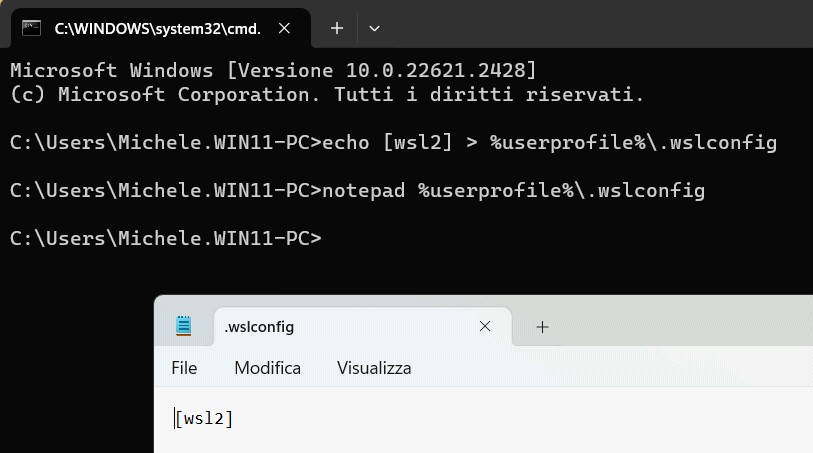
File configurazione WSL .wslconfig

Se avete installato Visual Studio Code, per modificare il file .wslconfig in modo ancora più semplice e immediato, basta digitare:

code %userprofile%\.wslconfig

Incollando quanto segue nel file di configurazione, si può beneficiare di una serie di vantaggi introdotti con WSL 2.0.0 e descritti puntualmente in uno degli articoli presentati in precedenza:

[experimental]
autoMemoryReclaim=gradual
sparseVhd=true
networkingMode=mirrored
firewall=true
dnsTunneling=true

A questo punto, è sufficiente salvare il file premendo CTRL+S nel Blocco Note o in Visual Studio Code.
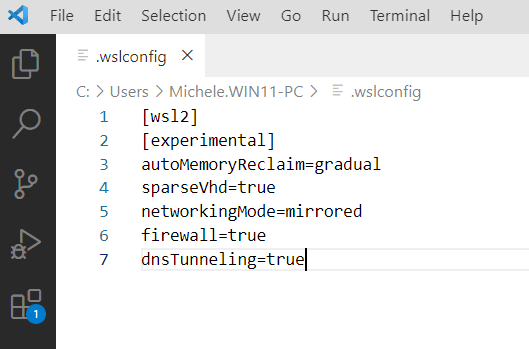
Personalizzare WSL

Le varie impostazioni definite a livello di file .wslconfig fanno sì che WSL liberi progressivamente (autoMemoryReclaim=gradual) la memoria RAM occupata dalle distribuzioni Linux nel momento in cui queste restano inutilizzate ovvero non vi sono attività in corso; che le unità virtuali siano automaticamente compresse in modo da occupare meno spazio su disco (sparseVhd=true), che le macchine virtuali WSL accedano alle stesse interfacce di rete configurate in Windows (networkingMode=mirrored), che le regole firewall di Windows siano automaticamente applicate anche su Linux (firewall=true), che le macchine virtuali Linux si appoggiano ai server DNS configurati in Windows per la risoluzione dei nomi a dominio (dnsTunneling=true).

Le macchine Linux WSL diventano parte integrante della rete locale

Grazie alle modifiche così applicate, la macchina Linux condivide lo stesso indirizzo IP locale del sistema Windows host. Verificarlo è molto semplice: basta digitare ipconfig al prompt dei comandi su Windows e ifconfig nella finestra di WSL: l’indirizzo IP risulterà identico.
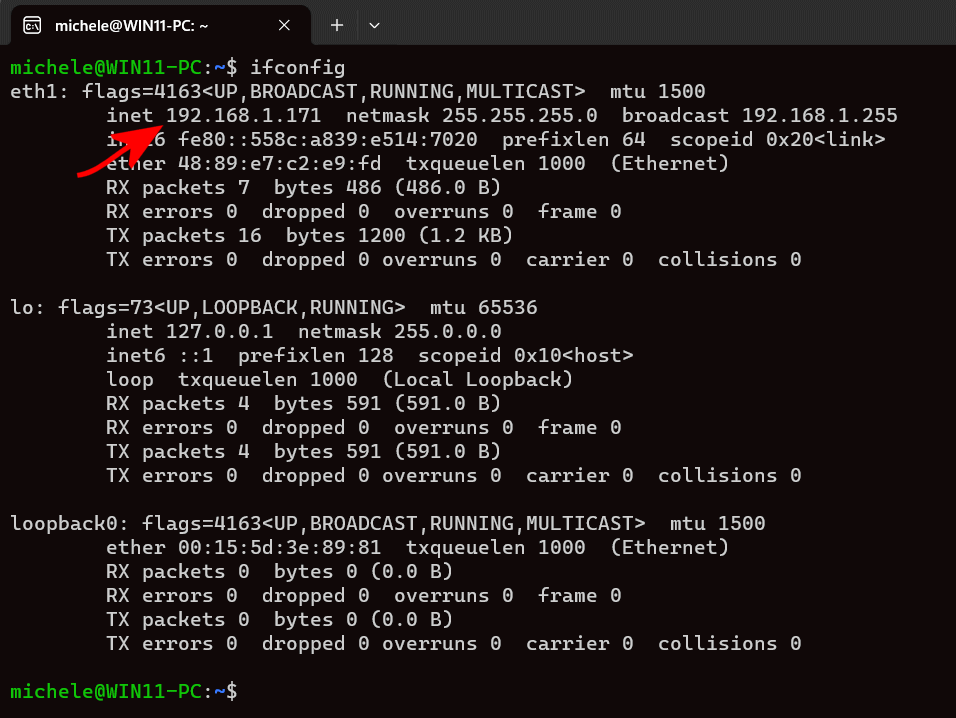
WSL, accesso da rete locale

A questo punto se s’installa ad esempio un server Web come Nginx con il comando sudo apt install nginx -y, la pagina di test sarà accessibile dal sistema Windows host digitando 127.0.0.1 nel browser Web oppure usando l’IP locale, anche dai dispositivi collegati in LAN.
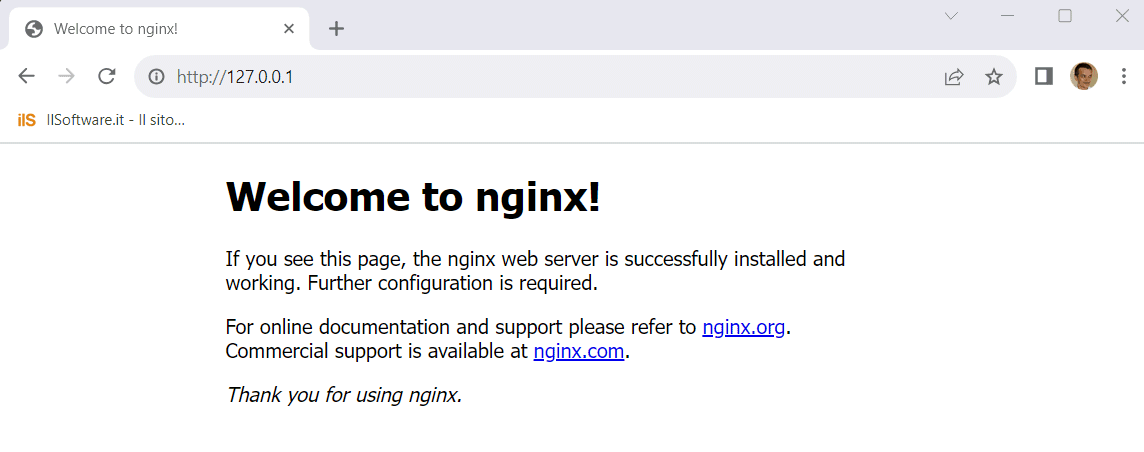
Accesso a Nginx da rete locale con WSL

Questa funzionalità cambia tutto perché consente di effettuare test e installare componenti server sulle macchine Linux create con WSL per poi avere la possibilità di accedervi da qualunque sistema locale. Si tratta di una funzionalità davvero fantastica per chi si trova a simulare la configurazione di server Web, database e applicazioni che rispondono su varie porte.

Se qualcosa non dovesse funzionare, verificate che la connessione di rete Ethernet o WiFi sul sistema Windows che esegue WSL si impostata come rete privata e non pubblica. Diversamente, il sistema Windows non risponderà neppure alle richieste ping inviate dagli altri dispositivi in rete locale (visualizzazione del messaggio Richiesta scaduta).

In un altro articolo abbiamo visto anche come importare ed esportare macchine Linux in Windows con WSL.

Ti consigliamo anche

Link copiato negli appunti