
Deprecated: Creation of dynamic property Timber\Site::$pingback is deprecated in /var/www/html/web/app/themes/ilsoftware/vendor/timber/timber/lib/Site.php on line 180

Deprecated: Creation of dynamic property Timber\User::$name is deprecated in /var/www/html/web/app/themes/ilsoftware/vendor/timber/timber/lib/User.php on line 118

Deprecated: Creation of dynamic property Timber\Post::$has_disclaimer is deprecated in /var/www/html/web/app/themes/ilsoftware/vendor/timber/timber/lib/Core.php on line 71

Deprecated: Creation of dynamic property Timber\Post::$_edit_lock is deprecated in /var/www/html/web/app/themes/ilsoftware/vendor/timber/timber/lib/Core.php on line 71

Deprecated: Creation of dynamic property Timber\Post::$_edit_last is deprecated in /var/www/html/web/app/themes/ilsoftware/vendor/timber/timber/lib/Core.php on line 71

Deprecated: Creation of dynamic property Timber\Post::$onesignal_meta_box_present is deprecated in /var/www/html/web/app/themes/ilsoftware/vendor/timber/timber/lib/Core.php on line 71

Deprecated: Creation of dynamic property Timber\Post::$onesignal_send_notification is deprecated in /var/www/html/web/app/themes/ilsoftware/vendor/timber/timber/lib/Core.php on line 71

Deprecated: Creation of dynamic property Timber\Post::$onesignal_modify_title_and_content is deprecated in /var/www/html/web/app/themes/ilsoftware/vendor/timber/timber/lib/Core.php on line 71

Deprecated: Creation of dynamic property Timber\Post::$onesignal_notification_custom_heading is deprecated in /var/www/html/web/app/themes/ilsoftware/vendor/timber/timber/lib/Core.php on line 71

Deprecated: Creation of dynamic property Timber\Post::$onesignal_notification_custom_content is deprecated in /var/www/html/web/app/themes/ilsoftware/vendor/timber/timber/lib/Core.php on line 71

Deprecated: Creation of dynamic property Timber\Post::$tipologia is deprecated in /var/www/html/web/app/themes/ilsoftware/vendor/timber/timber/lib/Core.php on line 71

Deprecated: Creation of dynamic property Timber\Post::$_tipologia is deprecated in /var/www/html/web/app/themes/ilsoftware/vendor/timber/timber/lib/Core.php on line 71

Deprecated: Creation of dynamic property Timber\Post::$attributi is deprecated in /var/www/html/web/app/themes/ilsoftware/vendor/timber/timber/lib/Core.php on line 71

Deprecated: Creation of dynamic property Timber\Post::$_attributi is deprecated in /var/www/html/web/app/themes/ilsoftware/vendor/timber/timber/lib/Core.php on line 71

Deprecated: Creation of dynamic property Timber\Post::$in_evidenza_newsletter is deprecated in /var/www/html/web/app/themes/ilsoftware/vendor/timber/timber/lib/Core.php on line 71

Deprecated: Creation of dynamic property Timber\Post::$_in_evidenza_newsletter is deprecated in /var/www/html/web/app/themes/ilsoftware/vendor/timber/timber/lib/Core.php on line 71

Deprecated: Creation of dynamic property Timber\Post::$inviato_in_newsletter is deprecated in /var/www/html/web/app/themes/ilsoftware/vendor/timber/timber/lib/Core.php on line 71

Deprecated: Creation of dynamic property Timber\Post::$_inviato_in_newsletter is deprecated in /var/www/html/web/app/themes/ilsoftware/vendor/timber/timber/lib/Core.php on line 71

Deprecated: Creation of dynamic property Timber\Post::$_yoast_wpseo_primary_category is deprecated in /var/www/html/web/app/themes/ilsoftware/vendor/timber/timber/lib/Core.php on line 71

Deprecated: Creation of dynamic property Timber\Post::$_yoast_wpseo_primary_blz_affiliation_attributes is deprecated in /var/www/html/web/app/themes/ilsoftware/vendor/timber/timber/lib/Core.php on line 71

Deprecated: Creation of dynamic property Timber\Post::$_yoast_wpseo_primary_content_type is deprecated in /var/www/html/web/app/themes/ilsoftware/vendor/timber/timber/lib/Core.php on line 71

Deprecated: Creation of dynamic property Timber\Post::$_yoast_wpseo_primary_attributes is deprecated in /var/www/html/web/app/themes/ilsoftware/vendor/timber/timber/lib/Core.php on line 71

Deprecated: Creation of dynamic property Timber\Post::$_yoast_wpseo_primary_speciali is deprecated in /var/www/html/web/app/themes/ilsoftware/vendor/timber/timber/lib/Core.php on line 71

Deprecated: Creation of dynamic property Timber\Post::$_yoast_wpseo_focuskw is deprecated in /var/www/html/web/app/themes/ilsoftware/vendor/timber/timber/lib/Core.php on line 71

Deprecated: Creation of dynamic property Timber\Post::$_yoast_wpseo_metadesc is deprecated in /var/www/html/web/app/themes/ilsoftware/vendor/timber/timber/lib/Core.php on line 71

Deprecated: Creation of dynamic property Timber\Post::$_yoast_wpseo_linkdex is deprecated in /var/www/html/web/app/themes/ilsoftware/vendor/timber/timber/lib/Core.php on line 71

Deprecated: Creation of dynamic property Timber\Post::$_yoast_wpseo_content_score is deprecated in /var/www/html/web/app/themes/ilsoftware/vendor/timber/timber/lib/Core.php on line 71

Deprecated: Creation of dynamic property Timber\Post::$_yoast_wpseo_focuskeywords is deprecated in /var/www/html/web/app/themes/ilsoftware/vendor/timber/timber/lib/Core.php on line 71

Deprecated: Creation of dynamic property Timber\Post::$_yoast_wpseo_keywordsynonyms is deprecated in /var/www/html/web/app/themes/ilsoftware/vendor/timber/timber/lib/Core.php on line 71

Deprecated: Creation of dynamic property Timber\Post::$_yoast_wpseo_estimated-reading-time-minutes is deprecated in /var/www/html/web/app/themes/ilsoftware/vendor/timber/timber/lib/Core.php on line 71

Deprecated: Creation of dynamic property Timber\Post::$_thumbnail_id is deprecated in /var/www/html/web/app/themes/ilsoftware/vendor/timber/timber/lib/Core.php on line 71

Deprecated: Creation of dynamic property Timber\Post::$response_body is deprecated in /var/www/html/web/app/themes/ilsoftware/vendor/timber/timber/lib/Core.php on line 71

Deprecated: Creation of dynamic property Timber\Post::$status is deprecated in /var/www/html/web/app/themes/ilsoftware/vendor/timber/timber/lib/Core.php on line 71

Deprecated: Creation of dynamic property Timber\Post::$_yoast_indexnow_last_ping is deprecated in /var/www/html/web/app/themes/ilsoftware/vendor/timber/timber/lib/Core.php on line 71

Deprecated: Creation of dynamic property Timber\Post::$post_date_gmt is deprecated in /var/www/html/web/app/themes/ilsoftware/vendor/timber/timber/lib/Core.php on line 71

Deprecated: Creation of dynamic property Timber\Post::$comment_status is deprecated in /var/www/html/web/app/themes/ilsoftware/vendor/timber/timber/lib/Core.php on line 71

Deprecated: Creation of dynamic property Timber\Post::$ping_status is deprecated in /var/www/html/web/app/themes/ilsoftware/vendor/timber/timber/lib/Core.php on line 71

Deprecated: Creation of dynamic property Timber\Post::$post_password is deprecated in /var/www/html/web/app/themes/ilsoftware/vendor/timber/timber/lib/Core.php on line 71

Deprecated: Creation of dynamic property Timber\Post::$post_name is deprecated in /var/www/html/web/app/themes/ilsoftware/vendor/timber/timber/lib/Core.php on line 71

Deprecated: Creation of dynamic property Timber\Post::$to_ping is deprecated in /var/www/html/web/app/themes/ilsoftware/vendor/timber/timber/lib/Core.php on line 71

Deprecated: Creation of dynamic property Timber\Post::$pinged is deprecated in /var/www/html/web/app/themes/ilsoftware/vendor/timber/timber/lib/Core.php on line 71

Deprecated: Creation of dynamic property Timber\Post::$post_modified is deprecated in /var/www/html/web/app/themes/ilsoftware/vendor/timber/timber/lib/Core.php on line 71

Deprecated: Creation of dynamic property Timber\Post::$post_modified_gmt is deprecated in /var/www/html/web/app/themes/ilsoftware/vendor/timber/timber/lib/Core.php on line 71

Deprecated: Creation of dynamic property Timber\Post::$post_content_filtered is deprecated in /var/www/html/web/app/themes/ilsoftware/vendor/timber/timber/lib/Core.php on line 71

Deprecated: Creation of dynamic property Timber\Post::$guid is deprecated in /var/www/html/web/app/themes/ilsoftware/vendor/timber/timber/lib/Core.php on line 71

Deprecated: Creation of dynamic property Timber\Post::$menu_order is deprecated in /var/www/html/web/app/themes/ilsoftware/vendor/timber/timber/lib/Core.php on line 71

Deprecated: Creation of dynamic property Timber\Post::$post_mime_type is deprecated in /var/www/html/web/app/themes/ilsoftware/vendor/timber/timber/lib/Core.php on line 71

Deprecated: Creation of dynamic property Timber\Post::$comment_count is deprecated in /var/www/html/web/app/themes/ilsoftware/vendor/timber/timber/lib/Core.php on line 71

Deprecated: Creation of dynamic property Timber\Post::$filter is deprecated in /var/www/html/web/app/themes/ilsoftware/vendor/timber/timber/lib/Core.php on line 71
Cosa significa montare un'unità come cartella in Windows | IlSoftware.it

Cosa significa montare un'unità come cartella in Windows

A cosa serve montare un'unità come cartella in Windows, una funzione che consente di ridurre il numero di lettere di unità visibili e semplificare la gestione delle risorse.

Quando si lavora con Windows e si inizia a notare una carenza di spazio su disco, la soluzione più comune consiste nell’aggiungere una nuova unità di memorizzazione. La soluzione migliore, almeno su workstation e dispositivi dei singoli utenti, sarebbe quella di clonare l’unità su un supporto di memorizzazione di più grandi dimensioni. È possibile farlo con Macrium Reflect o con altri software di disk imaging simili. In alternativa, si può pensare a configurazioni RAID o all’uso della funzionalità Spazi di archiviazione o Storage Spaces in Windows. Si possono così approntare configurazioni che sommano lo spazio disponibile sulle varie unità. Aspetto meno noto, Windows 10 e Windows 11 permettono di montare un’unità interna o esterna o cartella locale. Vediamo di che cosa si tratta.

Come montare un’unità come cartella

Quando si collega un’unità di memorizzazione, interna o esterna che sia, con un sistema Windows, il sistema operativo Microsoft di norma assegna automaticamente una lettera identificativa di unità. C’è però la possibilità di montare l’unità come cartella: ciò significa che il suo contenuto diventa subito accessibile sotto forma di sottocartella a livello di file system. Si immagini ad esempio un hard disk o un SSD che diventano raggiungibili da una cartella come C:\lavori.

Se si hanno molte unità, sia interne che esterne, può diventare difficile tenere traccia di tutte le lettere identificative via via assegnate. Montare un disco come cartella in una partizione esistente, consente di ridurre il numero di lettere di unità visibili, semplificando la gestione delle risorse.

Aggiungere un’unità come cartella in Windows

Collegate una nuova unità al sistema in uso. Per fare una prova, potete utilizzare anche un’unità rimovibile di tipo USB. Premete quindi la combinazione di tasti Windows+X e cliccate su Gestione disco.

Cliccando con il tasto destro sull’indicazione Disco (vedere la figura seguente) e selezionando Cambia lettera e percorso di unità, appare una piccola finestra contenente la frase Consenti accesso a questo volume utilizzando la lettera di unità e il percorso elencati di seguito.
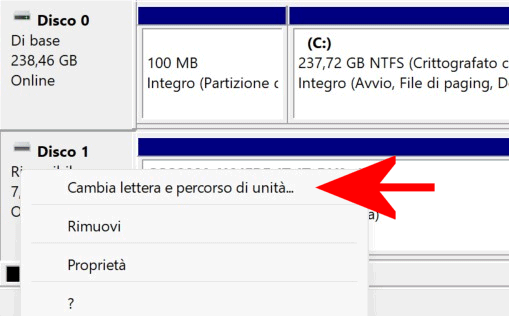
Montare unità disco come cartella in Windows

Tipicamente, la finestra mostra la lettera identificativa di unità assegnata da Windows. Con un clic su Aggiungi quindi scegliendo l’opzione Monta in questa cartella vuota NTFS, si può definire il percorso da associare al contenuto dell’unità.
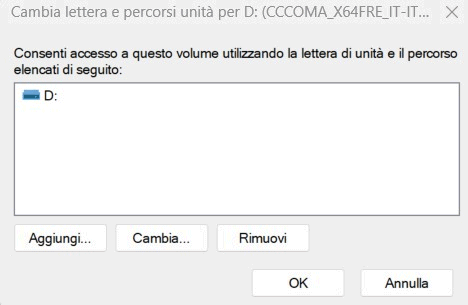
Impostazione percorso unità Windows

Con un clic su Sfoglia si può selezionare il supporto all’interno del quale creare la cartella che punta all’unità interna o esterna appena aggiunta. La cartella deve essere vuota e trovarsi necessariamente su una partizione NTFS.
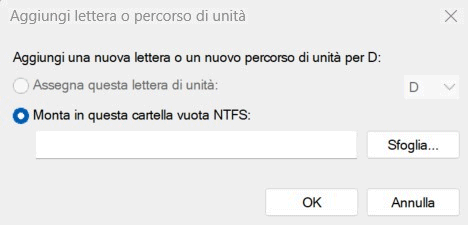
Percorso unità su file system NTFS

Utilizzando il pulsante Nuova cartella si può comodamente creare una cartella sulle unità già in uso (ad esempio C:\lavori).

Dopo aver fatto clic due volte su OK, la cartella appena creata permetterà di portarsi all’interno dell’unità appena aggiunta. Nel nostro esempio, nonostante la lettera identificativa di unità C: corrisponda all’SSD principale installato sul sistema, accedendo a C:\lavori Windows mostra il contenuto dell’unità appena aggiunta.

Eliminare la lettera identificativa di unità

Per evitare che Windows assegni anche una lettera identificativa di unità, basta tornare nella finestra Cambia lettera e percorso di unità vista in precedenza, selezionare la lettera quindi cliccare sul pulsante Rimuovi.
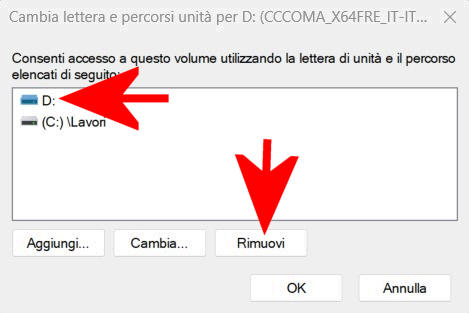
Lettera unità disco Windows

Così facendo, l’unità sarà accessibile da Windows così come da qualsiasi applicazione installata sul sistema, unicamente attraverso la cartella indicata poco fa.

Nel caso in cui si rimuovesse l’unità e la si connettesse di nuovo in seguito, Windows è in grado di riconoscerla automaticamente e ripristinare soltanto il collegamento con la cartella locale. Senza riassegnare alcuna lettera di unità.

Una cartella che punta a un’unità scollegata dal sistema mostra il messaggio Percorso non disponibile. Se la posizione è in questo PC, assicurarsi che il dispositivo o l’unità sia connessa o che il disco sia inserito.

In qualunque momento, se si volesse eliminare il riferimento alla cartella locale, basta selezionarla dalla finestra Cambia lettera e percorso di unità quindi cliccare il pulsante Rimuovi.

Ti consigliamo anche

Link copiato negli appunti