
Deprecated: Creation of dynamic property Timber\Site::$pingback is deprecated in /var/www/html/web/app/themes/ilsoftware/vendor/timber/timber/lib/Site.php on line 180

Deprecated: Creation of dynamic property Timber\User::$name is deprecated in /var/www/html/web/app/themes/ilsoftware/vendor/timber/timber/lib/User.php on line 118

Deprecated: Creation of dynamic property Timber\Post::$has_disclaimer is deprecated in /var/www/html/web/app/themes/ilsoftware/vendor/timber/timber/lib/Core.php on line 71

Deprecated: Creation of dynamic property Timber\Post::$_edit_lock is deprecated in /var/www/html/web/app/themes/ilsoftware/vendor/timber/timber/lib/Core.php on line 71

Deprecated: Creation of dynamic property Timber\Post::$_edit_last is deprecated in /var/www/html/web/app/themes/ilsoftware/vendor/timber/timber/lib/Core.php on line 71

Deprecated: Creation of dynamic property Timber\Post::$onesignal_meta_box_present is deprecated in /var/www/html/web/app/themes/ilsoftware/vendor/timber/timber/lib/Core.php on line 71

Deprecated: Creation of dynamic property Timber\Post::$onesignal_send_notification is deprecated in /var/www/html/web/app/themes/ilsoftware/vendor/timber/timber/lib/Core.php on line 71

Deprecated: Creation of dynamic property Timber\Post::$onesignal_modify_title_and_content is deprecated in /var/www/html/web/app/themes/ilsoftware/vendor/timber/timber/lib/Core.php on line 71

Deprecated: Creation of dynamic property Timber\Post::$onesignal_notification_custom_heading is deprecated in /var/www/html/web/app/themes/ilsoftware/vendor/timber/timber/lib/Core.php on line 71

Deprecated: Creation of dynamic property Timber\Post::$onesignal_notification_custom_content is deprecated in /var/www/html/web/app/themes/ilsoftware/vendor/timber/timber/lib/Core.php on line 71

Deprecated: Creation of dynamic property Timber\Post::$tipologia is deprecated in /var/www/html/web/app/themes/ilsoftware/vendor/timber/timber/lib/Core.php on line 71

Deprecated: Creation of dynamic property Timber\Post::$_tipologia is deprecated in /var/www/html/web/app/themes/ilsoftware/vendor/timber/timber/lib/Core.php on line 71

Deprecated: Creation of dynamic property Timber\Post::$attributi is deprecated in /var/www/html/web/app/themes/ilsoftware/vendor/timber/timber/lib/Core.php on line 71

Deprecated: Creation of dynamic property Timber\Post::$_attributi is deprecated in /var/www/html/web/app/themes/ilsoftware/vendor/timber/timber/lib/Core.php on line 71

Deprecated: Creation of dynamic property Timber\Post::$in_evidenza_newsletter is deprecated in /var/www/html/web/app/themes/ilsoftware/vendor/timber/timber/lib/Core.php on line 71

Deprecated: Creation of dynamic property Timber\Post::$_in_evidenza_newsletter is deprecated in /var/www/html/web/app/themes/ilsoftware/vendor/timber/timber/lib/Core.php on line 71

Deprecated: Creation of dynamic property Timber\Post::$inviato_in_newsletter is deprecated in /var/www/html/web/app/themes/ilsoftware/vendor/timber/timber/lib/Core.php on line 71

Deprecated: Creation of dynamic property Timber\Post::$_inviato_in_newsletter is deprecated in /var/www/html/web/app/themes/ilsoftware/vendor/timber/timber/lib/Core.php on line 71

Deprecated: Creation of dynamic property Timber\Post::$_yoast_wpseo_primary_category is deprecated in /var/www/html/web/app/themes/ilsoftware/vendor/timber/timber/lib/Core.php on line 71

Deprecated: Creation of dynamic property Timber\Post::$_yoast_wpseo_primary_blz_affiliation_attributes is deprecated in /var/www/html/web/app/themes/ilsoftware/vendor/timber/timber/lib/Core.php on line 71

Deprecated: Creation of dynamic property Timber\Post::$_yoast_wpseo_primary_content_type is deprecated in /var/www/html/web/app/themes/ilsoftware/vendor/timber/timber/lib/Core.php on line 71

Deprecated: Creation of dynamic property Timber\Post::$_yoast_wpseo_primary_attributes is deprecated in /var/www/html/web/app/themes/ilsoftware/vendor/timber/timber/lib/Core.php on line 71

Deprecated: Creation of dynamic property Timber\Post::$_yoast_wpseo_primary_speciali is deprecated in /var/www/html/web/app/themes/ilsoftware/vendor/timber/timber/lib/Core.php on line 71

Deprecated: Creation of dynamic property Timber\Post::$_yoast_wpseo_focuskw is deprecated in /var/www/html/web/app/themes/ilsoftware/vendor/timber/timber/lib/Core.php on line 71

Deprecated: Creation of dynamic property Timber\Post::$_yoast_wpseo_metadesc is deprecated in /var/www/html/web/app/themes/ilsoftware/vendor/timber/timber/lib/Core.php on line 71

Deprecated: Creation of dynamic property Timber\Post::$_yoast_wpseo_linkdex is deprecated in /var/www/html/web/app/themes/ilsoftware/vendor/timber/timber/lib/Core.php on line 71

Deprecated: Creation of dynamic property Timber\Post::$_yoast_wpseo_content_score is deprecated in /var/www/html/web/app/themes/ilsoftware/vendor/timber/timber/lib/Core.php on line 71

Deprecated: Creation of dynamic property Timber\Post::$_yoast_wpseo_focuskeywords is deprecated in /var/www/html/web/app/themes/ilsoftware/vendor/timber/timber/lib/Core.php on line 71

Deprecated: Creation of dynamic property Timber\Post::$_yoast_wpseo_keywordsynonyms is deprecated in /var/www/html/web/app/themes/ilsoftware/vendor/timber/timber/lib/Core.php on line 71

Deprecated: Creation of dynamic property Timber\Post::$_yoast_wpseo_estimated-reading-time-minutes is deprecated in /var/www/html/web/app/themes/ilsoftware/vendor/timber/timber/lib/Core.php on line 71

Deprecated: Creation of dynamic property Timber\Post::$_yoast_wpseo_wordproof_timestamp is deprecated in /var/www/html/web/app/themes/ilsoftware/vendor/timber/timber/lib/Core.php on line 71

Deprecated: Creation of dynamic property Timber\Post::$_thumbnail_id is deprecated in /var/www/html/web/app/themes/ilsoftware/vendor/timber/timber/lib/Core.php on line 71

Deprecated: Creation of dynamic property Timber\Post::$response_body is deprecated in /var/www/html/web/app/themes/ilsoftware/vendor/timber/timber/lib/Core.php on line 71

Deprecated: Creation of dynamic property Timber\Post::$status is deprecated in /var/www/html/web/app/themes/ilsoftware/vendor/timber/timber/lib/Core.php on line 71

Deprecated: Creation of dynamic property Timber\Post::$_yoast_indexnow_last_ping is deprecated in /var/www/html/web/app/themes/ilsoftware/vendor/timber/timber/lib/Core.php on line 71

Deprecated: Creation of dynamic property Timber\Post::$_oembed_f77bfaf3414bb147879b8df265cc4c08 is deprecated in /var/www/html/web/app/themes/ilsoftware/vendor/timber/timber/lib/Core.php on line 71

Deprecated: Creation of dynamic property Timber\Post::$_oembed_time_f77bfaf3414bb147879b8df265cc4c08 is deprecated in /var/www/html/web/app/themes/ilsoftware/vendor/timber/timber/lib/Core.php on line 71

Deprecated: Creation of dynamic property Timber\Post::$post_date_gmt is deprecated in /var/www/html/web/app/themes/ilsoftware/vendor/timber/timber/lib/Core.php on line 71

Deprecated: Creation of dynamic property Timber\Post::$comment_status is deprecated in /var/www/html/web/app/themes/ilsoftware/vendor/timber/timber/lib/Core.php on line 71

Deprecated: Creation of dynamic property Timber\Post::$ping_status is deprecated in /var/www/html/web/app/themes/ilsoftware/vendor/timber/timber/lib/Core.php on line 71

Deprecated: Creation of dynamic property Timber\Post::$post_password is deprecated in /var/www/html/web/app/themes/ilsoftware/vendor/timber/timber/lib/Core.php on line 71

Deprecated: Creation of dynamic property Timber\Post::$post_name is deprecated in /var/www/html/web/app/themes/ilsoftware/vendor/timber/timber/lib/Core.php on line 71

Deprecated: Creation of dynamic property Timber\Post::$to_ping is deprecated in /var/www/html/web/app/themes/ilsoftware/vendor/timber/timber/lib/Core.php on line 71

Deprecated: Creation of dynamic property Timber\Post::$pinged is deprecated in /var/www/html/web/app/themes/ilsoftware/vendor/timber/timber/lib/Core.php on line 71

Deprecated: Creation of dynamic property Timber\Post::$post_modified is deprecated in /var/www/html/web/app/themes/ilsoftware/vendor/timber/timber/lib/Core.php on line 71

Deprecated: Creation of dynamic property Timber\Post::$post_modified_gmt is deprecated in /var/www/html/web/app/themes/ilsoftware/vendor/timber/timber/lib/Core.php on line 71

Deprecated: Creation of dynamic property Timber\Post::$post_content_filtered is deprecated in /var/www/html/web/app/themes/ilsoftware/vendor/timber/timber/lib/Core.php on line 71

Deprecated: Creation of dynamic property Timber\Post::$guid is deprecated in /var/www/html/web/app/themes/ilsoftware/vendor/timber/timber/lib/Core.php on line 71

Deprecated: Creation of dynamic property Timber\Post::$menu_order is deprecated in /var/www/html/web/app/themes/ilsoftware/vendor/timber/timber/lib/Core.php on line 71

Deprecated: Creation of dynamic property Timber\Post::$post_mime_type is deprecated in /var/www/html/web/app/themes/ilsoftware/vendor/timber/timber/lib/Core.php on line 71

Deprecated: Creation of dynamic property Timber\Post::$comment_count is deprecated in /var/www/html/web/app/themes/ilsoftware/vendor/timber/timber/lib/Core.php on line 71

Deprecated: Creation of dynamic property Timber\Post::$filter is deprecated in /var/www/html/web/app/themes/ilsoftware/vendor/timber/timber/lib/Core.php on line 71
Dove sono i Download in Windows e come trovare i file scaricati | IlSoftware.it

Dove sono i Download in Windows e come trovare i file scaricati

Se non riuscite a trovare dove sono i file scaricati in Windows, questo articolo contiene ciò che fa per voi. Ecco dove si trova la cartella Download, come accedere rapidamente ai file e individuare gli elementi che interessano.

La cartella Download di Windows è la locazione di memoria in cui, per impostazione predefinita, finiscono i file scaricati dai browser Web installati. In Google Chrome, Edge e in generale con tutti i browser derivati da Chromium, basta digitare chrome://settings/downloads nella barra degli indirizzi per verificare il percorso della cartella in cui sono memorizzati i Download.

Stessa cosa di può fare, ad esempio, con Mozilla Firefox scrivendo about:preferences#general per accedere alle impostazioni del browser e scorrendo fino a trovare la sezione File e applicazioni, Download.

In tutti i casi, sebbene l’impostazione di default per i browser installati in Windows corrisponda alla cartella di sistema Download, è eventualmente possibile personalizzare il percorso oppure attivare l’opzione con cui si chiede all’utente, di volta in volta, dove debba essere salvato ciascun file (piuttosto scomoda).
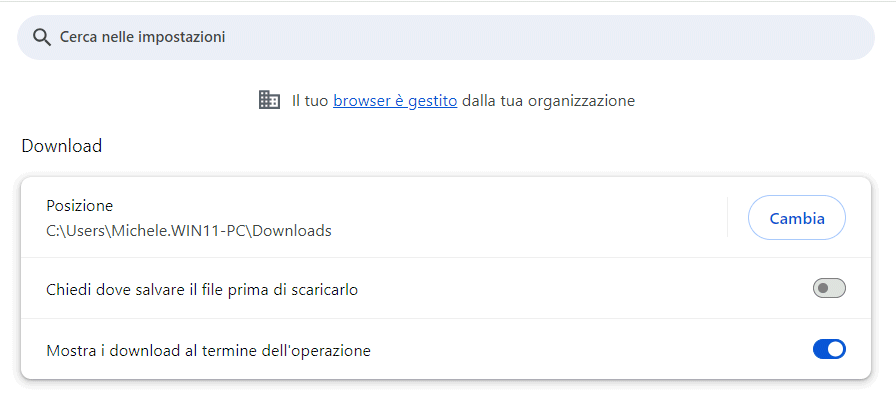
File scaricati, cartella Download Windows

Dove si trova la cartella Download in Windows

Per impostazione predefinita, la cartella Download di Windows è automaticamente creata dal sistema operativo nella directory dell’utente corrente. Per accedervi rapidamente è possibile premere Windows+E, così da aprire Esplora file, quindi cliccare sulla voce Download nella colonna di sinistra.

Dal momento che ogni account utente utilizzato in ambiente Windows, ha la sua cartella Download, è possibile passare alla cartella corrispondente anche premendo Windows+R quindi digitando %userprofile%\Downloads. La variabile d’ambiente %userprofile% è utile perché è possibile fare in modo che sia Windows a sostituire il percorso contenente il profilo dell’utente corrente (generalmente C:\Users\nome-utente).

Come trovare i file scaricati da browser Web

Per trovare i file via via scaricati dai vari browser Web installati sul sistema in uso, basta accedere alla cartella Download come visto in precedenza quindi cliccare sull’intestazione della colonna Ultima modifica. Fare clic eventualmente una seconda volta, fintanto che non compare una piccola freccia che punta verso il basso. In questo modo Windows provvede a ordinare i file in ordine decrescente (in alto si trovano gli elementi scaricati più di recente).

Se la colonna Ultima modifica non comparisse, fate clic su Visualizza quindi su Dettagli. In alternativa il trucco consiste nel tenere premuto il tasto CTRL mentre si fa scrolling con il mouse nell’una e nell’altra direzione. Così facendo si dovrebbe passare rapidamente tra una modalità di visualizzazione e l’altra, con la possibilità di scegliere anche Dettagli.

Da browser Web, indipendentemente dal software utilizzato, è possibile premere CTRL+J per accedere alla lista dei Download effettuati. Con un clic sui tre puntini quindi su Mostra nella cartella, Windows selezionerà il file scaricato nella cartella in cui esso si trova.

Accedere alla cartella Download in modo rapido

Per accedere rapidamente alla lista dei file scaricati, si può aggiungere al menu Start di Windows 10 e Windows 11 un’icona che funge da collegamento alla cartella Download.

In Windows 10 basta digitare cartelle nella casella di ricerca del menu Start quindi cliccare su Scegli le cartelle da visualizzare in Start; in Windows 11 si deve digitare menu Start quindi selezionare Impostazioni di Start (scorrere quindi la schermata fino a trovare la sezione Cartelle).

Spuntando l’opzione a destra di Download, il menu Start di Windows mostrerà un’icona per accedere all’elenco dei file scaricati.
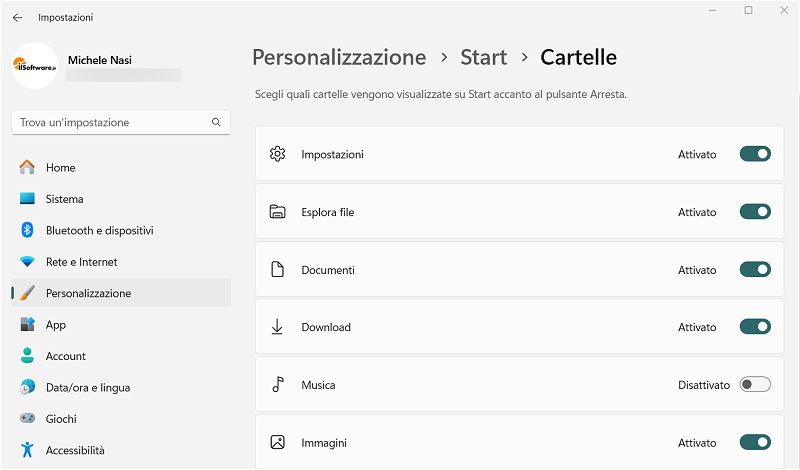
Cartella Download menu Start Windows

Per aggiungere un collegamento a Download sul desktop di Windows, si può premere Windows+E quindi cliccare con il tasto destro sulla voce Download nella colonna di sinistra, per poi selezionare Invia a, Desktop (crea collegamento).
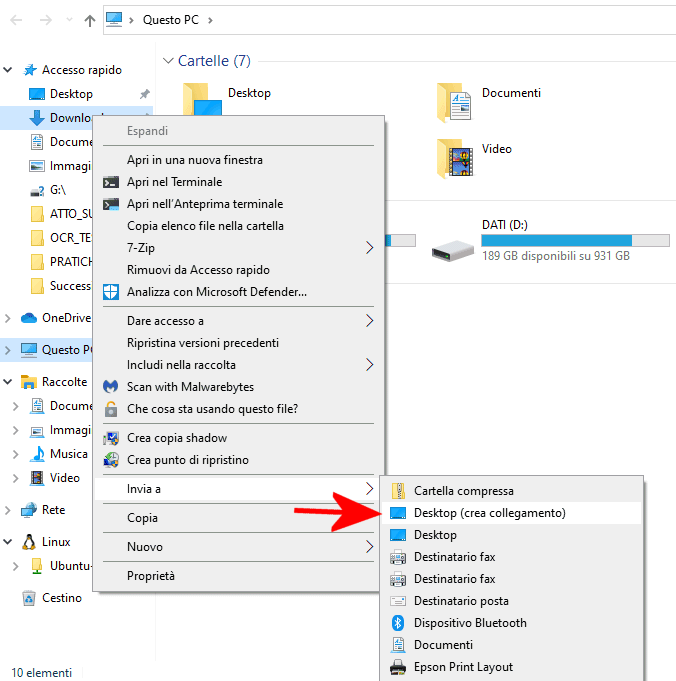
Collegamento cartella Download

Dopo aver individuato il collegamento a Download appena creato sul desktop, si può cliccare su di esso con il tasto destro del mouse e scegliere Proprietà. Se si volesse aprire istantaneamente il contenuto della cartella Download, con qualunque applicazione, è possibile applicare un semplice trucco.
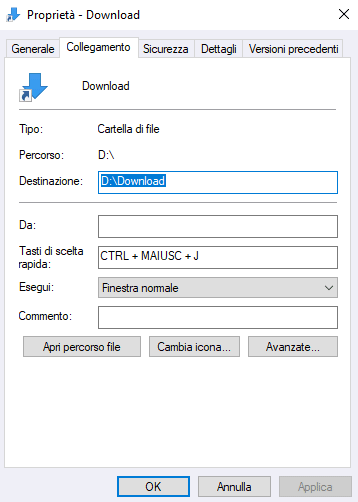
Scorciatoia apertura cartella Download Windows

Basta infatti cliccare sul campo Tasti di scelta rapida quindi impostare la combinazione di tasti che si desidera usare per aprire la cartella Download. Tale scorciatoia da tastiera non deve ovviamente essere utilizzata dal sistema operativo.

Poiché con CTRL+J si accede ai Download da browser Web, anche per ricordarsi più facilmente la combinazione scelta, si può ad esempio impostare CTRL+MAIUSC+J come in figura.

Nell’immagine si può notare che la cartella Download non si trova nella posizione standard: in caso di necessità, utilizzando una semplice procedura supportata da Microsoft, è possibile spostare la cartella Download in un’unità più capiente.

Credit immagine in apertura: iStock.com – cnythzl

Ti consigliamo anche

Link copiato negli appunti