
Deprecated: Creation of dynamic property Timber\Site::$pingback is deprecated in /var/www/html/web/app/themes/ilsoftware/vendor/timber/timber/lib/Site.php on line 180

Deprecated: Creation of dynamic property Timber\User::$name is deprecated in /var/www/html/web/app/themes/ilsoftware/vendor/timber/timber/lib/User.php on line 118

Deprecated: Creation of dynamic property Timber\Post::$has_disclaimer is deprecated in /var/www/html/web/app/themes/ilsoftware/vendor/timber/timber/lib/Core.php on line 71

Deprecated: Creation of dynamic property Timber\Post::$_edit_lock is deprecated in /var/www/html/web/app/themes/ilsoftware/vendor/timber/timber/lib/Core.php on line 71

Deprecated: Creation of dynamic property Timber\Post::$_edit_last is deprecated in /var/www/html/web/app/themes/ilsoftware/vendor/timber/timber/lib/Core.php on line 71

Deprecated: Creation of dynamic property Timber\Post::$onesignal_meta_box_present is deprecated in /var/www/html/web/app/themes/ilsoftware/vendor/timber/timber/lib/Core.php on line 71

Deprecated: Creation of dynamic property Timber\Post::$onesignal_send_notification is deprecated in /var/www/html/web/app/themes/ilsoftware/vendor/timber/timber/lib/Core.php on line 71

Deprecated: Creation of dynamic property Timber\Post::$onesignal_modify_title_and_content is deprecated in /var/www/html/web/app/themes/ilsoftware/vendor/timber/timber/lib/Core.php on line 71

Deprecated: Creation of dynamic property Timber\Post::$onesignal_notification_custom_heading is deprecated in /var/www/html/web/app/themes/ilsoftware/vendor/timber/timber/lib/Core.php on line 71

Deprecated: Creation of dynamic property Timber\Post::$onesignal_notification_custom_content is deprecated in /var/www/html/web/app/themes/ilsoftware/vendor/timber/timber/lib/Core.php on line 71

Deprecated: Creation of dynamic property Timber\Post::$tipologia is deprecated in /var/www/html/web/app/themes/ilsoftware/vendor/timber/timber/lib/Core.php on line 71

Deprecated: Creation of dynamic property Timber\Post::$_tipologia is deprecated in /var/www/html/web/app/themes/ilsoftware/vendor/timber/timber/lib/Core.php on line 71

Deprecated: Creation of dynamic property Timber\Post::$attributi is deprecated in /var/www/html/web/app/themes/ilsoftware/vendor/timber/timber/lib/Core.php on line 71

Deprecated: Creation of dynamic property Timber\Post::$_attributi is deprecated in /var/www/html/web/app/themes/ilsoftware/vendor/timber/timber/lib/Core.php on line 71

Deprecated: Creation of dynamic property Timber\Post::$in_evidenza_newsletter is deprecated in /var/www/html/web/app/themes/ilsoftware/vendor/timber/timber/lib/Core.php on line 71

Deprecated: Creation of dynamic property Timber\Post::$_in_evidenza_newsletter is deprecated in /var/www/html/web/app/themes/ilsoftware/vendor/timber/timber/lib/Core.php on line 71

Deprecated: Creation of dynamic property Timber\Post::$inviato_in_newsletter is deprecated in /var/www/html/web/app/themes/ilsoftware/vendor/timber/timber/lib/Core.php on line 71

Deprecated: Creation of dynamic property Timber\Post::$_inviato_in_newsletter is deprecated in /var/www/html/web/app/themes/ilsoftware/vendor/timber/timber/lib/Core.php on line 71

Deprecated: Creation of dynamic property Timber\Post::$_yoast_wpseo_primary_category is deprecated in /var/www/html/web/app/themes/ilsoftware/vendor/timber/timber/lib/Core.php on line 71

Deprecated: Creation of dynamic property Timber\Post::$_yoast_wpseo_primary_blz_affiliation_attributes is deprecated in /var/www/html/web/app/themes/ilsoftware/vendor/timber/timber/lib/Core.php on line 71

Deprecated: Creation of dynamic property Timber\Post::$_yoast_wpseo_primary_content_type is deprecated in /var/www/html/web/app/themes/ilsoftware/vendor/timber/timber/lib/Core.php on line 71

Deprecated: Creation of dynamic property Timber\Post::$_yoast_wpseo_primary_attributes is deprecated in /var/www/html/web/app/themes/ilsoftware/vendor/timber/timber/lib/Core.php on line 71

Deprecated: Creation of dynamic property Timber\Post::$_yoast_wpseo_primary_speciali is deprecated in /var/www/html/web/app/themes/ilsoftware/vendor/timber/timber/lib/Core.php on line 71

Deprecated: Creation of dynamic property Timber\Post::$_yoast_wpseo_focuskw is deprecated in /var/www/html/web/app/themes/ilsoftware/vendor/timber/timber/lib/Core.php on line 71

Deprecated: Creation of dynamic property Timber\Post::$_yoast_wpseo_linkdex is deprecated in /var/www/html/web/app/themes/ilsoftware/vendor/timber/timber/lib/Core.php on line 71

Deprecated: Creation of dynamic property Timber\Post::$_yoast_wpseo_content_score is deprecated in /var/www/html/web/app/themes/ilsoftware/vendor/timber/timber/lib/Core.php on line 71

Deprecated: Creation of dynamic property Timber\Post::$_yoast_wpseo_focuskeywords is deprecated in /var/www/html/web/app/themes/ilsoftware/vendor/timber/timber/lib/Core.php on line 71

Deprecated: Creation of dynamic property Timber\Post::$_yoast_wpseo_keywordsynonyms is deprecated in /var/www/html/web/app/themes/ilsoftware/vendor/timber/timber/lib/Core.php on line 71

Deprecated: Creation of dynamic property Timber\Post::$_yoast_wpseo_estimated-reading-time-minutes is deprecated in /var/www/html/web/app/themes/ilsoftware/vendor/timber/timber/lib/Core.php on line 71

Deprecated: Creation of dynamic property Timber\Post::$_yoast_wpseo_wordproof_timestamp is deprecated in /var/www/html/web/app/themes/ilsoftware/vendor/timber/timber/lib/Core.php on line 71

Deprecated: Creation of dynamic property Timber\Post::$_thumbnail_id is deprecated in /var/www/html/web/app/themes/ilsoftware/vendor/timber/timber/lib/Core.php on line 71

Deprecated: Creation of dynamic property Timber\Post::$_yoast_wpseo_metadesc is deprecated in /var/www/html/web/app/themes/ilsoftware/vendor/timber/timber/lib/Core.php on line 71

Deprecated: Creation of dynamic property Timber\Post::$response_body is deprecated in /var/www/html/web/app/themes/ilsoftware/vendor/timber/timber/lib/Core.php on line 71

Deprecated: Creation of dynamic property Timber\Post::$status is deprecated in /var/www/html/web/app/themes/ilsoftware/vendor/timber/timber/lib/Core.php on line 71

Deprecated: Creation of dynamic property Timber\Post::$_yoast_indexnow_last_ping is deprecated in /var/www/html/web/app/themes/ilsoftware/vendor/timber/timber/lib/Core.php on line 71

Deprecated: Creation of dynamic property Timber\Post::$_oembed_8201064b53df70c18db6b48651bdc325 is deprecated in /var/www/html/web/app/themes/ilsoftware/vendor/timber/timber/lib/Core.php on line 71

Deprecated: Creation of dynamic property Timber\Post::$_oembed_time_8201064b53df70c18db6b48651bdc325 is deprecated in /var/www/html/web/app/themes/ilsoftware/vendor/timber/timber/lib/Core.php on line 71

Deprecated: Creation of dynamic property Timber\Post::$post_date_gmt is deprecated in /var/www/html/web/app/themes/ilsoftware/vendor/timber/timber/lib/Core.php on line 71

Deprecated: Creation of dynamic property Timber\Post::$comment_status is deprecated in /var/www/html/web/app/themes/ilsoftware/vendor/timber/timber/lib/Core.php on line 71

Deprecated: Creation of dynamic property Timber\Post::$ping_status is deprecated in /var/www/html/web/app/themes/ilsoftware/vendor/timber/timber/lib/Core.php on line 71

Deprecated: Creation of dynamic property Timber\Post::$post_password is deprecated in /var/www/html/web/app/themes/ilsoftware/vendor/timber/timber/lib/Core.php on line 71

Deprecated: Creation of dynamic property Timber\Post::$post_name is deprecated in /var/www/html/web/app/themes/ilsoftware/vendor/timber/timber/lib/Core.php on line 71

Deprecated: Creation of dynamic property Timber\Post::$to_ping is deprecated in /var/www/html/web/app/themes/ilsoftware/vendor/timber/timber/lib/Core.php on line 71

Deprecated: Creation of dynamic property Timber\Post::$pinged is deprecated in /var/www/html/web/app/themes/ilsoftware/vendor/timber/timber/lib/Core.php on line 71

Deprecated: Creation of dynamic property Timber\Post::$post_modified is deprecated in /var/www/html/web/app/themes/ilsoftware/vendor/timber/timber/lib/Core.php on line 71

Deprecated: Creation of dynamic property Timber\Post::$post_modified_gmt is deprecated in /var/www/html/web/app/themes/ilsoftware/vendor/timber/timber/lib/Core.php on line 71

Deprecated: Creation of dynamic property Timber\Post::$post_content_filtered is deprecated in /var/www/html/web/app/themes/ilsoftware/vendor/timber/timber/lib/Core.php on line 71

Deprecated: Creation of dynamic property Timber\Post::$guid is deprecated in /var/www/html/web/app/themes/ilsoftware/vendor/timber/timber/lib/Core.php on line 71

Deprecated: Creation of dynamic property Timber\Post::$menu_order is deprecated in /var/www/html/web/app/themes/ilsoftware/vendor/timber/timber/lib/Core.php on line 71

Deprecated: Creation of dynamic property Timber\Post::$post_mime_type is deprecated in /var/www/html/web/app/themes/ilsoftware/vendor/timber/timber/lib/Core.php on line 71

Deprecated: Creation of dynamic property Timber\Post::$comment_count is deprecated in /var/www/html/web/app/themes/ilsoftware/vendor/timber/timber/lib/Core.php on line 71

Deprecated: Creation of dynamic property Timber\Post::$filter is deprecated in /var/www/html/web/app/themes/ilsoftware/vendor/timber/timber/lib/Core.php on line 71
E maiuscola accentata: come farla e inserirla nel testo | IlSoftware.it

E maiuscola accentata: come farla e inserirla nel testo

L'importanza dell'uso corretto della "E" maiuscola accentata (È) in italiano. Presentiamo diverse strategie per digitare questa lettera, inclusi metodi come l'uso del tastierino numerico, il copia e incolla, la Mappa caratteri di Windows e la conversione automatica nei programmi di elaborazione testi.

In italiano, la “e” con l’accento grave è la forma corretta del verbo essere alla terza persona singolare del presente indicativo. Capita spesso di dover cominciare una frase o un paragrafo proprio con una lettera “e” accentata. A questo proposito, diciamo che la E maiuscola accentata (È) è la forma corretta da utilizzare. La “e” con l’apostrofo (E’) non solo è scorretta, ma crea anche confusione. L’apostrofo si usa per indicare un’elisione, cioè la caduta di una vocale in una parola, ma nel caso del verbo “è”, non c’è evidentemente alcuna elisione.

Come fare, allora, per inserire in un testo la E maiuscola accentata evitando forme non accettabili? È possibile utilizzare diverse strategie: di seguito cerchiamo di mettere in evidenza quelle più semplici da utilizzare.

Usare il tastierino numerico per inserire la E maiuscola accentata

Le tastiere italiane dispongono dei tasti per digitare le vocali accentate minuscole (come “à”, “è”, “ì”, “ò”, “ù”), ma non dispongono di un tasto dedicato per le versioni maiuscole.

Tenendo premuto il tasto ALT e digitando un codice numerico, si accede ai caratteri ASCII, che rappresentano simboli e lettere speciali non presenti sulla tastiera. Per ottenere la E maiuscola accentata, è sufficiente premere ALT e, contemporaneamente, digitare 212 (ALT+212) oppure usare la combinazione ALT+0200.

Il sistema riconosce il codice ASCII solo se i numeri sono introdotti attraverso il tastierino numerico (non usando i numeri sopra le lettere), perché questi tasti inviano segnali diversi alla macchina. Il tasto BLOC NUM, inoltre, deve essere spento/disattivato affinché la combinazione funzioni correttamente.

Le differenze tra ALT+212 e ALT+0200

Il fatto che per ottenere la E maiuscola accentata si possa ricorrere indifferentemente alle combinazioni ALT+212 e ALT+0200, ha a che vedere con i sistemi di codifica utilizzati ma il risultato è identico.

ASCII è una tabella di codici numerici che rappresenta lettere, numeri e simboli. I primi 128 numeri (da 0 a 127) sono riservati ai caratteri standard, mentre i numeri superiori a 127 (ASCII esteso) includono caratteri speciali, come le lettere accentate. ALT+0200 è il codice ASCII esteso per la “È” ma è possibile utilizzare anche ALT+212 rifacendosi alla tabella di codici chiamata OEM (Original Equipment Manufacturer). Windows e gli altri sistemi operativi riconoscono entrambe le convenzioni per questioni di compatibilità.

In un altro articolo abbiamo spiegato più nel dettaglio perché premendo ALT e alcuni numeri si ottengono dei simboli.

Fare la e maiuscola accentata usando il copia e incolla

Se proprio non ci si ricordasse della combinazione di tasti che permette di digitare la e maiuscola accentata, si può pervenire allo stesso risultato con un semplice copia e incolla.

Basta selezionare la È anche da questo nostro articolo quindi incollarla altrove. Dopo aver usato CTRL+C per copiare la lettera in memoria, tuttavia, suggeriamo di usare la combinazione di tasti CTRL+MAIUSC+V. In questo modo si rimuove qualunque formattazione del carattere. Diversamente, il rischio è quello di “portarsi dietro” informazioni sulla dimensione e sul font di carattere utilizzati nel testo originale.

Digitare la È utilizzando la Mappa caratteri di Windows

Un approccio alternativo, ma non meno efficace, consiste nel premere la combinazione di tasti Windows+R quindi scrivere charmap e premere Invio.

A questo punto, selezionando un font di carattere standard (ad esempio il classico Times New Roman), quindi cliccando sulla e maiuscola accentata, si può fare clic su Copia per salvarla in memoria e usare poi CTRL+V per incollarla altrove.
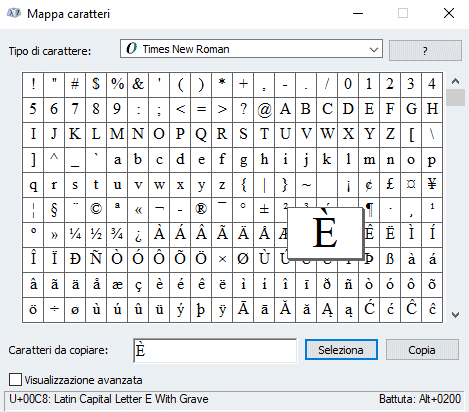
E maiuscola accentata con Mappa caratteri Windows

È interessante evidenziare che Mappa caratteri mostra, in basso a destra, la combinazione di tasti utile a ottenere il medesimo risultato. Si può quindi cliccare su altre lettere o simboli per conoscere la combinazione che prevede l’utilizzo del tastierino numerico e del tasto ALT.

Usare la combinazione di tasti Windows + .

Per inserire direttamente la e maiuscola accentata in qualunque applicazione, senza effettuare alcuna operazione di copia e incolla, basta premere la combinazione di tasti Windows + .

Supportato sia in Windows 10 che in Windows 11, questo trucco fa comparire una piccola finestra di dialogo attraverso la quale si possono inserire emoji, simboli e caratteri speciali.

Cliccando sull’icona Simboli in alto quindi su Simboli latini in basso, si può inserire direttamente la e maiuscola accentata insieme con molti altri caratteri di uso piuttosto comune.
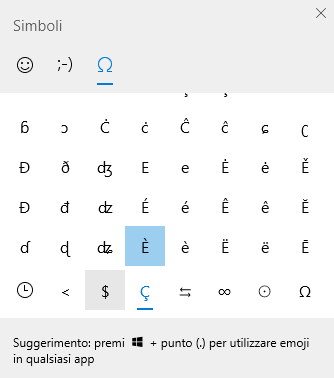
Inserire simboli nei testi su Windows 10 e Windows 11

Convertire la e con l’apostrofo in e maiuscola accentata

Un espediente efficace consiste nell’indicare al wordprocessor in uso (ad esempio Word, LibreOffice Writer, Google Documenti,…) di trasformare automaticamente la E maiuscola seguita da un apostrofo in una E maiuscola accentata. Questa soluzione è ottima soprattutto se si fosse ormai abituati a digitare (erroneamente) E’ in luogo di È.

In Microsoft Word si può fare clic su File, Opzioni quindi scegliere Strumenti di correzione nel menu a sinistra. Avvalendosi del pulsante Opzioni correzione automatica, è adesso sufficiente specificare E’ nel campo Sostituisci, introducendo È nella casella Con posta subito a destra.

Per confermare la correzione automatica, basta infine fare clic su Aggiungi e poi su OK.
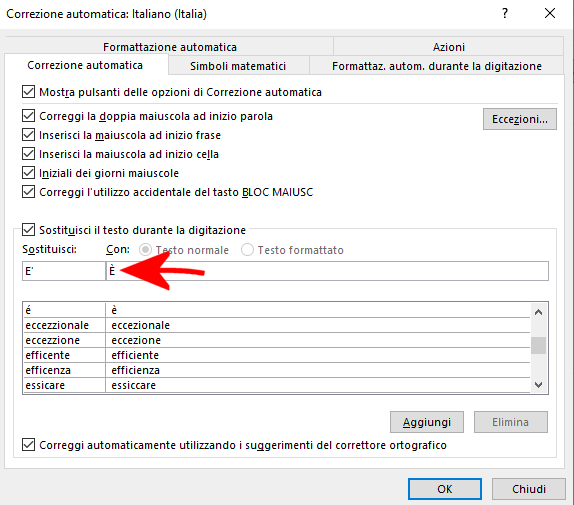
Inserimento E maiuscola accentata

Se provate a scrivere E’, Word d’ora in avanti provvederà ad operare una sostituzione “d’ufficio” in È.

Lo stesso risultato è ottenibile con LibreOffice Writer portandosi nel menu Strumenti, Correzione automatica, Opzioni di correzione automatica. Nella finestra che si apre, è necessario accedere alla scheda Sostituisci, inserire E’ nella colonna Sostituisci e È nel campo Con. Cliccando su Nuovo e poi su OK, si giunge allo stesso risultato visto in precedenza nel caso di Word.
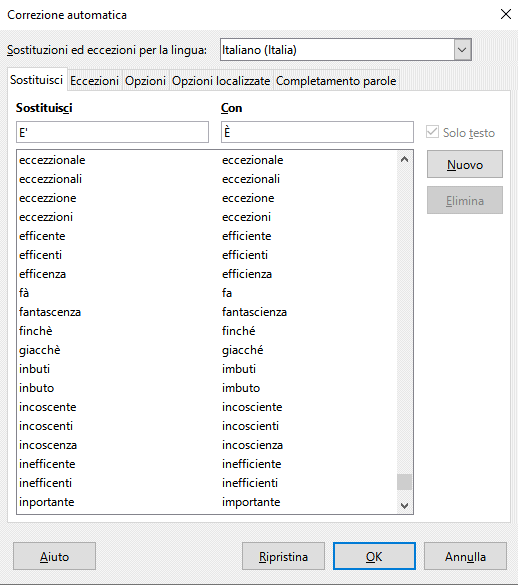
E maiuscola accentata con LibreOffice Writer

Se non funzionasse, copiate la E apostrofata digitata nel documento LibreOffice Writer (E’), incollatela nel campo Sostituisci ripetendo la procedura.

Con Google Documenti, è sufficiente fare clic su Strumenti, Preferenze, sulla scheda Sostituzioni e specificare E’ nel campo Sostituisci, È in corrispondenza di Con.
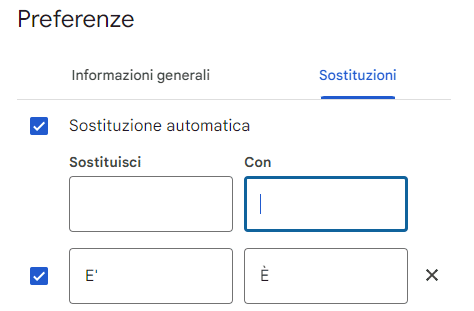
Sostituzione automatica e accentata maiuscola

Credit immagine in apertura: iStock.com – Ndul

Ti consigliamo anche

Link copiato negli appunti