
Deprecated: Creation of dynamic property Timber\Site::$pingback is deprecated in /var/www/html/web/app/themes/ilsoftware/vendor/timber/timber/lib/Site.php on line 180

Deprecated: Creation of dynamic property Timber\User::$name is deprecated in /var/www/html/web/app/themes/ilsoftware/vendor/timber/timber/lib/User.php on line 118

Deprecated: Creation of dynamic property Timber\Post::$has_disclaimer is deprecated in /var/www/html/web/app/themes/ilsoftware/vendor/timber/timber/lib/Core.php on line 71

Deprecated: Creation of dynamic property Timber\Post::$_edit_lock is deprecated in /var/www/html/web/app/themes/ilsoftware/vendor/timber/timber/lib/Core.php on line 71

Deprecated: Creation of dynamic property Timber\Post::$_edit_last is deprecated in /var/www/html/web/app/themes/ilsoftware/vendor/timber/timber/lib/Core.php on line 71

Deprecated: Creation of dynamic property Timber\Post::$onesignal_meta_box_present is deprecated in /var/www/html/web/app/themes/ilsoftware/vendor/timber/timber/lib/Core.php on line 71

Deprecated: Creation of dynamic property Timber\Post::$onesignal_send_notification is deprecated in /var/www/html/web/app/themes/ilsoftware/vendor/timber/timber/lib/Core.php on line 71

Deprecated: Creation of dynamic property Timber\Post::$onesignal_modify_title_and_content is deprecated in /var/www/html/web/app/themes/ilsoftware/vendor/timber/timber/lib/Core.php on line 71

Deprecated: Creation of dynamic property Timber\Post::$onesignal_notification_custom_heading is deprecated in /var/www/html/web/app/themes/ilsoftware/vendor/timber/timber/lib/Core.php on line 71

Deprecated: Creation of dynamic property Timber\Post::$onesignal_notification_custom_content is deprecated in /var/www/html/web/app/themes/ilsoftware/vendor/timber/timber/lib/Core.php on line 71

Deprecated: Creation of dynamic property Timber\Post::$tipologia is deprecated in /var/www/html/web/app/themes/ilsoftware/vendor/timber/timber/lib/Core.php on line 71

Deprecated: Creation of dynamic property Timber\Post::$_tipologia is deprecated in /var/www/html/web/app/themes/ilsoftware/vendor/timber/timber/lib/Core.php on line 71

Deprecated: Creation of dynamic property Timber\Post::$attributi is deprecated in /var/www/html/web/app/themes/ilsoftware/vendor/timber/timber/lib/Core.php on line 71

Deprecated: Creation of dynamic property Timber\Post::$_attributi is deprecated in /var/www/html/web/app/themes/ilsoftware/vendor/timber/timber/lib/Core.php on line 71

Deprecated: Creation of dynamic property Timber\Post::$in_evidenza_newsletter is deprecated in /var/www/html/web/app/themes/ilsoftware/vendor/timber/timber/lib/Core.php on line 71

Deprecated: Creation of dynamic property Timber\Post::$_in_evidenza_newsletter is deprecated in /var/www/html/web/app/themes/ilsoftware/vendor/timber/timber/lib/Core.php on line 71

Deprecated: Creation of dynamic property Timber\Post::$inviato_in_newsletter is deprecated in /var/www/html/web/app/themes/ilsoftware/vendor/timber/timber/lib/Core.php on line 71

Deprecated: Creation of dynamic property Timber\Post::$_inviato_in_newsletter is deprecated in /var/www/html/web/app/themes/ilsoftware/vendor/timber/timber/lib/Core.php on line 71

Deprecated: Creation of dynamic property Timber\Post::$_yoast_wpseo_primary_category is deprecated in /var/www/html/web/app/themes/ilsoftware/vendor/timber/timber/lib/Core.php on line 71

Deprecated: Creation of dynamic property Timber\Post::$_yoast_wpseo_primary_blz_affiliation_attributes is deprecated in /var/www/html/web/app/themes/ilsoftware/vendor/timber/timber/lib/Core.php on line 71

Deprecated: Creation of dynamic property Timber\Post::$_yoast_wpseo_primary_content_type is deprecated in /var/www/html/web/app/themes/ilsoftware/vendor/timber/timber/lib/Core.php on line 71

Deprecated: Creation of dynamic property Timber\Post::$_yoast_wpseo_primary_attributes is deprecated in /var/www/html/web/app/themes/ilsoftware/vendor/timber/timber/lib/Core.php on line 71

Deprecated: Creation of dynamic property Timber\Post::$_yoast_wpseo_primary_speciali is deprecated in /var/www/html/web/app/themes/ilsoftware/vendor/timber/timber/lib/Core.php on line 71

Deprecated: Creation of dynamic property Timber\Post::$_yoast_wpseo_focuskw is deprecated in /var/www/html/web/app/themes/ilsoftware/vendor/timber/timber/lib/Core.php on line 71

Deprecated: Creation of dynamic property Timber\Post::$_yoast_wpseo_metadesc is deprecated in /var/www/html/web/app/themes/ilsoftware/vendor/timber/timber/lib/Core.php on line 71

Deprecated: Creation of dynamic property Timber\Post::$_yoast_wpseo_linkdex is deprecated in /var/www/html/web/app/themes/ilsoftware/vendor/timber/timber/lib/Core.php on line 71

Deprecated: Creation of dynamic property Timber\Post::$_yoast_wpseo_content_score is deprecated in /var/www/html/web/app/themes/ilsoftware/vendor/timber/timber/lib/Core.php on line 71

Deprecated: Creation of dynamic property Timber\Post::$_yoast_wpseo_focuskeywords is deprecated in /var/www/html/web/app/themes/ilsoftware/vendor/timber/timber/lib/Core.php on line 71

Deprecated: Creation of dynamic property Timber\Post::$_yoast_wpseo_keywordsynonyms is deprecated in /var/www/html/web/app/themes/ilsoftware/vendor/timber/timber/lib/Core.php on line 71

Deprecated: Creation of dynamic property Timber\Post::$_yoast_wpseo_estimated-reading-time-minutes is deprecated in /var/www/html/web/app/themes/ilsoftware/vendor/timber/timber/lib/Core.php on line 71

Deprecated: Creation of dynamic property Timber\Post::$_thumbnail_id is deprecated in /var/www/html/web/app/themes/ilsoftware/vendor/timber/timber/lib/Core.php on line 71

Deprecated: Creation of dynamic property Timber\Post::$response_body is deprecated in /var/www/html/web/app/themes/ilsoftware/vendor/timber/timber/lib/Core.php on line 71

Deprecated: Creation of dynamic property Timber\Post::$status is deprecated in /var/www/html/web/app/themes/ilsoftware/vendor/timber/timber/lib/Core.php on line 71

Deprecated: Creation of dynamic property Timber\Post::$_yoast_indexnow_last_ping is deprecated in /var/www/html/web/app/themes/ilsoftware/vendor/timber/timber/lib/Core.php on line 71

Deprecated: Creation of dynamic property Timber\Post::$post_date_gmt is deprecated in /var/www/html/web/app/themes/ilsoftware/vendor/timber/timber/lib/Core.php on line 71

Deprecated: Creation of dynamic property Timber\Post::$comment_status is deprecated in /var/www/html/web/app/themes/ilsoftware/vendor/timber/timber/lib/Core.php on line 71

Deprecated: Creation of dynamic property Timber\Post::$ping_status is deprecated in /var/www/html/web/app/themes/ilsoftware/vendor/timber/timber/lib/Core.php on line 71

Deprecated: Creation of dynamic property Timber\Post::$post_password is deprecated in /var/www/html/web/app/themes/ilsoftware/vendor/timber/timber/lib/Core.php on line 71

Deprecated: Creation of dynamic property Timber\Post::$post_name is deprecated in /var/www/html/web/app/themes/ilsoftware/vendor/timber/timber/lib/Core.php on line 71

Deprecated: Creation of dynamic property Timber\Post::$to_ping is deprecated in /var/www/html/web/app/themes/ilsoftware/vendor/timber/timber/lib/Core.php on line 71

Deprecated: Creation of dynamic property Timber\Post::$pinged is deprecated in /var/www/html/web/app/themes/ilsoftware/vendor/timber/timber/lib/Core.php on line 71

Deprecated: Creation of dynamic property Timber\Post::$post_modified is deprecated in /var/www/html/web/app/themes/ilsoftware/vendor/timber/timber/lib/Core.php on line 71

Deprecated: Creation of dynamic property Timber\Post::$post_modified_gmt is deprecated in /var/www/html/web/app/themes/ilsoftware/vendor/timber/timber/lib/Core.php on line 71

Deprecated: Creation of dynamic property Timber\Post::$post_content_filtered is deprecated in /var/www/html/web/app/themes/ilsoftware/vendor/timber/timber/lib/Core.php on line 71

Deprecated: Creation of dynamic property Timber\Post::$guid is deprecated in /var/www/html/web/app/themes/ilsoftware/vendor/timber/timber/lib/Core.php on line 71

Deprecated: Creation of dynamic property Timber\Post::$menu_order is deprecated in /var/www/html/web/app/themes/ilsoftware/vendor/timber/timber/lib/Core.php on line 71

Deprecated: Creation of dynamic property Timber\Post::$post_mime_type is deprecated in /var/www/html/web/app/themes/ilsoftware/vendor/timber/timber/lib/Core.php on line 71

Deprecated: Creation of dynamic property Timber\Post::$comment_count is deprecated in /var/www/html/web/app/themes/ilsoftware/vendor/timber/timber/lib/Core.php on line 71

Deprecated: Creation of dynamic property Timber\Post::$filter is deprecated in /var/www/html/web/app/themes/ilsoftware/vendor/timber/timber/lib/Core.php on line 71
Edizione di Windows 11 non selezionabile durante l'installazione? Ecco come risolvere | IlSoftware.it

Edizione di Windows 11 non selezionabile durante l'installazione? Ecco come risolvere

Windows 11 non vi permette di scegliere l'edizione da installare? Il setup carica sempre Windows 11 Home? Ecco come risolvere il problema con l'aggiunta del semplice file ei.cfg.

La pagina Scarica Windows 11 sul sito ufficiale Microsoft, permette di scaricare l’immagine ISO del supporto d’installazione di Windows 11. Quest’ultima può essere quindi passata a Rufus oppure gestita con altre utilità simili con l’obiettivo di creare una chiavetta USB avviabile dalla quale provvedere all’installazione o alla reinstallazione del sistema operativo. Il file ISO proposto da Microsoft contiene più edizioni di Windows 11 in modo da permette all’utente di scegliere quale caricare sul sistema.

Controllare le edizioni di Windows 11 presenti nel file ISO

Scaricate il file ISO per l’installazione di Windows 11 dal sito ufficiale Microsoft (pulsante Scarica ora al di sotto di Scarica l’immagine disco di Windows 11 (ISO) per dispositivi x64).

Il menu a tendina riporta esclusivamente Windows 11 (ISO multiedizione per dispositivi x64) a conferma che l’immagine del supporto d’installazione contiene più edizioni del sistema operativo, unicamente nell’architettura x86-64. Le versioni a 32 bit non sono più disponibili: Windows 10 è l’ultima piattaforma Microsoft a renderle disponibili per le macchine dotate di hardware più datato.

Il file ISO presenta solitamente un nome simile al seguente: Win11_24H2_Italian_x64.iso. La nomenclatura aiuta a capire, a colpo d’occhio, che l’immagine ISO contiene Windows 11 in italiano aggiornato, in questo caso, alla versione Windows 11 24H2.

Utilità DISM per verificare le edizioni

A download di Windows 11 completato, cliccate due volte sul nome del file ISO da una finestra di Esplora file quindi accettate che il sistema operativo provveda a “montare” il contenuto dell’immagine del supporto d’installazione. Il doppio clic sull’immagine ISO di Windows 11, fa sì che il sistema assegni una lettera identificativa di unità al contenuto del file.

Nel caso in cui comparisse una finestra di dialogo come quella riprodotta nell’immagine, basta confermare l’operazione cliccando sul pulsante Apri:
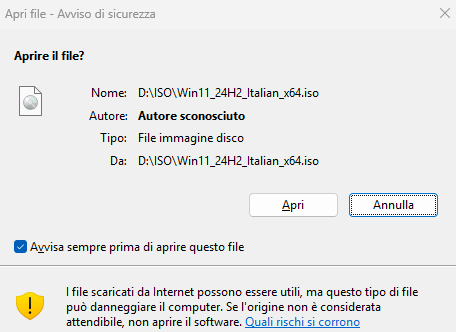
Montare file ISO installazione Windows 11

A questo punto, digitate cmd nella casella di ricerca del sistema operativo quindi scegliete Esegui come amministratore. Impartite quindi il comando seguente:

dism /get-wiminfo /wimfile:E:\sources\install.wim

Al posto di E: va sostituita la lettera identificativa di unità che Windows ha assegnato al contenuto del file ISO, verificabile nella finestra Questo PC. Guardate, nella risposta del comando DISM, quante edizioni sono incluse nel file ISO scaricato dal sito ufficiale Microsoft. A ogni singola edizione è associato uno specifico numero di indice.
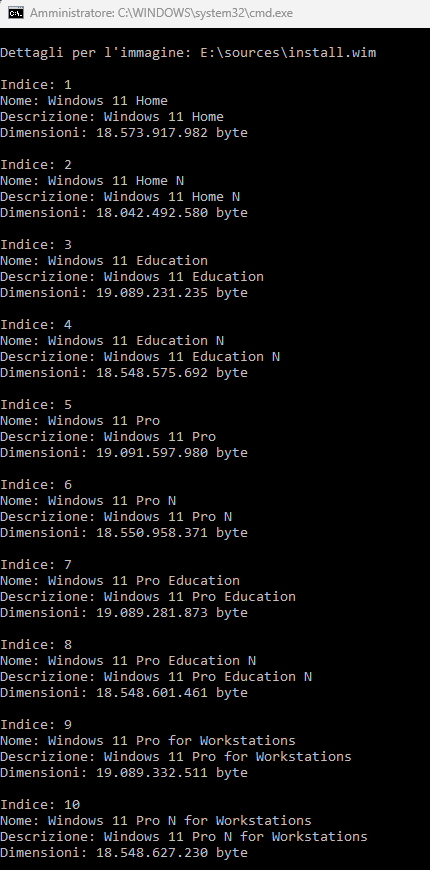
Edizioni Windows 11 file ISO

Cosa fare quando l’installazione di Windows 11 non fa scegliere l’edizione

Ci è stato più volte segnalato che la nuova procedura d’installazione di Windows 11 spesso non permette di scegliere l’edizione del sistema operativo da installare sul sistema.

Il setup di Windows 11 seleziona automaticamente l’edizione da installare in base alla chiave di prodotto (Product Key) presente nel BIOS UEFI del computer. Poiché in molti dispositivi preassemblati è caricata una chiave per l’edizione Home, succede che per impostazione predefinita si installa automaticamente Windows 11 Home.

Per superare quest’inghippo, è possibile utilizzare un trucco che permette di chiedere all’installazione di Windows 11 di chiedere sempre all’utente quale edizione di Windows 11 desideri installare.

Dopo aver generato un supporto d’installazione USB con Rufus o con altre utilità simili, è sufficiente portarsi nella cartella \sources di tale unità quindi creare un file chiamato ei.cfg. Per procedere in tal senso, è sufficiente il Blocco Note di Windows, assicurandosi che poi – in fase di salvataggio – non aggiunga una doppia estensione al file (l’elemento deve chiamarsi ei.cfg e non ei.cfg.txt).

Nel file ei.cfg è necessario specificare semplicemente quanto segue:

[Channel]
Retail
[VL]
0

Analisi delle indicazioni nel file ei.cfg

La sezione [Channel] permette di specificare il canale di distribuzione o licenza. Può assumere i seguenti valori:

  • Retail: Indica che la licenza è destinata a utenti finali (vendita al dettaglio).
  • OEM: Indica che la licenza è preinstallata su dispositivi dal produttore (Original Equipment Manufacturer).
  • Volume: Riguarda licenze multiple destinate alle aziende tramite contratti Volume Licensing.

Invece, [VL] indica se la licenza è associata a un contratto di tipo Volume Licensing. I valori possibili sono:

  • 0: Non è un’edizione Volume Licensing (ad esempio, Retail o OEM).
  • 1: È un’edizione Volume Licensing.

Avviare l’installazione di Windows 11 e scegliere l’edizione da installare

Effettuando il boot del PC dal supporto d’installazione USB, dopo aver scelto lingua, formato ora/valuta e layout della tastiera, alla comparsa della schermata seguente si deve scegliere Versione precedente dell’installazione.
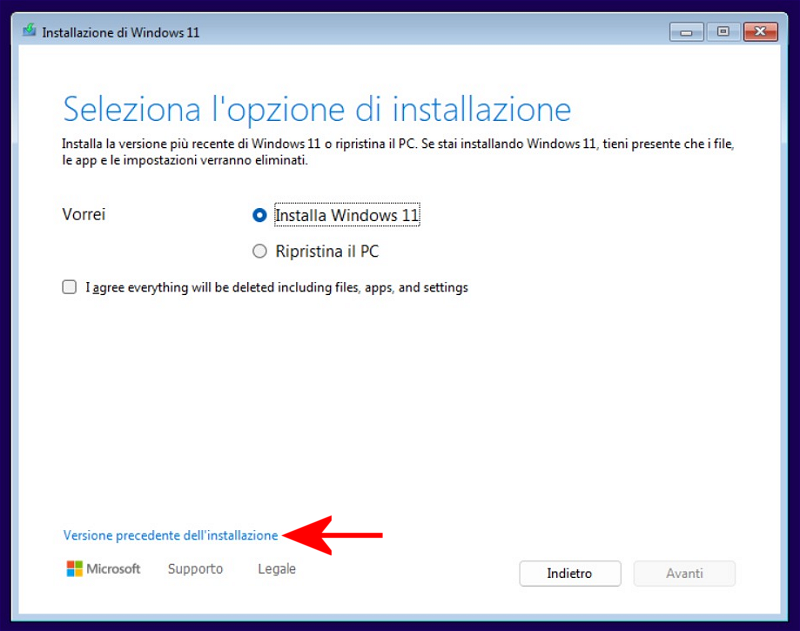
Versione precedente installazione Windows 11

Cliccando sul pulsante Installa, la routine di setup offrirà finalmente la possibilità di installare una qualunque delle edizioni di Windows 11 presenti nel supporto d’installazione generato a partire dal file ISO.
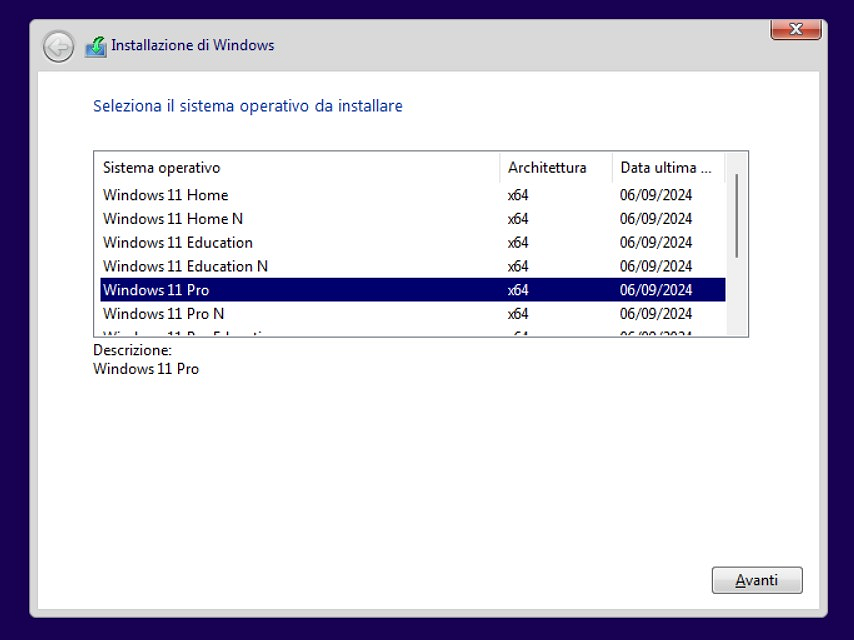
Scegliere edizione Windows 11 da installare

Volendo, è possibile usare un programma gratuito come Anyburn per modificare l’immagine ISO di Windows 11 e aggiungere il file ei.cfg creato in precedenza direttamente all’interno del file scaricato dai server Microsoft.

Ti consigliamo anche

Link copiato negli appunti