
Deprecated: Creation of dynamic property Timber\Site::$pingback is deprecated in /var/www/html/web/app/themes/ilsoftware/vendor/timber/timber/lib/Site.php on line 180

Deprecated: Creation of dynamic property Timber\User::$name is deprecated in /var/www/html/web/app/themes/ilsoftware/vendor/timber/timber/lib/User.php on line 118

Deprecated: Creation of dynamic property Timber\Post::$has_disclaimer is deprecated in /var/www/html/web/app/themes/ilsoftware/vendor/timber/timber/lib/Core.php on line 71

Deprecated: Creation of dynamic property Timber\Post::$_edit_lock is deprecated in /var/www/html/web/app/themes/ilsoftware/vendor/timber/timber/lib/Core.php on line 71

Deprecated: Creation of dynamic property Timber\Post::$_edit_last is deprecated in /var/www/html/web/app/themes/ilsoftware/vendor/timber/timber/lib/Core.php on line 71

Deprecated: Creation of dynamic property Timber\Post::$onesignal_meta_box_present is deprecated in /var/www/html/web/app/themes/ilsoftware/vendor/timber/timber/lib/Core.php on line 71

Deprecated: Creation of dynamic property Timber\Post::$onesignal_send_notification is deprecated in /var/www/html/web/app/themes/ilsoftware/vendor/timber/timber/lib/Core.php on line 71

Deprecated: Creation of dynamic property Timber\Post::$onesignal_modify_title_and_content is deprecated in /var/www/html/web/app/themes/ilsoftware/vendor/timber/timber/lib/Core.php on line 71

Deprecated: Creation of dynamic property Timber\Post::$onesignal_notification_custom_heading is deprecated in /var/www/html/web/app/themes/ilsoftware/vendor/timber/timber/lib/Core.php on line 71

Deprecated: Creation of dynamic property Timber\Post::$onesignal_notification_custom_content is deprecated in /var/www/html/web/app/themes/ilsoftware/vendor/timber/timber/lib/Core.php on line 71

Deprecated: Creation of dynamic property Timber\Post::$tipologia is deprecated in /var/www/html/web/app/themes/ilsoftware/vendor/timber/timber/lib/Core.php on line 71

Deprecated: Creation of dynamic property Timber\Post::$_tipologia is deprecated in /var/www/html/web/app/themes/ilsoftware/vendor/timber/timber/lib/Core.php on line 71

Deprecated: Creation of dynamic property Timber\Post::$attributi is deprecated in /var/www/html/web/app/themes/ilsoftware/vendor/timber/timber/lib/Core.php on line 71

Deprecated: Creation of dynamic property Timber\Post::$_attributi is deprecated in /var/www/html/web/app/themes/ilsoftware/vendor/timber/timber/lib/Core.php on line 71

Deprecated: Creation of dynamic property Timber\Post::$in_evidenza_newsletter is deprecated in /var/www/html/web/app/themes/ilsoftware/vendor/timber/timber/lib/Core.php on line 71

Deprecated: Creation of dynamic property Timber\Post::$_in_evidenza_newsletter is deprecated in /var/www/html/web/app/themes/ilsoftware/vendor/timber/timber/lib/Core.php on line 71

Deprecated: Creation of dynamic property Timber\Post::$inviato_in_newsletter is deprecated in /var/www/html/web/app/themes/ilsoftware/vendor/timber/timber/lib/Core.php on line 71

Deprecated: Creation of dynamic property Timber\Post::$_inviato_in_newsletter is deprecated in /var/www/html/web/app/themes/ilsoftware/vendor/timber/timber/lib/Core.php on line 71

Deprecated: Creation of dynamic property Timber\Post::$_yoast_wpseo_primary_category is deprecated in /var/www/html/web/app/themes/ilsoftware/vendor/timber/timber/lib/Core.php on line 71

Deprecated: Creation of dynamic property Timber\Post::$_yoast_wpseo_primary_blz_affiliation_attributes is deprecated in /var/www/html/web/app/themes/ilsoftware/vendor/timber/timber/lib/Core.php on line 71

Deprecated: Creation of dynamic property Timber\Post::$_yoast_wpseo_primary_content_type is deprecated in /var/www/html/web/app/themes/ilsoftware/vendor/timber/timber/lib/Core.php on line 71

Deprecated: Creation of dynamic property Timber\Post::$_yoast_wpseo_primary_attributes is deprecated in /var/www/html/web/app/themes/ilsoftware/vendor/timber/timber/lib/Core.php on line 71

Deprecated: Creation of dynamic property Timber\Post::$_yoast_wpseo_primary_speciali is deprecated in /var/www/html/web/app/themes/ilsoftware/vendor/timber/timber/lib/Core.php on line 71

Deprecated: Creation of dynamic property Timber\Post::$_yoast_wpseo_focuskw is deprecated in /var/www/html/web/app/themes/ilsoftware/vendor/timber/timber/lib/Core.php on line 71

Deprecated: Creation of dynamic property Timber\Post::$_yoast_wpseo_metadesc is deprecated in /var/www/html/web/app/themes/ilsoftware/vendor/timber/timber/lib/Core.php on line 71

Deprecated: Creation of dynamic property Timber\Post::$_yoast_wpseo_linkdex is deprecated in /var/www/html/web/app/themes/ilsoftware/vendor/timber/timber/lib/Core.php on line 71

Deprecated: Creation of dynamic property Timber\Post::$_yoast_wpseo_content_score is deprecated in /var/www/html/web/app/themes/ilsoftware/vendor/timber/timber/lib/Core.php on line 71

Deprecated: Creation of dynamic property Timber\Post::$_yoast_wpseo_focuskeywords is deprecated in /var/www/html/web/app/themes/ilsoftware/vendor/timber/timber/lib/Core.php on line 71

Deprecated: Creation of dynamic property Timber\Post::$_yoast_wpseo_keywordsynonyms is deprecated in /var/www/html/web/app/themes/ilsoftware/vendor/timber/timber/lib/Core.php on line 71

Deprecated: Creation of dynamic property Timber\Post::$_yoast_wpseo_estimated-reading-time-minutes is deprecated in /var/www/html/web/app/themes/ilsoftware/vendor/timber/timber/lib/Core.php on line 71

Deprecated: Creation of dynamic property Timber\Post::$_yoast_wpseo_wordproof_timestamp is deprecated in /var/www/html/web/app/themes/ilsoftware/vendor/timber/timber/lib/Core.php on line 71

Deprecated: Creation of dynamic property Timber\Post::$_thumbnail_id is deprecated in /var/www/html/web/app/themes/ilsoftware/vendor/timber/timber/lib/Core.php on line 71

Deprecated: Creation of dynamic property Timber\Post::$response_body is deprecated in /var/www/html/web/app/themes/ilsoftware/vendor/timber/timber/lib/Core.php on line 71

Deprecated: Creation of dynamic property Timber\Post::$status is deprecated in /var/www/html/web/app/themes/ilsoftware/vendor/timber/timber/lib/Core.php on line 71

Deprecated: Creation of dynamic property Timber\Post::$_yoast_indexnow_last_ping is deprecated in /var/www/html/web/app/themes/ilsoftware/vendor/timber/timber/lib/Core.php on line 71

Deprecated: Creation of dynamic property Timber\Post::$_oembed_ba0183e114e55befd55dad125b705339 is deprecated in /var/www/html/web/app/themes/ilsoftware/vendor/timber/timber/lib/Core.php on line 71

Deprecated: Creation of dynamic property Timber\Post::$_oembed_time_ba0183e114e55befd55dad125b705339 is deprecated in /var/www/html/web/app/themes/ilsoftware/vendor/timber/timber/lib/Core.php on line 71

Deprecated: Creation of dynamic property Timber\Post::$post_date_gmt is deprecated in /var/www/html/web/app/themes/ilsoftware/vendor/timber/timber/lib/Core.php on line 71

Deprecated: Creation of dynamic property Timber\Post::$comment_status is deprecated in /var/www/html/web/app/themes/ilsoftware/vendor/timber/timber/lib/Core.php on line 71

Deprecated: Creation of dynamic property Timber\Post::$ping_status is deprecated in /var/www/html/web/app/themes/ilsoftware/vendor/timber/timber/lib/Core.php on line 71

Deprecated: Creation of dynamic property Timber\Post::$post_password is deprecated in /var/www/html/web/app/themes/ilsoftware/vendor/timber/timber/lib/Core.php on line 71

Deprecated: Creation of dynamic property Timber\Post::$post_name is deprecated in /var/www/html/web/app/themes/ilsoftware/vendor/timber/timber/lib/Core.php on line 71

Deprecated: Creation of dynamic property Timber\Post::$to_ping is deprecated in /var/www/html/web/app/themes/ilsoftware/vendor/timber/timber/lib/Core.php on line 71

Deprecated: Creation of dynamic property Timber\Post::$pinged is deprecated in /var/www/html/web/app/themes/ilsoftware/vendor/timber/timber/lib/Core.php on line 71

Deprecated: Creation of dynamic property Timber\Post::$post_modified is deprecated in /var/www/html/web/app/themes/ilsoftware/vendor/timber/timber/lib/Core.php on line 71

Deprecated: Creation of dynamic property Timber\Post::$post_modified_gmt is deprecated in /var/www/html/web/app/themes/ilsoftware/vendor/timber/timber/lib/Core.php on line 71

Deprecated: Creation of dynamic property Timber\Post::$post_content_filtered is deprecated in /var/www/html/web/app/themes/ilsoftware/vendor/timber/timber/lib/Core.php on line 71

Deprecated: Creation of dynamic property Timber\Post::$guid is deprecated in /var/www/html/web/app/themes/ilsoftware/vendor/timber/timber/lib/Core.php on line 71

Deprecated: Creation of dynamic property Timber\Post::$menu_order is deprecated in /var/www/html/web/app/themes/ilsoftware/vendor/timber/timber/lib/Core.php on line 71

Deprecated: Creation of dynamic property Timber\Post::$post_mime_type is deprecated in /var/www/html/web/app/themes/ilsoftware/vendor/timber/timber/lib/Core.php on line 71

Deprecated: Creation of dynamic property Timber\Post::$comment_count is deprecated in /var/www/html/web/app/themes/ilsoftware/vendor/timber/timber/lib/Core.php on line 71

Deprecated: Creation of dynamic property Timber\Post::$filter is deprecated in /var/www/html/web/app/themes/ilsoftware/vendor/timber/timber/lib/Core.php on line 71
Google Drive: come usarlo da Linux con GNOME Account online | IlSoftware.it

Google Drive: come usarlo da Linux con GNOME Account online

Come configurare GNOME Account online e utilizzarlo dai sistemi Linux per accedere ai dati memorizzati sul cloud di Google Drive.

GNOME Online Accounts è un componente integrato nel desktop environment GNOME per Linux che facilita la gestione e l’integrazione dei vari account online all’interno del sistema operativo. Questo strumento, che in italiano si chiama semplicemente Account online, offre agli utenti la possibilità di collegare e gestire in modo centralizzato diversi servizi online come quelli di Google, Nextcloud, Microsoft e molti altri. Una volta impostato, l’account è disponibile nel file manager predefinito e a livello di intero sistema.

Gli account configurati tramite GNOME Account online sono automaticamente integrati con le applicazioni predefinite di GNOME come il client di posta elettronica (Evolution), il calendario, i contatti, il file manager (Nautilus) e così via. In questo modo è possibile accedere subito al contenuto degli account e usarli direttamente con le applicazioni installate in locale.

Come accedere a Google Drive con GNOME Account online

Per chi utilizza qualunque file manager su Linux, risulta particolarmente utile interfacciarsi con i file memorizzati su Google Drive o su altri servizi di storage cloud.

Il componente Account online è già integrato in GNOME: gli utenti di Ubuntu, quindi, non devono fare altro che avviarlo dalle impostazioni del sistema operativo. Ci si troverà dinanzi a una schermata simile alla seguente che, tra le varie proposte, consente di selezionare anche un account Google.

Per verificare l’effettivo utilizzo di GNOME come desktop environment, si può digitare quanto segue in una finestra del terminale:

echo $XDG_CURRENT_DESKTOP
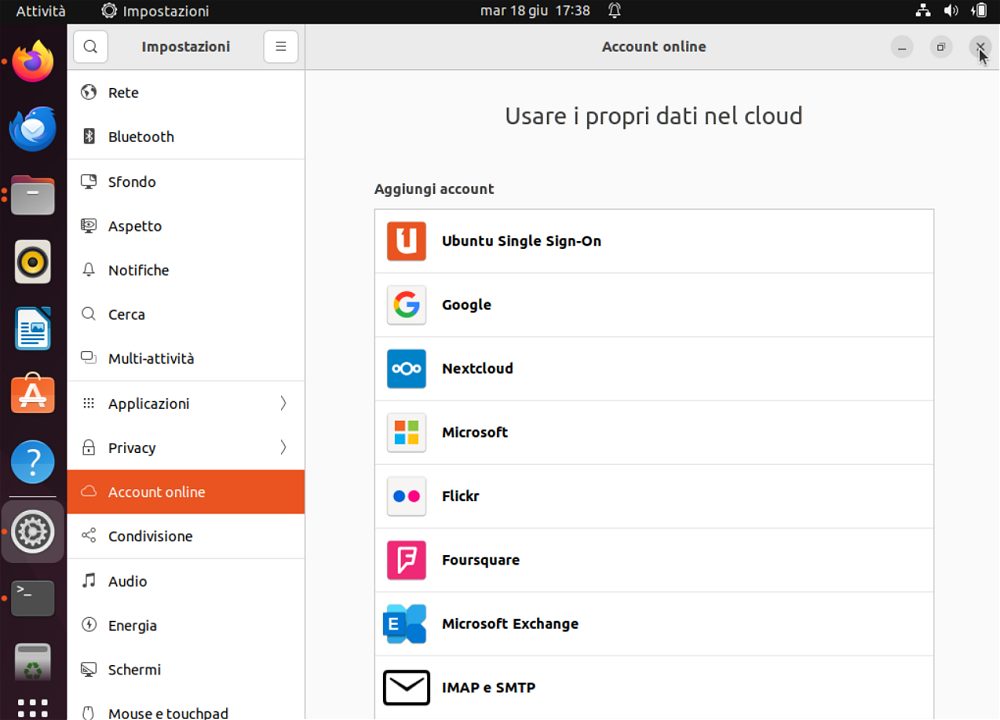
Account online Google Drive GNOME Linux

Per verificare se GNOME Account online è installato sul sistema, è possibile usare diversi metodi. In generale, però si può aprire la finestra del terminale e digitare quanto segue, a seconda della distro in uso:

dpkg -l | grep gnome-online-accounts (Ubuntu/Debian)

rpm -qa | grep gnome-online-accounts (Fedora)

pacman -Qs gnome-online-accounts (Arch Linux)

Alla comparsa della schermata Accedi, basta digitare il proprio account Google quindi premere Invio o cliccare sul pulsante Avanti.
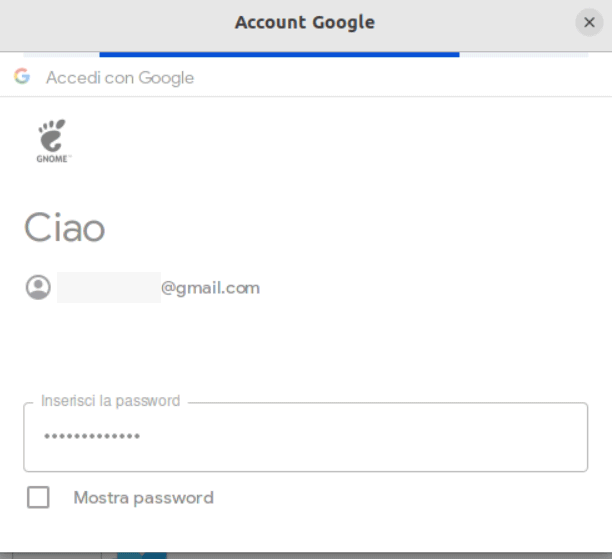
Accesso account Google da Linux

Dopo l’inserimento della password corretta, la barra posizionata al di sotto del titolo della finestra (Account Google) potrebbe non fermarsi mai. In questi casi, la procedura sembrerebbe bloccata e parrebbe impossibile proseguire. In realtà la soluzione è molto semplice.

Superare la verifica in due passaggi Google

Quando sull’account Google è abilitata la verifica in due passaggi, GNOME Account online sembra non essere in grado di gestire la cosa. Per superare l’impasse, è sufficiente cliccare con il tasto destro del mouse o del touchpad quindi scegliere la voce Reload.
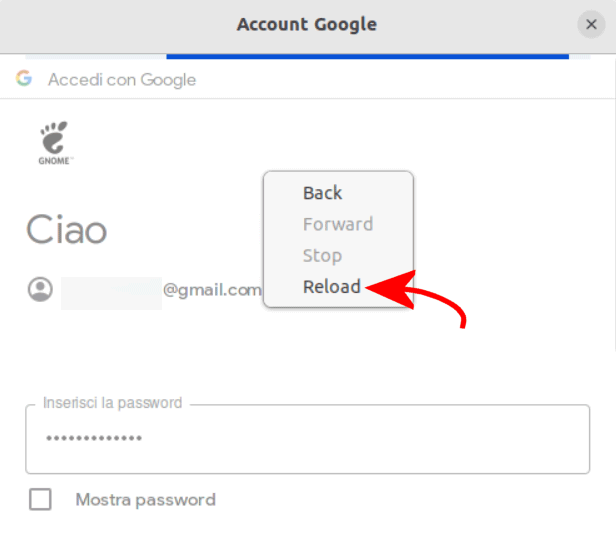
GNOME Linux verifica in due passaggi Google

Applicando questo semplice trucco, appare la schermata Verifica in due passaggi: si può eventualmente selezionare Prova un altro metodo per introdurre il secondo fattore come più vi aggrada.
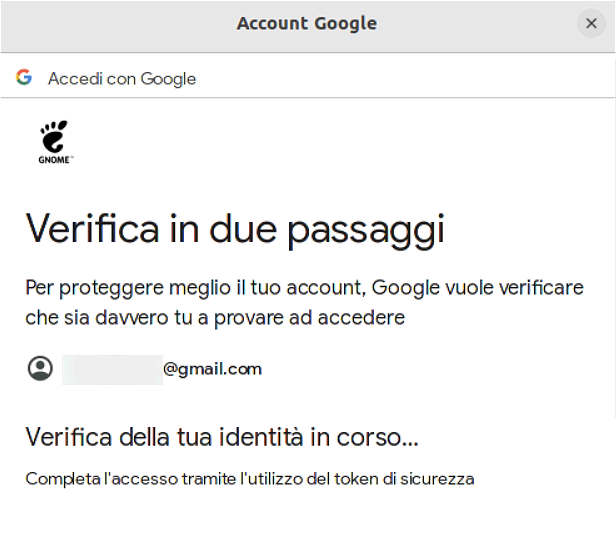
Superare verifica due passaggi Linux

Quando compare Accedi a GNOME, basta fare clic su Continua per poi accordare l’accesso all’account da parte dell’app GNOME: si deve scorrere il contenuto della finestra quindi scegliere Consenti. Se si fosse interessati solamente a Google Drive, si possono disattivare tutti gli “interruttori” lasciando abilitato solo File.
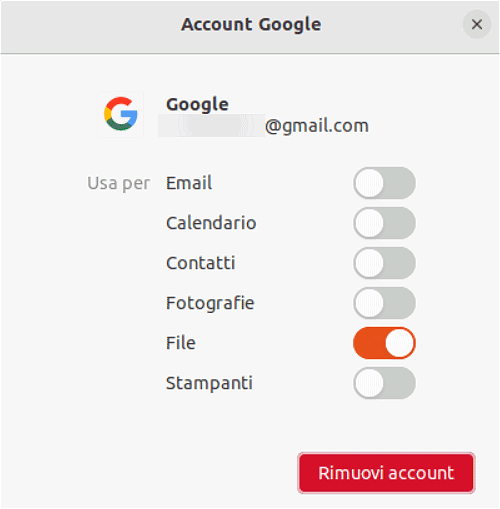
Accesso all'account Google da Linux

Con un clic sull’account Google appena aggiunto, sarà comunque possibile – in seguito – aggiungere anche l’accesso agli altri dati contenuti nell’account (email, calendario, contatti, foto, stampanti condivise sul cloud).

Usare il file manager Linux per accedere ai file Google Drive

Una volta conclusa la procedura di configurazione, si può aprire il file manager: tra le risorse elencate nella colonna di sinistra, si trova un riferimento esplicito all’account Google appena aggiunto.

Cliccando su di esso, GNOME Account online propone due icone: Condiviso con me e Il mio Drive. Nella prima cartella sono riuniti i file condivisi da altri utenti proprietari di account Google; nella seconda si trovano i file personali conservati su Google Drive.

Basta un semplice doppio clic per accedere all’una o all’altra risorsa. Google Drive diventa così comodamente navigabile da desktop, con qualunque distro Linux supporti il desktop environment GNOME.
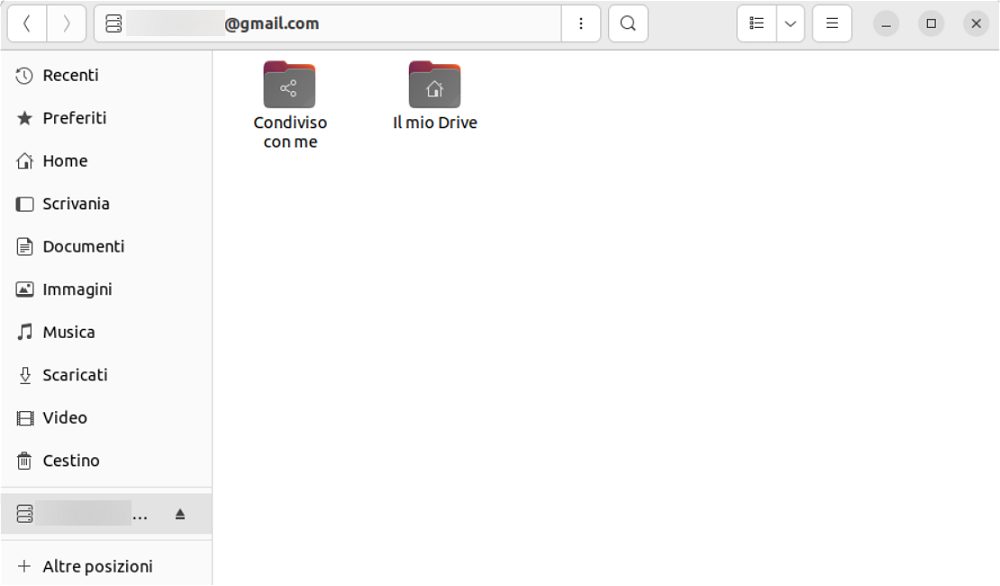
File manager Google Drive su Linux con GNOME

GNOME Account online è progettato per semplificare e migliorare l’esperienza dell’utente quando si tratta di gestire più account online. Aiuta ad aumentare la produttività centralizzando la gestione degli account online. Gli utenti possono risparmiare tempo prezioso evitando di dover configurare gli account separatamente per ogni applicazione.

L’integrazione nativa con le applicazioni Linux offre un’esperienza utente più coesa e uniforme. Inoltre la facilità di accesso ai dati ospitati sui servizi Google (e degli altri provider) è davvero impareggiabile.

Nel caso in cui si volesse rimuovere l’accesso al contenuto di Google Drive da parte di GNOME Account online, basta accedere alla pagina Servizi e app di terze parti, selezionare GNOME quindi Elimina tutti i tuoi collegamenti con GNOME.

In un altro articolo abbiamo presentato Celeste, una soluzione che aiuta invece a sincronizzare file tra Google Drive, il sistema locale e viceversa.

Credit immagine in apertura: Copilot Designer.

Ti consigliamo anche

Link copiato negli appunti