
Deprecated: Creation of dynamic property Timber\Site::$pingback is deprecated in /var/www/html/web/app/themes/ilsoftware/vendor/timber/timber/lib/Site.php on line 180

Deprecated: Creation of dynamic property Timber\User::$name is deprecated in /var/www/html/web/app/themes/ilsoftware/vendor/timber/timber/lib/User.php on line 118

Deprecated: Creation of dynamic property Timber\Post::$has_disclaimer is deprecated in /var/www/html/web/app/themes/ilsoftware/vendor/timber/timber/lib/Core.php on line 71

Deprecated: Creation of dynamic property Timber\Post::$_edit_lock is deprecated in /var/www/html/web/app/themes/ilsoftware/vendor/timber/timber/lib/Core.php on line 71

Deprecated: Creation of dynamic property Timber\Post::$_edit_last is deprecated in /var/www/html/web/app/themes/ilsoftware/vendor/timber/timber/lib/Core.php on line 71

Deprecated: Creation of dynamic property Timber\Post::$onesignal_meta_box_present is deprecated in /var/www/html/web/app/themes/ilsoftware/vendor/timber/timber/lib/Core.php on line 71

Deprecated: Creation of dynamic property Timber\Post::$onesignal_send_notification is deprecated in /var/www/html/web/app/themes/ilsoftware/vendor/timber/timber/lib/Core.php on line 71

Deprecated: Creation of dynamic property Timber\Post::$onesignal_modify_title_and_content is deprecated in /var/www/html/web/app/themes/ilsoftware/vendor/timber/timber/lib/Core.php on line 71

Deprecated: Creation of dynamic property Timber\Post::$onesignal_notification_custom_heading is deprecated in /var/www/html/web/app/themes/ilsoftware/vendor/timber/timber/lib/Core.php on line 71

Deprecated: Creation of dynamic property Timber\Post::$onesignal_notification_custom_content is deprecated in /var/www/html/web/app/themes/ilsoftware/vendor/timber/timber/lib/Core.php on line 71

Deprecated: Creation of dynamic property Timber\Post::$tipologia is deprecated in /var/www/html/web/app/themes/ilsoftware/vendor/timber/timber/lib/Core.php on line 71

Deprecated: Creation of dynamic property Timber\Post::$_tipologia is deprecated in /var/www/html/web/app/themes/ilsoftware/vendor/timber/timber/lib/Core.php on line 71

Deprecated: Creation of dynamic property Timber\Post::$attributi is deprecated in /var/www/html/web/app/themes/ilsoftware/vendor/timber/timber/lib/Core.php on line 71

Deprecated: Creation of dynamic property Timber\Post::$_attributi is deprecated in /var/www/html/web/app/themes/ilsoftware/vendor/timber/timber/lib/Core.php on line 71

Deprecated: Creation of dynamic property Timber\Post::$in_evidenza_newsletter is deprecated in /var/www/html/web/app/themes/ilsoftware/vendor/timber/timber/lib/Core.php on line 71

Deprecated: Creation of dynamic property Timber\Post::$_in_evidenza_newsletter is deprecated in /var/www/html/web/app/themes/ilsoftware/vendor/timber/timber/lib/Core.php on line 71

Deprecated: Creation of dynamic property Timber\Post::$inviato_in_newsletter is deprecated in /var/www/html/web/app/themes/ilsoftware/vendor/timber/timber/lib/Core.php on line 71

Deprecated: Creation of dynamic property Timber\Post::$_inviato_in_newsletter is deprecated in /var/www/html/web/app/themes/ilsoftware/vendor/timber/timber/lib/Core.php on line 71

Deprecated: Creation of dynamic property Timber\Post::$_yoast_wpseo_primary_category is deprecated in /var/www/html/web/app/themes/ilsoftware/vendor/timber/timber/lib/Core.php on line 71

Deprecated: Creation of dynamic property Timber\Post::$_yoast_wpseo_primary_blz_affiliation_attributes is deprecated in /var/www/html/web/app/themes/ilsoftware/vendor/timber/timber/lib/Core.php on line 71

Deprecated: Creation of dynamic property Timber\Post::$_yoast_wpseo_primary_content_type is deprecated in /var/www/html/web/app/themes/ilsoftware/vendor/timber/timber/lib/Core.php on line 71

Deprecated: Creation of dynamic property Timber\Post::$_yoast_wpseo_primary_attributes is deprecated in /var/www/html/web/app/themes/ilsoftware/vendor/timber/timber/lib/Core.php on line 71

Deprecated: Creation of dynamic property Timber\Post::$_yoast_wpseo_primary_speciali is deprecated in /var/www/html/web/app/themes/ilsoftware/vendor/timber/timber/lib/Core.php on line 71

Deprecated: Creation of dynamic property Timber\Post::$_yoast_wpseo_focuskw is deprecated in /var/www/html/web/app/themes/ilsoftware/vendor/timber/timber/lib/Core.php on line 71

Deprecated: Creation of dynamic property Timber\Post::$_yoast_wpseo_metadesc is deprecated in /var/www/html/web/app/themes/ilsoftware/vendor/timber/timber/lib/Core.php on line 71

Deprecated: Creation of dynamic property Timber\Post::$_yoast_wpseo_linkdex is deprecated in /var/www/html/web/app/themes/ilsoftware/vendor/timber/timber/lib/Core.php on line 71

Deprecated: Creation of dynamic property Timber\Post::$_yoast_wpseo_content_score is deprecated in /var/www/html/web/app/themes/ilsoftware/vendor/timber/timber/lib/Core.php on line 71

Deprecated: Creation of dynamic property Timber\Post::$_yoast_wpseo_focuskeywords is deprecated in /var/www/html/web/app/themes/ilsoftware/vendor/timber/timber/lib/Core.php on line 71

Deprecated: Creation of dynamic property Timber\Post::$_yoast_wpseo_keywordsynonyms is deprecated in /var/www/html/web/app/themes/ilsoftware/vendor/timber/timber/lib/Core.php on line 71

Deprecated: Creation of dynamic property Timber\Post::$_yoast_wpseo_estimated-reading-time-minutes is deprecated in /var/www/html/web/app/themes/ilsoftware/vendor/timber/timber/lib/Core.php on line 71

Deprecated: Creation of dynamic property Timber\Post::$_thumbnail_id is deprecated in /var/www/html/web/app/themes/ilsoftware/vendor/timber/timber/lib/Core.php on line 71

Deprecated: Creation of dynamic property Timber\Post::$response_body is deprecated in /var/www/html/web/app/themes/ilsoftware/vendor/timber/timber/lib/Core.php on line 71

Deprecated: Creation of dynamic property Timber\Post::$status is deprecated in /var/www/html/web/app/themes/ilsoftware/vendor/timber/timber/lib/Core.php on line 71

Deprecated: Creation of dynamic property Timber\Post::$_yoast_indexnow_last_ping is deprecated in /var/www/html/web/app/themes/ilsoftware/vendor/timber/timber/lib/Core.php on line 71

Deprecated: Creation of dynamic property Timber\Post::$post_date_gmt is deprecated in /var/www/html/web/app/themes/ilsoftware/vendor/timber/timber/lib/Core.php on line 71

Deprecated: Creation of dynamic property Timber\Post::$comment_status is deprecated in /var/www/html/web/app/themes/ilsoftware/vendor/timber/timber/lib/Core.php on line 71

Deprecated: Creation of dynamic property Timber\Post::$ping_status is deprecated in /var/www/html/web/app/themes/ilsoftware/vendor/timber/timber/lib/Core.php on line 71

Deprecated: Creation of dynamic property Timber\Post::$post_password is deprecated in /var/www/html/web/app/themes/ilsoftware/vendor/timber/timber/lib/Core.php on line 71

Deprecated: Creation of dynamic property Timber\Post::$post_name is deprecated in /var/www/html/web/app/themes/ilsoftware/vendor/timber/timber/lib/Core.php on line 71

Deprecated: Creation of dynamic property Timber\Post::$to_ping is deprecated in /var/www/html/web/app/themes/ilsoftware/vendor/timber/timber/lib/Core.php on line 71

Deprecated: Creation of dynamic property Timber\Post::$pinged is deprecated in /var/www/html/web/app/themes/ilsoftware/vendor/timber/timber/lib/Core.php on line 71

Deprecated: Creation of dynamic property Timber\Post::$post_modified is deprecated in /var/www/html/web/app/themes/ilsoftware/vendor/timber/timber/lib/Core.php on line 71

Deprecated: Creation of dynamic property Timber\Post::$post_modified_gmt is deprecated in /var/www/html/web/app/themes/ilsoftware/vendor/timber/timber/lib/Core.php on line 71

Deprecated: Creation of dynamic property Timber\Post::$post_content_filtered is deprecated in /var/www/html/web/app/themes/ilsoftware/vendor/timber/timber/lib/Core.php on line 71

Deprecated: Creation of dynamic property Timber\Post::$guid is deprecated in /var/www/html/web/app/themes/ilsoftware/vendor/timber/timber/lib/Core.php on line 71

Deprecated: Creation of dynamic property Timber\Post::$menu_order is deprecated in /var/www/html/web/app/themes/ilsoftware/vendor/timber/timber/lib/Core.php on line 71

Deprecated: Creation of dynamic property Timber\Post::$post_mime_type is deprecated in /var/www/html/web/app/themes/ilsoftware/vendor/timber/timber/lib/Core.php on line 71

Deprecated: Creation of dynamic property Timber\Post::$comment_count is deprecated in /var/www/html/web/app/themes/ilsoftware/vendor/timber/timber/lib/Core.php on line 71

Deprecated: Creation of dynamic property Timber\Post::$filter is deprecated in /var/www/html/web/app/themes/ilsoftware/vendor/timber/timber/lib/Core.php on line 71
Il nuovo modo per installare Windows 11 su Raspberry Pi, senza limiti | IlSoftware.it

Il nuovo modo per installare Windows 11 su Raspberry Pi, senza limiti

L'idea di eseguire Windows 11 su Raspberry Pi affascina molti, ma presenta sfide tecniche. Il progetto BVM (Botspot Virtual Machine) ne semplifica l'installazione utilizzando QEMU/KVM. Con una procedura automatizzata, BVM scarica e ottimizza Windows 11 ARM, rendendolo più scattante.

L’idea di far girare Windows 11 su un piccolo, economico single-board computer Raspberry Pi ha sempre stuzzicato la fantasia di molti. Immaginate di poter utilizzare qualsiasi software per Windows, anche quell’utilità o quel gestionale un po’ datato ma insostituibile, su un dispositivo che consuma pochissima energia e può essere nascosto ovunque. Il progetto BVM (Botspot Virtual Machine), pubblicato in questa pagina GitHub, vuole rendere molto più semplice portare Windows 11 su Raspberry Pi grazie all’utilizzo della virtualizzazione.

Diversamente rispetto a un’installazione classica di Windows 11 ARM su Raspberry Pi, BVM esegue il sistema operativo Microsoft in una macchina virtuale QEMU KVM creata e gestita, ad esempio, sul Raspberry Pi OS.

Raspberry Pi e Windows 11: un piccolo computer, grandi sfide

Far funzionare Windows 11 su un Raspberry Pi non è esattamente una passeggiata. Il procedimento richiede un minimo di preparazione e una buona dose di pazienza.

Prima di iniziare, è bene disporre di una Raspberry Pi 4 o superiore con almeno 4 GB di RAM. Idealmente, sarebbero preferibili le versioni della scheda con 8 GB o 16 GB, in modo tale da poter contare su prestazioni più fluide. Inoltre, il consiglio migliore è abbandonare la scheda microSD come unità principale. Al suo posto, è importante utilizzare un’unità SSD NVMe: la differenza in termini di velocità è abissale e vi metterete subito al riparo da parecchie frustrazioni. In un altro articolo abbiamo visto come effettuare il boot di Raspberry Pi da SSD NVMe.

Perché usare Windows su Raspberry Pi quando c’è Linux? La risposta è che spesso possiamo avere bisogno di Windows: che si tratti di un software aziendale specifico, di un’applicazione per il controllo di apparecchiature particolari o semplicemente perché si ha bisogno di usare una specifica applicazione, in alcuni contesti risulta necessario ricorrere alla piattaforma di casa Microsoft.

Una Raspberry Pi con Windows 11 a bordo potrebbe inoltre essere sfruttata come dispositivo a basso consumo per eseguire applicazioni embedded che richiedono Windows. Inoltre, gli sviluppatori software possono utilizzare questa configurazione per testare applicazioni Windows in un ambiente ARM.
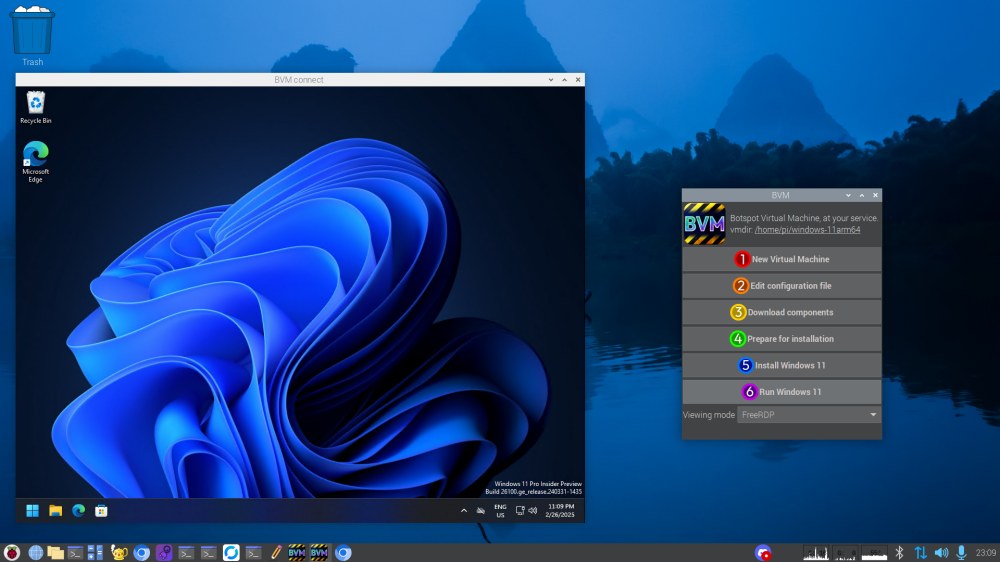
Virtualizzazione Windows 11 ARM desktop Raspberry Pi

Come funziona BVM, per portare Windows 11 ARM su Raspberry Pi come macchina virtuale

BVM è un software libero (licenza GNU GPLv3) che automatizza gran parte del processo di installazione di Windows 11 su Raspberry Pi, trasformando un’operazione potenzialmente complessa in qualcosa di relativamente semplice.

Per cominciare, è necessario aver installato Raspberry Pi OS a 64 bit, preferibilmente su un’unità SSD NVMe collegata con la scheda Raspberry. Aprendo una finestra del terminale, si può quindi introdurre quanto segue in modo da clonare in locale il contenuto del repository GitHub:

git clone https://github.com/Botspot/bvm

A questo punto si può aggiornare il sistema operativo quindi accedere all’interfaccia grafica di BVM per semplificare la configurazione:

sudo apt update && sudo apt upgrade -y
cd bvm
./bvm gui
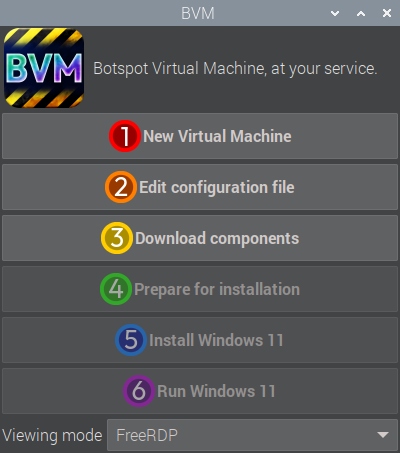
Windows 11 su Raspberry Pi come macchina virtuale

Creazione della macchina virtuale Windows 11 e configurazione

L’utilità BVM permette di effettuare in automatico una serie di passaggi tramite una comoda interfaccia grafica. Gli stessi possono essere eseguiti anche manualmente, dalla riga di comando, così come spiegato qui. La GUI, tuttavia, semplifica molto l’impostazione della macchina virtuale, l’installazione di Windows 11 su Raspberry Pi e il suo utilizzo.

Cliccando su New Virtual Machine, BVM si occupa di creare una nuova macchina virtuale con QEMU/KVM. Al termine dell’operazione, cliccando il pulsante Edit configuration file, basta specificare il nome utente e la password per l’account usato nella macchina virtuale Windows 11 (fare riferimento alle direttive vm_username e vm_password).

Una volta salvato il file di configurazione, si può fare clic su Download components per avviare il prelievo di tutto il software necessario, compreso il file ISO di Windows 11 ARM. Lo script, dopo aver scaricato l’immagine ISO di Windows 11 ARM provvede a modificarla in modo da rendere l’installazione completamente automatica (non è necessario operare alcuna scelta né premere alcun pulsante). Sono inoltre automaticamente rimossi una serie di componenti di Windows 11 ritenuti pesanti, soprattutto in vista dell’esecuzione su Raspberry Pi. Nello specifico, BVM utilizza lo script Win11Debloat per alleggerire Windows 11.

Conclusa anche la quarta fase, non resta che cliccare su Install Windows 11 per avviare l’installazione del sistema operativo. L’operazione richiederà molto tempo: non dovete far altro che aspettare. Alla fine, cliccando su Run Windows 11, il sistema operativo si schiuderà dinanzi ai vostri occhi e sarà eseguito in finestra.

Per installare Windows 11 senza limiti su Raspberry Pi, BVM utilizza per default il Product Key fornito da Microsoft per gli utenti che si servono delle macchine virtuali. Per maggiori informazioni in proposito, si può fare riferimento al contenuto della cartella resources/.

Attenzione: non è tutto oro quello che luccica

L’installazione di Windows 11 su Raspberry Pi tramite BVM è un’impresa affascinante, ma non priva di compromessi.

Va tenuto presente, ad esempio, che la funzionalità USB passthrough (permetterebbe di collegare dispositivi USB direttamente alla macchina virtuale Windows), potrebbe non funzionare perfettamente.

Il vero tallone d’Achille, però, è la mancanza di driver GPU per Windows su ARM su Raspberry Pi. Questo significa che le prestazioni grafiche saranno limitate, rendendo il gaming un’esperienza ben lontana dalle aspettative.

In termini di prestazioni, inoltre, non aspettatevi miracoli. Windows 11 su Raspberry Pi non sarà mai veloce come su un PC desktop. Le applicazioni di base e la navigazione Web funzionano in modo accettabile, ma attività più intensive metteranno a dura prova il piccolo computer.

BVM: un progetto che può crescere tanto

Il progetto BVM è in continua evoluzione. Con ulteriori ottimizzazioni, il supporto per i driver GPU e il perfezionamento della funzionalità di USB passthrough, questa soluzione potrebbe diventare ancora più interessante.

In conclusione, se siete pronti a scendere a qualche compromesso e avete bisogno di Windows su Raspberry Pi, BVM è uno strumento da prendere in seria considerazione. Non aspettatevi miracoli, ma siate pronti a sperimentare e a scoprire le potenzialità di un’accoppiata che potrebbe assicurare importanti soddisfazioni in futuro.

Ti consigliamo anche

Link copiato negli appunti