
Deprecated: Creation of dynamic property Timber\Site::$pingback is deprecated in /var/www/html/web/app/themes/ilsoftware/vendor/timber/timber/lib/Site.php on line 180

Deprecated: Creation of dynamic property Timber\User::$name is deprecated in /var/www/html/web/app/themes/ilsoftware/vendor/timber/timber/lib/User.php on line 118

Deprecated: Creation of dynamic property Timber\Post::$has_disclaimer is deprecated in /var/www/html/web/app/themes/ilsoftware/vendor/timber/timber/lib/Core.php on line 71

Deprecated: Creation of dynamic property Timber\Post::$_edit_lock is deprecated in /var/www/html/web/app/themes/ilsoftware/vendor/timber/timber/lib/Core.php on line 71

Deprecated: Creation of dynamic property Timber\Post::$_edit_last is deprecated in /var/www/html/web/app/themes/ilsoftware/vendor/timber/timber/lib/Core.php on line 71

Deprecated: Creation of dynamic property Timber\Post::$_oembed_58db7f3e0eb15557a62b1134f7ff22f7 is deprecated in /var/www/html/web/app/themes/ilsoftware/vendor/timber/timber/lib/Core.php on line 71

Deprecated: Creation of dynamic property Timber\Post::$_oembed_time_58db7f3e0eb15557a62b1134f7ff22f7 is deprecated in /var/www/html/web/app/themes/ilsoftware/vendor/timber/timber/lib/Core.php on line 71

Deprecated: Creation of dynamic property Timber\Post::$_oembed_56a0f28a0540838bf04ed463e1e108ab is deprecated in /var/www/html/web/app/themes/ilsoftware/vendor/timber/timber/lib/Core.php on line 71

Deprecated: Creation of dynamic property Timber\Post::$_oembed_time_56a0f28a0540838bf04ed463e1e108ab is deprecated in /var/www/html/web/app/themes/ilsoftware/vendor/timber/timber/lib/Core.php on line 71

Deprecated: Creation of dynamic property Timber\Post::$onesignal_meta_box_present is deprecated in /var/www/html/web/app/themes/ilsoftware/vendor/timber/timber/lib/Core.php on line 71

Deprecated: Creation of dynamic property Timber\Post::$onesignal_send_notification is deprecated in /var/www/html/web/app/themes/ilsoftware/vendor/timber/timber/lib/Core.php on line 71

Deprecated: Creation of dynamic property Timber\Post::$onesignal_modify_title_and_content is deprecated in /var/www/html/web/app/themes/ilsoftware/vendor/timber/timber/lib/Core.php on line 71

Deprecated: Creation of dynamic property Timber\Post::$onesignal_notification_custom_heading is deprecated in /var/www/html/web/app/themes/ilsoftware/vendor/timber/timber/lib/Core.php on line 71

Deprecated: Creation of dynamic property Timber\Post::$onesignal_notification_custom_content is deprecated in /var/www/html/web/app/themes/ilsoftware/vendor/timber/timber/lib/Core.php on line 71

Deprecated: Creation of dynamic property Timber\Post::$tipologia is deprecated in /var/www/html/web/app/themes/ilsoftware/vendor/timber/timber/lib/Core.php on line 71

Deprecated: Creation of dynamic property Timber\Post::$_tipologia is deprecated in /var/www/html/web/app/themes/ilsoftware/vendor/timber/timber/lib/Core.php on line 71

Deprecated: Creation of dynamic property Timber\Post::$attributi is deprecated in /var/www/html/web/app/themes/ilsoftware/vendor/timber/timber/lib/Core.php on line 71

Deprecated: Creation of dynamic property Timber\Post::$_attributi is deprecated in /var/www/html/web/app/themes/ilsoftware/vendor/timber/timber/lib/Core.php on line 71

Deprecated: Creation of dynamic property Timber\Post::$in_evidenza_newsletter is deprecated in /var/www/html/web/app/themes/ilsoftware/vendor/timber/timber/lib/Core.php on line 71

Deprecated: Creation of dynamic property Timber\Post::$_in_evidenza_newsletter is deprecated in /var/www/html/web/app/themes/ilsoftware/vendor/timber/timber/lib/Core.php on line 71

Deprecated: Creation of dynamic property Timber\Post::$inviato_in_newsletter is deprecated in /var/www/html/web/app/themes/ilsoftware/vendor/timber/timber/lib/Core.php on line 71

Deprecated: Creation of dynamic property Timber\Post::$_inviato_in_newsletter is deprecated in /var/www/html/web/app/themes/ilsoftware/vendor/timber/timber/lib/Core.php on line 71

Deprecated: Creation of dynamic property Timber\Post::$_yoast_wpseo_primary_category is deprecated in /var/www/html/web/app/themes/ilsoftware/vendor/timber/timber/lib/Core.php on line 71

Deprecated: Creation of dynamic property Timber\Post::$_yoast_wpseo_primary_blz_affiliation_attributes is deprecated in /var/www/html/web/app/themes/ilsoftware/vendor/timber/timber/lib/Core.php on line 71

Deprecated: Creation of dynamic property Timber\Post::$_yoast_wpseo_primary_content_type is deprecated in /var/www/html/web/app/themes/ilsoftware/vendor/timber/timber/lib/Core.php on line 71

Deprecated: Creation of dynamic property Timber\Post::$_yoast_wpseo_primary_attributes is deprecated in /var/www/html/web/app/themes/ilsoftware/vendor/timber/timber/lib/Core.php on line 71

Deprecated: Creation of dynamic property Timber\Post::$_yoast_wpseo_primary_speciali is deprecated in /var/www/html/web/app/themes/ilsoftware/vendor/timber/timber/lib/Core.php on line 71

Deprecated: Creation of dynamic property Timber\Post::$_yoast_wpseo_focuskw is deprecated in /var/www/html/web/app/themes/ilsoftware/vendor/timber/timber/lib/Core.php on line 71

Deprecated: Creation of dynamic property Timber\Post::$_yoast_wpseo_metadesc is deprecated in /var/www/html/web/app/themes/ilsoftware/vendor/timber/timber/lib/Core.php on line 71

Deprecated: Creation of dynamic property Timber\Post::$_yoast_wpseo_linkdex is deprecated in /var/www/html/web/app/themes/ilsoftware/vendor/timber/timber/lib/Core.php on line 71

Deprecated: Creation of dynamic property Timber\Post::$_yoast_wpseo_content_score is deprecated in /var/www/html/web/app/themes/ilsoftware/vendor/timber/timber/lib/Core.php on line 71

Deprecated: Creation of dynamic property Timber\Post::$_yoast_wpseo_focuskeywords is deprecated in /var/www/html/web/app/themes/ilsoftware/vendor/timber/timber/lib/Core.php on line 71

Deprecated: Creation of dynamic property Timber\Post::$_yoast_wpseo_keywordsynonyms is deprecated in /var/www/html/web/app/themes/ilsoftware/vendor/timber/timber/lib/Core.php on line 71

Deprecated: Creation of dynamic property Timber\Post::$_yoast_wpseo_estimated-reading-time-minutes is deprecated in /var/www/html/web/app/themes/ilsoftware/vendor/timber/timber/lib/Core.php on line 71

Deprecated: Creation of dynamic property Timber\Post::$_yoast_wpseo_wordproof_timestamp is deprecated in /var/www/html/web/app/themes/ilsoftware/vendor/timber/timber/lib/Core.php on line 71

Deprecated: Creation of dynamic property Timber\Post::$_thumbnail_id is deprecated in /var/www/html/web/app/themes/ilsoftware/vendor/timber/timber/lib/Core.php on line 71

Deprecated: Creation of dynamic property Timber\Post::$response_body is deprecated in /var/www/html/web/app/themes/ilsoftware/vendor/timber/timber/lib/Core.php on line 71

Deprecated: Creation of dynamic property Timber\Post::$status is deprecated in /var/www/html/web/app/themes/ilsoftware/vendor/timber/timber/lib/Core.php on line 71

Deprecated: Creation of dynamic property Timber\Post::$_yoast_indexnow_last_ping is deprecated in /var/www/html/web/app/themes/ilsoftware/vendor/timber/timber/lib/Core.php on line 71

Deprecated: Creation of dynamic property Timber\Post::$_oembed_550980641807f5d2d921ceef288a50d2 is deprecated in /var/www/html/web/app/themes/ilsoftware/vendor/timber/timber/lib/Core.php on line 71

Deprecated: Creation of dynamic property Timber\Post::$_oembed_time_550980641807f5d2d921ceef288a50d2 is deprecated in /var/www/html/web/app/themes/ilsoftware/vendor/timber/timber/lib/Core.php on line 71

Deprecated: Creation of dynamic property Timber\Post::$newsletter_subject is deprecated in /var/www/html/web/app/themes/ilsoftware/vendor/timber/timber/lib/Core.php on line 71

Deprecated: Creation of dynamic property Timber\Post::$_newsletter_subject is deprecated in /var/www/html/web/app/themes/ilsoftware/vendor/timber/timber/lib/Core.php on line 71

Deprecated: Creation of dynamic property Timber\Post::$newsletter_summary is deprecated in /var/www/html/web/app/themes/ilsoftware/vendor/timber/timber/lib/Core.php on line 71

Deprecated: Creation of dynamic property Timber\Post::$_newsletter_summary is deprecated in /var/www/html/web/app/themes/ilsoftware/vendor/timber/timber/lib/Core.php on line 71

Deprecated: Creation of dynamic property Timber\Post::$post_date_gmt is deprecated in /var/www/html/web/app/themes/ilsoftware/vendor/timber/timber/lib/Core.php on line 71

Deprecated: Creation of dynamic property Timber\Post::$comment_status is deprecated in /var/www/html/web/app/themes/ilsoftware/vendor/timber/timber/lib/Core.php on line 71

Deprecated: Creation of dynamic property Timber\Post::$ping_status is deprecated in /var/www/html/web/app/themes/ilsoftware/vendor/timber/timber/lib/Core.php on line 71

Deprecated: Creation of dynamic property Timber\Post::$post_password is deprecated in /var/www/html/web/app/themes/ilsoftware/vendor/timber/timber/lib/Core.php on line 71

Deprecated: Creation of dynamic property Timber\Post::$post_name is deprecated in /var/www/html/web/app/themes/ilsoftware/vendor/timber/timber/lib/Core.php on line 71

Deprecated: Creation of dynamic property Timber\Post::$to_ping is deprecated in /var/www/html/web/app/themes/ilsoftware/vendor/timber/timber/lib/Core.php on line 71

Deprecated: Creation of dynamic property Timber\Post::$pinged is deprecated in /var/www/html/web/app/themes/ilsoftware/vendor/timber/timber/lib/Core.php on line 71

Deprecated: Creation of dynamic property Timber\Post::$post_modified is deprecated in /var/www/html/web/app/themes/ilsoftware/vendor/timber/timber/lib/Core.php on line 71

Deprecated: Creation of dynamic property Timber\Post::$post_modified_gmt is deprecated in /var/www/html/web/app/themes/ilsoftware/vendor/timber/timber/lib/Core.php on line 71

Deprecated: Creation of dynamic property Timber\Post::$post_content_filtered is deprecated in /var/www/html/web/app/themes/ilsoftware/vendor/timber/timber/lib/Core.php on line 71

Deprecated: Creation of dynamic property Timber\Post::$guid is deprecated in /var/www/html/web/app/themes/ilsoftware/vendor/timber/timber/lib/Core.php on line 71

Deprecated: Creation of dynamic property Timber\Post::$menu_order is deprecated in /var/www/html/web/app/themes/ilsoftware/vendor/timber/timber/lib/Core.php on line 71

Deprecated: Creation of dynamic property Timber\Post::$post_mime_type is deprecated in /var/www/html/web/app/themes/ilsoftware/vendor/timber/timber/lib/Core.php on line 71

Deprecated: Creation of dynamic property Timber\Post::$comment_count is deprecated in /var/www/html/web/app/themes/ilsoftware/vendor/timber/timber/lib/Core.php on line 71

Deprecated: Creation of dynamic property Timber\Post::$filter is deprecated in /var/www/html/web/app/themes/ilsoftware/vendor/timber/timber/lib/Core.php on line 71
ISO Windows 10 e 11: migliori modi per personalizzare contenuto e comportamento | IlSoftware.it

ISO Windows 10 e 11: migliori modi per personalizzare contenuto e comportamento

Una guida pratica alla personalizzazione del contenuto del file ISO di Windows 10 e Windows 11. Tutti i metodi per intervenire sul comportamento osservato dalla procedura d'installazione del sistema operativo.

Il file ISO di Windows 10 e 11 altro non è che un'”immagine” del contenuto del supporto d’installazione. Nel caso di Windows 10 e Windows 11, Microsoft mette a disposizione ISO scaricabili attraverso tutti i suoi principali canali. In alternativa, è possibile generare una ISO di Windows con il Media Creation Tool oppure scaricarla e scriverla su di un supporto USB con un programma non ufficiale come Rufus.

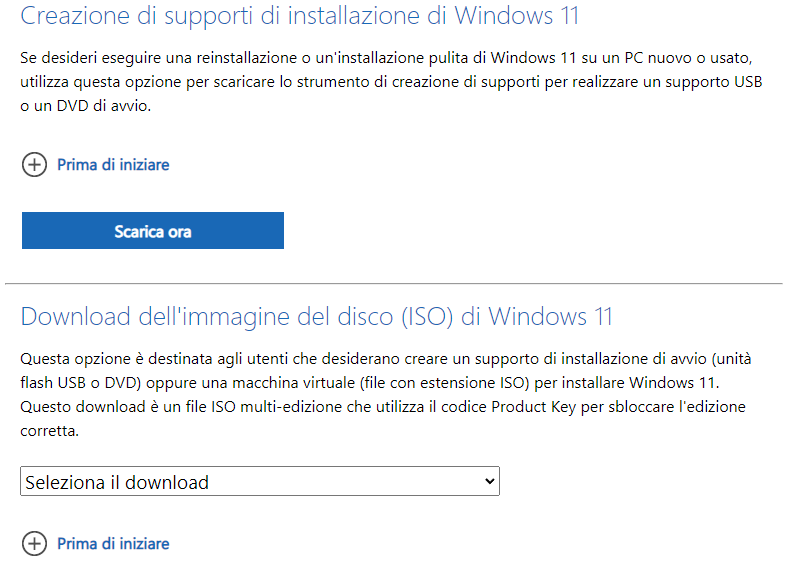
La pagina di download di Windows 11 consente di scaricare i file ISO direttamente (Download dell’immagine del disco (ISO) di Windows 11) mentre per effettuare il download della ISO di Windows 10 è necessario seguire una procedura un po’ più cervellotica.

Come personalizzare il file ISO di Windows 10 e Windows 11

Una volta scaricato il file ISO di Windows 10 o di Windows 11, però, cosa è possibile farci?

Innanzi tutto può essere utilizzato per creare un supporto d’installazione avviabile. Allo scopo, si può utilizzare l’ottima utilità Rufus. In alternativa, si può ricorrere – come accennato in apertura – al Media Creation Tool, che si occupa di scrivere direttamente sui supporti rimovibili di tipo USB (selezionare la voce Scarica ora lo strumento oppure Scarica ora nella sezione Creazione di supporti di installazione di Windows 11 nelle pagine di download di Windows 10 e Windows 11).
ISO Windows download

Il file ISO può essere utilizzato anche per effettuare l’installazione di Windows all’interno di una macchina virtuale oppure in rete locale, servendosi del boot via PXE (Preboot Execution Environment).

Ancora, facendo doppio clic sul file ISO e avviando setup.exe, è possibile aggiornare l’installazione di Windows in uso (ad esempio Windows 10 o Windows 11). Si chiama installazione o aggiornamento in-place.

Come modificare il contenuto della ISO di Windows

In molte procedure si dice che è necessario estrarre il contenuto del file ISO per applicarvi delle modifiche. Questo è sicuramente vero se si volesse modificare il contenuto del pacchetto d’installazione (install.wim) principale. Allo scopo è necessario ricorrere al comando DISM.

Come vedremo più avanti, ci sono tuttavia molti modi per modificare la ISO di Windows senza dover necessariamente intervenire sul file install.wim. È inoltre bene sottolineare che i file ISO generati con il Media Creation Tool contengono un file install.esd nella cartella sources anziché il classico install.wim. In un altro articolo abbiamo visto le differenze tra file WIM ed ESD.

Per intervenire molto semplicemente sul contenuto delle ISO di Windows, basta munirsi del programma gratuito AnyBurn Free: va benissimo anche la versione Portable, che non necessita di installazione. All’avvio, è sufficiente cliccare su Modifica file immagine e selezionare la ISO di Windows precedentemente scaricata.
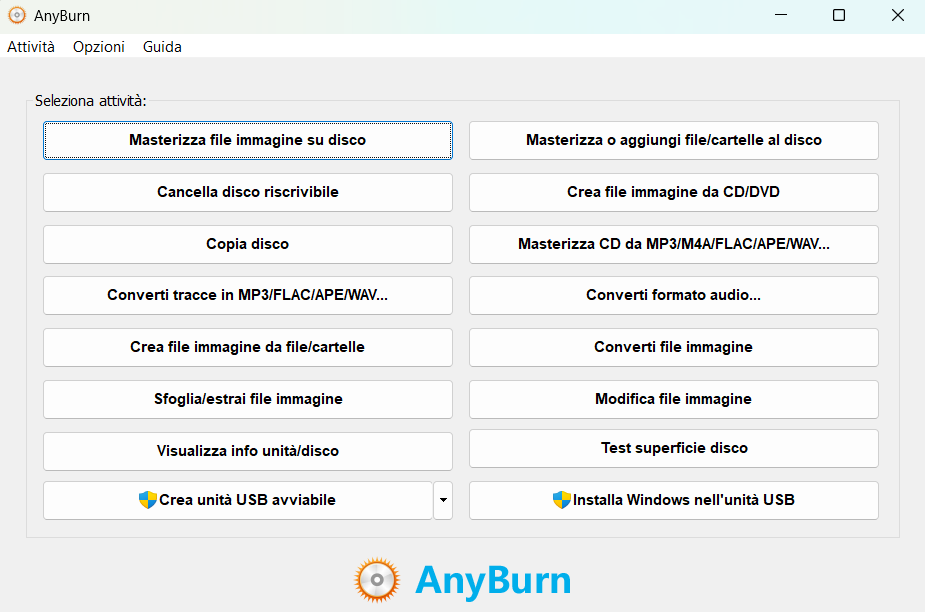
Modificare ISO Windows con AnyBurn

Con un clic su Avanti, AnyBurn mostra il contenuto del file ISO permettendo all’utente di aggiungere e rimuovere file e cartelle. Il bello di questo approccio è che una volta completate le modifiche, AnyBurn è in grado di confezionare un nuovo file ISO, regolarmente avviabile.
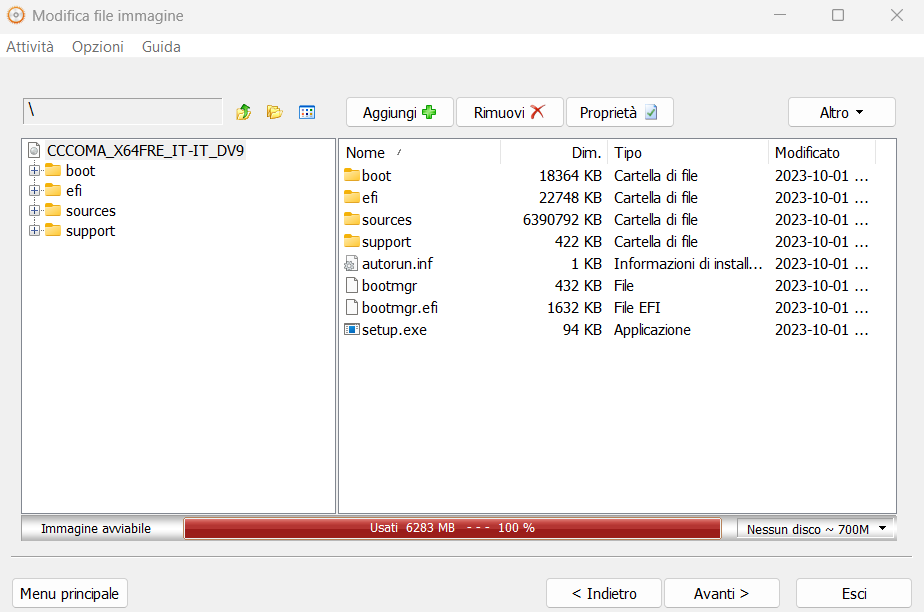
Contenuto ISO Windows 10 e 11

Come abbiamo spiegato nell’articolo su come installare Windows 11 su un PC non compatibile, è possibile modificare il file sources\appraiserres.dll sostituendolo con un altro contenente un paio di byte casuali, per avere la possibilità di aggiornare qualunque sistema, anche quelli che non soddisfano i requisiti minimi, semplicemente cliccando due volte sul file ISO quindi su setup.exe.

Velocizzare l’installazione di Windows 10 e Windows 11

Capito come creare un nuovo file ISO di Windows con Anyburn, è possibile applicare alcune modifiche molto semplici per modificare il comportamento dell’installazione.

Inserendo un file chiamato autounattend.xml nella cartella radice del supporto d’installazione di Windows 10 e Windows 11, è possibile preconfigurare le preferenze per il caricamento del sistema operativo sulla macchina, senza nulla chiedere all’utente. Si può decidere l’edizione di Windows da installare per impostazione predefinita, partizionare l’unità di memorizzazione, regolare la configurazione di rete e applicare tutta una serie di personalizzazioni. Si può anche fare in modo che Windows 11 s’installi senza verificare i requisiti minimi.

Con la procedura Windows 11 Unattended si configura un’installazione automatica che cioè non chiede nulla all’utente e non mostra neppure i noiosi passaggi abitualmente proposti nella fase finale del setup (fase OOBE, Out of Box Experience).

La stessa prassi è applicabile anche nel caso di Windows 10: il file che permette di avviare un’installazione Unattended dal supporto avviabile consente anche di installare Windows 10 automaticamente.

L’elemento chiamato autounattend.xml può essere usato per creare una ISO di Windows 11 senza controllo dei requisiti minimi ma anche aggiunto semplicemente nella cartella radice di un supporto d’installazione USB.

Personalizzare il comportamento della ISO di Windows 10 e 11

Indipendentemente dal fatto che si utilizzi o meno il file autounattend.xml, si può aggiungere una cartella chiamata $OEM$ all’interno della directory sources del file ISO.

La routine d’installazione tiene in considerazione la presenza di questa cartella per personalizzare i passaggi via via svolti. Ecco alcuni esempi pratici:

  • \sources\$OEM$\$1 I file e le directory in questa sottocartella sono automaticamente copiati nella radice dell’unità di sistema. Ad esempio, se si inserisce una cartella _scripts all’interno di \sources\$OEM$\$1, si ritroverà la stessa risorsa in C:\ a installazione conclusa (cartella C:\_scripts).
  • \sources\$OEM$\$$ I file qui inseriti sono copiati nella directory di sistema di Windows (di solito C:\Windows). Ad esempio, \sources\$OEM$\$$\System32\libreria-custom.dll sarà copiata in C:\Windows\System32\libreria-custom.dll.
  • Setup\Scripts Questa cartella è usata per memorizzare script che possono essere eseguiti durante o dopo l’installazione. Ad esempio, è possibile aggiungere uno script FineSetup.cmd da avviare al termine dell’installazione di Windows.

Eseguire operazioni dopo l’installazione di Windows

All’interno di FineSetup.cmd si possono inserire delle istruzioni per eseguire una serie di operazioni post-installazione. Ecco un esempio:

@echo off
rem Esempio di script che esegue operazioni post-installazione
copy %systemdrive%\example.txt %systemroot%\System32\
rem Altre operazioni di configurazione possono essere aggiunte qui
exit

Abbiamo sfruttato questo approccio per installare Windows con i programmi che servono. Nel file autounattend.xml che abbiamo presentato nell’articolo su Windows 11, basta aggiungere il blocco che segue per impostare l’esecuzione del file .cmd:

<RunSynchronous>
<RunSynchronousCommand wcm:action="add">
<Path>%WINDIR%\Setup\Scripts\FineSetup.cmd</Path>
<Description>Esecuzione script post-installazione</Description>
<Order>1</Order>
</RunSynchronousCommand>
</RunSynchronous>

Il bello è che utilizzando AnyBurn, è possibile aggiungere cartelle e file di configurazione nel file ISO senza dover usare il comando DISM né dover ricreare la ISO con oscdimg.

Ovviamente, applicando qualunque modifica il file ISO di Windows 10 o di Windows 11 non sarà più indicato come originale ma il sistema operativo sarà sempre attivabile con la licenza in proprio possesso. È necessario disporre di un codice Product Key compatibile con l’edizione di Windows 10 o di Windows 11 installata sulla macchina.

Credit immagine in apertura: Copilot Designer

Ti consigliamo anche

Link copiato negli appunti