
Deprecated: Creation of dynamic property Timber\Site::$pingback is deprecated in /var/www/html/web/app/themes/ilsoftware/vendor/timber/timber/lib/Site.php on line 180

Deprecated: Creation of dynamic property Timber\User::$name is deprecated in /var/www/html/web/app/themes/ilsoftware/vendor/timber/timber/lib/User.php on line 118

Deprecated: Creation of dynamic property Timber\Post::$has_disclaimer is deprecated in /var/www/html/web/app/themes/ilsoftware/vendor/timber/timber/lib/Core.php on line 71

Deprecated: Creation of dynamic property Timber\Post::$_edit_lock is deprecated in /var/www/html/web/app/themes/ilsoftware/vendor/timber/timber/lib/Core.php on line 71

Deprecated: Creation of dynamic property Timber\Post::$_edit_last is deprecated in /var/www/html/web/app/themes/ilsoftware/vendor/timber/timber/lib/Core.php on line 71

Deprecated: Creation of dynamic property Timber\Post::$onesignal_meta_box_present is deprecated in /var/www/html/web/app/themes/ilsoftware/vendor/timber/timber/lib/Core.php on line 71

Deprecated: Creation of dynamic property Timber\Post::$onesignal_send_notification is deprecated in /var/www/html/web/app/themes/ilsoftware/vendor/timber/timber/lib/Core.php on line 71

Deprecated: Creation of dynamic property Timber\Post::$onesignal_modify_title_and_content is deprecated in /var/www/html/web/app/themes/ilsoftware/vendor/timber/timber/lib/Core.php on line 71

Deprecated: Creation of dynamic property Timber\Post::$onesignal_notification_custom_heading is deprecated in /var/www/html/web/app/themes/ilsoftware/vendor/timber/timber/lib/Core.php on line 71

Deprecated: Creation of dynamic property Timber\Post::$onesignal_notification_custom_content is deprecated in /var/www/html/web/app/themes/ilsoftware/vendor/timber/timber/lib/Core.php on line 71

Deprecated: Creation of dynamic property Timber\Post::$tipologia is deprecated in /var/www/html/web/app/themes/ilsoftware/vendor/timber/timber/lib/Core.php on line 71

Deprecated: Creation of dynamic property Timber\Post::$_tipologia is deprecated in /var/www/html/web/app/themes/ilsoftware/vendor/timber/timber/lib/Core.php on line 71

Deprecated: Creation of dynamic property Timber\Post::$attributi is deprecated in /var/www/html/web/app/themes/ilsoftware/vendor/timber/timber/lib/Core.php on line 71

Deprecated: Creation of dynamic property Timber\Post::$_attributi is deprecated in /var/www/html/web/app/themes/ilsoftware/vendor/timber/timber/lib/Core.php on line 71

Deprecated: Creation of dynamic property Timber\Post::$in_evidenza_newsletter is deprecated in /var/www/html/web/app/themes/ilsoftware/vendor/timber/timber/lib/Core.php on line 71

Deprecated: Creation of dynamic property Timber\Post::$_in_evidenza_newsletter is deprecated in /var/www/html/web/app/themes/ilsoftware/vendor/timber/timber/lib/Core.php on line 71

Deprecated: Creation of dynamic property Timber\Post::$inviato_in_newsletter is deprecated in /var/www/html/web/app/themes/ilsoftware/vendor/timber/timber/lib/Core.php on line 71

Deprecated: Creation of dynamic property Timber\Post::$_inviato_in_newsletter is deprecated in /var/www/html/web/app/themes/ilsoftware/vendor/timber/timber/lib/Core.php on line 71

Deprecated: Creation of dynamic property Timber\Post::$_yoast_wpseo_primary_category is deprecated in /var/www/html/web/app/themes/ilsoftware/vendor/timber/timber/lib/Core.php on line 71

Deprecated: Creation of dynamic property Timber\Post::$_yoast_wpseo_primary_blz_affiliation_attributes is deprecated in /var/www/html/web/app/themes/ilsoftware/vendor/timber/timber/lib/Core.php on line 71

Deprecated: Creation of dynamic property Timber\Post::$_yoast_wpseo_primary_content_type is deprecated in /var/www/html/web/app/themes/ilsoftware/vendor/timber/timber/lib/Core.php on line 71

Deprecated: Creation of dynamic property Timber\Post::$_yoast_wpseo_primary_attributes is deprecated in /var/www/html/web/app/themes/ilsoftware/vendor/timber/timber/lib/Core.php on line 71

Deprecated: Creation of dynamic property Timber\Post::$_yoast_wpseo_primary_speciali is deprecated in /var/www/html/web/app/themes/ilsoftware/vendor/timber/timber/lib/Core.php on line 71

Deprecated: Creation of dynamic property Timber\Post::$_yoast_wpseo_focuskw is deprecated in /var/www/html/web/app/themes/ilsoftware/vendor/timber/timber/lib/Core.php on line 71

Deprecated: Creation of dynamic property Timber\Post::$_yoast_wpseo_metadesc is deprecated in /var/www/html/web/app/themes/ilsoftware/vendor/timber/timber/lib/Core.php on line 71

Deprecated: Creation of dynamic property Timber\Post::$_yoast_wpseo_linkdex is deprecated in /var/www/html/web/app/themes/ilsoftware/vendor/timber/timber/lib/Core.php on line 71

Deprecated: Creation of dynamic property Timber\Post::$_yoast_wpseo_content_score is deprecated in /var/www/html/web/app/themes/ilsoftware/vendor/timber/timber/lib/Core.php on line 71

Deprecated: Creation of dynamic property Timber\Post::$_yoast_wpseo_focuskeywords is deprecated in /var/www/html/web/app/themes/ilsoftware/vendor/timber/timber/lib/Core.php on line 71

Deprecated: Creation of dynamic property Timber\Post::$_yoast_wpseo_keywordsynonyms is deprecated in /var/www/html/web/app/themes/ilsoftware/vendor/timber/timber/lib/Core.php on line 71

Deprecated: Creation of dynamic property Timber\Post::$_yoast_wpseo_estimated-reading-time-minutes is deprecated in /var/www/html/web/app/themes/ilsoftware/vendor/timber/timber/lib/Core.php on line 71

Deprecated: Creation of dynamic property Timber\Post::$_yoast_wpseo_wordproof_timestamp is deprecated in /var/www/html/web/app/themes/ilsoftware/vendor/timber/timber/lib/Core.php on line 71

Deprecated: Creation of dynamic property Timber\Post::$_thumbnail_id is deprecated in /var/www/html/web/app/themes/ilsoftware/vendor/timber/timber/lib/Core.php on line 71

Deprecated: Creation of dynamic property Timber\Post::$response_body is deprecated in /var/www/html/web/app/themes/ilsoftware/vendor/timber/timber/lib/Core.php on line 71

Deprecated: Creation of dynamic property Timber\Post::$status is deprecated in /var/www/html/web/app/themes/ilsoftware/vendor/timber/timber/lib/Core.php on line 71

Deprecated: Creation of dynamic property Timber\Post::$_yoast_indexnow_last_ping is deprecated in /var/www/html/web/app/themes/ilsoftware/vendor/timber/timber/lib/Core.php on line 71

Deprecated: Creation of dynamic property Timber\Post::$_oembed_6bb9a0735feb18e9404113dccb462d33 is deprecated in /var/www/html/web/app/themes/ilsoftware/vendor/timber/timber/lib/Core.php on line 71

Deprecated: Creation of dynamic property Timber\Post::$_oembed_time_6bb9a0735feb18e9404113dccb462d33 is deprecated in /var/www/html/web/app/themes/ilsoftware/vendor/timber/timber/lib/Core.php on line 71

Deprecated: Creation of dynamic property Timber\Post::$post_date_gmt is deprecated in /var/www/html/web/app/themes/ilsoftware/vendor/timber/timber/lib/Core.php on line 71

Deprecated: Creation of dynamic property Timber\Post::$comment_status is deprecated in /var/www/html/web/app/themes/ilsoftware/vendor/timber/timber/lib/Core.php on line 71

Deprecated: Creation of dynamic property Timber\Post::$ping_status is deprecated in /var/www/html/web/app/themes/ilsoftware/vendor/timber/timber/lib/Core.php on line 71

Deprecated: Creation of dynamic property Timber\Post::$post_password is deprecated in /var/www/html/web/app/themes/ilsoftware/vendor/timber/timber/lib/Core.php on line 71

Deprecated: Creation of dynamic property Timber\Post::$post_name is deprecated in /var/www/html/web/app/themes/ilsoftware/vendor/timber/timber/lib/Core.php on line 71

Deprecated: Creation of dynamic property Timber\Post::$to_ping is deprecated in /var/www/html/web/app/themes/ilsoftware/vendor/timber/timber/lib/Core.php on line 71

Deprecated: Creation of dynamic property Timber\Post::$pinged is deprecated in /var/www/html/web/app/themes/ilsoftware/vendor/timber/timber/lib/Core.php on line 71

Deprecated: Creation of dynamic property Timber\Post::$post_modified is deprecated in /var/www/html/web/app/themes/ilsoftware/vendor/timber/timber/lib/Core.php on line 71

Deprecated: Creation of dynamic property Timber\Post::$post_modified_gmt is deprecated in /var/www/html/web/app/themes/ilsoftware/vendor/timber/timber/lib/Core.php on line 71

Deprecated: Creation of dynamic property Timber\Post::$post_content_filtered is deprecated in /var/www/html/web/app/themes/ilsoftware/vendor/timber/timber/lib/Core.php on line 71

Deprecated: Creation of dynamic property Timber\Post::$guid is deprecated in /var/www/html/web/app/themes/ilsoftware/vendor/timber/timber/lib/Core.php on line 71

Deprecated: Creation of dynamic property Timber\Post::$menu_order is deprecated in /var/www/html/web/app/themes/ilsoftware/vendor/timber/timber/lib/Core.php on line 71

Deprecated: Creation of dynamic property Timber\Post::$post_mime_type is deprecated in /var/www/html/web/app/themes/ilsoftware/vendor/timber/timber/lib/Core.php on line 71

Deprecated: Creation of dynamic property Timber\Post::$comment_count is deprecated in /var/www/html/web/app/themes/ilsoftware/vendor/timber/timber/lib/Core.php on line 71

Deprecated: Creation of dynamic property Timber\Post::$filter is deprecated in /var/www/html/web/app/themes/ilsoftware/vendor/timber/timber/lib/Core.php on line 71
Modelli PowerPoint pronti da usare: ecco dove trovarli subito | IlSoftware.it

Modelli PowerPoint pronti da usare: ecco dove trovarli subito

Una breve guida per accedere a modelli PowerPoint da utilizzare per creare presentazioni semplici ed elaborate. Come usare, allo scopo, Microsoft Create e Canva con PowerPoint Online.

Se dovete realizzare una presentazione PowerPoint e non sapete da che parte iniziare, non preoccupatevi. Non siete i soli. Molto spesso si ha chiaramente in testa come affrontare un argomento ma non si possiedono gli strumenti e le abilità grafiche per realizzare una serie di slide accattivanti e convincenti. Se state cercando modelli PowerPoint che vi aiutino a trasformare in un progetto concreto tutte quelle idee che vi frullano in testa, sappiate che già da qualche tempo Microsoft mette a disposizione tutto il necessario per procedere. E anche a titolo completamente gratuito.

Microsoft Create è una piattaforma che l’azienda di Redmond ha presentato nel 2022 e che permette di generare, in pochi secondi, modelli di presentazioni, biglietti, documenti, storie e tanto altro ancora.

Qualora non vi bastassero gli spunti di Microsoft Create (altro che “spunti”, sono presentazioni già pronte da personalizzare…), potete abbinare anche l’utilizzo di Canva, una piattaforma che mette a disposizione anche un’ampia scelta di slide pronte per l’uso.

Come usare i modelli PowerPoint di Microsoft Create

Per cominciare, è fondamentale avere e utilizzare un account Microsoft. La pagina trova il modello permette di attingere alla raccolta dei modelli disponibili: si può ad esempio digitare l’argomento della presentazione in modo da individuare i modelli maggiormente in tema. Evitate di premere Crea da zero, altrimenti si aprirà PowerPoint Online con una pagina completamente bianca.
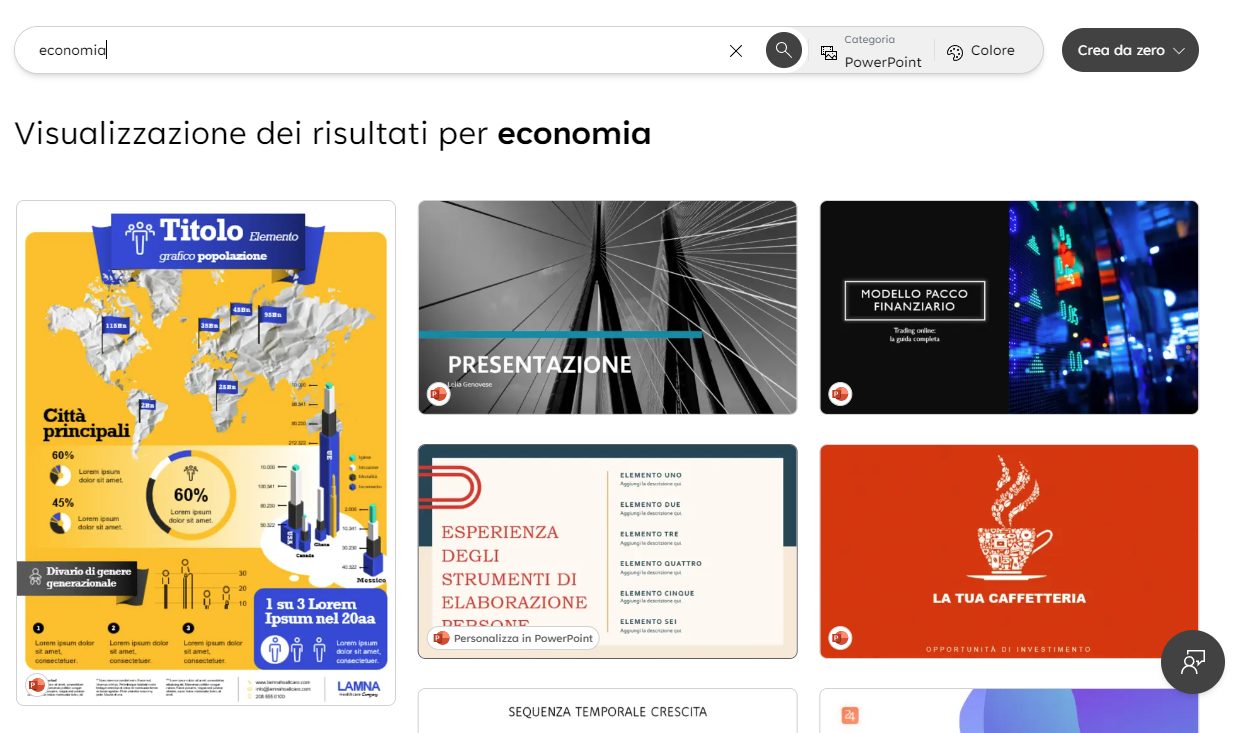
Modelli PowerPoint già pronti

Con un clic sull’icona Personalizza in PowerPoint, si apre PowerPoint Online: senza neppure aver acquistato il pacchetto Office “stand alone” o Microsoft 365, diventa possibile creare una presentazione efficace a costo zero. L’unica cosa che serve è il browser Web: con un clic sul pulsante Designer in alto a destra nell’interfaccia di PowerPoint, è possibile accedere a una serie di design alternativi per la slide in corso di visualizzazione.
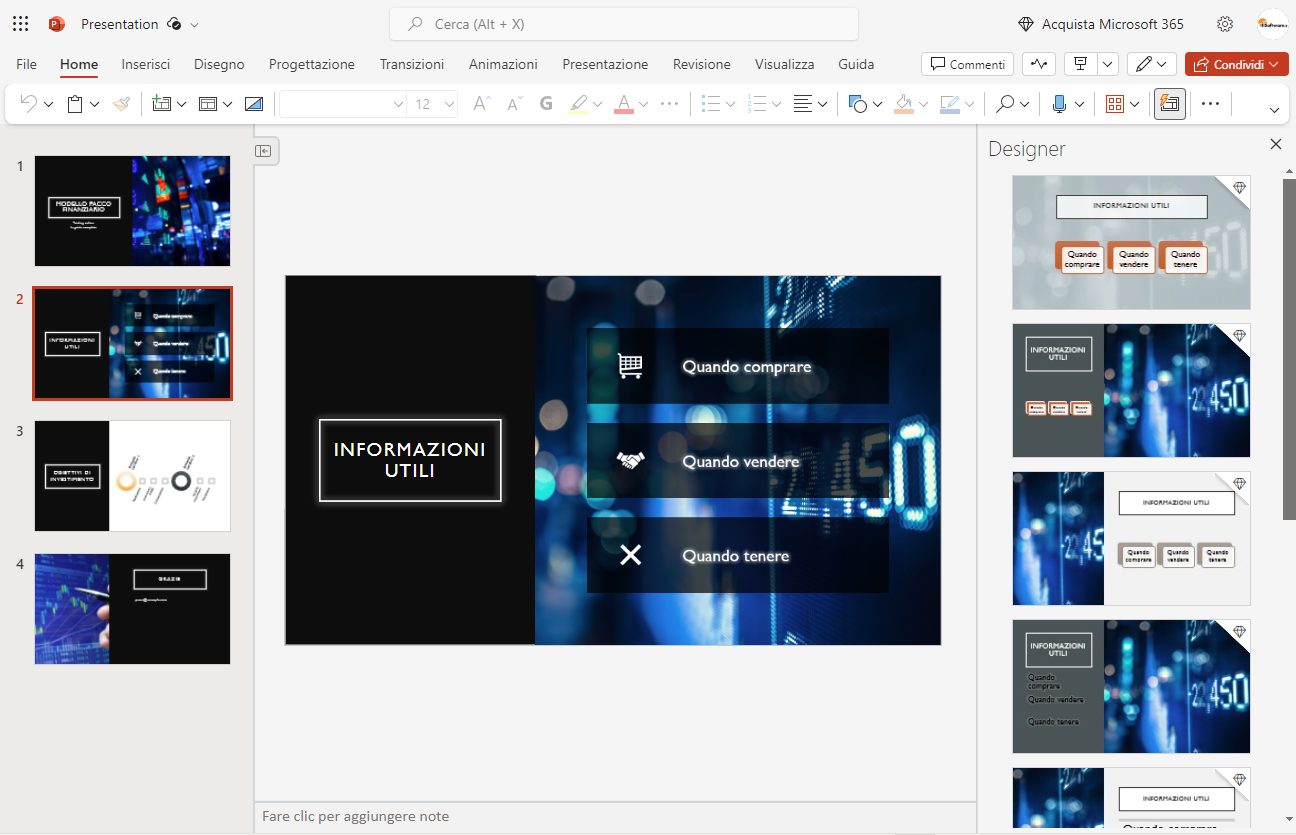
Design presentazione PowerPoint

Se pensate che la versione Web di PowerPoint sia uno strumento eccessivamente limitato in termini di funzionalità, potete ricredervi. Già nella guida pubblicata a suo tempo avevamo messo in luce le principali caratteristiche di PowerPoint Online, da sfruttare subito.

Una volta creata una nuova presentazione PowerPoint, suggeriamo di accedere al proprio account OneDrive. Nella pagina principale, cliccando su Ordina quindi su Ultima modifica e infine su Decrescente, troverete la presentazione appena creata, in formato PPTX.
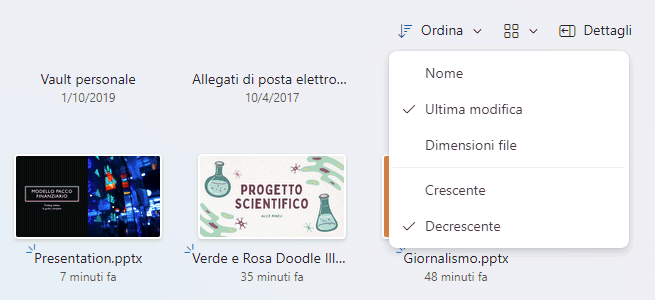
Presentazione PowerPoint su OneDrive

Cliccando con il tasto destro sulla miniatura della presentazione, quindi su Condividi, è eventualmente possibile condividere il lavoro con chiunque sia in possesso del link oppure specificare persone specifiche (devono a loro volta essere in possesso di un account Microsoft).

Condivisione presentazione PowerPoint

Usare i modelli PowerPoint di Canva

Canva è una piattaforma online che consente agli utenti di creare facilmente design grafici di alta qualità senza richiedere conoscenze avanzate di progettazione. La piattaforma offre strumenti intuitivi e una vasta gamma di modelli predefiniti per creare materiali come presentazioni, grafici per i social media, poster, inviti, brochure e molto altro. In un altro articolo ci siamo concentrati sui trucchi e segreti di Canva da conoscere subito.

Portandosi nella home page di Canva, cliccando sull’icona Presentazioni quindi sul link Mostra tutto a destra di Presentazioni, è possibile accedere a una lista di modelli PowerPoint immediatamente disponibili per i propri progetti.

Il vantaggio è che gli utenti di Canva hanno a disposizione la potenza di questo strumento Web-based per personalizzare le presentazioni e adattarle alle proprie esigenze. Attingendo all’immenso serbatoio di contenuti royalty-free oggi disponibili, si possono aggiungere immagini e supporti grafici di qualità senza spendere un centesimo, anche per usi commerciali. Nel caso di Canva, è comunque sempre bene fare riferimento a queste informazioni in tema di proprietà dei contenuti.

Come esportare la presentazione Canva su OneDrive e PowerPoint Online

Per caricare la presentazione Canva su OneDrive e modificarla con PowerPoint, basta cliccare sul pulsante Condividi in alto a destra quindi scegliere la voce Altro e infine Microsoft OneDrive.

Canva chiede l’autorizzazione per accedere ai file dell’utente ospitati su OneDrive: qualora si volesse revocarla, in seguito basta accedere alla pagina App e servizi a cui hai concesso l’accesso, fare clic su Canva quindi sul pulsante Rimuovi queste autorizzazioni.
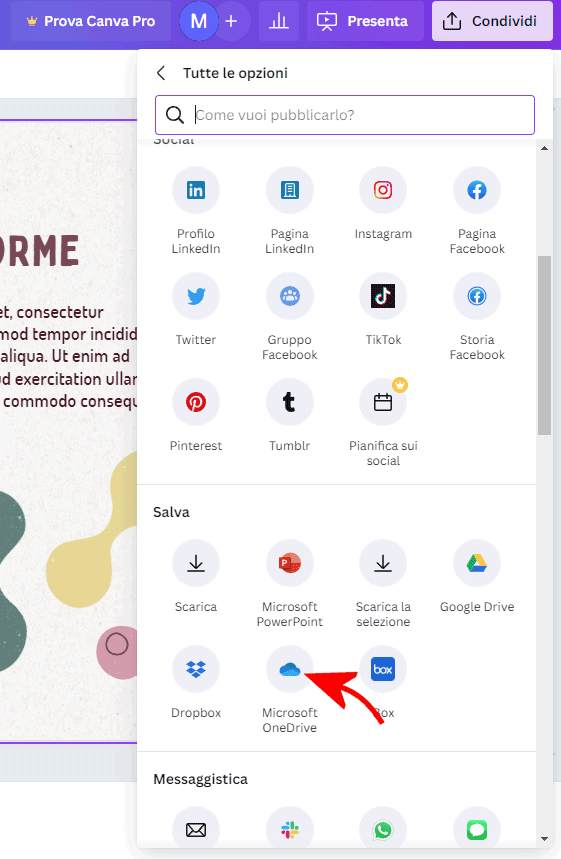
Condivisione modello Canva PowerPoint

Per collegare OneDrive con Canva, basta cliccare sul pulsante Connetti Microsoft OneDrive quindi concedere tutte le autorizzazioni richieste.

Connessione OneDrive Canva

Canva chiede infine di selezionare la cartella OneDrive (visualizzandone il contenuto) da usare come destinazione per la presentazione OneDrive. Per memorizzare il modello creato con Canva nella directory radice di OneDrive, basta semplicemente scegliere Scegli.
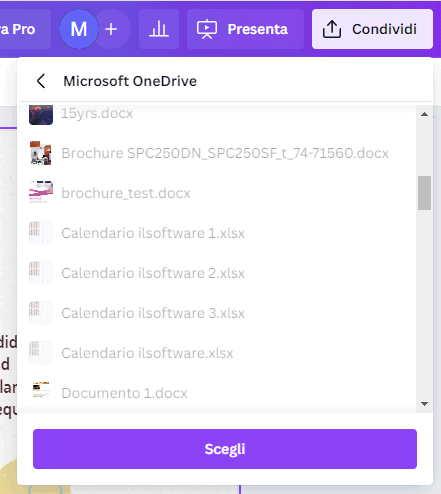
Cartella OneDrive destinazione presentazione PowerPoint

Al momento, Canva consente di esportare su OneDrive fino a un massimo di 10 slide: è quindi bene tenerne conto quando si crea una presentazione e si scelgono le risorse da inserire (colonna a sinistra nell’interfaccia di Canva). Dal menu a tendina Tipo di file, si può scegliere PPTX in modo da ottenere una presentazione modificabile con PowerPoint (sia online che offline).
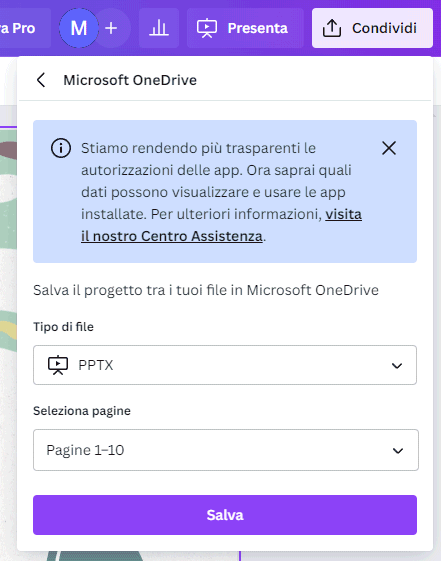
Condivisione PPTX su OneDrive da Canva

Per impostazione predefinita, Canva attiva automaticamente un link di condivisione su OneDrive e lo mostra all’utente. Per rimuoverlo, basta accedere alla home page di OneDrive, cliccare con il tasto destro sulla miniatura della presentazione, scegliere Condividi, quindi fare clic sull’icona “1 collegamento di condivisione” in basso. Come ultimo passo, si può fare clic sulla scheda Collegamenti quindi sull’icona raffigurando un cestino.
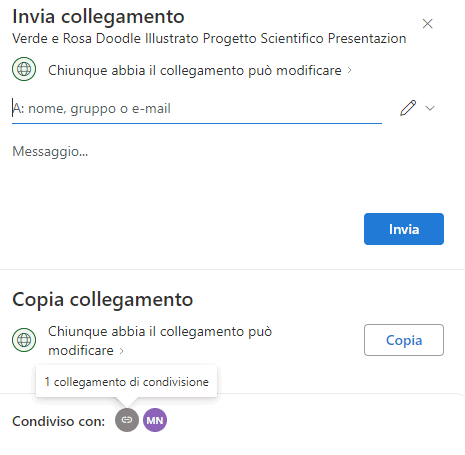
Collegamento condivisione modello presentazione

Il limite di 10 slide può essere agevolmente superato importando più presentazioni in PowerPoint, selezionando le slide di proprio interesse, premendo CTRL+C quindi usando la combinazione di tasti CTRL+V per ampliare l’altra presentazione.

Credit immagine in apertura: iStock.com – Tempura

Ti consigliamo anche

Link copiato negli appunti