
Deprecated: Creation of dynamic property Timber\Site::$pingback is deprecated in /var/www/html/web/app/themes/ilsoftware/vendor/timber/timber/lib/Site.php on line 180

Deprecated: Creation of dynamic property Timber\User::$name is deprecated in /var/www/html/web/app/themes/ilsoftware/vendor/timber/timber/lib/User.php on line 118

Deprecated: Creation of dynamic property Timber\Post::$has_disclaimer is deprecated in /var/www/html/web/app/themes/ilsoftware/vendor/timber/timber/lib/Core.php on line 71

Deprecated: Creation of dynamic property Timber\Post::$_edit_lock is deprecated in /var/www/html/web/app/themes/ilsoftware/vendor/timber/timber/lib/Core.php on line 71

Deprecated: Creation of dynamic property Timber\Post::$_edit_last is deprecated in /var/www/html/web/app/themes/ilsoftware/vendor/timber/timber/lib/Core.php on line 71

Deprecated: Creation of dynamic property Timber\Post::$onesignal_meta_box_present is deprecated in /var/www/html/web/app/themes/ilsoftware/vendor/timber/timber/lib/Core.php on line 71

Deprecated: Creation of dynamic property Timber\Post::$onesignal_send_notification is deprecated in /var/www/html/web/app/themes/ilsoftware/vendor/timber/timber/lib/Core.php on line 71

Deprecated: Creation of dynamic property Timber\Post::$onesignal_modify_title_and_content is deprecated in /var/www/html/web/app/themes/ilsoftware/vendor/timber/timber/lib/Core.php on line 71

Deprecated: Creation of dynamic property Timber\Post::$onesignal_notification_custom_heading is deprecated in /var/www/html/web/app/themes/ilsoftware/vendor/timber/timber/lib/Core.php on line 71

Deprecated: Creation of dynamic property Timber\Post::$onesignal_notification_custom_content is deprecated in /var/www/html/web/app/themes/ilsoftware/vendor/timber/timber/lib/Core.php on line 71

Deprecated: Creation of dynamic property Timber\Post::$tipologia is deprecated in /var/www/html/web/app/themes/ilsoftware/vendor/timber/timber/lib/Core.php on line 71

Deprecated: Creation of dynamic property Timber\Post::$_tipologia is deprecated in /var/www/html/web/app/themes/ilsoftware/vendor/timber/timber/lib/Core.php on line 71

Deprecated: Creation of dynamic property Timber\Post::$attributi is deprecated in /var/www/html/web/app/themes/ilsoftware/vendor/timber/timber/lib/Core.php on line 71

Deprecated: Creation of dynamic property Timber\Post::$_attributi is deprecated in /var/www/html/web/app/themes/ilsoftware/vendor/timber/timber/lib/Core.php on line 71

Deprecated: Creation of dynamic property Timber\Post::$in_evidenza_newsletter is deprecated in /var/www/html/web/app/themes/ilsoftware/vendor/timber/timber/lib/Core.php on line 71

Deprecated: Creation of dynamic property Timber\Post::$_in_evidenza_newsletter is deprecated in /var/www/html/web/app/themes/ilsoftware/vendor/timber/timber/lib/Core.php on line 71

Deprecated: Creation of dynamic property Timber\Post::$inviato_in_newsletter is deprecated in /var/www/html/web/app/themes/ilsoftware/vendor/timber/timber/lib/Core.php on line 71

Deprecated: Creation of dynamic property Timber\Post::$_inviato_in_newsletter is deprecated in /var/www/html/web/app/themes/ilsoftware/vendor/timber/timber/lib/Core.php on line 71

Deprecated: Creation of dynamic property Timber\Post::$_yoast_wpseo_primary_category is deprecated in /var/www/html/web/app/themes/ilsoftware/vendor/timber/timber/lib/Core.php on line 71

Deprecated: Creation of dynamic property Timber\Post::$_yoast_wpseo_primary_blz_affiliation_attributes is deprecated in /var/www/html/web/app/themes/ilsoftware/vendor/timber/timber/lib/Core.php on line 71

Deprecated: Creation of dynamic property Timber\Post::$_yoast_wpseo_primary_content_type is deprecated in /var/www/html/web/app/themes/ilsoftware/vendor/timber/timber/lib/Core.php on line 71

Deprecated: Creation of dynamic property Timber\Post::$_yoast_wpseo_primary_attributes is deprecated in /var/www/html/web/app/themes/ilsoftware/vendor/timber/timber/lib/Core.php on line 71

Deprecated: Creation of dynamic property Timber\Post::$_yoast_wpseo_primary_speciali is deprecated in /var/www/html/web/app/themes/ilsoftware/vendor/timber/timber/lib/Core.php on line 71

Deprecated: Creation of dynamic property Timber\Post::$_yoast_wpseo_content_score is deprecated in /var/www/html/web/app/themes/ilsoftware/vendor/timber/timber/lib/Core.php on line 71

Deprecated: Creation of dynamic property Timber\Post::$_yoast_wpseo_focuskeywords is deprecated in /var/www/html/web/app/themes/ilsoftware/vendor/timber/timber/lib/Core.php on line 71

Deprecated: Creation of dynamic property Timber\Post::$_yoast_wpseo_keywordsynonyms is deprecated in /var/www/html/web/app/themes/ilsoftware/vendor/timber/timber/lib/Core.php on line 71

Deprecated: Creation of dynamic property Timber\Post::$_yoast_wpseo_estimated-reading-time-minutes is deprecated in /var/www/html/web/app/themes/ilsoftware/vendor/timber/timber/lib/Core.php on line 71

Deprecated: Creation of dynamic property Timber\Post::$_yoast_wpseo_focuskw is deprecated in /var/www/html/web/app/themes/ilsoftware/vendor/timber/timber/lib/Core.php on line 71

Deprecated: Creation of dynamic property Timber\Post::$_yoast_wpseo_metadesc is deprecated in /var/www/html/web/app/themes/ilsoftware/vendor/timber/timber/lib/Core.php on line 71

Deprecated: Creation of dynamic property Timber\Post::$_yoast_wpseo_linkdex is deprecated in /var/www/html/web/app/themes/ilsoftware/vendor/timber/timber/lib/Core.php on line 71

Deprecated: Creation of dynamic property Timber\Post::$_thumbnail_id is deprecated in /var/www/html/web/app/themes/ilsoftware/vendor/timber/timber/lib/Core.php on line 71

Deprecated: Creation of dynamic property Timber\Post::$response_body is deprecated in /var/www/html/web/app/themes/ilsoftware/vendor/timber/timber/lib/Core.php on line 71

Deprecated: Creation of dynamic property Timber\Post::$status is deprecated in /var/www/html/web/app/themes/ilsoftware/vendor/timber/timber/lib/Core.php on line 71

Deprecated: Creation of dynamic property Timber\Post::$_yoast_indexnow_last_ping is deprecated in /var/www/html/web/app/themes/ilsoftware/vendor/timber/timber/lib/Core.php on line 71

Deprecated: Creation of dynamic property Timber\Post::$newsletter_subject is deprecated in /var/www/html/web/app/themes/ilsoftware/vendor/timber/timber/lib/Core.php on line 71

Deprecated: Creation of dynamic property Timber\Post::$_newsletter_subject is deprecated in /var/www/html/web/app/themes/ilsoftware/vendor/timber/timber/lib/Core.php on line 71

Deprecated: Creation of dynamic property Timber\Post::$newsletter_summary is deprecated in /var/www/html/web/app/themes/ilsoftware/vendor/timber/timber/lib/Core.php on line 71

Deprecated: Creation of dynamic property Timber\Post::$_newsletter_summary is deprecated in /var/www/html/web/app/themes/ilsoftware/vendor/timber/timber/lib/Core.php on line 71

Deprecated: Creation of dynamic property Timber\Post::$post_date_gmt is deprecated in /var/www/html/web/app/themes/ilsoftware/vendor/timber/timber/lib/Core.php on line 71

Deprecated: Creation of dynamic property Timber\Post::$comment_status is deprecated in /var/www/html/web/app/themes/ilsoftware/vendor/timber/timber/lib/Core.php on line 71

Deprecated: Creation of dynamic property Timber\Post::$ping_status is deprecated in /var/www/html/web/app/themes/ilsoftware/vendor/timber/timber/lib/Core.php on line 71

Deprecated: Creation of dynamic property Timber\Post::$post_password is deprecated in /var/www/html/web/app/themes/ilsoftware/vendor/timber/timber/lib/Core.php on line 71

Deprecated: Creation of dynamic property Timber\Post::$post_name is deprecated in /var/www/html/web/app/themes/ilsoftware/vendor/timber/timber/lib/Core.php on line 71

Deprecated: Creation of dynamic property Timber\Post::$to_ping is deprecated in /var/www/html/web/app/themes/ilsoftware/vendor/timber/timber/lib/Core.php on line 71

Deprecated: Creation of dynamic property Timber\Post::$pinged is deprecated in /var/www/html/web/app/themes/ilsoftware/vendor/timber/timber/lib/Core.php on line 71

Deprecated: Creation of dynamic property Timber\Post::$post_modified is deprecated in /var/www/html/web/app/themes/ilsoftware/vendor/timber/timber/lib/Core.php on line 71

Deprecated: Creation of dynamic property Timber\Post::$post_modified_gmt is deprecated in /var/www/html/web/app/themes/ilsoftware/vendor/timber/timber/lib/Core.php on line 71

Deprecated: Creation of dynamic property Timber\Post::$post_content_filtered is deprecated in /var/www/html/web/app/themes/ilsoftware/vendor/timber/timber/lib/Core.php on line 71

Deprecated: Creation of dynamic property Timber\Post::$guid is deprecated in /var/www/html/web/app/themes/ilsoftware/vendor/timber/timber/lib/Core.php on line 71

Deprecated: Creation of dynamic property Timber\Post::$menu_order is deprecated in /var/www/html/web/app/themes/ilsoftware/vendor/timber/timber/lib/Core.php on line 71

Deprecated: Creation of dynamic property Timber\Post::$post_mime_type is deprecated in /var/www/html/web/app/themes/ilsoftware/vendor/timber/timber/lib/Core.php on line 71

Deprecated: Creation of dynamic property Timber\Post::$comment_count is deprecated in /var/www/html/web/app/themes/ilsoftware/vendor/timber/timber/lib/Core.php on line 71

Deprecated: Creation of dynamic property Timber\Post::$filter is deprecated in /var/www/html/web/app/themes/ilsoftware/vendor/timber/timber/lib/Core.php on line 71
NVM Windows: eseguire codice JavaScript lato server | IlSoftware.it

NVM Windows: eseguire codice JavaScript lato server

Node.js è un ambiente di runtime che consente di eseguire JavaScript lato server, rendendolo ideale per applicazioni Web e in tempo reale. Grazie a NVM per Windows, è possibile gestire facilmente diverse versioni di Node.js e lavorare senza conflitti.

JavaScript è nato come linguaggio per la programmazione lato client: il codice è caricato dal browser per gestire l’interattività delle pagine Web. Con l’introduzione di Node.js, è diventato possibile eseguire JavaScript anche sul server. Ed è proprio questa la caratteristica distintiva dell’apprezzato ambiente di runtime che grazie a NVM per Windows diventa facilmente gestibile e utilizzabile anche con il sistema operativo Microsoft.

Cos’è Node.js in poche parole

Node.js è un ambiente di runtime che utilizza il motore V8 di Google Chrome, lo stesso che si occupa di caricare il codice JavaScript nei browser derivati da Chromium. La differenza principale è che, mentre nel browser tutto il codice JavaScript è eseguito in un contesto di client-side (cioè nel dispositivo dell’utente), con Node.js JavaScript può essere eseguito lato server, permettendo lo sviluppo di applicazioni Web complete con un unico e peraltro ben noto linguaggio, sia per il frontend che per il backend.

L’ambiente di runtime JavaScript è progettato per gestire un gran numero di richieste simultanee in modo molto efficiente, rendendolo ideale per applicazioni in tempo reale, come chat, giochi online e applicazioni Web ad alte prestazioni.

Grazie alla sua architettura leggera, Node.js è spesso utilizzato per costruire microservizi, consentendo agli sviluppatori di creare sistemi modulari e scalabili. Node.js è inoltre particolarmente efficace per le applicazioni che richiedono lo streaming di dati in tempo reale nonché per costruire API RESTful o GraphQL. Sta inoltre guadagnando sempre più popolarità in ambito Internet delle Cose (IoT) perché può essere usato per eseguire codice in grado di raccogliere e analizzare in tempo reale dati provenienti da sensori e dispositivi connessi.

Cos’è NVM e a che cosa serve

NVM (Node Version Manager) è un software nato per gestire diverse versioni di Node.js su una stessa macchina, permettendo agli sviluppatori di installare, cambiare e aggiornare facilmente le release necessarie per diversi progetti. Grazie a NVM è possibile passare rapidamente da una versione di Node.js all’altra, senza conflitti e senza il bisogno di avviare ogni volta una nuova installazione.
Logo NVM

Con un’interfaccia che sfrutta la riga di comando (CLI), NVM utilizza comandi di base:

  • nvm ls per elencare tutte le versioni di Node.js installate.
  • nvm install <versione> per installare una versione specifica di Node.js.
  • nvm use <versione> per passare alla release indicata.

Di base, NVM è disponibile solo per Linux e macOS mentre non lo è per Windows. Posto che nulla vieta di utilizzare NVM, ad esempio, da una macchina virtuale oppure con WSL (Sottosistema Windows per Linux), ci ha pensato Corey Butler a creare una versione nativa per la piattaforma Microsoft.

Come installare NVM Windows

Per installare NVM Windows basta visitare questa pagina quindi scaricare e avviare il file nvm-setup.exe, seguendo i pochi passaggi proposti.

Ad installazione conclusa, basta digitare cmd nella casella di ricerca di Windows, selezionare Esegui come amministratore quindi portarsi nella cartella di NVM per Windows (esempio: cd c:\nvm).

Il semplice comando nvm install latest permette di installare in Windows l’ultima versione di Node.js disponibile.
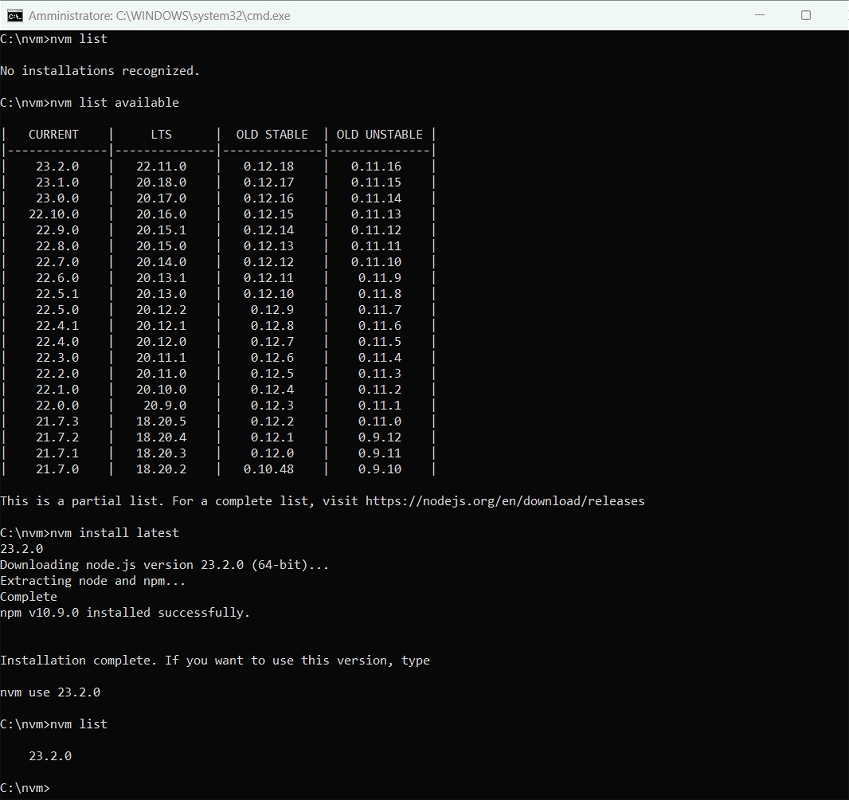
NVM Windows: lista versioni Node.js disponibili

Per iniziare a usare Node.js è a questo punto indispensabile confermare a NVM Windows qual è la release da usare. Anche se ce ne fosse soltanto una installata: diversamente si otterrebbe l’errore node non è riconosciuto come comando interno o esterno, un programma eseguibile o un file batch.

Nel nostro caso, digitiamo nvm use 23.2.0 quindi impartiamo il comando node -v per verificare che tutto funzioni correttamente.
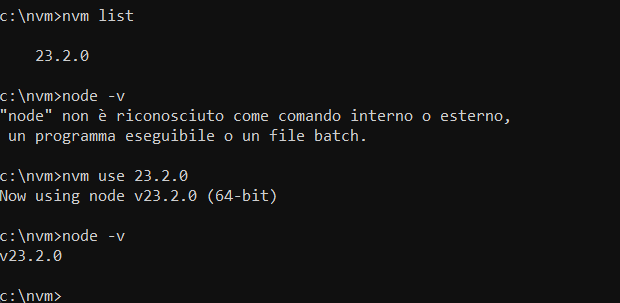
Node.js con NVM per Windows

Come creare un progetto di esempio

Dal prompt dei comandi si possono impartire le istruzioni che seguono per creare un nuovo progetto Node.js nella cartella del profilo utente corrente:

md %userprofile%\nodetest

cd %userprofile%\nodetest

Per creare automaticamente un file package.json contenente le informazioni di base del progetto, basta eseguire il comando che segue:

npm init -y

Aggiungiamo anche la dipendenza facente riferimento al modulo esterno express: potrebbe essere utile per estendere le funzionalità di un semplicissimo server Web basato su JavaScript che andremo a sviluppare:

npm install express

Incollare il codice per configurare un server in esecuzione in locale

A questo punto digitiamo quanto segue per creare un nuovo file JavaScript e aprirlo con il Blocco Note di Windows:

notepad app.js

Alla visualizzazione del messaggio Creare un nuovo file?, cliccare sul pulsante Sì per proseguire.
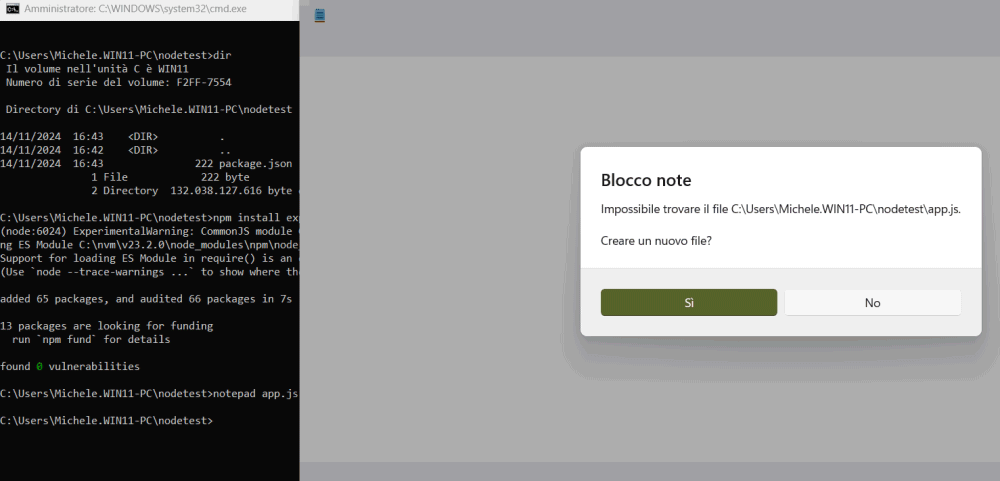
Creare file con Node.js

Il codice seguente, da incollare nel Blocco Note all’interno del file app.js, permette di configurare un server Web basico che si pone in ascolto delle richieste di connessione sulla porta 3000 e risponde con un messaggio di saluto:

const http = require('http');

const server = http.createServer((req, res) => {
    res.statusCode = 200;
    res.setHeader('Content-Type', 'text/plain');
    res.end('Ciao mondo!');
});

server.listen(3000, '127.0.0.1', () => {
    console.log('Server in esecuzione su http://127.0.0.1:3000/');
});

Come ultimo passo, premete CTRL+S per salvare il codice JavaScript appena inserito.

Eseguire il codice con Node.js in Windows

È tutto pronto per eseguire il codice JavaScript. Digitando node app.js al prompt, si ottiene il messaggio di log nella finestra del terminale (“Server in esecuzione“).

Provate però ad aprire il browser Web che più preferite quindi digitate 127.0.0.1:3000 nella barra degli indirizzi: leggerete la risposta Ciao mondo!
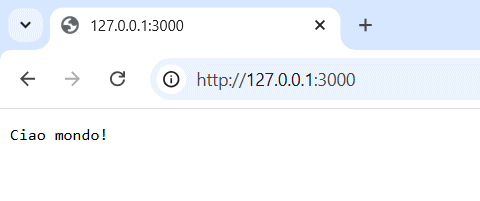
Server Web con NVM Windows e Node.js

Capite la portata di ciò che avete realizzato con appena due minuti di lavoro e un codice JavaScript davvero elementare?

Altri esempi pratici per interfacciarsi con Node.js con NVM per Windows

Usando un framework come express, si possono creare API REST per comunicare con database e fornire dati a client frontend:

const express = require('express');
const app = express();

app.get('/api/saluto', (req, res) => {
    res.json({ message: 'Ciao da Node.js!' });
});

app.listen(3000, () => {
    console.log('API in esecuzione su http://localhost:3000/api/saluto');
});

Con Node.js si possono predisporre script per automatizzare attività come la gestione di file, l’invio di email o l’interazione con API di terze parti. Ad esempio, si potrebbe scrivere uno script che legge il contenuto di file CSV ed elabora i dati.

Servendosi dei moduli WebSocket o Socket.io, si possono sviluppare applicazioni in tempo reale usando codice JavaScript. Si pensi a una chat bidirezionale che Node.js permette di costruire facilmente, occupandosi degli aggiornamenti in tempo reale tra client e server.

Ancora, si può sfruttare Node.js per stabilire una connessione con vari database, come MongoDB, MySQL o PostgreSQL, con la possibilità di gestire i dati tramite query.

Grazie a framework come Electron, Node.js diventa uno strumento eccellente per sviluppare applicazioni desktop multipiattaforma. Electron integra infatti Node.js e Chromium, permettendo di creare app desktop basate su HTML, CSS e JavaScript.

Conclusioni

Node.js rappresenta una svolta significativa nel panorama della programmazione, permettendo agli sviluppatori di utilizzare un unico linguaggio, JavaScript, sia per il frontend che per il backend delle applicazioni.

L’introduzione di NVM per Windows ha ulteriormente ampliato l’accessibilità di Node.js, semplificando la gestione delle versioni e permettendo agli sviluppatori Windows di utilizzare facilmente diverse release senza conflitti. La combinazione di Node.js e NVM su Windows offre un ambiente versatile e potente, ideale per lo sviluppo di progetti Web, server, e applicazioni desktop multipiattaforma tramite framework come Electron.

Credit immagine in apertura: iStock.com – gilaxia

Ti consigliamo anche

Link copiato negli appunti