
Deprecated: Creation of dynamic property Timber\Site::$pingback is deprecated in /var/www/html/web/app/themes/ilsoftware/vendor/timber/timber/lib/Site.php on line 180

Deprecated: Creation of dynamic property Timber\User::$name is deprecated in /var/www/html/web/app/themes/ilsoftware/vendor/timber/timber/lib/User.php on line 118

Deprecated: Creation of dynamic property Timber\Post::$has_disclaimer is deprecated in /var/www/html/web/app/themes/ilsoftware/vendor/timber/timber/lib/Core.php on line 71

Deprecated: Creation of dynamic property Timber\Post::$_edit_lock is deprecated in /var/www/html/web/app/themes/ilsoftware/vendor/timber/timber/lib/Core.php on line 71

Deprecated: Creation of dynamic property Timber\Post::$_edit_last is deprecated in /var/www/html/web/app/themes/ilsoftware/vendor/timber/timber/lib/Core.php on line 71

Deprecated: Creation of dynamic property Timber\Post::$onesignal_meta_box_present is deprecated in /var/www/html/web/app/themes/ilsoftware/vendor/timber/timber/lib/Core.php on line 71

Deprecated: Creation of dynamic property Timber\Post::$onesignal_send_notification is deprecated in /var/www/html/web/app/themes/ilsoftware/vendor/timber/timber/lib/Core.php on line 71

Deprecated: Creation of dynamic property Timber\Post::$onesignal_modify_title_and_content is deprecated in /var/www/html/web/app/themes/ilsoftware/vendor/timber/timber/lib/Core.php on line 71

Deprecated: Creation of dynamic property Timber\Post::$onesignal_notification_custom_heading is deprecated in /var/www/html/web/app/themes/ilsoftware/vendor/timber/timber/lib/Core.php on line 71

Deprecated: Creation of dynamic property Timber\Post::$onesignal_notification_custom_content is deprecated in /var/www/html/web/app/themes/ilsoftware/vendor/timber/timber/lib/Core.php on line 71

Deprecated: Creation of dynamic property Timber\Post::$tipologia is deprecated in /var/www/html/web/app/themes/ilsoftware/vendor/timber/timber/lib/Core.php on line 71

Deprecated: Creation of dynamic property Timber\Post::$_tipologia is deprecated in /var/www/html/web/app/themes/ilsoftware/vendor/timber/timber/lib/Core.php on line 71

Deprecated: Creation of dynamic property Timber\Post::$attributi is deprecated in /var/www/html/web/app/themes/ilsoftware/vendor/timber/timber/lib/Core.php on line 71

Deprecated: Creation of dynamic property Timber\Post::$_attributi is deprecated in /var/www/html/web/app/themes/ilsoftware/vendor/timber/timber/lib/Core.php on line 71

Deprecated: Creation of dynamic property Timber\Post::$in_evidenza_newsletter is deprecated in /var/www/html/web/app/themes/ilsoftware/vendor/timber/timber/lib/Core.php on line 71

Deprecated: Creation of dynamic property Timber\Post::$_in_evidenza_newsletter is deprecated in /var/www/html/web/app/themes/ilsoftware/vendor/timber/timber/lib/Core.php on line 71

Deprecated: Creation of dynamic property Timber\Post::$newsletter_subject is deprecated in /var/www/html/web/app/themes/ilsoftware/vendor/timber/timber/lib/Core.php on line 71

Deprecated: Creation of dynamic property Timber\Post::$_newsletter_subject is deprecated in /var/www/html/web/app/themes/ilsoftware/vendor/timber/timber/lib/Core.php on line 71

Deprecated: Creation of dynamic property Timber\Post::$newsletter_summary is deprecated in /var/www/html/web/app/themes/ilsoftware/vendor/timber/timber/lib/Core.php on line 71

Deprecated: Creation of dynamic property Timber\Post::$_newsletter_summary is deprecated in /var/www/html/web/app/themes/ilsoftware/vendor/timber/timber/lib/Core.php on line 71

Deprecated: Creation of dynamic property Timber\Post::$inviato_in_newsletter is deprecated in /var/www/html/web/app/themes/ilsoftware/vendor/timber/timber/lib/Core.php on line 71

Deprecated: Creation of dynamic property Timber\Post::$_inviato_in_newsletter is deprecated in /var/www/html/web/app/themes/ilsoftware/vendor/timber/timber/lib/Core.php on line 71

Deprecated: Creation of dynamic property Timber\Post::$_yoast_wpseo_primary_category is deprecated in /var/www/html/web/app/themes/ilsoftware/vendor/timber/timber/lib/Core.php on line 71

Deprecated: Creation of dynamic property Timber\Post::$_yoast_wpseo_primary_blz_affiliation_attributes is deprecated in /var/www/html/web/app/themes/ilsoftware/vendor/timber/timber/lib/Core.php on line 71

Deprecated: Creation of dynamic property Timber\Post::$_yoast_wpseo_primary_content_type is deprecated in /var/www/html/web/app/themes/ilsoftware/vendor/timber/timber/lib/Core.php on line 71

Deprecated: Creation of dynamic property Timber\Post::$_yoast_wpseo_primary_attributes is deprecated in /var/www/html/web/app/themes/ilsoftware/vendor/timber/timber/lib/Core.php on line 71

Deprecated: Creation of dynamic property Timber\Post::$_yoast_wpseo_primary_speciali is deprecated in /var/www/html/web/app/themes/ilsoftware/vendor/timber/timber/lib/Core.php on line 71

Deprecated: Creation of dynamic property Timber\Post::$_yoast_wpseo_focuskw is deprecated in /var/www/html/web/app/themes/ilsoftware/vendor/timber/timber/lib/Core.php on line 71

Deprecated: Creation of dynamic property Timber\Post::$_yoast_wpseo_metadesc is deprecated in /var/www/html/web/app/themes/ilsoftware/vendor/timber/timber/lib/Core.php on line 71

Deprecated: Creation of dynamic property Timber\Post::$_yoast_wpseo_linkdex is deprecated in /var/www/html/web/app/themes/ilsoftware/vendor/timber/timber/lib/Core.php on line 71

Deprecated: Creation of dynamic property Timber\Post::$_yoast_wpseo_content_score is deprecated in /var/www/html/web/app/themes/ilsoftware/vendor/timber/timber/lib/Core.php on line 71

Deprecated: Creation of dynamic property Timber\Post::$_yoast_wpseo_focuskeywords is deprecated in /var/www/html/web/app/themes/ilsoftware/vendor/timber/timber/lib/Core.php on line 71

Deprecated: Creation of dynamic property Timber\Post::$_yoast_wpseo_keywordsynonyms is deprecated in /var/www/html/web/app/themes/ilsoftware/vendor/timber/timber/lib/Core.php on line 71

Deprecated: Creation of dynamic property Timber\Post::$_yoast_wpseo_estimated-reading-time-minutes is deprecated in /var/www/html/web/app/themes/ilsoftware/vendor/timber/timber/lib/Core.php on line 71

Deprecated: Creation of dynamic property Timber\Post::$_yoast_wpseo_wordproof_timestamp is deprecated in /var/www/html/web/app/themes/ilsoftware/vendor/timber/timber/lib/Core.php on line 71

Deprecated: Creation of dynamic property Timber\Post::$_thumbnail_id is deprecated in /var/www/html/web/app/themes/ilsoftware/vendor/timber/timber/lib/Core.php on line 71

Deprecated: Creation of dynamic property Timber\Post::$response_body is deprecated in /var/www/html/web/app/themes/ilsoftware/vendor/timber/timber/lib/Core.php on line 71

Deprecated: Creation of dynamic property Timber\Post::$status is deprecated in /var/www/html/web/app/themes/ilsoftware/vendor/timber/timber/lib/Core.php on line 71

Deprecated: Creation of dynamic property Timber\Post::$_yoast_indexnow_last_ping is deprecated in /var/www/html/web/app/themes/ilsoftware/vendor/timber/timber/lib/Core.php on line 71

Deprecated: Creation of dynamic property Timber\Post::$_oembed_c4f483d10f9122125f431f11c9945797 is deprecated in /var/www/html/web/app/themes/ilsoftware/vendor/timber/timber/lib/Core.php on line 71

Deprecated: Creation of dynamic property Timber\Post::$_oembed_time_c4f483d10f9122125f431f11c9945797 is deprecated in /var/www/html/web/app/themes/ilsoftware/vendor/timber/timber/lib/Core.php on line 71

Deprecated: Creation of dynamic property Timber\Post::$_oembed_dec6d98b3dcae625b851c335ac348f77 is deprecated in /var/www/html/web/app/themes/ilsoftware/vendor/timber/timber/lib/Core.php on line 71

Deprecated: Creation of dynamic property Timber\Post::$_oembed_time_dec6d98b3dcae625b851c335ac348f77 is deprecated in /var/www/html/web/app/themes/ilsoftware/vendor/timber/timber/lib/Core.php on line 71

Deprecated: Creation of dynamic property Timber\Post::$_oembed_183a40b07e0a8b8983d918336823a76e is deprecated in /var/www/html/web/app/themes/ilsoftware/vendor/timber/timber/lib/Core.php on line 71

Deprecated: Creation of dynamic property Timber\Post::$_oembed_time_183a40b07e0a8b8983d918336823a76e is deprecated in /var/www/html/web/app/themes/ilsoftware/vendor/timber/timber/lib/Core.php on line 71

Deprecated: Creation of dynamic property Timber\Post::$post_date_gmt is deprecated in /var/www/html/web/app/themes/ilsoftware/vendor/timber/timber/lib/Core.php on line 71

Deprecated: Creation of dynamic property Timber\Post::$comment_status is deprecated in /var/www/html/web/app/themes/ilsoftware/vendor/timber/timber/lib/Core.php on line 71

Deprecated: Creation of dynamic property Timber\Post::$ping_status is deprecated in /var/www/html/web/app/themes/ilsoftware/vendor/timber/timber/lib/Core.php on line 71

Deprecated: Creation of dynamic property Timber\Post::$post_password is deprecated in /var/www/html/web/app/themes/ilsoftware/vendor/timber/timber/lib/Core.php on line 71

Deprecated: Creation of dynamic property Timber\Post::$post_name is deprecated in /var/www/html/web/app/themes/ilsoftware/vendor/timber/timber/lib/Core.php on line 71

Deprecated: Creation of dynamic property Timber\Post::$to_ping is deprecated in /var/www/html/web/app/themes/ilsoftware/vendor/timber/timber/lib/Core.php on line 71

Deprecated: Creation of dynamic property Timber\Post::$pinged is deprecated in /var/www/html/web/app/themes/ilsoftware/vendor/timber/timber/lib/Core.php on line 71

Deprecated: Creation of dynamic property Timber\Post::$post_modified is deprecated in /var/www/html/web/app/themes/ilsoftware/vendor/timber/timber/lib/Core.php on line 71

Deprecated: Creation of dynamic property Timber\Post::$post_modified_gmt is deprecated in /var/www/html/web/app/themes/ilsoftware/vendor/timber/timber/lib/Core.php on line 71

Deprecated: Creation of dynamic property Timber\Post::$post_content_filtered is deprecated in /var/www/html/web/app/themes/ilsoftware/vendor/timber/timber/lib/Core.php on line 71

Deprecated: Creation of dynamic property Timber\Post::$guid is deprecated in /var/www/html/web/app/themes/ilsoftware/vendor/timber/timber/lib/Core.php on line 71

Deprecated: Creation of dynamic property Timber\Post::$menu_order is deprecated in /var/www/html/web/app/themes/ilsoftware/vendor/timber/timber/lib/Core.php on line 71

Deprecated: Creation of dynamic property Timber\Post::$post_mime_type is deprecated in /var/www/html/web/app/themes/ilsoftware/vendor/timber/timber/lib/Core.php on line 71

Deprecated: Creation of dynamic property Timber\Post::$comment_count is deprecated in /var/www/html/web/app/themes/ilsoftware/vendor/timber/timber/lib/Core.php on line 71

Deprecated: Creation of dynamic property Timber\Post::$filter is deprecated in /var/www/html/web/app/themes/ilsoftware/vendor/timber/timber/lib/Core.php on line 71
Stampanti e scanner: la stampante sparisce in Windows 11 | IlSoftware.it

Stampanti e scanner: la stampante sparisce in Windows 11

Nella finestra Stampanti e scanner di Windows 11 è sparita una stampante e non è possibile inviare in stampa alcun documento. Ecco come gestire questa situazione e risolverla senza fatica.

Vi state accingendo a inviare un documento alla stampante sul vostro nuovo sistema Windows 11. Tuttavia, la stampante è sparita e accedendo alla finestra Stampanti e scanner non ve n’è traccia. Che succede? E com’è possibile risolvere il problema per tornare a stampare?

Iniziamo col premettere che Windows 11 ha modificato in maniera rilevante il sistema di gestione delle stampanti. Digitando Stampanti e scanner nella casella di ricerca del sistema operativo, si accede a una finestra che presenta diverse novità rispetto all’impostazione utilizzata in Windows 10 e, soprattutto, in Windows 7.

Nella finestra Stampanti e scanner non c’è la stampante che vi serve

Se, accedendo alla finestra Stampanti e scanner di Windows 11, la stampante con cui volete stampare sembra sparita, suggeriamo di premere la combinazione di tasti Windows+X quindi scegliere Gestione dispositivi.
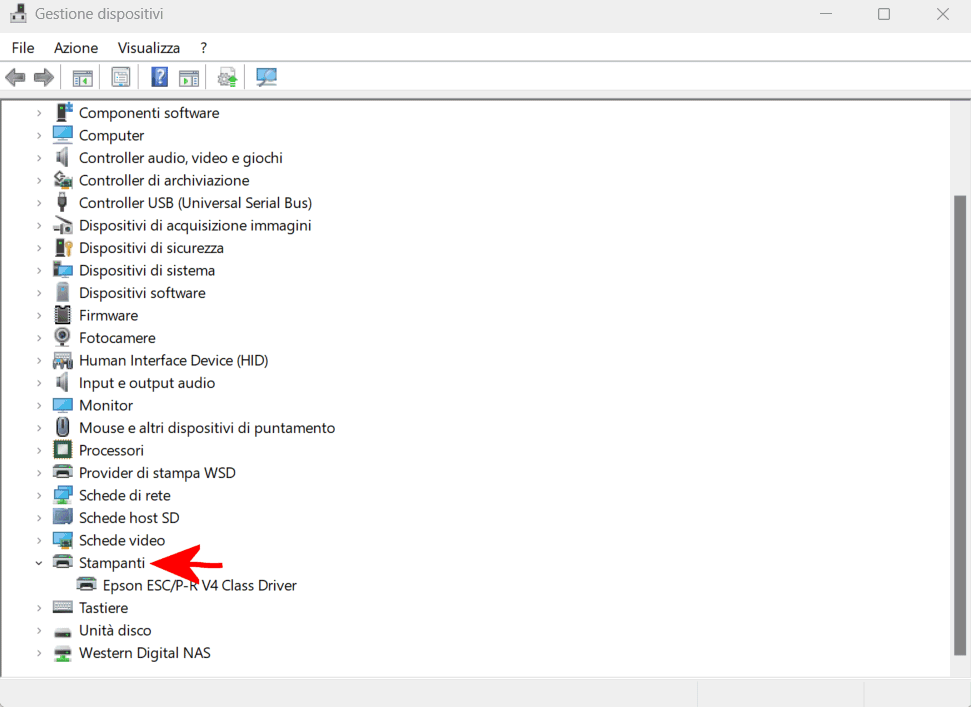
Finestra Gestione dispositivi Windows 11

Windows 11 presenta, tra le varie categorie di dispositivi, anche la sezione Stampanti: controllate se al suo interno figurasse il driver di stampa corrispondente alla stampante che non trovate più nella finestra Stampanti e scanner. In caso affermativo, il problema può essere risolto molto semplicemente usando la procedura per riavviare lo spooler della stampante (ne parliamo al paragrafo seguente).

Cancellare la coda di stampa e riavviare lo spooler della stampante

Per procedere in tal senso, basta digitare cmd nella casella di ricerca di Windows 11 quindi selezionare il collegamento Esegui come amministratore che compare nel menu Start sulla destra. A questo punto, si possono impartire i seguenti tre comandi, l’uno dopo l’altro:

net stop spooler
del /q /f /s "%systemroot%\System32\Spool\Printers\*.*"
net start spooler
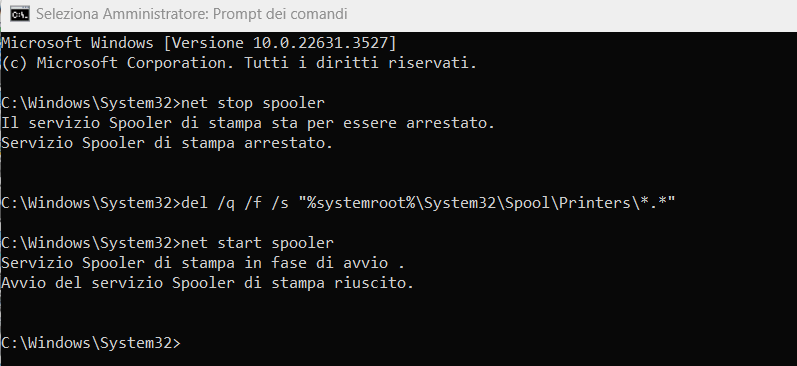
Riavviare spooler stampante in Windows 11

Il primo comando interrompe il servizio di stampa di Windows, noto come “spooler di stampa”. Lo spooler di stampa è il componente di Windows che gestisce tutti i lavori di stampa inviati alla stampante.

Il secondo passo consiste nel cancellare tutta l’eventuale coda di stampa, conservata dal sistema operativo Microsoft nella cartella %systemroot%\System32\Spool\Printers\, per poi riavviare lo spooler.

Questo passaggio, nella stragrande maggioranza dei casi, dovrebbe sortire come effetto la ricomparsa della stampante nella finestra Stampanti e scanner.

Provare a reinstallare il driver di stampa

Nel caso in cui non si riuscisse a risolvere, digitando Stampanti e scanner si può selezionare Aggiungi dispositivo e verificare se la stampante fosse automaticamente rilevata (assicurarsi che sia accesa e collegata alla rete locale o via USB).

Per richiamare la routine di ricerca della stampante alla quale erano abituati gli utenti di Windows 10 (e versioni precedenti), si può premere Windows+R quindi incollare quanto segue nel campo Apri:

Rundll32 shell32.dll,SHHelpShortcuts_RunDLL AddPrinter
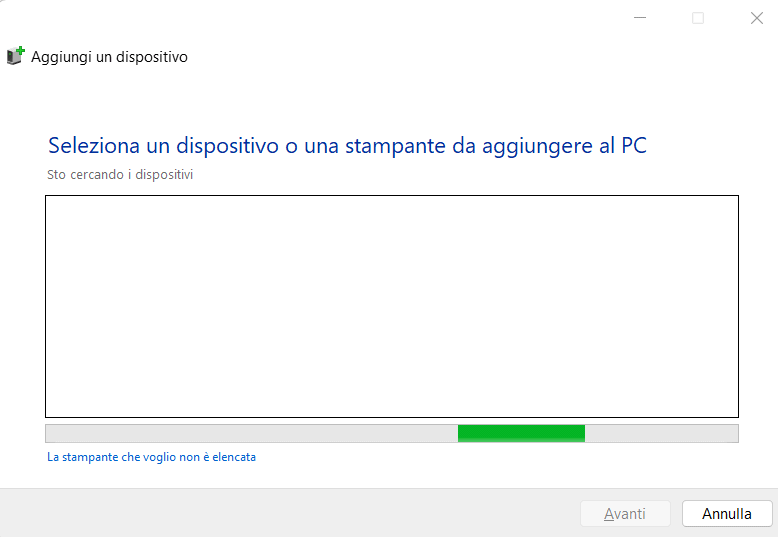
Aggiungere stampante Windows 11

Con un clic su La stampante che voglio non è elencata, è possibile attivare la scansione automatica che permette di rilevare le stampanti meno recenti o specificarne l’indirizzo di rete. Aiutandosi con le opzioni Seleziona una stampante condivisa in base al nome oppure Aggiungi una stampante usando un indirizzo IP o un nome host, è possibile indicarne l’indirizzo corrispondente (IP locale o nome dell’host).
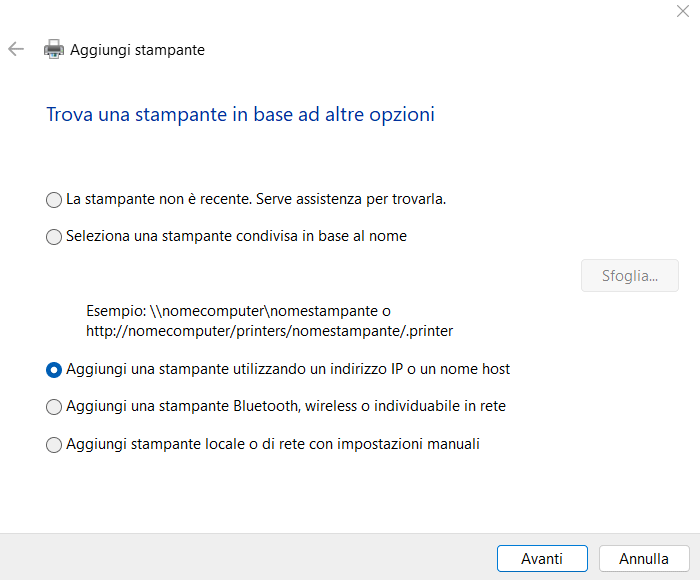
Trovare stampante di rete

Il display che tante stampanti di rete mostrano oppure il pannello di amministrazione del router, permettono di risalire all’indirizzo IP privato della stampante. Se fosse assegnato via DHCP, suggeriamo di attribuire alla stampante un IP statico.

Accedere alla vecchia finestra delle stampanti

In Windows 11, per portarsi nella storica finestra Dispositivi e stampanti, si può digitare Bluetooth nella casella di ricerca del menu Start quindi selezionare Impostazioni dei dispositivi Bluetooth e di altro tipo. La finestra che appare deve essere scorsa fino in fondo, per cliccare sulla voce Altre impostazioni di dispositivi e stampanti.
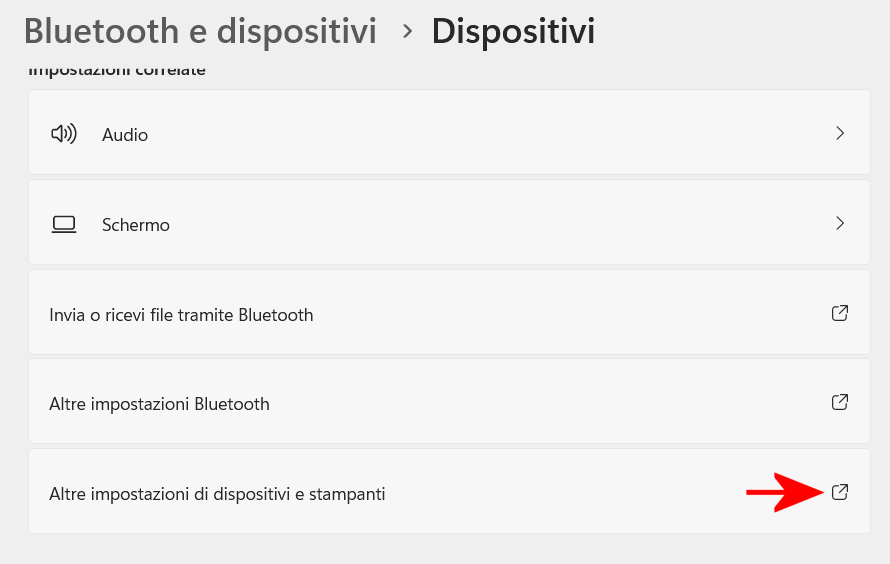
Finestra dispositivi e stampanti Windows

In alternativa, si può cliccare due volte sul nome della stampante nella sezione Stampanti della finestra Gestione dispositivi (sempre che la stampante sia presente) quindi cliccare sulla scheda Impostazioni e infine su Cartella Dispositivi e stampanti.

All’interno di Dispositivi e stampanti, si deve verificare che la stampante sia presente, altrimenti è necessario procedere con il passaggio seguente.

Rimuovere il driver di stampa presente sul sistema Windows 11 e reinstallarlo da zero

Nella finestra vista in precedenza (Dispositivi e stampanti) si deve fare clic su una stampante qualunque (va bene anche quella virtuale chiamata Microsoft Print to PDF) quindi cliccare sul pulsante Proprietà server di stampa in alto, portandosi infine nella scheda Driver.

Nel riquadro Driver di stampa installati, si deve selezionare la stampante che dà problemi e che risulta sparita dalla finestra Stampanti e scanner quindi fare clic sul pulsante Rimuovi e infine Rimuovi driver e pacchetto driver.
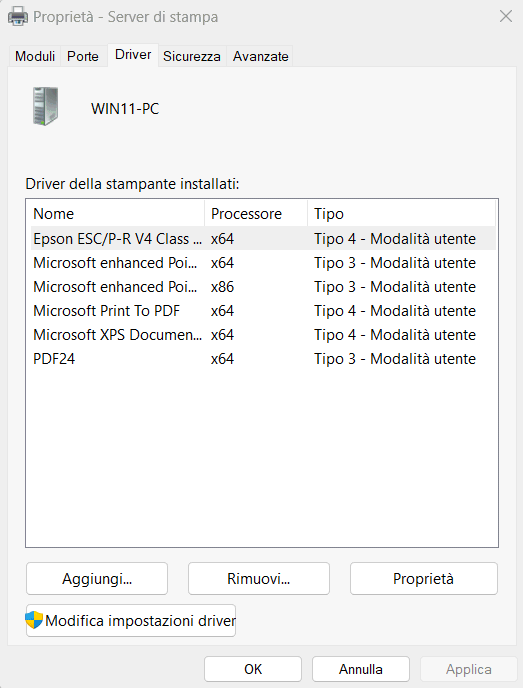
Rimozione driver stampante e reinstallazione Windows 11

Se la rimozione del driver restituisse un errore, è possibile forzarne l’eliminazione seguendo le indicazioni riportate nell’articolo sulla disinstallazione del driver di stampa in Windows a partire dal punto 7) e successivi.

Dopo il riavvio del sistema, si può procedere con la reinstallazione del driver della stampante. In primis, tornando nella finestra Stampanti e scanner si può verificare se, dopo una nuova accensione del dispositivo di stampa, questo fosse correttamente riconosciuto.

Cercare il driver più aggiornato sul sito del produttore della stampante

È inoltre bene verificare sempre sul sito del produttore della stampante se vi fosse un driver più recente rispetto a quello installato automaticamente da Windows facendo leva sulla funzionalità plug and play. Nella finestra Gestione dispositivi, vista in precedenza, suggeriamo di fare doppio clic sul nome della stampante nella sezione Stampanti, portarsi nella scheda Dettagli quindi selezionare dal menu a tendina Proprietà le voci Data driver e Versione driver. Queste due informazioni vanno confrontate con il driver disponibile sul sito del produttore.

Microsoft ha annunciato che, progressivamente, i driver di stampa non saranno più disponibili su Windows Update e che con Windows 11 22H2 sono cambiate le modalità di comunicazione predefinite con le stampanti di rete. Nell’articolo abbiamo spiegato com’è possibile comportarsi in caso di problemi.

Credit immagine in apertura: iStock.com – Fahroni

Ti consigliamo anche

Link copiato negli appunti