
Deprecated: Creation of dynamic property Timber\Site::$pingback is deprecated in /var/www/html/web/app/themes/ilsoftware/vendor/timber/timber/lib/Site.php on line 180

Deprecated: Creation of dynamic property Timber\User::$name is deprecated in /var/www/html/web/app/themes/ilsoftware/vendor/timber/timber/lib/User.php on line 118

Deprecated: Creation of dynamic property Timber\Post::$has_disclaimer is deprecated in /var/www/html/web/app/themes/ilsoftware/vendor/timber/timber/lib/Core.php on line 71

Deprecated: Creation of dynamic property Timber\Post::$_edit_lock is deprecated in /var/www/html/web/app/themes/ilsoftware/vendor/timber/timber/lib/Core.php on line 71

Deprecated: Creation of dynamic property Timber\Post::$_edit_last is deprecated in /var/www/html/web/app/themes/ilsoftware/vendor/timber/timber/lib/Core.php on line 71

Deprecated: Creation of dynamic property Timber\Post::$onesignal_meta_box_present is deprecated in /var/www/html/web/app/themes/ilsoftware/vendor/timber/timber/lib/Core.php on line 71

Deprecated: Creation of dynamic property Timber\Post::$onesignal_send_notification is deprecated in /var/www/html/web/app/themes/ilsoftware/vendor/timber/timber/lib/Core.php on line 71

Deprecated: Creation of dynamic property Timber\Post::$onesignal_modify_title_and_content is deprecated in /var/www/html/web/app/themes/ilsoftware/vendor/timber/timber/lib/Core.php on line 71

Deprecated: Creation of dynamic property Timber\Post::$onesignal_notification_custom_heading is deprecated in /var/www/html/web/app/themes/ilsoftware/vendor/timber/timber/lib/Core.php on line 71

Deprecated: Creation of dynamic property Timber\Post::$onesignal_notification_custom_content is deprecated in /var/www/html/web/app/themes/ilsoftware/vendor/timber/timber/lib/Core.php on line 71

Deprecated: Creation of dynamic property Timber\Post::$_yoast_wpseo_content_score is deprecated in /var/www/html/web/app/themes/ilsoftware/vendor/timber/timber/lib/Core.php on line 71

Deprecated: Creation of dynamic property Timber\Post::$_yoast_wpseo_focuskeywords is deprecated in /var/www/html/web/app/themes/ilsoftware/vendor/timber/timber/lib/Core.php on line 71

Deprecated: Creation of dynamic property Timber\Post::$_yoast_wpseo_keywordsynonyms is deprecated in /var/www/html/web/app/themes/ilsoftware/vendor/timber/timber/lib/Core.php on line 71

Deprecated: Creation of dynamic property Timber\Post::$_yoast_wpseo_estimated-reading-time-minutes is deprecated in /var/www/html/web/app/themes/ilsoftware/vendor/timber/timber/lib/Core.php on line 71

Deprecated: Creation of dynamic property Timber\Post::$_yoast_wpseo_wordproof_timestamp is deprecated in /var/www/html/web/app/themes/ilsoftware/vendor/timber/timber/lib/Core.php on line 71

Deprecated: Creation of dynamic property Timber\Post::$tipologia is deprecated in /var/www/html/web/app/themes/ilsoftware/vendor/timber/timber/lib/Core.php on line 71

Deprecated: Creation of dynamic property Timber\Post::$_tipologia is deprecated in /var/www/html/web/app/themes/ilsoftware/vendor/timber/timber/lib/Core.php on line 71

Deprecated: Creation of dynamic property Timber\Post::$attributi is deprecated in /var/www/html/web/app/themes/ilsoftware/vendor/timber/timber/lib/Core.php on line 71

Deprecated: Creation of dynamic property Timber\Post::$_attributi is deprecated in /var/www/html/web/app/themes/ilsoftware/vendor/timber/timber/lib/Core.php on line 71

Deprecated: Creation of dynamic property Timber\Post::$in_evidenza_newsletter is deprecated in /var/www/html/web/app/themes/ilsoftware/vendor/timber/timber/lib/Core.php on line 71

Deprecated: Creation of dynamic property Timber\Post::$_in_evidenza_newsletter is deprecated in /var/www/html/web/app/themes/ilsoftware/vendor/timber/timber/lib/Core.php on line 71

Deprecated: Creation of dynamic property Timber\Post::$inviato_in_newsletter is deprecated in /var/www/html/web/app/themes/ilsoftware/vendor/timber/timber/lib/Core.php on line 71

Deprecated: Creation of dynamic property Timber\Post::$_inviato_in_newsletter is deprecated in /var/www/html/web/app/themes/ilsoftware/vendor/timber/timber/lib/Core.php on line 71

Deprecated: Creation of dynamic property Timber\Post::$_yoast_wpseo_primary_category is deprecated in /var/www/html/web/app/themes/ilsoftware/vendor/timber/timber/lib/Core.php on line 71

Deprecated: Creation of dynamic property Timber\Post::$_yoast_wpseo_primary_blz_affiliation_attributes is deprecated in /var/www/html/web/app/themes/ilsoftware/vendor/timber/timber/lib/Core.php on line 71

Deprecated: Creation of dynamic property Timber\Post::$_yoast_wpseo_primary_content_type is deprecated in /var/www/html/web/app/themes/ilsoftware/vendor/timber/timber/lib/Core.php on line 71

Deprecated: Creation of dynamic property Timber\Post::$_yoast_wpseo_primary_attributes is deprecated in /var/www/html/web/app/themes/ilsoftware/vendor/timber/timber/lib/Core.php on line 71

Deprecated: Creation of dynamic property Timber\Post::$_yoast_wpseo_primary_speciali is deprecated in /var/www/html/web/app/themes/ilsoftware/vendor/timber/timber/lib/Core.php on line 71

Deprecated: Creation of dynamic property Timber\Post::$_yoast_wpseo_focuskw is deprecated in /var/www/html/web/app/themes/ilsoftware/vendor/timber/timber/lib/Core.php on line 71

Deprecated: Creation of dynamic property Timber\Post::$_yoast_wpseo_linkdex is deprecated in /var/www/html/web/app/themes/ilsoftware/vendor/timber/timber/lib/Core.php on line 71

Deprecated: Creation of dynamic property Timber\Post::$_yoast_wpseo_metadesc is deprecated in /var/www/html/web/app/themes/ilsoftware/vendor/timber/timber/lib/Core.php on line 71

Deprecated: Creation of dynamic property Timber\Post::$_thumbnail_id is deprecated in /var/www/html/web/app/themes/ilsoftware/vendor/timber/timber/lib/Core.php on line 71

Deprecated: Creation of dynamic property Timber\Post::$response_body is deprecated in /var/www/html/web/app/themes/ilsoftware/vendor/timber/timber/lib/Core.php on line 71

Deprecated: Creation of dynamic property Timber\Post::$status is deprecated in /var/www/html/web/app/themes/ilsoftware/vendor/timber/timber/lib/Core.php on line 71

Deprecated: Creation of dynamic property Timber\Post::$_yoast_indexnow_last_ping is deprecated in /var/www/html/web/app/themes/ilsoftware/vendor/timber/timber/lib/Core.php on line 71

Deprecated: Creation of dynamic property Timber\Post::$_oembed_30e04b556b92a9b7bad50f1f29c98246 is deprecated in /var/www/html/web/app/themes/ilsoftware/vendor/timber/timber/lib/Core.php on line 71

Deprecated: Creation of dynamic property Timber\Post::$_oembed_time_30e04b556b92a9b7bad50f1f29c98246 is deprecated in /var/www/html/web/app/themes/ilsoftware/vendor/timber/timber/lib/Core.php on line 71

Deprecated: Creation of dynamic property Timber\Post::$_oembed_8a29b209f4128d47d220b786b9a4db67 is deprecated in /var/www/html/web/app/themes/ilsoftware/vendor/timber/timber/lib/Core.php on line 71

Deprecated: Creation of dynamic property Timber\Post::$_oembed_time_8a29b209f4128d47d220b786b9a4db67 is deprecated in /var/www/html/web/app/themes/ilsoftware/vendor/timber/timber/lib/Core.php on line 71

Deprecated: Creation of dynamic property Timber\Post::$post_date_gmt is deprecated in /var/www/html/web/app/themes/ilsoftware/vendor/timber/timber/lib/Core.php on line 71

Deprecated: Creation of dynamic property Timber\Post::$comment_status is deprecated in /var/www/html/web/app/themes/ilsoftware/vendor/timber/timber/lib/Core.php on line 71

Deprecated: Creation of dynamic property Timber\Post::$ping_status is deprecated in /var/www/html/web/app/themes/ilsoftware/vendor/timber/timber/lib/Core.php on line 71

Deprecated: Creation of dynamic property Timber\Post::$post_password is deprecated in /var/www/html/web/app/themes/ilsoftware/vendor/timber/timber/lib/Core.php on line 71

Deprecated: Creation of dynamic property Timber\Post::$post_name is deprecated in /var/www/html/web/app/themes/ilsoftware/vendor/timber/timber/lib/Core.php on line 71

Deprecated: Creation of dynamic property Timber\Post::$to_ping is deprecated in /var/www/html/web/app/themes/ilsoftware/vendor/timber/timber/lib/Core.php on line 71

Deprecated: Creation of dynamic property Timber\Post::$pinged is deprecated in /var/www/html/web/app/themes/ilsoftware/vendor/timber/timber/lib/Core.php on line 71

Deprecated: Creation of dynamic property Timber\Post::$post_modified is deprecated in /var/www/html/web/app/themes/ilsoftware/vendor/timber/timber/lib/Core.php on line 71

Deprecated: Creation of dynamic property Timber\Post::$post_modified_gmt is deprecated in /var/www/html/web/app/themes/ilsoftware/vendor/timber/timber/lib/Core.php on line 71

Deprecated: Creation of dynamic property Timber\Post::$post_content_filtered is deprecated in /var/www/html/web/app/themes/ilsoftware/vendor/timber/timber/lib/Core.php on line 71

Deprecated: Creation of dynamic property Timber\Post::$guid is deprecated in /var/www/html/web/app/themes/ilsoftware/vendor/timber/timber/lib/Core.php on line 71

Deprecated: Creation of dynamic property Timber\Post::$menu_order is deprecated in /var/www/html/web/app/themes/ilsoftware/vendor/timber/timber/lib/Core.php on line 71

Deprecated: Creation of dynamic property Timber\Post::$post_mime_type is deprecated in /var/www/html/web/app/themes/ilsoftware/vendor/timber/timber/lib/Core.php on line 71

Deprecated: Creation of dynamic property Timber\Post::$comment_count is deprecated in /var/www/html/web/app/themes/ilsoftware/vendor/timber/timber/lib/Core.php on line 71

Deprecated: Creation of dynamic property Timber\Post::$filter is deprecated in /var/www/html/web/app/themes/ilsoftware/vendor/timber/timber/lib/Core.php on line 71
Sveliamo come provare subito Google Gemma in locale, sui propri sistemi | IlSoftware.it

Sveliamo come provare subito Google Gemma in locale, sui propri sistemi

La strada più semplice per provare i modelli Google Gemma consiste nell'utilizzare Ollama, soluzione che permette la gestione di tutti i principali LLM (Large Language Models) open source dalla riga di comando.

Google Gemma è una nuova famiglia di modelli generativi aperti, progettata per assistere sviluppatori e ricercatori nella costruzione responsabile di applicazioni basate sull’intelligenza artificiale. I nuovi modelli, già pubblicamente disponibili, ovvero Gemma 2B e 7B, sono il frutto dei medesimi sforzi di ricerca e degli avanzamenti tecnologici che hanno portato alla recente presentazione di Gemini. Sviluppati da Google DeepMind con la collaborazione di altri team dell’azienda di Mountain View, i modelli Gemma sono open source e possono essere utilizzati gratuitamente dagli sviluppatori, anche per usi commerciali.

Le caratteristiche di base dei modelli Google Gemma

I modelli Gemma sono leggeri e all’avanguardia, e offrono prestazioni elevate a dispetto delle dimensioni ridotte. Il grande vantaggio è che possono essere eseguiti direttamente su notebook, workstation oppure sulla piattaforma Google Cloud, appoggiandosi a Vertex AI e Google Kubernetes Engine (GKE).

Per mettere a tacere le cassandre che a maggio 2023 descrivevano i modelli open source di terze parti sulla strada di superare Google e OpenAI, l’azienda guidata da Sundar Pichai decide di imboccare proprio quella via. I modelli Google Gemma non solo sono aperti e liberamente utilizzabili ma possono essere integrati con diverse piattaforme e strumenti popolari quali Kaggle, Colab, Hugging Face, MaxText e NVidia NeMo. Questa integrazione consente agli sviluppatori utilizzare i modelli Gemma in ambienti familiari e con strumenti ampiamente adottati, scegliendo quelli preferiti.

Google fornisce anche un Responsible Generative AI Toolkit per supportare l’uso sicuro dell’IA, promuovendo la collaborazione e guidando l’uso responsabile. I modelli Gemma utilizzano tecniche automatizzate per filtrare informazioni personali e altri dati riservati dai set di dati. Inoltre, la società ha annunciato il rilascio di un set completo di benchmark per valutare Gemma rispetto ad altri modelli.

Entrambi i modelli, Gemma 2B e Gemma 7B, comunque sono text-oriented, nel senso che ricevono in ingresso del testo in linguaggio naturale (prompt), lo elaborano e restituiscono a loro volta del testo in output.

Le novità introdotte con Gemma sono tantissime: davvero troppe anche per un articolo approfondito. Invitiamo quindi gli interessati a documentarsi sul post in italiano “una nuova famiglia di modelli aperti“. Concentriamoci invece su come installare Gemma e usarlo in locale o sul cloud.

Come installare Google Gemma in locale

Come abbiamo anticipato nell’introduzione, Gemma è progettato per funzionare su qualunque hardware, in locale o sul cloud. Si pensi a server, workstation, laptop, dispositivi mobili e in qualunque applicazione personalizzata dagli utenti. La buona notizia, inoltre, è che i modelli generativi di Google possono essere ottimizzati e sottoposti, in totale autonomia, ad attività di fine tuning volte ad ampliarne le capacità o a “specializzare” il comportamento di Gemma per svolgere al meglio compiti “ad hoc”.

Per iniziare e avere la possibilità di eseguire in locale Gemma, anche con un set di risorse hardware piuttosto modesto, si può cominciare con il modello più leggero da due miliardi di parametri (2B) per poi eventualmente migrare al 7B.

Configurazione di Gemma su un sistema Ubuntu con Ollama

Gemma può essere utilizzato senza limitazioni su una vasta gamma di piattaforme e sistemi operativi. Proviamo, innanzi tutto, a predisporne il funzionamento su una macchina Linux, nel nostro caso Ubuntu 22.04.

Per usare Gemma in locale è certamente possibile seguire le istruzioni Google pubblicate su Hugging Face. Requisito essenziale è la presenza del linguaggio Python e di pip (strumento di gestione dei pacchetti per Python; il suo nome è un acronimo che sta per “Pip Installs Packages“).

Da parte nostra, tuttavia, ci sentiamo di consigliare l’utilizzo di Ollama. Progetto open source, Ollama porta l’intelligenza artificiale sui propri sistemi in locale: framework leggero ed estensibile, fornisce un’API (Application Programming Interface) per la creazione, l’esecuzione e la gestione di modelli linguistici, consentendo agli utenti di eseguire modelli generativi in locale su macOS, Linux e Windows.

La piattaforma riconosce automaticamente la presenza di schede basate su GPU NVidia (diversamente, si appoggia ai core della CPU per le elaborazioni, ovviamente con prestazioni ridotte) e offre un’ampia varietà di integrazioni. L’installazione di Ollama può essere eseguita tramite un semplice comando da terminale, e sono disponibili anche immagini Docker ufficiali.

Installazione di Ollama e aggiunta dei modelli generativi Google Gemma

Per installare Ollama, è sufficiente impartire il seguente comando dalla finestra del terminale Linux:

curl https://ollama.ai/install.sh | sh

A questo punto, è possibile scegliere se scaricare e installare il LLM (Large Language Model) Gemma 2B o Gemma 7B, ricorrendo a una delle seguenti due istruzioni (è possibile impartirle entrambe per usare tutti e due i modelli Google):

ollama run gemma:2b

ollama run gemma:7b
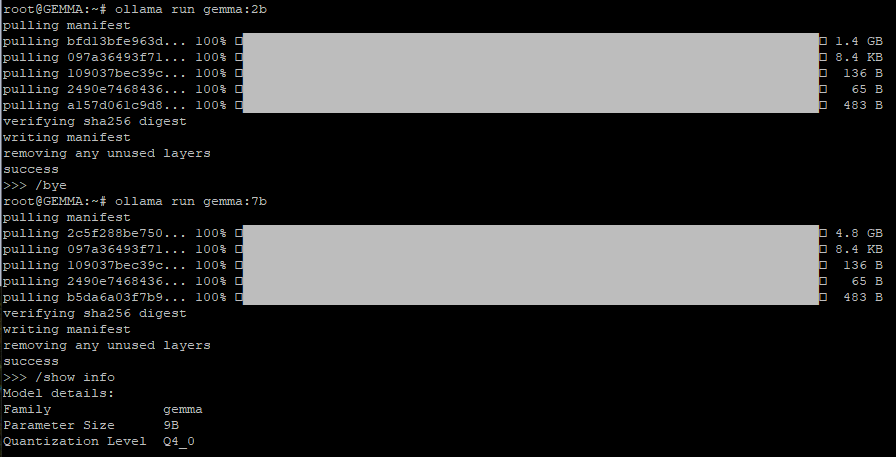
Eseguire Google Gemma in locale

Curiosamente, digitando /show info al prompt di Ollama, il framework indica 3B come numero di parametri supportati da Gemma 2B e 9B nel caso del modello Gemma 7B. Ma tant’è.

Passare un prompt a Gemma e ottenere una risposta argomentata

In corrispondenza del prompt di Ollama, è possibile digitare il quesito in linguaggio naturale da presentare al modello generativo di Google. Dopo la pressione del tasto Invio, a seconda del modello scelto con il comando ollama run, si otterrà la risposta desiderata.
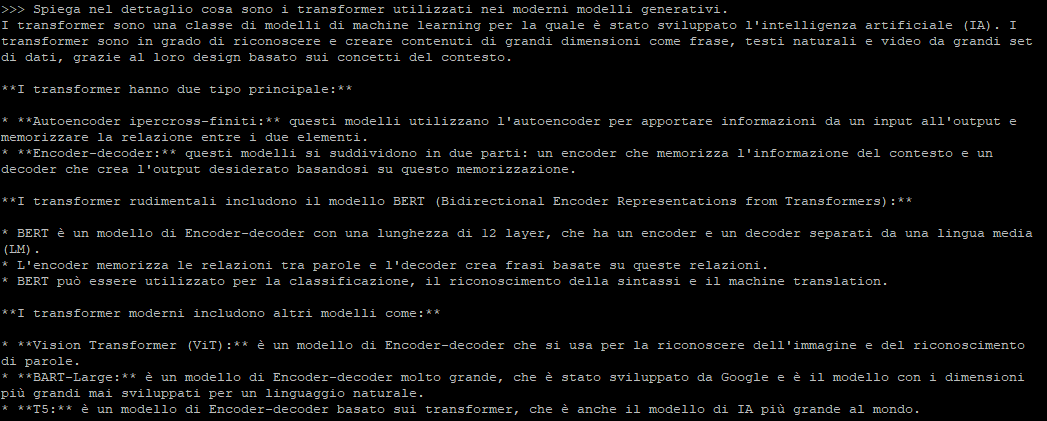
Ollama esegue Google Gemma 2B e 7B

Utilizzando Ollama Web UI si può addirittura creare un proprio chatbot interagendovi direttamente mediante interfaccia grafica. In un altro approfondimento abbiamo visto come allestire un chatbot locale con GUI usando i principali LLM, Google Gemma compreso.

Appena installato, Ollama mostra un messaggio simile al seguente: “The Ollama API is now available at 127.0.0.1:11434“. Questo significa che non è possibile interagire con i vari modelli generativi solo tramite interfaccia testuale ma anche appoggiandosi all’API dedicata di Ollama.

Il comando seguente utilizza l’API REST di Ollama per dialogare con Gemma e ottenere una risposta in formato JSON, poi opportunamente gestibile:

curl http://localhost:11434/api/generate -d '{ "model": "gemma:2b", "prompt":"Perché il cielo è celeste?" }'

Di Ollama esistono anche versioni per macOS e Windows, scaricabili gratuitamente dalla pagina di download. Inoltre, le possibilità sono praticamente infinite grazie alle librerie che consentono di interagire con Ollama tramite codice Python e JavaScript. È possibile installare queste librerie utilizzando pip per Python e npm per JavaScript.

Ti consigliamo anche

Link copiato negli appunti