
Deprecated: Creation of dynamic property Timber\Site::$pingback is deprecated in /var/www/html/web/app/themes/ilsoftware/vendor/timber/timber/lib/Site.php on line 180

Deprecated: Creation of dynamic property Timber\User::$name is deprecated in /var/www/html/web/app/themes/ilsoftware/vendor/timber/timber/lib/User.php on line 118

Deprecated: Creation of dynamic property Timber\Post::$has_disclaimer is deprecated in /var/www/html/web/app/themes/ilsoftware/vendor/timber/timber/lib/Core.php on line 71

Deprecated: Creation of dynamic property Timber\Post::$_edit_lock is deprecated in /var/www/html/web/app/themes/ilsoftware/vendor/timber/timber/lib/Core.php on line 71

Deprecated: Creation of dynamic property Timber\Post::$_edit_last is deprecated in /var/www/html/web/app/themes/ilsoftware/vendor/timber/timber/lib/Core.php on line 71

Deprecated: Creation of dynamic property Timber\Post::$onesignal_meta_box_present is deprecated in /var/www/html/web/app/themes/ilsoftware/vendor/timber/timber/lib/Core.php on line 71

Deprecated: Creation of dynamic property Timber\Post::$onesignal_send_notification is deprecated in /var/www/html/web/app/themes/ilsoftware/vendor/timber/timber/lib/Core.php on line 71

Deprecated: Creation of dynamic property Timber\Post::$onesignal_modify_title_and_content is deprecated in /var/www/html/web/app/themes/ilsoftware/vendor/timber/timber/lib/Core.php on line 71

Deprecated: Creation of dynamic property Timber\Post::$onesignal_notification_custom_heading is deprecated in /var/www/html/web/app/themes/ilsoftware/vendor/timber/timber/lib/Core.php on line 71

Deprecated: Creation of dynamic property Timber\Post::$onesignal_notification_custom_content is deprecated in /var/www/html/web/app/themes/ilsoftware/vendor/timber/timber/lib/Core.php on line 71

Deprecated: Creation of dynamic property Timber\Post::$tipologia is deprecated in /var/www/html/web/app/themes/ilsoftware/vendor/timber/timber/lib/Core.php on line 71

Deprecated: Creation of dynamic property Timber\Post::$_tipologia is deprecated in /var/www/html/web/app/themes/ilsoftware/vendor/timber/timber/lib/Core.php on line 71

Deprecated: Creation of dynamic property Timber\Post::$attributi is deprecated in /var/www/html/web/app/themes/ilsoftware/vendor/timber/timber/lib/Core.php on line 71

Deprecated: Creation of dynamic property Timber\Post::$_attributi is deprecated in /var/www/html/web/app/themes/ilsoftware/vendor/timber/timber/lib/Core.php on line 71

Deprecated: Creation of dynamic property Timber\Post::$in_evidenza_newsletter is deprecated in /var/www/html/web/app/themes/ilsoftware/vendor/timber/timber/lib/Core.php on line 71

Deprecated: Creation of dynamic property Timber\Post::$_in_evidenza_newsletter is deprecated in /var/www/html/web/app/themes/ilsoftware/vendor/timber/timber/lib/Core.php on line 71

Deprecated: Creation of dynamic property Timber\Post::$newsletter_subject is deprecated in /var/www/html/web/app/themes/ilsoftware/vendor/timber/timber/lib/Core.php on line 71

Deprecated: Creation of dynamic property Timber\Post::$_newsletter_subject is deprecated in /var/www/html/web/app/themes/ilsoftware/vendor/timber/timber/lib/Core.php on line 71

Deprecated: Creation of dynamic property Timber\Post::$newsletter_summary is deprecated in /var/www/html/web/app/themes/ilsoftware/vendor/timber/timber/lib/Core.php on line 71

Deprecated: Creation of dynamic property Timber\Post::$_newsletter_summary is deprecated in /var/www/html/web/app/themes/ilsoftware/vendor/timber/timber/lib/Core.php on line 71

Deprecated: Creation of dynamic property Timber\Post::$inviato_in_newsletter is deprecated in /var/www/html/web/app/themes/ilsoftware/vendor/timber/timber/lib/Core.php on line 71

Deprecated: Creation of dynamic property Timber\Post::$_inviato_in_newsletter is deprecated in /var/www/html/web/app/themes/ilsoftware/vendor/timber/timber/lib/Core.php on line 71

Deprecated: Creation of dynamic property Timber\Post::$_yoast_wpseo_primary_category is deprecated in /var/www/html/web/app/themes/ilsoftware/vendor/timber/timber/lib/Core.php on line 71

Deprecated: Creation of dynamic property Timber\Post::$_yoast_wpseo_primary_blz_affiliation_attributes is deprecated in /var/www/html/web/app/themes/ilsoftware/vendor/timber/timber/lib/Core.php on line 71

Deprecated: Creation of dynamic property Timber\Post::$_yoast_wpseo_primary_content_type is deprecated in /var/www/html/web/app/themes/ilsoftware/vendor/timber/timber/lib/Core.php on line 71

Deprecated: Creation of dynamic property Timber\Post::$_yoast_wpseo_primary_attributes is deprecated in /var/www/html/web/app/themes/ilsoftware/vendor/timber/timber/lib/Core.php on line 71

Deprecated: Creation of dynamic property Timber\Post::$_yoast_wpseo_primary_speciali is deprecated in /var/www/html/web/app/themes/ilsoftware/vendor/timber/timber/lib/Core.php on line 71

Deprecated: Creation of dynamic property Timber\Post::$_yoast_wpseo_focuskw is deprecated in /var/www/html/web/app/themes/ilsoftware/vendor/timber/timber/lib/Core.php on line 71

Deprecated: Creation of dynamic property Timber\Post::$_yoast_wpseo_metadesc is deprecated in /var/www/html/web/app/themes/ilsoftware/vendor/timber/timber/lib/Core.php on line 71

Deprecated: Creation of dynamic property Timber\Post::$_yoast_wpseo_linkdex is deprecated in /var/www/html/web/app/themes/ilsoftware/vendor/timber/timber/lib/Core.php on line 71

Deprecated: Creation of dynamic property Timber\Post::$_yoast_wpseo_content_score is deprecated in /var/www/html/web/app/themes/ilsoftware/vendor/timber/timber/lib/Core.php on line 71

Deprecated: Creation of dynamic property Timber\Post::$_yoast_wpseo_focuskeywords is deprecated in /var/www/html/web/app/themes/ilsoftware/vendor/timber/timber/lib/Core.php on line 71

Deprecated: Creation of dynamic property Timber\Post::$_yoast_wpseo_keywordsynonyms is deprecated in /var/www/html/web/app/themes/ilsoftware/vendor/timber/timber/lib/Core.php on line 71

Deprecated: Creation of dynamic property Timber\Post::$_yoast_wpseo_estimated-reading-time-minutes is deprecated in /var/www/html/web/app/themes/ilsoftware/vendor/timber/timber/lib/Core.php on line 71

Deprecated: Creation of dynamic property Timber\Post::$_thumbnail_id is deprecated in /var/www/html/web/app/themes/ilsoftware/vendor/timber/timber/lib/Core.php on line 71

Deprecated: Creation of dynamic property Timber\Post::$response_body is deprecated in /var/www/html/web/app/themes/ilsoftware/vendor/timber/timber/lib/Core.php on line 71

Deprecated: Creation of dynamic property Timber\Post::$status is deprecated in /var/www/html/web/app/themes/ilsoftware/vendor/timber/timber/lib/Core.php on line 71

Deprecated: Creation of dynamic property Timber\Post::$_yoast_indexnow_last_ping is deprecated in /var/www/html/web/app/themes/ilsoftware/vendor/timber/timber/lib/Core.php on line 71

Deprecated: Creation of dynamic property Timber\Post::$post_date_gmt is deprecated in /var/www/html/web/app/themes/ilsoftware/vendor/timber/timber/lib/Core.php on line 71

Deprecated: Creation of dynamic property Timber\Post::$comment_status is deprecated in /var/www/html/web/app/themes/ilsoftware/vendor/timber/timber/lib/Core.php on line 71

Deprecated: Creation of dynamic property Timber\Post::$ping_status is deprecated in /var/www/html/web/app/themes/ilsoftware/vendor/timber/timber/lib/Core.php on line 71

Deprecated: Creation of dynamic property Timber\Post::$post_password is deprecated in /var/www/html/web/app/themes/ilsoftware/vendor/timber/timber/lib/Core.php on line 71

Deprecated: Creation of dynamic property Timber\Post::$post_name is deprecated in /var/www/html/web/app/themes/ilsoftware/vendor/timber/timber/lib/Core.php on line 71

Deprecated: Creation of dynamic property Timber\Post::$to_ping is deprecated in /var/www/html/web/app/themes/ilsoftware/vendor/timber/timber/lib/Core.php on line 71

Deprecated: Creation of dynamic property Timber\Post::$pinged is deprecated in /var/www/html/web/app/themes/ilsoftware/vendor/timber/timber/lib/Core.php on line 71

Deprecated: Creation of dynamic property Timber\Post::$post_modified is deprecated in /var/www/html/web/app/themes/ilsoftware/vendor/timber/timber/lib/Core.php on line 71

Deprecated: Creation of dynamic property Timber\Post::$post_modified_gmt is deprecated in /var/www/html/web/app/themes/ilsoftware/vendor/timber/timber/lib/Core.php on line 71

Deprecated: Creation of dynamic property Timber\Post::$post_content_filtered is deprecated in /var/www/html/web/app/themes/ilsoftware/vendor/timber/timber/lib/Core.php on line 71

Deprecated: Creation of dynamic property Timber\Post::$guid is deprecated in /var/www/html/web/app/themes/ilsoftware/vendor/timber/timber/lib/Core.php on line 71

Deprecated: Creation of dynamic property Timber\Post::$menu_order is deprecated in /var/www/html/web/app/themes/ilsoftware/vendor/timber/timber/lib/Core.php on line 71

Deprecated: Creation of dynamic property Timber\Post::$post_mime_type is deprecated in /var/www/html/web/app/themes/ilsoftware/vendor/timber/timber/lib/Core.php on line 71

Deprecated: Creation of dynamic property Timber\Post::$comment_count is deprecated in /var/www/html/web/app/themes/ilsoftware/vendor/timber/timber/lib/Core.php on line 71

Deprecated: Creation of dynamic property Timber\Post::$filter is deprecated in /var/www/html/web/app/themes/ilsoftware/vendor/timber/timber/lib/Core.php on line 71
Sveliamo il trucco per caricare qualunque programma a fine installazione Windows 11 | IlSoftware.it

Sveliamo il trucco per caricare qualunque programma a fine installazione Windows 11

Guida alla personalizzazione dell'installazione automatica di Windows 11. Modificando il file autounattend.xml è possibile caricare automaticamente tutti i programmi che servono, al termine del setup di Windows 11.

Chi ci segue da tempo lo sa già. L’ultima fase dell’installazione di Windows 11, chiamata OOBE (Out of Box Experience), non ci va proprio a genio. Microsoft l’ha rimpinguata con troppe schermate, alcune delle quali di fatto inutili per gli utenti. Per non parlare dell’obbligo di impostare un account Microsoft o effettuare una connessione alla rete Internet. In un altro articolo abbiamo visto come installare automaticamente Windows 11 con il setup unattended. Adesso faccio un passo in più e riveliamo come installare qualunque programma al termine della routine di setup di Windows 11.

Perché installare automaticamente i programmi a fine installazione Windows 11

Il file autounattend.xml che abbiamo presentato nell’articolo citato in apertura consente di installare Windows 11 Pro senza compiere un singolo passaggio manuale. Basta caricare il file autounattend.xml allo stesso livello del file setup.exe, nel supporto d’installazione di Windows 11, effettuare il boot da tale unità e… il gioco è fatto. Da ricordare, comunque, che la routine d’installazione cancella per impostazione predefinita tutto quanto eventualmente presente nell’unità disco principale, per fare spazio a Windows 11. Fate un po’ di prove da una macchina virtuale per prendere confidenza con l’installazione unattended. Termine traducibile in italiano come “non presidiata“.

Abbiamo detto che l’installazione unattended permette di avere un’istanza di Windows 11 perfettamente operativa sin dal primo accesso al desktop del sistema operativo.

Ecco, con un semplice passaggio in più, è possibile chiedere al file autounattend.xml di disporre l’installazione di qualunque programma possa servire con Windows 11.

Immaginate di installare Windows 11 dal supporto USB e ritrovarvi già disponibili tutte quelle applicazioni che utilizzate ogni giorno. Ecco, con pochi semplici comandi andremo a fare proprio questo.

Scegliere le applicazioni da installare automaticamente

Partiamo da questo comando che abbiamo sviluppato per voi:

powershell.exe -Command "echo 'if (Test-Connection -ComputerName google.com -Count 1 -Quiet) { schtasks /Change /TN InstallazionePacchetti /DISABLE; winget install Google.Chrome --accept-package-agreements --accept-source-agreements --scope machine; winget install --id=7zip.7zip --scope machine }' > %TEMP%\InstallazionePacchetti.ps1" & schtasks /create /tn "InstallazionePacchetti" /tr "powershell.exe -NoProfile -ExecutionPolicy Bypass -File %TEMP%\InstallazionePacchetti.ps1" /sc MINUTE /mo 5 /f /rl HIGHEST

Sembra complicato ma non lo è affatto.

Il comando crea un file PowerShell (InstallazionePacchetti.ps1) nella cartella temporanea %temp% di Windows 11. Al suo interno inserisce una serie di riferimenti a Winget, package manager ufficiale Microsoft, comunicando quali sono le applicazioni da scaricare e installare.

Il successivo schtasks fa in modo che l’esecuzione del file PowerShell sia impostata attraverso l’Utilità di pianificazione Windows con i privilegi utente più estesi.

Nell’esempio impostiamo il download e l’installazione di Google Chrome e 7-Zip, ma è possibile aggiungere altre direttive per caricare automaticamente altri programmi. Aggiungiamo ad esempio IrfanView, VLC, Visual Studio Code, Microsoft PowerToys:

winget install Google.Chrome --accept-package-agreements --accept-source-agreements --scope machine; winget install --id=7zip.7zip --scope machine; winget install --id=IrfanSkiljan.IrfanView --scope machine; winget install --id=VideoLAN.VLC --scope machine; winget install --id=Microsoft.VisualStudioCode --scope machine;winget install --id=Microsoft.PowerToys --scope machine

Sostituiamo semplicemente il comando al posto della parte evidenziata in grassetto. È ovviamente possibile aggiungere altri programmi cercando i corrispondenti identificativi (id) con la sintassi Winget seguente:

winget search nomeprogramma

Creare un file autounattend.xml personalizzato

Scaricate il file autounattend.xml che abbiamo presentato nell’articolo citato nell’introduzione e portatevi sul sito Unattend Generator.

Cliccate quindi su Scegli file a destra di Import a file generated by this service, selezionate il nostro file autounattend.xml quindi cliccate su Import.
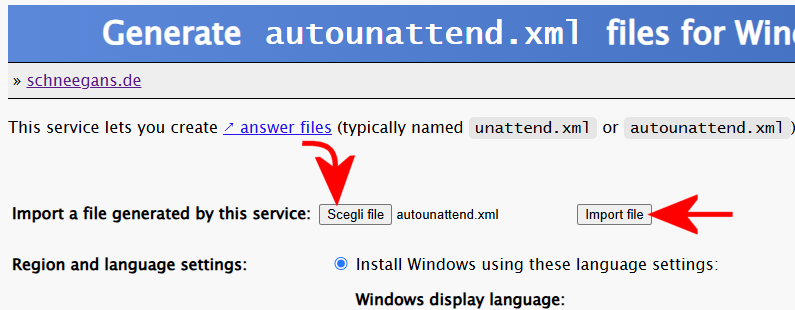
Personalizzazione file autounattend.xml Windows 11

Scorrete fino a incontrare la sezione Scripts to run when the first user logs on after Windows has been installed.

Nel primo riquadro Run (as a .cmd file) incollate il comando prodotto in precedenza. Ad esempio:

powershell.exe -Command "echo 'if (Test-Connection -ComputerName google.com -Count 1 -Quiet) { schtasks /Change /TN InstallazionePacchetti /DISABLE; winget install Google.Chrome --accept-package-agreements --accept-source-agreements --scope machine; winget install --id=7zip.7zip --scope machine; winget install --id=IrfanSkiljan.IrfanView --scope machine; winget install --id=VideoLAN.VLC --scope machine; winget install --id=Microsoft.VisualStudioCode --scope machine;winget install --id=Microsoft.PowerToys --scope machine }' > %TEMP%\InstallazionePacchetti.ps1" & schtasks /create /tn "InstallazionePacchetti" /tr "powershell.exe -NoProfile -ExecutionPolicy Bypass -File %TEMP%\InstallazionePacchetti.ps1" /sc MINUTE /mo 5 /f /rl HIGHEST
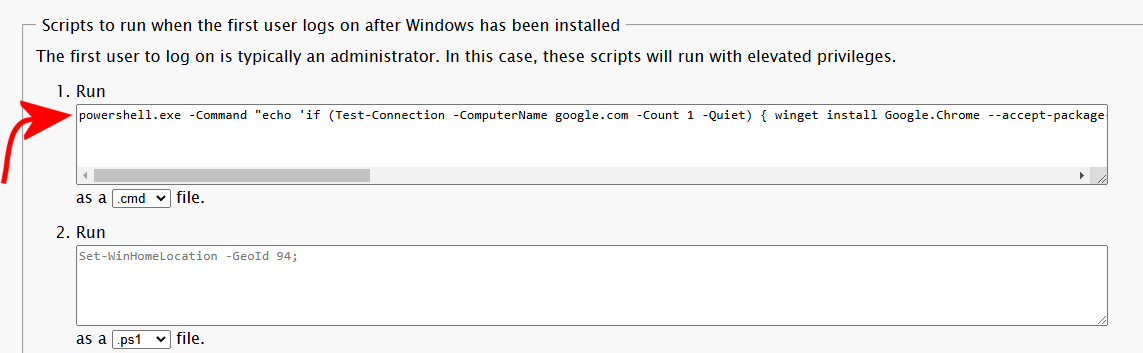
Installazione automatica programmi setup Windows 11

Portatevi alla fine della pagina per poi fare clic su Download .xml file.

File autounattend.xml Windows 11

Aggiungere il file autounattend.xml al supporto d’installazione di Windows 11

Il file autounattend.xml così ottenuto va semplicemente copiato nel supporto d’installazione di Windows 11, allo stesso livello del file setup.exe.

Chi volesse, può modificare il file ISO di Windows 11 con l’utilità Anyburn, come spiegato nell’articolo sul funzionamento dell’installazione unattended di Windows 11.

A setup di Windows 11 concluso, che procede in forma del tutto automatizzata, dopo circa 5 minuti (o comunque nel momento in cui lo script PowerShell rileverà una connessione Internet attiva e funzionante…), inizieranno il download e l’installazione automatica delle applicazioni con Winget.
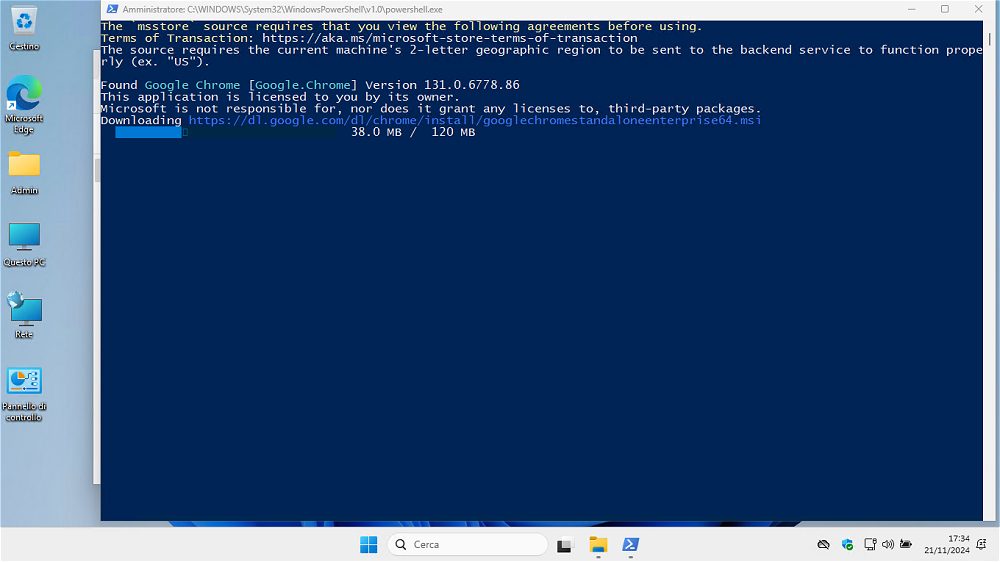
Installazione automatica applicazioni setup Windows 11 con Winget

Non è assolutamente fantastico?

Una volta installati i programmi di proprio interesse con Winget, lo script PowerShell provvede a disattivare l’operazione pianificata. Volendo, è possibile eliminarla digitando Utilità di pianificazione, cliccando su Libreria Utilità di pianificazione quindi rimuovendo l’attività InstallazionePacchetti nel riquadro di destra (tasto destro Eliminazione).
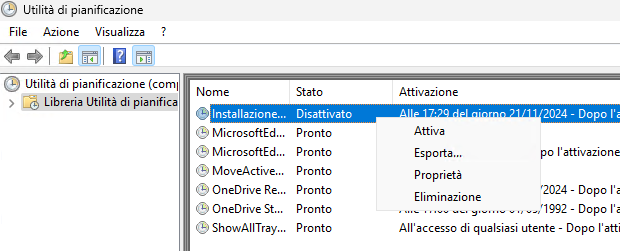
Installazione pacchetti setup Windows 11

Lo script crea inoltre il file InstallazionePacchetti.ps1 nella cartella temporanea di Windows. Si può eventualmente rimuoverlo digitando il comando che segue da una finestra del prompt dei comandi:

del %temp%\InstallazionePacchetti.ps1

Da ultimo, è importante chiarire il significato --scope machine che abbiamo usato nei comandi Winget. Fa in modo che ciascuno dei programmi installati automaticamente con il package manager Microsoft sia disponibile per tutti gli account utente configurati sulla stessa macchina.

Credit immagine in apertura: Microsoft

Ti consigliamo anche

Link copiato negli appunti