
Deprecated: Creation of dynamic property Timber\Site::$pingback is deprecated in /var/www/html/web/app/themes/ilsoftware/vendor/timber/timber/lib/Site.php on line 180

Deprecated: Creation of dynamic property Timber\User::$name is deprecated in /var/www/html/web/app/themes/ilsoftware/vendor/timber/timber/lib/User.php on line 118

Deprecated: Creation of dynamic property Timber\Post::$has_disclaimer is deprecated in /var/www/html/web/app/themes/ilsoftware/vendor/timber/timber/lib/Core.php on line 71

Deprecated: Creation of dynamic property Timber\Post::$_edit_lock is deprecated in /var/www/html/web/app/themes/ilsoftware/vendor/timber/timber/lib/Core.php on line 71

Deprecated: Creation of dynamic property Timber\Post::$_edit_last is deprecated in /var/www/html/web/app/themes/ilsoftware/vendor/timber/timber/lib/Core.php on line 71

Deprecated: Creation of dynamic property Timber\Post::$onesignal_meta_box_present is deprecated in /var/www/html/web/app/themes/ilsoftware/vendor/timber/timber/lib/Core.php on line 71

Deprecated: Creation of dynamic property Timber\Post::$onesignal_send_notification is deprecated in /var/www/html/web/app/themes/ilsoftware/vendor/timber/timber/lib/Core.php on line 71

Deprecated: Creation of dynamic property Timber\Post::$onesignal_modify_title_and_content is deprecated in /var/www/html/web/app/themes/ilsoftware/vendor/timber/timber/lib/Core.php on line 71

Deprecated: Creation of dynamic property Timber\Post::$onesignal_notification_custom_heading is deprecated in /var/www/html/web/app/themes/ilsoftware/vendor/timber/timber/lib/Core.php on line 71

Deprecated: Creation of dynamic property Timber\Post::$onesignal_notification_custom_content is deprecated in /var/www/html/web/app/themes/ilsoftware/vendor/timber/timber/lib/Core.php on line 71

Deprecated: Creation of dynamic property Timber\Post::$tipologia is deprecated in /var/www/html/web/app/themes/ilsoftware/vendor/timber/timber/lib/Core.php on line 71

Deprecated: Creation of dynamic property Timber\Post::$_tipologia is deprecated in /var/www/html/web/app/themes/ilsoftware/vendor/timber/timber/lib/Core.php on line 71

Deprecated: Creation of dynamic property Timber\Post::$attributi is deprecated in /var/www/html/web/app/themes/ilsoftware/vendor/timber/timber/lib/Core.php on line 71

Deprecated: Creation of dynamic property Timber\Post::$_attributi is deprecated in /var/www/html/web/app/themes/ilsoftware/vendor/timber/timber/lib/Core.php on line 71

Deprecated: Creation of dynamic property Timber\Post::$in_evidenza_newsletter is deprecated in /var/www/html/web/app/themes/ilsoftware/vendor/timber/timber/lib/Core.php on line 71

Deprecated: Creation of dynamic property Timber\Post::$_in_evidenza_newsletter is deprecated in /var/www/html/web/app/themes/ilsoftware/vendor/timber/timber/lib/Core.php on line 71

Deprecated: Creation of dynamic property Timber\Post::$inviato_in_newsletter is deprecated in /var/www/html/web/app/themes/ilsoftware/vendor/timber/timber/lib/Core.php on line 71

Deprecated: Creation of dynamic property Timber\Post::$_inviato_in_newsletter is deprecated in /var/www/html/web/app/themes/ilsoftware/vendor/timber/timber/lib/Core.php on line 71

Deprecated: Creation of dynamic property Timber\Post::$_yoast_wpseo_primary_category is deprecated in /var/www/html/web/app/themes/ilsoftware/vendor/timber/timber/lib/Core.php on line 71

Deprecated: Creation of dynamic property Timber\Post::$_yoast_wpseo_primary_blz_affiliation_attributes is deprecated in /var/www/html/web/app/themes/ilsoftware/vendor/timber/timber/lib/Core.php on line 71

Deprecated: Creation of dynamic property Timber\Post::$_yoast_wpseo_primary_content_type is deprecated in /var/www/html/web/app/themes/ilsoftware/vendor/timber/timber/lib/Core.php on line 71

Deprecated: Creation of dynamic property Timber\Post::$_yoast_wpseo_primary_attributes is deprecated in /var/www/html/web/app/themes/ilsoftware/vendor/timber/timber/lib/Core.php on line 71

Deprecated: Creation of dynamic property Timber\Post::$_yoast_wpseo_primary_speciali is deprecated in /var/www/html/web/app/themes/ilsoftware/vendor/timber/timber/lib/Core.php on line 71

Deprecated: Creation of dynamic property Timber\Post::$_yoast_wpseo_focuskw is deprecated in /var/www/html/web/app/themes/ilsoftware/vendor/timber/timber/lib/Core.php on line 71

Deprecated: Creation of dynamic property Timber\Post::$_yoast_wpseo_linkdex is deprecated in /var/www/html/web/app/themes/ilsoftware/vendor/timber/timber/lib/Core.php on line 71

Deprecated: Creation of dynamic property Timber\Post::$_yoast_wpseo_content_score is deprecated in /var/www/html/web/app/themes/ilsoftware/vendor/timber/timber/lib/Core.php on line 71

Deprecated: Creation of dynamic property Timber\Post::$_yoast_wpseo_focuskeywords is deprecated in /var/www/html/web/app/themes/ilsoftware/vendor/timber/timber/lib/Core.php on line 71

Deprecated: Creation of dynamic property Timber\Post::$_yoast_wpseo_keywordsynonyms is deprecated in /var/www/html/web/app/themes/ilsoftware/vendor/timber/timber/lib/Core.php on line 71

Deprecated: Creation of dynamic property Timber\Post::$_yoast_wpseo_estimated-reading-time-minutes is deprecated in /var/www/html/web/app/themes/ilsoftware/vendor/timber/timber/lib/Core.php on line 71

Deprecated: Creation of dynamic property Timber\Post::$_yoast_wpseo_wordproof_timestamp is deprecated in /var/www/html/web/app/themes/ilsoftware/vendor/timber/timber/lib/Core.php on line 71

Deprecated: Creation of dynamic property Timber\Post::$_yoast_wpseo_metadesc is deprecated in /var/www/html/web/app/themes/ilsoftware/vendor/timber/timber/lib/Core.php on line 71

Deprecated: Creation of dynamic property Timber\Post::$_thumbnail_id is deprecated in /var/www/html/web/app/themes/ilsoftware/vendor/timber/timber/lib/Core.php on line 71

Deprecated: Creation of dynamic property Timber\Post::$response_body is deprecated in /var/www/html/web/app/themes/ilsoftware/vendor/timber/timber/lib/Core.php on line 71

Deprecated: Creation of dynamic property Timber\Post::$status is deprecated in /var/www/html/web/app/themes/ilsoftware/vendor/timber/timber/lib/Core.php on line 71

Deprecated: Creation of dynamic property Timber\Post::$_yoast_indexnow_last_ping is deprecated in /var/www/html/web/app/themes/ilsoftware/vendor/timber/timber/lib/Core.php on line 71

Deprecated: Creation of dynamic property Timber\Post::$post_date_gmt is deprecated in /var/www/html/web/app/themes/ilsoftware/vendor/timber/timber/lib/Core.php on line 71

Deprecated: Creation of dynamic property Timber\Post::$comment_status is deprecated in /var/www/html/web/app/themes/ilsoftware/vendor/timber/timber/lib/Core.php on line 71

Deprecated: Creation of dynamic property Timber\Post::$ping_status is deprecated in /var/www/html/web/app/themes/ilsoftware/vendor/timber/timber/lib/Core.php on line 71

Deprecated: Creation of dynamic property Timber\Post::$post_password is deprecated in /var/www/html/web/app/themes/ilsoftware/vendor/timber/timber/lib/Core.php on line 71

Deprecated: Creation of dynamic property Timber\Post::$post_name is deprecated in /var/www/html/web/app/themes/ilsoftware/vendor/timber/timber/lib/Core.php on line 71

Deprecated: Creation of dynamic property Timber\Post::$to_ping is deprecated in /var/www/html/web/app/themes/ilsoftware/vendor/timber/timber/lib/Core.php on line 71

Deprecated: Creation of dynamic property Timber\Post::$pinged is deprecated in /var/www/html/web/app/themes/ilsoftware/vendor/timber/timber/lib/Core.php on line 71

Deprecated: Creation of dynamic property Timber\Post::$post_modified is deprecated in /var/www/html/web/app/themes/ilsoftware/vendor/timber/timber/lib/Core.php on line 71

Deprecated: Creation of dynamic property Timber\Post::$post_modified_gmt is deprecated in /var/www/html/web/app/themes/ilsoftware/vendor/timber/timber/lib/Core.php on line 71

Deprecated: Creation of dynamic property Timber\Post::$post_content_filtered is deprecated in /var/www/html/web/app/themes/ilsoftware/vendor/timber/timber/lib/Core.php on line 71

Deprecated: Creation of dynamic property Timber\Post::$guid is deprecated in /var/www/html/web/app/themes/ilsoftware/vendor/timber/timber/lib/Core.php on line 71

Deprecated: Creation of dynamic property Timber\Post::$menu_order is deprecated in /var/www/html/web/app/themes/ilsoftware/vendor/timber/timber/lib/Core.php on line 71

Deprecated: Creation of dynamic property Timber\Post::$post_mime_type is deprecated in /var/www/html/web/app/themes/ilsoftware/vendor/timber/timber/lib/Core.php on line 71

Deprecated: Creation of dynamic property Timber\Post::$comment_count is deprecated in /var/www/html/web/app/themes/ilsoftware/vendor/timber/timber/lib/Core.php on line 71

Deprecated: Creation of dynamic property Timber\Post::$filter is deprecated in /var/www/html/web/app/themes/ilsoftware/vendor/timber/timber/lib/Core.php on line 71
Task Host Window: cos'è e perché blocca l'arresto del sistema | IlSoftware.it

Task Host Window: cos'è e perché blocca l'arresto del sistema

Durante lo spegnimento di Windows, Task Host Window gestisce i processi in esecuzione, ma può bloccare la chiusura a causa di applicazioni che non rispondono, come Windows Update o Notizie e interessi. Per velocizzare il processo, si può intervenire in modo da ridurre i tempi d'attesa.

Quando si richiede lo spegnimento di una macchina Windows, il sistema operativo verifica i processi in esecuzione e prova a chiuderli. Per impostazione predefinita, Windows attende fino a 5 secondi affinché i servizi in esecuzione completino le loro operazioni prima di forzarne la chiusura. Allorquando questo tempo venisse superato, appare una schermata in cui il sistema informa che sta chiudendo una o più applicazioni, per poi riavviarsi. Un riferimento a Task Host Window è spesso presente in quanto si tratta del componente di Windows responsabile della gestione delle applicazioni e dei processi che devono essere chiusi quando il sistema operativo viene spento o riavviato.

La comparsa di un riferimento a Task Host Window, sta a significare che uno o più processi non hanno ancora completato il lavoro lavoro. Se una o più applicazioni non rispondono durante il processo di chiusura, Task Host Manager continuerà ad attendere che queste applicazioni si chiudano. Questo può accadere, ad esempio, se un’applicazione è bloccata o sta completando un’operazione complessa.

Come risolvere il problema con Task Host Window che blocca lo spegnimento di Windows 10 e 11

Se dopo aver richiesto lo spegnimento di Windows 10 o di Windows 11, Task Host Window risulta ancora “appeso” e contribuisce a rallentare la procedura, il consiglio è quello di dare un’occhiata a ciò che è riportato tra parentesi. Accanto al messaggio “l’host sta arrestando le sue attività in background“, si solito è presente un vero e proprio indizio: ad esempio, la presenza della stringa Windows Update suggerisce, evidentemente, che la procedura di aggiornamento del sistema è ancora in corso e che essa sta interferendo con la fase di spegnimento del PC.

Poiché Task Host Window, come detto, si occupa della chiusura di qualunque processo in esecuzione, possono verificarsi intoppi con i programmi di terze parti oppure con le applicazioni di sistema.

Controllare le attività sul sistema da Task Manager

Per risolvere il problema, si può annotare quanto riportato tra parentesi, cliccare su Annulla quindi usare il Task Manager (CTRL+MAIUSC+ESC) per verificare quali processi continuano a impegnare la macchina in uso. Cliccando sulla scheda Dettagli, quindi sull’intestazione CPU (la freccia deve puntare verso il basso) si possono identificare i processi che sono ancora attivi.

Un trucco molto utile: tenendo premuto il tasto CTRL è possibile “congelare” il contenuto della finestra del Task Manager, in modo da avere il tempo materiale per esaminare quanto riportato.
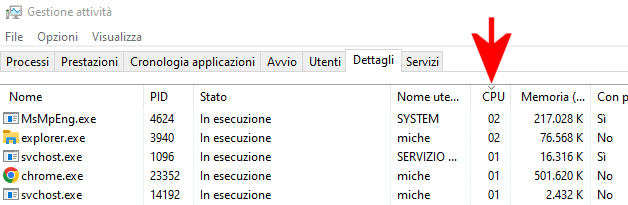
Task Host Window, processo host attività Windows

Consigliamo anche di fare clic sulla scheda Prestazioni quindi su Apri monitoraggio risorse: con un clic su Disco quindi sull’intestazione Totale (B/sec) nel riquadro Processi con attività disco, si può accertare quali programmi stessero ancora leggendo e/o scrivendo in maniera intensiva sull’unità di memorizzazione. Anche qui la piccola freccia nell’intestazione Totale (B/sec) deve guardare verso il basso.
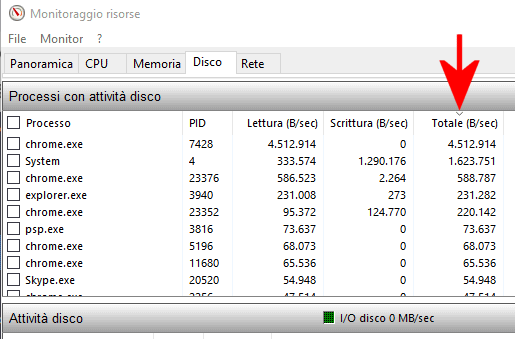
Task Host Window: monitoraggio risorse

Task Host Window attende anche la chiusura di Notizie e interessi

A ottobre 2024 è emersa un’anomalia con la funzionalità Notizie e interessi integrata in Windows 10. Si tratta dell’icona mostrata nella barra delle applicazioni del sistema operativo che fornisce indicazioni meteo e informazioni di attualità.

Ecco, Task Host Window aspetta anche la chiusura di questo strumento di sistema prima di arrestare il sistema. Se Notizie e interessi non rispondessero nei tempi previsti, può capitare che l’intera fase di spegnimento subisca un evidente rallentamento.

In questi frangenti si può anche valutare la disattivazione di Notizie e interessi digitando cmd nella casella di ricerca di Windows 10, scegliendo Esegui come amministratore quindi incollando quanto segue:

reg add HKLM\SOFTWARE\Microsoft\PolicyManager\default\NewsAndInterests\AllowNewsAndInterests /v value /t REG_DWORD /d 0 /f

reg add "HKLM\SOFTWARE\Policies\Microsoft\Windows\Windows Feeds" /v EnableFeeds /t REG_DWORD /d 0 /f

Qualora se si volesse riattivare la funzionalità, basterà successivamente impartire i comandi seguenti:

reg add HKLM\SOFTWARE\Microsoft\PolicyManager\default\NewsAndInterests\AllowNewsAndInterests /v value /t REG_DWORD /d 1 /f

reg add "HKLM\SOFTWARE\Policies\Microsoft\Windows\Windows Feeds" /v EnableFeeds /t REG_DWORD /d 1 /f

Seguire il percorso e modificare il processo nella finestra Utilità di pianificazione

A destra del messaggio “l’host sta arrestando le sue attività in background“, Task Host Windows solitamente mostra un percorso. Non si tratta un percorso a livello di file system, bensì di un’indicazione che fa riferimento a una procedura programmata usando Utilità di pianificazione.

Digitate quindi Windows+R, scrivete taskschd.msc oppure digitate Utilità di pianificazione nella casella di ricerca.

Nella colonna di sinistra, all’interno di Libreria Utilità di pianificazione, cercate il percorso riportato da Task Host Window: con un clic con il tasto destro, potete eventualmente bloccare e disattivare l’attività pianificata. Verificate se con questo intervento, lo spegnimento di Windows tornasse veloce.
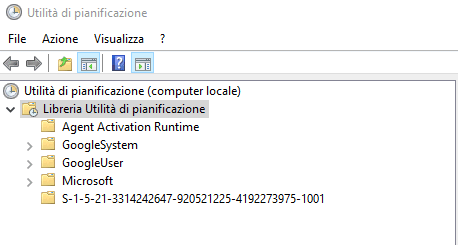
Utilità pianificazione Task Host Window

Ridurre il tempo necessario per lo spegnimento di Windows

Se proprio non si riuscisse a risalire alla causa del problema, come ultima ratio si può temporaneamente velocizzare lo spegnimento di Windows digitando cmd nella casella di ricerca di Windows 10, scegliendo Esegui come amministratore quindi impartendo queste istruzioni:

reg add "HKCU\Control Panel\Desktop" /v AutoEndTasks /t REG_SZ /d 1 /f

reg add "HKCU\Control Panel\Desktop" /v HungAppTimeout /t REG_SZ /d 1000 /f

reg add "HKCU\Control Panel\Desktop" /v WaitToKillAppTimeout /t REG_SZ /d 2000 /f

La prima istruzione abilita la chiusura automatica delle applicazioni che non rispondono al momento dell’arresto o del riavvio del sistema. Impostando il valore a 1, si forza il sistema a chiudere automaticamente le applicazioni bloccate senza attendere che l’utente le chiuda manualmente. In altre parole, si evita completamente la comparsa con la finestra contenente il riferimento a Task Host Window.

Il secondo comando determina il tempo (in millisecondi) che il sistema attende prima di considerare un’applicazione “bloccata”. In questo caso il valore è abbassato a 1000 millisecondi (1 secondo).

Windows concede 20 secondi ai programmi per salvare i dati e cancellare il contenuto della cache prima di attivare lo spegnimento del sistema. L’ultimo comando riduce il tempo a 2000 millisecondi (2 secondi).

Ripristinare la configurazione predefinita per lo spegnimento del sistema

Evidenziando che tutte le modifiche descritte al paragrafo precedente agiscono a livello del singolo account utente e non sulla configurazione della macchina, allorquando si volesse ripristinare la configurazione predefinita di Windows 10 e 11, basta impartire i seguenti comandi al prompt aperto con i diritti di amministratore:

reg delete "HKCU\Control Panel\Desktop" /v AutoEndTasks /f
reg delete "HKCU\Control Panel\Desktop" /v HungAppTimeout /f
reg delete "HKCU\Control Panel\Desktop" /v WaitToKillAppTimeout /f

Ti consigliamo anche

Link copiato negli appunti