
Deprecated: Creation of dynamic property Timber\Site::$pingback is deprecated in /var/www/html/web/app/themes/ilsoftware/vendor/timber/timber/lib/Site.php on line 180

Deprecated: Creation of dynamic property Timber\User::$name is deprecated in /var/www/html/web/app/themes/ilsoftware/vendor/timber/timber/lib/User.php on line 118

Deprecated: Creation of dynamic property Timber\Post::$old_id is deprecated in /var/www/html/web/app/themes/ilsoftware/vendor/timber/timber/lib/Core.php on line 71

Deprecated: Creation of dynamic property Timber\Post::$_thumbnail_id is deprecated in /var/www/html/web/app/themes/ilsoftware/vendor/timber/timber/lib/Core.php on line 71

Deprecated: Creation of dynamic property Timber\Post::$ext-thumbnail_url is deprecated in /var/www/html/web/app/themes/ilsoftware/vendor/timber/timber/lib/Core.php on line 71

Deprecated: Creation of dynamic property Timber\Post::$_edit_last is deprecated in /var/www/html/web/app/themes/ilsoftware/vendor/timber/timber/lib/Core.php on line 71

Deprecated: Creation of dynamic property Timber\Post::$_yoast_wpseo_metadesc is deprecated in /var/www/html/web/app/themes/ilsoftware/vendor/timber/timber/lib/Core.php on line 71

Deprecated: Creation of dynamic property Timber\Post::$_edit_lock is deprecated in /var/www/html/web/app/themes/ilsoftware/vendor/timber/timber/lib/Core.php on line 71

Deprecated: Creation of dynamic property Timber\Post::$onesignal_meta_box_present is deprecated in /var/www/html/web/app/themes/ilsoftware/vendor/timber/timber/lib/Core.php on line 71

Deprecated: Creation of dynamic property Timber\Post::$onesignal_send_notification is deprecated in /var/www/html/web/app/themes/ilsoftware/vendor/timber/timber/lib/Core.php on line 71

Deprecated: Creation of dynamic property Timber\Post::$onesignal_modify_title_and_content is deprecated in /var/www/html/web/app/themes/ilsoftware/vendor/timber/timber/lib/Core.php on line 71

Deprecated: Creation of dynamic property Timber\Post::$onesignal_notification_custom_heading is deprecated in /var/www/html/web/app/themes/ilsoftware/vendor/timber/timber/lib/Core.php on line 71

Deprecated: Creation of dynamic property Timber\Post::$onesignal_notification_custom_content is deprecated in /var/www/html/web/app/themes/ilsoftware/vendor/timber/timber/lib/Core.php on line 71

Deprecated: Creation of dynamic property Timber\Post::$_yoast_wpseo_focuskw is deprecated in /var/www/html/web/app/themes/ilsoftware/vendor/timber/timber/lib/Core.php on line 71

Deprecated: Creation of dynamic property Timber\Post::$_yoast_wpseo_linkdex is deprecated in /var/www/html/web/app/themes/ilsoftware/vendor/timber/timber/lib/Core.php on line 71

Deprecated: Creation of dynamic property Timber\Post::$_yoast_wpseo_content_score is deprecated in /var/www/html/web/app/themes/ilsoftware/vendor/timber/timber/lib/Core.php on line 71

Deprecated: Creation of dynamic property Timber\Post::$_yoast_wpseo_estimated-reading-time-minutes is deprecated in /var/www/html/web/app/themes/ilsoftware/vendor/timber/timber/lib/Core.php on line 71

Deprecated: Creation of dynamic property Timber\Post::$_yoast_wpseo_wordproof_timestamp is deprecated in /var/www/html/web/app/themes/ilsoftware/vendor/timber/timber/lib/Core.php on line 71

Deprecated: Creation of dynamic property Timber\Post::$response_body is deprecated in /var/www/html/web/app/themes/ilsoftware/vendor/timber/timber/lib/Core.php on line 71

Deprecated: Creation of dynamic property Timber\Post::$status is deprecated in /var/www/html/web/app/themes/ilsoftware/vendor/timber/timber/lib/Core.php on line 71

Deprecated: Creation of dynamic property Timber\Post::$tipologia is deprecated in /var/www/html/web/app/themes/ilsoftware/vendor/timber/timber/lib/Core.php on line 71

Deprecated: Creation of dynamic property Timber\Post::$_tipologia is deprecated in /var/www/html/web/app/themes/ilsoftware/vendor/timber/timber/lib/Core.php on line 71

Deprecated: Creation of dynamic property Timber\Post::$attributi is deprecated in /var/www/html/web/app/themes/ilsoftware/vendor/timber/timber/lib/Core.php on line 71

Deprecated: Creation of dynamic property Timber\Post::$_attributi is deprecated in /var/www/html/web/app/themes/ilsoftware/vendor/timber/timber/lib/Core.php on line 71

Deprecated: Creation of dynamic property Timber\Post::$in_evidenza_newsletter is deprecated in /var/www/html/web/app/themes/ilsoftware/vendor/timber/timber/lib/Core.php on line 71

Deprecated: Creation of dynamic property Timber\Post::$_in_evidenza_newsletter is deprecated in /var/www/html/web/app/themes/ilsoftware/vendor/timber/timber/lib/Core.php on line 71

Deprecated: Creation of dynamic property Timber\Post::$newsletter_subject is deprecated in /var/www/html/web/app/themes/ilsoftware/vendor/timber/timber/lib/Core.php on line 71

Deprecated: Creation of dynamic property Timber\Post::$_newsletter_subject is deprecated in /var/www/html/web/app/themes/ilsoftware/vendor/timber/timber/lib/Core.php on line 71

Deprecated: Creation of dynamic property Timber\Post::$newsletter_summary is deprecated in /var/www/html/web/app/themes/ilsoftware/vendor/timber/timber/lib/Core.php on line 71

Deprecated: Creation of dynamic property Timber\Post::$_newsletter_summary is deprecated in /var/www/html/web/app/themes/ilsoftware/vendor/timber/timber/lib/Core.php on line 71

Deprecated: Creation of dynamic property Timber\Post::$inviato_in_newsletter is deprecated in /var/www/html/web/app/themes/ilsoftware/vendor/timber/timber/lib/Core.php on line 71

Deprecated: Creation of dynamic property Timber\Post::$_inviato_in_newsletter is deprecated in /var/www/html/web/app/themes/ilsoftware/vendor/timber/timber/lib/Core.php on line 71

Deprecated: Creation of dynamic property Timber\Post::$_yoast_wpseo_primary_category is deprecated in /var/www/html/web/app/themes/ilsoftware/vendor/timber/timber/lib/Core.php on line 71

Deprecated: Creation of dynamic property Timber\Post::$_yoast_wpseo_primary_content_type is deprecated in /var/www/html/web/app/themes/ilsoftware/vendor/timber/timber/lib/Core.php on line 71

Deprecated: Creation of dynamic property Timber\Post::$_yoast_wpseo_primary_attributes is deprecated in /var/www/html/web/app/themes/ilsoftware/vendor/timber/timber/lib/Core.php on line 71

Deprecated: Creation of dynamic property Timber\Post::$_yoast_wpseo_primary_speciali is deprecated in /var/www/html/web/app/themes/ilsoftware/vendor/timber/timber/lib/Core.php on line 71

Deprecated: Creation of dynamic property Timber\Post::$post_date_gmt is deprecated in /var/www/html/web/app/themes/ilsoftware/vendor/timber/timber/lib/Core.php on line 71

Deprecated: Creation of dynamic property Timber\Post::$comment_status is deprecated in /var/www/html/web/app/themes/ilsoftware/vendor/timber/timber/lib/Core.php on line 71

Deprecated: Creation of dynamic property Timber\Post::$ping_status is deprecated in /var/www/html/web/app/themes/ilsoftware/vendor/timber/timber/lib/Core.php on line 71

Deprecated: Creation of dynamic property Timber\Post::$post_password is deprecated in /var/www/html/web/app/themes/ilsoftware/vendor/timber/timber/lib/Core.php on line 71

Deprecated: Creation of dynamic property Timber\Post::$post_name is deprecated in /var/www/html/web/app/themes/ilsoftware/vendor/timber/timber/lib/Core.php on line 71

Deprecated: Creation of dynamic property Timber\Post::$to_ping is deprecated in /var/www/html/web/app/themes/ilsoftware/vendor/timber/timber/lib/Core.php on line 71

Deprecated: Creation of dynamic property Timber\Post::$pinged is deprecated in /var/www/html/web/app/themes/ilsoftware/vendor/timber/timber/lib/Core.php on line 71

Deprecated: Creation of dynamic property Timber\Post::$post_modified is deprecated in /var/www/html/web/app/themes/ilsoftware/vendor/timber/timber/lib/Core.php on line 71

Deprecated: Creation of dynamic property Timber\Post::$post_modified_gmt is deprecated in /var/www/html/web/app/themes/ilsoftware/vendor/timber/timber/lib/Core.php on line 71

Deprecated: Creation of dynamic property Timber\Post::$post_content_filtered is deprecated in /var/www/html/web/app/themes/ilsoftware/vendor/timber/timber/lib/Core.php on line 71

Deprecated: Creation of dynamic property Timber\Post::$guid is deprecated in /var/www/html/web/app/themes/ilsoftware/vendor/timber/timber/lib/Core.php on line 71

Deprecated: Creation of dynamic property Timber\Post::$menu_order is deprecated in /var/www/html/web/app/themes/ilsoftware/vendor/timber/timber/lib/Core.php on line 71

Deprecated: Creation of dynamic property Timber\Post::$post_mime_type is deprecated in /var/www/html/web/app/themes/ilsoftware/vendor/timber/timber/lib/Core.php on line 71

Deprecated: Creation of dynamic property Timber\Post::$comment_count is deprecated in /var/www/html/web/app/themes/ilsoftware/vendor/timber/timber/lib/Core.php on line 71

Deprecated: Creation of dynamic property Timber\Post::$filter is deprecated in /var/www/html/web/app/themes/ilsoftware/vendor/timber/timber/lib/Core.php on line 71
Test RAM, come diagnosticare problemi sulla memoria | IlSoftware.it

Test RAM, come diagnosticare problemi sulla memoria

RAM test ovvero come controllare che la memoria volatile installata nel PC non abbia problemi. Dallo strumento integrato in Windows a quelli di terze parti.

Se il computer presenta evidenti segni di instabilità o vengono mostrate schermate blu nei momenti più diversi, è importante verificare se la memoria RAM funziona correttamente. Effettuare un test RAM per stabilire se uno o più moduli fossero difettosi, è una delle operazioni più utili per risolvere situazioni che sembrano ormai compromesse e che non permettono di lavorare.

Iniziamo col dire che, per impostazione predefinita, Windows si riavvia in automatico allorquando si presentasse una schermata blu (BSOD). In genere non c’è quindi neppure il tempo materiale per leggere l’errore restituito da Windows. Nell’articolo Schermata blu in Windows: che cosa può provocarne la comparsa abbiamo visto che è possibile indicare al sistema operativo di non riavviarsi immediatamente dopo il BSOD in modo da poter leggere l’errore e annotarlo.

RAM test integrato in Windows: come avviarlo

Il sistema operativo Microsoft integra un’utilità in grado di effettuare un test della RAM: si chiama Diagnostica memoria Windows. È un po’ nascosta ma consente di provare il funzionamento della memoria senza rivolgersi a software di terze parti.

Per avviare l’utilità, basta digitare Diagnostica memoria Windows nella casella di ricerca oppure premere Windows+R, scrivere mdsched e premere il tasto Invio.

Il test della RAM deve essere necessariamente avviato all’infuori dell’ambiente Windows: cliccando su Riavvia ora e individua eventuali problemi, viene disposto il reboot della macchina ed eseguita l’utilità Diagnostica memoria Windows.

Test RAM, come diagnosticare problemi sulla memoria

Al riavvio del computer, sotto l’indicazione Stato, l’utilità riporta gli eventuali problemi individuati. Nel caso in cui i moduli di memoria RAM avessero dei problemi, la dizione Nessun problema rilevato sino a questo momento scompare per essere sostituita con un messaggio che rende manifesto il tipo di errore diagnosticato.

Test RAM, come diagnosticare problemi sulla memoria

Premendo il tasto F1, si possono eventualmente personalizzare i test effettuati sulla RAM per verificare il corretto funzionamento della memoria.

Test RAM, come diagnosticare problemi sulla memoria

L’utilità riavvia il sistema al termine della procedura di verifica. Dopo il reboot, Windows mostra, come sempre, la finestra di login e il desktop di Windows senza che appaia alcun resoconto finale.

Come accedere al report del test sulla RAM

La verifica del report del test RAM è un po’ elaborata. Digitando Windows+R quindi eventvwr.msc si apre il Visualizzatore eventi. Qui, dopo aver selezionato Registri di Windows, Sistema, si  deve scegliere Azione, Trova quindi digitare MemoryDiagnostic.

Test RAM, come diagnosticare problemi sulla memoria

Windows seleziona così, automaticamente, l’ultimo test della RAM (quello appena effettuato) ed espone il risultato dell’analisi nel pannello sottostante.

Sebbene un maggior numero di test, più approfonditi, possa essere effettuato premendo il tasto F1 durante l’analisi da parte di Diagnostica memoria Windows, utilità come MemTest86 e MemTest86+ offrono un ventaglio di possibilità nettamente più ampio.

Eseguire un test RAM con MemtTest86+

Memtest86+ è un popolare programma di test della memoria. È progettato per individuare errori nella memoria del sistema, difetti hardware e problemi di compatibilità dei moduli di memoria. In particolare, MemTest86+ consente anche di verificare la frequenza di clock della memoria, informazione importante per capire se vi siano discordanze con quanto indicato a livello BIOS/UEFI. L’applicazione va eseguita da un’unità USB avviabile in modo da eseguire i test indipendentemente dal sistema operativo installato.

L’applicazione, una volta in esecuzione, effettua test sulla memoria. Essi includono la scrittura e la lettura di dati in diverse posizioni oltre al confronto dei dati letti con quelli scritti per verificarne l’integrità. Inoltre, vengono eseguiti test di movimento dei dati, test di pattern e test di marcatura delle eventuali celle di memoria difettose. Memtest86+ mostra i risultati sullo schermo in tempo reale, consentendo di monitorare eventuali errori rilevati.
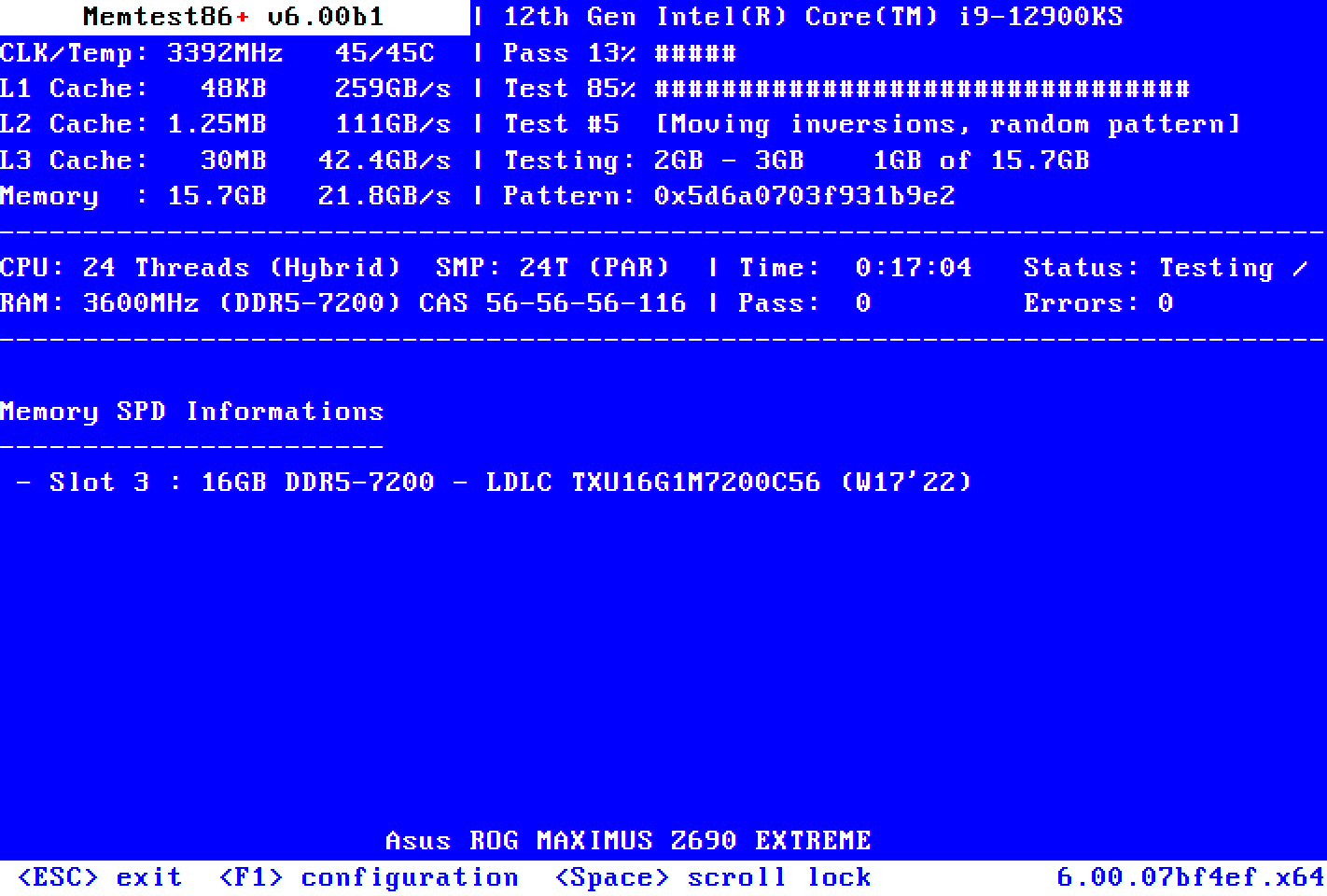
Test RAM con MemTest86+

Le tecniche utilizzate da MemTest86+ per individuare errori di memoria

Nel paragrafo precedente abbiamo citato diverse tecniche utilizzate da Memtest86+ per individuare errori nella memoria del sistema. Di seguito ne vediamo brevemente il significato:

  • Test di movimento dei dati: questo test consiste nello scrivere un pattern di dati in una posizione di memoria e successivamente spostare quei dati in altre posizioni. Viene eseguito per rilevare eventuali problemi nella copia e nel trasferimento dei dati tra le celle di memoria.
  • Test di pattern: i test di pattern sono progettati per rilevare errori specifici nella memoria, come problemi con determinati bit o sequenze di bit. Memtest86+ utilizza diversi tipi di pattern di dati, come sequenze binarie, sequenze incrementali, pattern inversi e così via. Scrive questi pattern in posizioni di memoria specifiche e quindi legge i dati per verificare l’integrità.
  • Test di marcatura delle celle difettose: questa prova mira a individuare le celle di memoria difettose. Memtest86+ scrive dati specifici in ogni cella di memoria e successivamente li legge. Se viene rilevata una discrepanza tra i dati scritti e quelli letti in una particolare cella di memoria, viene considerata difettosa e viene segnalato un errore. Si tratta di un test che aiuta a identificare le aree della memoria che potrebbero essere fisicamente danneggiate o malfunzionanti.

Come usare MemTest86+

Per effettuare un test della RAM con MemTest86+, basta scaricare il file Linux ISO dal riquadro Download quindi utilizzarlo per creare una chiavetta avviabile, ad esempio con l’ottima utilità Rufus. In alternativa, è possibile scaricare il file Windows USB Installer (32/64 bit) che permette di creare una chiavetta USB di boot senza ricorrere a software di terze parti.
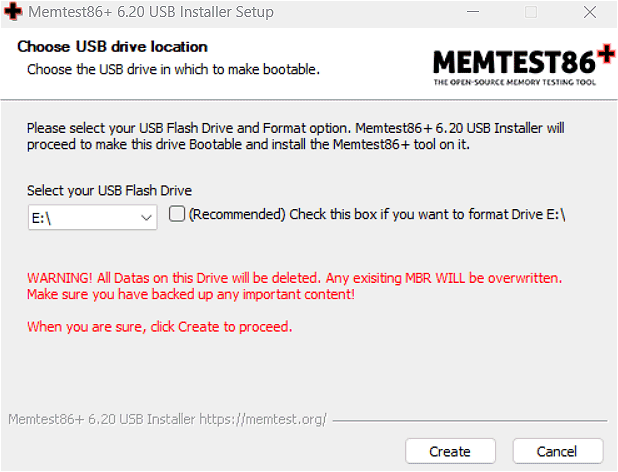
Memtest86+, come funziona il test della RAM

All’avvio dell’utilità per Windows, basta specificare la lettera identificativa di unità corrispondente al supporto rimovibile, collegato al sistema, che si desidera utilizzare. È consigliato spuntare la casella immediatamente a lato per formattare l’unità USB.

Ti consigliamo anche

Link copiato negli appunti