
Deprecated: Creation of dynamic property Timber\Site::$pingback is deprecated in /var/www/html/web/app/themes/ilsoftware/vendor/timber/timber/lib/Site.php on line 180

Deprecated: Creation of dynamic property Timber\User::$name is deprecated in /var/www/html/web/app/themes/ilsoftware/vendor/timber/timber/lib/User.php on line 118

Deprecated: Creation of dynamic property Timber\Post::$os_meta is deprecated in /var/www/html/web/app/themes/ilsoftware/vendor/timber/timber/lib/Core.php on line 71

Deprecated: Creation of dynamic property Timber\Post::$has_disclaimer is deprecated in /var/www/html/web/app/themes/ilsoftware/vendor/timber/timber/lib/Core.php on line 71

Deprecated: Creation of dynamic property Timber\Post::$_edit_lock is deprecated in /var/www/html/web/app/themes/ilsoftware/vendor/timber/timber/lib/Core.php on line 71

Deprecated: Creation of dynamic property Timber\Post::$_edit_last is deprecated in /var/www/html/web/app/themes/ilsoftware/vendor/timber/timber/lib/Core.php on line 71

Deprecated: Creation of dynamic property Timber\Post::$_thumbnail_id is deprecated in /var/www/html/web/app/themes/ilsoftware/vendor/timber/timber/lib/Core.php on line 71

Deprecated: Creation of dynamic property Timber\Post::$tipologia is deprecated in /var/www/html/web/app/themes/ilsoftware/vendor/timber/timber/lib/Core.php on line 71

Deprecated: Creation of dynamic property Timber\Post::$_tipologia is deprecated in /var/www/html/web/app/themes/ilsoftware/vendor/timber/timber/lib/Core.php on line 71

Deprecated: Creation of dynamic property Timber\Post::$attributi is deprecated in /var/www/html/web/app/themes/ilsoftware/vendor/timber/timber/lib/Core.php on line 71

Deprecated: Creation of dynamic property Timber\Post::$_attributi is deprecated in /var/www/html/web/app/themes/ilsoftware/vendor/timber/timber/lib/Core.php on line 71

Deprecated: Creation of dynamic property Timber\Post::$in_evidenza_newsletter is deprecated in /var/www/html/web/app/themes/ilsoftware/vendor/timber/timber/lib/Core.php on line 71

Deprecated: Creation of dynamic property Timber\Post::$_in_evidenza_newsletter is deprecated in /var/www/html/web/app/themes/ilsoftware/vendor/timber/timber/lib/Core.php on line 71

Deprecated: Creation of dynamic property Timber\Post::$inviato_in_newsletter is deprecated in /var/www/html/web/app/themes/ilsoftware/vendor/timber/timber/lib/Core.php on line 71

Deprecated: Creation of dynamic property Timber\Post::$_inviato_in_newsletter is deprecated in /var/www/html/web/app/themes/ilsoftware/vendor/timber/timber/lib/Core.php on line 71

Deprecated: Creation of dynamic property Timber\Post::$_yoast_wpseo_primary_category is deprecated in /var/www/html/web/app/themes/ilsoftware/vendor/timber/timber/lib/Core.php on line 71

Deprecated: Creation of dynamic property Timber\Post::$_yoast_wpseo_primary_blz_affiliation_attributes is deprecated in /var/www/html/web/app/themes/ilsoftware/vendor/timber/timber/lib/Core.php on line 71

Deprecated: Creation of dynamic property Timber\Post::$_yoast_wpseo_primary_content_type is deprecated in /var/www/html/web/app/themes/ilsoftware/vendor/timber/timber/lib/Core.php on line 71

Deprecated: Creation of dynamic property Timber\Post::$_yoast_wpseo_primary_attributes is deprecated in /var/www/html/web/app/themes/ilsoftware/vendor/timber/timber/lib/Core.php on line 71

Deprecated: Creation of dynamic property Timber\Post::$_yoast_wpseo_primary_speciali is deprecated in /var/www/html/web/app/themes/ilsoftware/vendor/timber/timber/lib/Core.php on line 71

Deprecated: Creation of dynamic property Timber\Post::$_yoast_wpseo_focuskw is deprecated in /var/www/html/web/app/themes/ilsoftware/vendor/timber/timber/lib/Core.php on line 71

Deprecated: Creation of dynamic property Timber\Post::$_yoast_wpseo_metadesc is deprecated in /var/www/html/web/app/themes/ilsoftware/vendor/timber/timber/lib/Core.php on line 71

Deprecated: Creation of dynamic property Timber\Post::$_yoast_wpseo_linkdex is deprecated in /var/www/html/web/app/themes/ilsoftware/vendor/timber/timber/lib/Core.php on line 71

Deprecated: Creation of dynamic property Timber\Post::$_yoast_wpseo_content_score is deprecated in /var/www/html/web/app/themes/ilsoftware/vendor/timber/timber/lib/Core.php on line 71

Deprecated: Creation of dynamic property Timber\Post::$_yoast_wpseo_focuskeywords is deprecated in /var/www/html/web/app/themes/ilsoftware/vendor/timber/timber/lib/Core.php on line 71

Deprecated: Creation of dynamic property Timber\Post::$_yoast_wpseo_keywordsynonyms is deprecated in /var/www/html/web/app/themes/ilsoftware/vendor/timber/timber/lib/Core.php on line 71

Deprecated: Creation of dynamic property Timber\Post::$_yoast_wpseo_estimated-reading-time-minutes is deprecated in /var/www/html/web/app/themes/ilsoftware/vendor/timber/timber/lib/Core.php on line 71

Deprecated: Creation of dynamic property Timber\Post::$_yoast_indexnow_last_ping is deprecated in /var/www/html/web/app/themes/ilsoftware/vendor/timber/timber/lib/Core.php on line 71

Deprecated: Creation of dynamic property Timber\Post::$post_date_gmt is deprecated in /var/www/html/web/app/themes/ilsoftware/vendor/timber/timber/lib/Core.php on line 71

Deprecated: Creation of dynamic property Timber\Post::$comment_status is deprecated in /var/www/html/web/app/themes/ilsoftware/vendor/timber/timber/lib/Core.php on line 71

Deprecated: Creation of dynamic property Timber\Post::$ping_status is deprecated in /var/www/html/web/app/themes/ilsoftware/vendor/timber/timber/lib/Core.php on line 71

Deprecated: Creation of dynamic property Timber\Post::$post_password is deprecated in /var/www/html/web/app/themes/ilsoftware/vendor/timber/timber/lib/Core.php on line 71

Deprecated: Creation of dynamic property Timber\Post::$post_name is deprecated in /var/www/html/web/app/themes/ilsoftware/vendor/timber/timber/lib/Core.php on line 71

Deprecated: Creation of dynamic property Timber\Post::$to_ping is deprecated in /var/www/html/web/app/themes/ilsoftware/vendor/timber/timber/lib/Core.php on line 71

Deprecated: Creation of dynamic property Timber\Post::$pinged is deprecated in /var/www/html/web/app/themes/ilsoftware/vendor/timber/timber/lib/Core.php on line 71

Deprecated: Creation of dynamic property Timber\Post::$post_modified is deprecated in /var/www/html/web/app/themes/ilsoftware/vendor/timber/timber/lib/Core.php on line 71

Deprecated: Creation of dynamic property Timber\Post::$post_modified_gmt is deprecated in /var/www/html/web/app/themes/ilsoftware/vendor/timber/timber/lib/Core.php on line 71

Deprecated: Creation of dynamic property Timber\Post::$post_content_filtered is deprecated in /var/www/html/web/app/themes/ilsoftware/vendor/timber/timber/lib/Core.php on line 71

Deprecated: Creation of dynamic property Timber\Post::$guid is deprecated in /var/www/html/web/app/themes/ilsoftware/vendor/timber/timber/lib/Core.php on line 71

Deprecated: Creation of dynamic property Timber\Post::$menu_order is deprecated in /var/www/html/web/app/themes/ilsoftware/vendor/timber/timber/lib/Core.php on line 71

Deprecated: Creation of dynamic property Timber\Post::$post_mime_type is deprecated in /var/www/html/web/app/themes/ilsoftware/vendor/timber/timber/lib/Core.php on line 71

Deprecated: Creation of dynamic property Timber\Post::$comment_count is deprecated in /var/www/html/web/app/themes/ilsoftware/vendor/timber/timber/lib/Core.php on line 71

Deprecated: Creation of dynamic property Timber\Post::$filter is deprecated in /var/www/html/web/app/themes/ilsoftware/vendor/timber/timber/lib/Core.php on line 71

Deprecated: Creation of dynamic property Timber\Post::$status is deprecated in /var/www/html/web/app/themes/ilsoftware/vendor/timber/timber/lib/Core.php on line 71
Windows 11: i trucchi delle Impostazioni Rapide che devi conoscere | IlSoftware.it

Windows 11: i trucchi delle Impostazioni Rapide che devi conoscere

Vediamo come funzionano le Impostazioni rapide (Quick Settings) di Windows 11, accessibili dalla traybar. Le scorciatoie da tastiera, come riorganizzare le icone, modificare il volume senza aprire pannelli, cambiare dispositivi audio, controllare rapidamente le reti WiFi e altro ancora.

C’è un’area di Windows 11 che abbiamo sott’occhio quasi tutti i giorni ma alla quale abbiano riservato, forse, poca attenzione. L’area nota come Impostazioni rapide (Quick Settings, in inglese) si trova nella barra delle applicazioni (traybar) di Windows 11 ed è accessibile cliccando sulla zona che combina le icone rete, volume e batteria (sulla destra). Da lì è possibile gestire rapidamente funzioni come WiFi, Bluetooth, modalità aereo, risparmio energetico, luminosità, volume e intervenire su molte altre regolazioni di sistema.
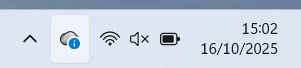
Impostazioni rapide Windows 11

Le Impostazioni rapide rappresentano quindi un punto di accesso centrale per ottimizzare l’esperienza quotidiana su Windows 11, consentendo di risparmiare tempo e rendere più fluida la gestione delle principali funzioni del PC.

Come aprire le Impostazioni rapide di Windows 11: scorciatoie essenziali

Oltre a poter cliccare sull’area a sinistra dell’orologio di sistema di Windows 11, per aprire le Impostazioni rapide è possibile anche servirsi di una combinazione di tasti “ad hoc”: Windows+A.

Alcune azioni correlate, accessibili attraverso l’area delle Impostazioni rapide, sono a loro volta richiamabili usando specifiche scorciatoie. Ad esempio, premendo Windows+K si apre la schermata per trasmettere lo schermo del PC attraverso Miracast.

Ancora, la combinazione di tasti Windows+P dà modo di accedere alla funzionalità di proiezione dello schermo di Windows, anche in modalità wireless.
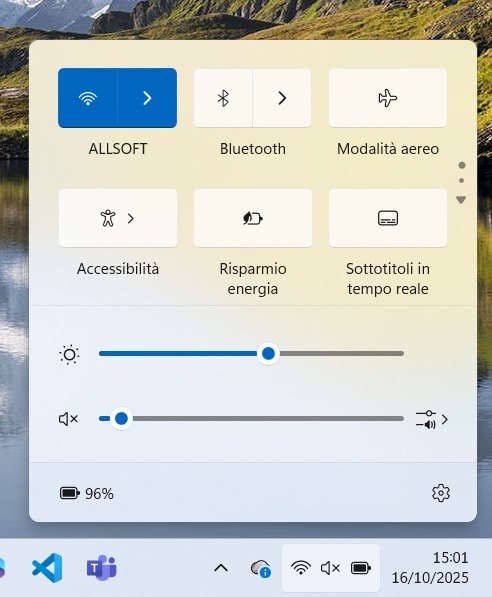
Pannello Impostazioni rapide Windows 11

Come riorganizzare le icone nella sezione Impostazioni rapide

Un po’ come avviene sui dispositivi mobili, Windows 11 permette di trascinare le icone contenuto nella sezione Impostazioni rapide in modo da dare massima visibilità a quelle che si usano più spesso. L’operazione di trascinamento consente di riposizionare le icone secondo le proprie necessità.

Il riquadro di Impostazioni rapide che ospita le icone potrebbe svilupparsi su più livelli: per spostarsi dall’uno all’altro basta spostare il puntatore sopra le icone e poi scorrere verso il basso o verso l’alto con la rotella del mouse, agendo sul touchpad (gesture avanzate) oppure cliccando sui puntini e sulle frecce a destra. In alternativa, si possono usare le frecce su/giù sulla tastiera oppure i tasti Pag.Su/Pag.Giù.

L’ordine dei riquadri delle Impostazioni rapide è memorizzato nel registro di sistema, all’interno del percorso HKEY_CURRENT_USER\Control Panel\Quick Actions\Control Center\UserLayoutPaginated. È eventualmente possibile copiare il valore di UserLayoutPaginated nell’area degli Appunti di Windows semplicemente usando il seguente comando:

for /f "tokens=3" %A in ('reg query "HKCU\Control Panel\Quick Actions\Control Center" /v UserLayoutPaginated ^| find "UserLayoutPaginated"') do @echo %A | clip

Con CTRL+V è possibile salvare altrove, ad esempio in un file di testo, la configurazione con cui i riquadri sono attualmente visualizzati nelle Impostazioni rapide di Windows 11.

Aggiungere o rimuovere riquadri

Nelle versioni più recenti di Windows 11 (a partire da 24H2), Microsoft ha temporaneamente rimosso l’opzione “Modifica impostazioni rapide” (icona della matita). La modifica dei riquadri proposti nelle Impostazioni rapide non quindi è più accessibile dall’interfaccia, eccezion fatta per il riposizionamento visto al paragrafo precedente.

L’aggiunta o la rimozione di nuovi riquadri non è al momento più prevista per l’utente standard.

Modificare il volume senza aprire nulla

Tra i trucchi più simpatici che hanno a che fare con le Impostazioni rapide vi è la possibilità di aumentare o diminuire il volume posizionando il puntatore sull’icona volume nella traybar.

Agendo sulla rotellina del mouse mentre il puntatore si trova sull’icona del volume, è possibile modificare il volume senza dover aprire il pannello né agire sui tasti fisici presenti sulla tastiera.

Attivare/disattivare rapidamente i dispositivi audio

Un trucco poco conosciuto: cliccando sulla freccia accanto all’icona del volume nelle Impostazioni rapide, si apre un menu che permette di cambiare rapidamente la periferica audio in uscita, ad esempio per passare dagli altoparlanti alle cuffie Bluetooth.
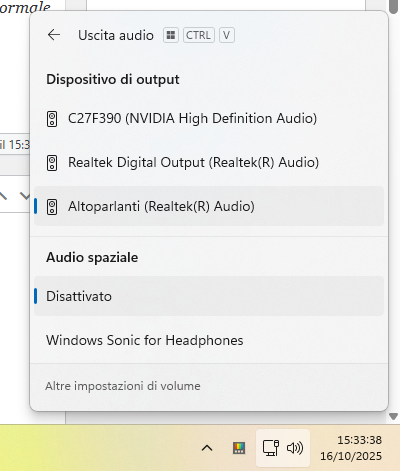
Selezione dispositivo audio uscita Windows 11

In alternativa si può premere la combinazioni di tasti Windows+CTRL+V ma attenzione utenti PowerToys: la stessa scorciatoia è sfruttata dal meccanismo Incolla direttamente come testo normale. Verificare sempre i tasti di scelta rapida configurati che hanno la meglio sulle impostazioni predefinite di Windows.

Controllare le connessioni WiFi più rapidamente

Dal riquadro WiFi nelle Impostazioni rapide, cliccando sulla freccia a destra del nome della rete si apre la lista completa delle reti wireless disponibili. È un modo più veloce per cambiare rete senza passare per le Impostazioni di sistema, sezione Rete e Internet.

Ripristinare la configurazione predefinita

Se l’area delle Impostazioni rapide non funziona correttamente o le icone risultassero scomparse, è possibile ripristinare la configurazione di default cancellando la seguente chiave del registro:

reg delete "HKCU\Control Panel\Quick Actions\Control Center" /f

Al riavvio di Windows, la disposizione dei riquadri verrà ricreata in modo pulito. Se non si volesse riavviare, basta digitare il comando che segue da una finestra del prompt dei comandi (cmd) aperta con i diritti di amministratore:

taskkill /im explorer.exe /f && explorer.exe

Ti consigliamo anche

Link copiato negli appunti